
You’ve finally sat down to edit, only to realize you missed the specific close-up that makes the scene work. In practice, this common oversight turns a fun project into a stressful rescue mission.

Think of a film shoot like a busy kitchen: without a recipe, you’re just guessing with ingredients. A shot list serves as that essential guide, providing a checklist of every angle required to tell your story. Experienced directors know that rigorous organization actually liberates creativity rather than stifling it.
High-quality production relies on planning, not just expensive gear. By upgrading to free shot list software, you replace crumpled paper with a digital roadmap that saves hours on set. Several excellent cinematography planning software options are available today at no cost.
The 'Grocery List' Method: Why Every Shot Needs a Name
Imagine trying to cook a complex meal without verifying you have the ingredients first; you inevitably end up running to the store halfway through. A shot list acts as your production recipe, ensuring you capture every necessary moment before you leave the location. This preparation is what separates amateur clips from professional content, and using beginner-friendly cinematography shot list creators makes this process accessible to everyone.
Just as a recipe specifies “chopped” versus “whole,” your plan needs specific language to describe how the camera sees the subject. You don’t need to memorize a textbook, but these five essential acronyms will cover 90% of your needs:
- WS (Wide Shot): Sets the scene by showing the full location.
- MS (Medium Shot): Captures a subject from the waist up.
- CU (Close Up): Focuses tight on the face to show emotion.
- POV (Point of View): Shows exactly what a character is seeing.
- OTS (Over the Shoulder): Looks past one person to focus on another.
Once you are comfortable with those, you can add nuance with an MCU (Medium Close Up), which frames the subject from the chest up—perfect for YouTube intros. We call this collection of angles “coverage.” Getting good coverage means you have enough variety to hide mistakes during editing without breaking the story’s flow.
To keep this organized, every angle gets a unique “Shot ID” (like Scene 1, Shot A). This simple label links your plan to your video files, so you never lose track of a take. While people often ask what is the best free app for camera blocking, you can actually start mastering this system right now using a basic shot list template in standard office software.
Google Sheets: The Most Powerful Free Shot List Tool You Already Own
Specialized software can feel overwhelming, but you likely already have a production powerhouse installed on your phone. Google Sheets is arguably the most versatile free shot list software because it removes the learning curve of complex interfaces. Instead of fighting with a new app, you can focus purely on organizing your video shoots using a grid system you are already familiar with.
Building your template takes only minutes if you stick to the essentials. Open a blank sheet and create these six column headers to track every detail of your production:
- Shot ID: A unique number (e.g., 1A, 1B) to label your video files later.
- Location: Where you are filming (e.g., “Kitchen,” “Park Bench”).
- Subject: Who or what is in the frame.
- Shot Type: The angle (WS, CU) we defined earlier.
- Action: A brief description of what happens in the scene.
- Status: A checkbox or text field to mark when complete.
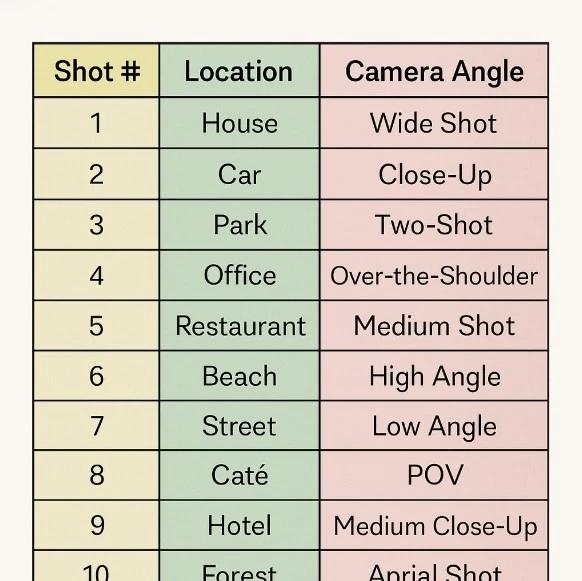
Once the data is entered, simple spreadsheet logic turns a boring text document into an interactive tool. You can use “Conditional Formatting” to make rows turn green automatically when you type “Done,” giving you a satisfying visual progress bar during a chaotic shoot. Furthermore, because this is cloud-based, a remote editor can see your notes instantly, bridging the gap between static shot list templates vs dedicated scheduling apps that often charge extra for team features.
Creating a digital shot list for free doesn’t require manual coding, but spreadsheets do demand some DIY setup time. If you prefer a platform that pre-builds the structure for you and adheres to Hollywood standards without the manual formatting, there is a specialized industry favorite available at no cost.
StudioBinder: Getting a Professional Industry Workflow for Zero Dollars
While spreadsheets offer unlimited flexibility, they lack the polished automation of a dedicated shot list app. For creators ready to trade manual formatting for a sleek interface, StudioBinder provides a robust free tier that introduces you to professional filmmaking suites without the subscription cost. This tool takes the guesswork out of layout by providing a structured environment where every column is pre-set to industry standards, instantly elevating the look of your documents when showing them to a client or cast member.
Speed is vital during planning, and visual pre-production tools for indie filmmakers accelerate this by replacing text with images. Instead of typing “Medium Close Up” repeatedly, you select from a menu of standard Shot Icons that visually represent the camera framing. This helps you spot coverage gaps instantly, ensuring you don’t accidentally plan a video consisting entirely of wide angles.
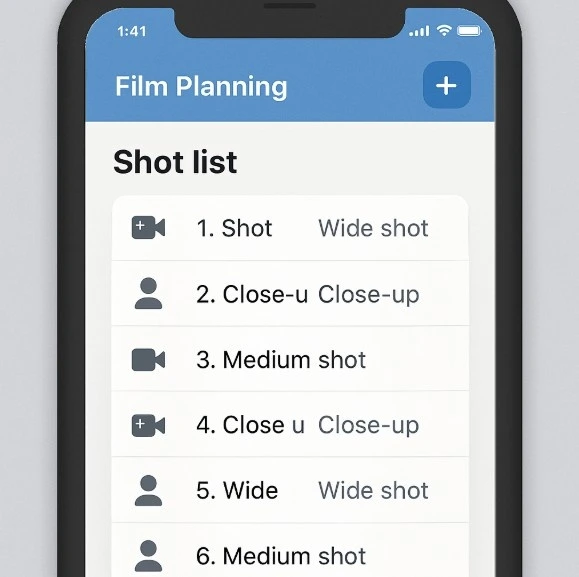
The utility extends to the actual shoot day through the Digital Shot Log. This feature organizes your primary dialogue scenes and essential B-Roll—supplementary footage used to hide cuts or set the mood—into a linear checklist. You can export this as a clean PDF to hand out to your team, giving your small production an immediate sense of authority and order.
However, this platform is designed for structured film sets, and that rigidity can sometimes feel like overkill for a solo vlogger. If your creative process relies more on dragging ideas around a board than filling out detailed forms, you might prefer a workflow that adapts to you rather than the other way around.
Notion & Trello: Building a Drag-and-Drop Visual Production Board
For many creators, a static list feels restrictive compared to the freedom of moving ideas around a whiteboard. Tools like Trello or Notion use a “Kanban” system—essentially digital sticky notes—that lets you organize your shoot visually. These collaborative film production planning tools allow you to create a separate “card” for each shot where you can attach reference photos, lighting diagrams, or rough sketches. This visual approach ensures you aren’t just reading text, but actually seeing the flow of your story before you pick up a camera.
Organizing these cards is intuitive because it mimics how you move through a project day. You can achieve basic storyboard and shot list synchronization by setting up a simple three-column layout to drag your cards through:
- Shot Ideas: A holding pen for every cool angle or B-roll concept you brainstorm.
- To Shoot: The specific shots you are committed to capturing on filming day.
- In the Can: Where you move cards once the record button stops, giving you a satisfying progress tracker.
The real power of this method unlocks when you leave your desk. Since both apps sync instantly to the cloud, they function as mobile-friendly production documents that fit right in your pocket. You can check off shots while standing on location without ever shuffling through printed papers. With a tool selected that fits your style, put it to work immediately.
Your First Pro Shoot: A 3-Step Action Plan to Using Your New Shot List
Moving from a mental checklist to a tangible plan marks your shift from holding a camera to leading a production. By streamlining camera setups on a zero budget, you reclaim mental energy for creativity rather than wasting it on logistic stress. You no longer have to rely on memory to ensure your story makes sense in the edit.
Start by picking the most intuitive tool and populating just your first scene. Organizing scene coverage digitally helps you spot visual gaps before arriving on location. This simple habit is the secret to reducing production delays with automated shot tracking, ensuring every angle serves a purpose.
The anxiety of the sun setting while you scramble for ideas is a thing of the past. You have a roadmap in your pocket. Go create with the confidence of a producer who knows exactly what they need to capture.