
Creating a successful video starts long before the cameras begin rolling. Every great production relies on careful planning and coordination. Whether you are filming a YouTube clip, a marketing campaign, a documentary, a short film, or a feature-length movie, organization ensures your vision becomes reality. Therefore, learning how to structure a Free Video Production Timeline stands out as one of the most valuable steps in the filmmaking process.
A timeline outlines every task required to complete a project. Instead of relying on memory, filmmakers use schedules to assign responsibilities, monitor progress, and meet deadlines. Even a simple three-minute video involves dozens of interconnected tasks. Without a structured timeline, those tasks can quickly become difficult to manage.
Fortunately, professional scheduling no longer requires expensive software or years of production experience. Several free tools now help filmmakers build detailed timelines, collaborate with teams, and keep projects on track. Consequently, independent creators, film students, and content marketing teams can drastically improve both efficiency and production quality.
In this guide, you will learn how to create a Free Video Production Timeline. Furthermore, you will understand each phase of production and discover practical tips that professionals use to deliver projects on time.

What Is a Video Production Timeline?
This document serves as a structured schedule that maps out every activity involved in creating a video. It provides a clear overview of what needs to happen. Additionally, it shows who is responsible for each task and when milestones should finish. Unlike a simple calendar, a production timeline shows how different activities connect with one another. Therefore, it ensures that each stage flows smoothly into the next.
Moreover, a well-planned schedule covers much more than filming dates. It includes brainstorming ideas, script development, budgeting, storyboarding, casting, and location scouting. Subsequently, teams also prepare equipment, develop shot lists, edit footage, mix sound, correct colors, and manage client reviews. By organizing these activities into a logical sequence, production teams reduce confusion and improve collaboration.
For larger productions, the Free Video Production Timeline becomes the central document that guides every department. For instance, producers use it to monitor deadlines, while directors use it to prepare shoots. Meanwhile, editors rely on it to plan post-production, and crew members refer to it for daily responsibilities. Even solo creators benefit from having a structured roadmap that keeps the project moving forward.
Why Is a Video Production Timeline Important?
Many video projects fail to meet deadlines because of poor planning. Without a clear map, teams often struggle to coordinate resources or schedule locations. Consequently, a missed deadline during pre-production can affect filming, editing, and final delivery. This breakdown leads to unnecessary stress and higher production costs.
However, utilizing a Free Video Production Timeline helps eliminate these problems by creating a clear plan before work begins. Everyone involved understands their responsibilities completely. As a result, communication improves, productivity increases, and production runs more efficiently.
Another important benefit is budget control. For example, every additional day of filming increases expenses for equipment rentals, crew wages, transportation, and catering. When schedules remain organized, productions avoid unnecessary delays. Therefore, they keep costs under control, which becomes especially valuable for independent filmmakers working with limited budgets.
Furthermore, a dynamic schedule provides excellent flexibility. Unexpected challenges like weather changes, equipment failures, or client revisions can disrupt even the best plans. With a detailed schedule in place, producers can quickly adjust tasks without losing sight of the overall deadline.
Understanding the Three Phases of Video Production
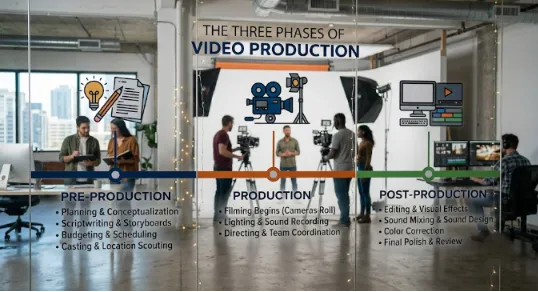
Every video production follows three primary stages: pre-production, production, and post-production. While the length of each stage varies, every successful schedule includes activities from all three phases.
Pre-Production
To begin with, pre-production serves as the planning stage. During this phase, ideas evolve into actionable plans. Writers create scripts, managers prepare budgets, and artists draw storyboards. In addition, teams select locations, secure permits, cast actors, and hire crew members. Shooting schedules and call sheets also take shape during pre-production. Ultimately, the more detailed this phase becomes, the smoother the filming process will be.
Production
Subsequently, production begins once planning finishes. This is the stage where cameras roll and crew members capture footage according to the shooting schedule. Directors work closely with actors, while cinematographers manage camera setups. Meanwhile, lighting teams prepare each scene, and production assistants coordinate daily logistics. Therefore, every department depends on the schedule to understand daily priorities.
Post-Production
After filming ends, post-production transforms raw footage into the finished video. Editors organize media files, assemble rough cuts, refine pacing, mix audio, and apply visual effects. Furthermore, review sessions and client feedback often lead to revisions before the project reaches its final version. Although audiences only see the completed video, post-production frequently requires more time than filming itself.
Step 1: Define the Purpose of Your Video
Every effective Free Video Production Timeline begins with a clear understanding of the project’s objectives. Before scheduling tasks or assigning deadlines, you must determine exactly what the video should accomplish. For instance, a promotional advertisement, a documentary, and a feature film all require different production approaches. Consequently, understanding the purpose helps shape every decision that follows.
Consider who will watch the video and where you will publish it. For example, a short-form social media campaign demands a different production schedule than a long-form corporate training video. Likewise, a documentary often requires months of research, while a product demonstration may only need a single filming day.
Therefore, setting realistic goals at the beginning prevents unnecessary revisions later. When the creative vision is clearly defined, every department can work toward the same outcome without confusion.
Step 2: Break the Project into Manageable Tasks
Once the project’s objectives are clear, divide the entire production into smaller, manageable activities. Large projects become far less intimidating when you organize them into individual milestones. Rather than treating production as one enormous assignment, separate it into logical stages that you can complete one at a time.
Begin with concept development and continue through scriptwriting, storyboarding, budgeting, location scouting, casting, and equipment preparation. In addition, include scheduling, filming, editing, sound design, color grading, quality checks, and final publishing. Each task should represent a specific deliverable with a measurable outcome. Consequently, this approach makes it easier to monitor progress and identify potential delays early.
Breaking the workflow into smaller tasks also improves accountability. Team members know exactly what they need to complete. Meanwhile, producers can quickly identify which activities require additional attention. Instead of reacting to problems after they occur, the production team can solve issues proactively.
Step 3: Estimate Realistic Timeframes
One of the most common mistakes in video production is underestimating how long creative work actually takes. Writing a script, reviewing edits, scouting locations, or recording voiceovers often requires more time than expected. Therefore, your Free Video Production Timeline should include realistic deadlines that reflect the complexity of each task.
Professional producers avoid overly aggressive schedules because unexpected challenges arise on almost every project. For example, weather conditions may delay outdoor shoots, actors may become unavailable, or equipment might require repairs. By allowing extra time between major milestones, productions remain flexible without affecting the final delivery date.
A practical timeline also considers the relationship between tasks. For instance, editing cannot begin until filming is complete. Meanwhile, filming depends on finalized scripts, approved shot lists, and confirmed locations. Recognizing these dependencies helps create a schedule that flows naturally while reducing bottlenecks throughout production.
Ultimately, planning realistic timeframes saves valuable production hours. Teams work with greater confidence because expectations remain achievable, deadlines become predictable, and unexpected obstacles no longer derail the entire project.
Step 4: Organize Tasks in Chronological Order
Once you have listed every activity and estimated the time required, the next step is to arrange those tasks sequentially. A Free Video Production Timeline should reflect the natural flow of filmmaking. This chronological structure helps everyone understand what should happen first and what depends on earlier work.
To begin with, place pre-production activities at the start of the schedule. Scriptwriting should come before storyboarding because artists need a completed script to visualize scenes. Subsequently, storyboards lead into shot lists, while shot lists help create shooting schedules. After these planning activities are complete, filming can begin. Only after production wraps should editing, sound design, visual effects, and final delivery take place.
Furthermore, viewing the entire project from beginning to end makes it easier to identify overlapping tasks. For example, while the production team prepares for filming, the editor can organize project folders and prepare storage drives. These parallel activities save valuable time without disrupting the production schedule.
Backup files also remain essential. Consequently, a chronological timeline improves communication. Instead of repeatedly asking what comes next, every crew member can review the schedule and understand how their work fits into the larger process.
Step 5: Assign Responsibilities to Your Team
Even the most detailed timeline will fail if responsibilities remain unclear. Therefore, every task should have a designated owner who is accountable for completing it on time. Assigning responsibilities creates clear accountability while preventing confusion between departments.
On smaller productions, one person may perform several roles. For instance, an independent filmmaker might write the script, direct the project, and edit the final video. However, larger productions usually divide responsibilities among producers, directors, cinematographers, editors, and sound engineers. Regardless of team size, assigning ownership ensures that no task is overlooked.
Communication also becomes much smoother when responsibilities are clearly defined. Instead of sending messages to the entire crew, producers can contact the individual responsible for a specific activity. As a result, this approach reduces delays and allows teams to resolve problems much faster.
In addition, modern production management software makes responsibility tracking even easier. These tools allow teams to assign tasks, monitor progress, share files, and receive notifications whenever schedules change.
Step 6: Create Your Production Schedule
With tasks organized and responsibilities assigned, you can now build the production schedule. This schedule transforms your planning into a practical calendar that everyone can follow throughout the project.
Many filmmakers divide their schedules into weekly milestones. For example, the first week may focus on concept development, scriptwriting, and budgeting. The second week can cover storyboarding, casting, and location scouting. During the following week, the team prepares equipment and finalizes the shooting schedule. Production follows after planning is complete, while post-production occupies the final weeks before delivery. Therefore, a Free Video Production Timeline acts as the perfect structural spine for this schedule.
The exact duration depends entirely on the complexity of the project. A short promotional video may require only two weeks from start to finish. Conversely, a documentary or feature film may extend across several months. Regardless of length, every schedule should include realistic deadlines that allow enough time for creative work without creating unnecessary pressure.
Furthermore, keeping the schedule visible to the entire production team improves accountability. Everyone understands upcoming milestones, making collaboration far more efficient.
Step 7: Prepare for Unexpected Delays
No production unfolds exactly as planned. Even experienced filmmakers encounter unexpected challenges that require schedule adjustments. For instance, outdoor shoots may face bad weather, equipment can malfunction, or clients may request additional revisions before approving the final edit.
Rather than treating these situations as emergencies, build flexibility into your Free Video Production Timeline from the beginning. Including buffer days between major milestones provides room for unexpected delays without affecting the final deadline. Consequently, these extra days often become the difference between a calm production and a stressful one.
Risk management also plays an important role in production planning. For example, backup equipment, alternate shooting locations, and contingency plans reduce the impact of unforeseen problems. Productions that prepare for change generally recover much faster than those relying on rigid schedules.
Ultimately, flexibility does not mean poor planning. Instead, it demonstrates realistic project management that recognizes the unpredictable nature of filmmaking.
Step 8: Review and Update Your Timeline Regularly
A production timeline should remain an active document throughout the project. It is not something you create once and ignore. As production progresses, new information becomes available, priorities change, and schedules evolve.
Regular progress reviews help identify completed tasks while highlighting activities that still require attention. For example, daily production meetings during filming allow department heads to discuss achievements, address challenges, and adjust plans before the next shooting day begins. During post-production, editors, producers, and clients should review milestones together to ensure revisions remain on schedule.
Furthermore, updating the timeline regularly improves communication between departments. Everyone works from the same information, reducing misunderstandings and preventing duplicate work.
Modern digital production management platforms simplify this process by updating schedules automatically and notifying team members whenever deadlines or responsibilities change.
Best Free Tools to Create a Video Production Timeline
Creating a professional production timeline no longer requires expensive software. Several free tools provide excellent project management capabilities for filmmakers at every experience level.
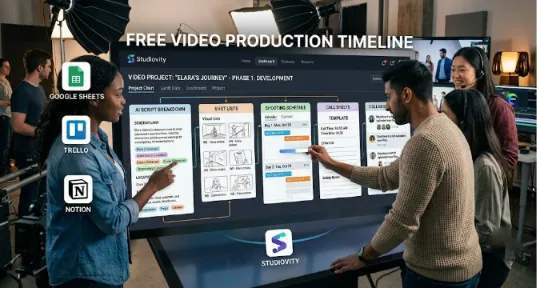
Google Sheets: Remains one of the most popular options because it is simple, flexible, and accessible from any device. Many filmmakers begin by creating production calendars within spreadsheets before moving to advanced tools.
Trello: Offers a visual approach to production management through boards, lists, and task cards. Its drag-and-drop interface makes it easy to monitor progress and organize production activities.
Notion: Combines documentation with project management. This combination makes it useful for storing scripts, production notes, schedules, and meeting minutes in one workspace.
For filmmakers seeking an all-in-one production workflow, Studiovity provides a comprehensive solution that goes beyond simple scheduling. Therefore, it is arguably the best platform to build a comprehensive Free Video Production Timeline. Instead of switching between multiple applications, production teams can write screenplays, generate AI script breakdowns, create storyboards, build shot lists, prepare shooting schedules, manage call sheets, and organize production calendars from a single platform. Because these tools work together, teams spend less time updating documents and more time focusing on creative work.
The ability to connect every production stage within one workspace significantly reduces manual effort while improving overall project organization. Consequently, independent filmmakers, production houses, educators, and content creators can all benefit from having every planning document connected throughout the filmmaking process.
Common Mistakes to Avoid When Building a Production Timeline
Many production schedules fail because they focus only on filming while overlooking the importance of preparation and post-production. Successful projects dedicate sufficient time to planning. This allows scripts, storyboards, budgets, and schedules to reach completion before cameras arrive on set.
Another common mistake involves unrealistic deadlines. Creative work often requires multiple revisions, especially during editing. Compressing these activities into tight schedules increases stress while reducing overall production quality. Therefore, giving editors enough time to refine the final product leads to stronger storytelling and fewer last-minute changes.
Poor communication also affects production timelines. When departments work from outdated schedules or conflicting information, delays become almost inevitable. Sharing one centralized timeline with the entire team helps maintain consistency throughout the project.
Finally, many filmmakers underestimate the importance of backup plans. Productions that include contingency days and alternative solutions recover much faster from unexpected setbacks than those operating without flexibility.
Professional Tips for Building a Better Video Production Timeline
Creating a timeline is only the beginning. The most successful filmmakers continuously refine their schedules as the project progresses. A production timeline should remain flexible enough to adapt to changing circumstances while still keeping the overall project on track. The goal is not to follow a schedule perfectly but to create a framework that helps the team respond quickly when challenges arise. Therefore, optimization of your Free Video Production Timeline requires ongoing maintenance.
One of the best practices is to begin planning as early as possible. Waiting until the script is finalized before thinking about scheduling often results in rushed decisions. Instead, producers should start identifying potential locations, estimating budgets, and researching equipment while the script is still under development. Early planning allows multiple departments to work simultaneously and shortens the overall production timeline.
Another important strategy is to set milestones rather than focusing only on the final deadline. Breaking the project into smaller achievements makes progress easier to measure and keeps the entire team motivated. Completing the script, approving the storyboard, locking the shooting schedule, finishing principal photography, completing the first edit, and exporting the final version are all milestones that indicate healthy project progress. Celebrating these achievements also boosts team morale during longer productions.
Regular communication is equally important. Production meetings should happen consistently throughout every phase of the project. During pre-production, meetings ensure that everyone understands creative expectations and logistical requirements. During filming, daily briefings help crews prepare for upcoming scenes while addressing issues from previous shooting days. In post-production, scheduled review sessions allow editors, producers, and clients to provide feedback before moving to the next stage. Consistent communication prevents misunderstandings and keeps the production timeline realistic.
Organizing files from the beginning also saves considerable time later. Every script version, storyboard, shot list, production note, and media file should follow a consistent naming system. When editors receive well-organized footage, they spend less time searching for assets and more time improving the final video. A structured file management system becomes even more valuable when multiple editors or departments collaborate on the same project.
How AI Is Transforming Video Production Planning
Artificial intelligence has changed the way filmmakers approach production planning. Many repetitive tasks that once required hours of manual work can now be completed within minutes. Instead of manually reviewing scripts and identifying production elements, AI-powered tools can analyze screenplays, detect characters, locations, props, costumes, and special effects, and organize them into production-ready breakdowns.
AI also helps generate storyboards, build shot lists, estimate production requirements, and organize schedules automatically. Rather than creating every document separately, filmmakers can use intelligent production software to connect these workflows into one streamlined system. This integration reduces administrative work while allowing creative teams to spend more time focusing on storytelling.
Collaboration has improved as well. Cloud-based AI production platforms enable directors, producers, cinematographers, editors, and clients to review updates in real time regardless of their location. Changes made to a shooting schedule or storyboard become instantly available to everyone involved, reducing confusion and minimizing the risk of outdated information.
As productions become more complex and deadlines become shorter, AI continues to play an increasingly important role in helping teams stay organized without sacrificing creativity.
Why Studiovity Is an Excellent Choice for Creating a Free Video Production Timeline
While spreadsheets and generic project management tools can help organize production tasks, filmmakers often benefit from software designed specifically for film and video production. Studiovity brings together every major stage of the filmmaking process into one connected platform, allowing creators to manage projects from concept to completion without constantly switching between different applications.
Instead of using separate tools for scriptwriting, scheduling, budgeting, storyboarding, and collaboration, filmmakers can complete the entire pre-production workflow within a single workspace. Screenplays can be written and imported directly into the platform, where AI automatically performs script breakdowns and identifies production elements. Storyboards, shot lists, shooting schedules, call sheets, and production calendars remain connected throughout the project, making updates significantly easier.
Because every production document shares the same project data, changes made during planning automatically flow through the workflow. This level of integration reduces manual work, improves accuracy, and allows production teams to respond quickly when schedules change. Independent filmmakers, production companies, educators, and content creators all benefit from having one centralized production environment instead of managing multiple disconnected files.
Perhaps the biggest advantage is accessibility. Since Studiovity offers a free plan along with web and mobile access, filmmakers can continue planning, reviewing schedules, and collaborating with crew members from virtually anywhere. Whether preparing a short social media video or organizing a large-scale film production, having every production tool available in one place simplifies the entire workflow.
Final Thoughts
A video production timeline is much more than a simple schedule. It is the foundation that keeps every stage of filmmaking organized, efficient, and aligned with the project’s goals. From developing the initial concept to delivering the final video, a structured timeline helps producers manage deadlines, coordinate teams, control budgets, and reduce unnecessary stress throughout the production process.
Creating a timeline does not require expensive software or years of industry experience. By breaking the project into manageable tasks, assigning responsibilities, estimating realistic deadlines, and reviewing progress regularly, any filmmaker can build a professional production plan using free tools. The key is to treat the timeline as a living document that evolves alongside the project rather than a static checklist.
As production technology continues to evolve, AI-powered platforms are making timeline creation faster and more accurate than ever before. Automated script breakdowns, integrated scheduling, collaborative workspaces, and intelligent planning tools allow filmmakers to focus less on administration and more on creativity. For creators looking to streamline their workflow, solutions like Studiovity combine these capabilities into one comprehensive production platform.
Whether you are producing your first YouTube video, managing a commercial campaign, directing a documentary, or planning a feature film, investing time in a well-structured video production timeline will improve every stage of your project. Careful planning leads to smoother production, stronger collaboration, fewer costly delays, and ultimately a better final video. The more organized your workflow becomes, the more freedom you gain to focus on what matters most—bringing your creative vision to life.