
Plan Every Shoot With Confidence
Great films are made twice. First, you create them in pre-production. Consequently, you make them again on set. However, many filmmakers scatter their scripts, schedules, crew details, and budgets across different tools. Therefore, even a strong creative vision can easily turn into last-minute confusion.
Fortunately, this all-in-one film pre-production software is built to help you move from your initial idea to a shoot-ready plan much faster. It brings every essential piece of planning into one organized workspace. As a result, producers, directors, assistant directors, and clients can collaborate seamlessly before cameras roll.
If you are searching for the best tools, your goal is not simply to find another generic project management app. Instead, you need a production-ready system that understands scripts, scenes, shoot days, locations, cast & crew, assets, call sheets, and approvals. Therefore, this page breaks down what to look for in dedicated film pre-production software. We will cover which features matter most, and how a dedicated solution compares with generic alternatives.

Built for Filmmakers, Not Just Task Lists
Film production has its own specific rhythm. For this reason, a shoot is never managed like a standard office project. You must think in scenes, setups, talent availability, daylight, and location restrictions. Furthermore, you need to balance equipment needs, company moves, weather windows, department notes, and budget realities.
A purpose-built platform helps you connect these details instead of forcing them into disconnected spreadsheets.
You can use this film pre-production software to plan:
Narrative films and short films
Documentaries and commercials
Branded content and music videos
Corporate video projects
Social-first campaigns
Agency productions
Student and independent films
Whether you are a solo filmmaker building your first short or a production team coordinating multiple shoot days, the right software helps everyone understand the next steps clearly.
Why Pre-Production Software Matters
Pre-production is the exact place where expensive problems are either prevented or created. For example, a missing prop, an unavailable actor, an unclear schedule, or an outdated shot list can slow down the entire set.
Therefore, the right platform helps you:
Turn scripts and creative briefs into actionable plans.
Build realistic schedules before locking shoot dates.
Keep creative, logistical, and budget information in one place.
Share updates with stakeholders without endless email chains.
Reduce mistakes caused by outdated files.
Give every department visibility into what affects them.
Move faster from planning to production.
Generic tools can easily track tasks, but they often miss the context filmmakers need. Conversely, dedicated film pre-production software connects the creative and logistical sides of production. Because of this connection, your team can make better decisions earlier.
Key Features Designed for Better Production Planning
Script Breakdown and Scene Organization
First, start with the script or creative outline. Then, break it into the elements your team needs to plan. You can organize scenes by location, cast, time of day, props, wardrobe, vehicles, special equipment, stunts, VFX needs, or custom categories.
A strong breakdown workflow helps your team identify production requirements before they become on-set surprises.
Use this feature to:
Identify every scene element clearly.
Group scenes by location or production need.
Track cast, props, wardrobe, and special notes.
Prepare department-specific planning lists.
Connect creative details to scheduling decisions.
Production Scheduling Software That Understands Shoots
Scheduling is one of the most important reasons filmmakers look for dedicated solutions. A production schedule must account for more than due dates. Specifically, it needs to balance scene order, actor availability, location access, company moves, daylight, equipment, and crew constraints.
With a centralized scheduling workspace, you can build a smarter shoot plan. Additionally, you can adjust quickly when plans change.
Helpful scheduling capabilities include:
Drag-and-drop scene organization
Shoot day planning
Location grouping
Cast and crew availability notes
Time-of-day planning
Production day summaries
Schedule version control
Exportable schedules for team review
Instead of rebuilding your plan across multiple documents, your schedule stays connected to the rest of your details.
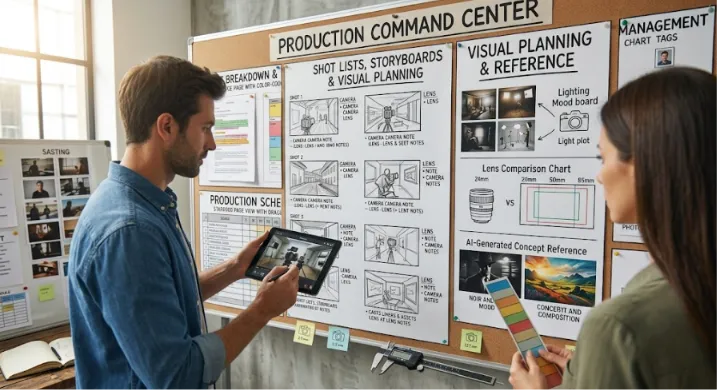
Shot Lists, Storyboards, and Visual Planning
A great schedule tells the team when to shoot, whereas a great shot list tells the team how to shoot.
Therefore, you should plan coverage, camera setups, lens notes, movement, framing, equipment, and creative references in one place. Directors and cinematographers can collaborate before the shoot. Meanwhile, producers and ADs can see how creative choices affect timing and resources.
For projects that need fast visual exploration, you can use AI-generated concept images as planning references for mood, style, lighting, composition, or environment direction. However, these visuals should support creative alignment, not replace professional storyboards or final artwork.
Visual planning features may include:
Shot lists by scene or shoot day
Storyboard organization
Mood and reference boards
Camera and lens notes
Setup estimates
Visual style references
AI-assisted concept frames for early ideation
Approval workflows for creative direction
Consequently, this gives every stakeholder a clearer view of the intended final result before production begins.
Centralized Crew, Cast, and Contact Management
Keeping track of names, roles, phone numbers, emails, availability, contracts, and department assignments can become messy quickly. However, a good film pre-production software hub keeps people information organized and accessible to approved team members.
Manage:
Cast lists and crew roles
Department assignments
Client or agency contacts
Vendor details
Emergency contacts
Availability notes
Private production notes
When contact information and schedule details live together, it becomes much easier to coordinate changes and keep the right people informed.
Locations, Assets, and Production Resources
Locations can easily make or break a shoot. Therefore, you should store location photos, scout notes, access instructions, permit reminders, parking details, power availability, sound concerns, and logistical limitations in one production hub.
You can also organize production resources such as:
Props and wardrobe
Equipment and vehicles
Set dressing
Release forms and insurance documents
Location agreements
Vendor information
Instead of searching old messages for critical details, your team can find what they need instantly in the production workspace.
Call Sheets and Daily Production Communication
A clear call sheet keeps the entire team aligned. First, build call sheets from your approved schedule. Then, customize details for each shoot day.
Include information such as:
Call times and scenes scheduled
Location details, parking, and arrival instructions
Weather notes
Cast and crew contacts
Department notes and safety reminders
Meal breaks and wrap expectations
When plans shift, you can update the relevant information quickly. Thus, you keep the team working from the current version.
Collaboration, Reviews, and Approvals
Pre-production involves constant decision-making. Directors, producers, cinematographers, clients, agencies, and department heads all need to review different pieces of the plan.
Fortunately, a collaborative workspace helps reduce confusion by keeping comments, approvals, and revisions connected to the actual production materials.
Use collaboration tools to:
Share planning documents with selected users.
Request feedback on schedules or shot lists.
Collect approvals from clients or internal stakeholders.
Assign tasks to departments.
Track open decisions.
Keep discussions tied to scenes, assets, or shoot days.
This is especially valuable for commercial and branded video production, where client approval can directly affect timelines, locations, casting, and budget.
What Makes This Different From Generic Video Production Software?
Many teams search for video production software and find tools that focus on editing, file storage, task management, or post-production. Those tools can be useful, but they may not solve the planning challenges that happen before the shoot.
Instead, dedicated film pre-production software is different because it is built entirely around the production process itself.
Generic project tools usually focus on:
Tasks and deadlines
Basic file sharing
Team comments
Project status updates
General calendars
Conversely, film-focused tools focus on:
Script breakdowns
Scenes and shoot days
Cast, crew, and locations
Shot lists and storyboards
Call sheets
Department planning
Production logistics
Schedule changes
Creative approvals
If your team only needs a simple checklist, a generic tool may be enough. But if you are coordinating scenes, people, locations, assets, and creative decisions, choosing a dedicated film pre-production software platform provides a more practical workflow.
How to Choose the Best Film Pre-Production Software
The best choice depends on your team size, project type, budget, workflow, and level of production complexity. Therefore, before you commit, evaluate each option using clear criteria.
When you evaluate film pre-production software, consider these crucial factors:
1. Ease of Use
The platform should be simple enough for producers, directors, crew members, and clients to use without extensive training. If the software feels too complicated, teams may fall back into spreadsheets and message threads.
Look for:
Clean navigation
Simple project setup
Easy sharing options
Minimal manual duplication
Fast onboarding for collaborators
2. Film-Specific Workflows
Always choose film pre-production software that supports the way productions actually work. Scene-based planning, shoot day scheduling, call sheets, and shot lists are more useful than generic task boards alone.
Look for:
Script and scene breakdown tools
Production scheduling features
Cast and location management
Shot planning
Call sheet creation
Version tracking
3. Collaboration and Permissions
Different people need different access levels. For example, a client may only need to approve a storyboard, while a producer needs full project visibility and a department head needs specific planning details.
Look for:
Role-based permissions
Shareable views
Commenting and approvals
Update notifications
Secure access controls
4. Flexibility for Different Production Types
A documentary team, commercial agency, and short film crew may all plan differently. Therefore, the software should adapt to your workflow instead of forcing every project into the same structure.
Look for:
Custom fields
Flexible categories
Reusable templates
Adjustable schedules
Support for small and large teams
5. Exporting and On-Set Practicality
Even the best digital workspace needs to support real-world production. Your team may need printable PDFs, offline documents, or shareable schedules for crew members who are not in the platform every day.
Look for:
Exportable schedules
Downloadable call sheets
Printable production documents
Easy sharing with external collaborators
Mobile-friendly access
6. Pricing That Matches Your Production Volume
Pricing should align with how often you produce, how many users need access, and which features are essential. A solo filmmaker may need a lighter plan, whereas a studio, agency, or production company may need advanced collaboration and team management.
Because pricing can vary by plan and usage, review the current subscription options, included features, and any limits before choosing.
Who This Platform Is Best For
This solution is ideal for teams that want a more organized, professional, and collaborative pre-production process.
It is a strong fit for:
Independent filmmakers who want to replace scattered planning docs with reliable film pre-production software.
Producers who need clearer schedules and production visibility.
Directors who want shot lists, storyboards, and creative references in one place.
Assistant directors managing scene order and shoot logistics.
Agencies planning client-facing video projects.
In-house video teams coordinating recurring productions.
Film students learning professional planning workflows.
Production companies managing multiple projects or crews.
If your current process depends on spreadsheets, shared folders, email threads, and last-minute calls, a centralized platform can save time and reduce production risk.
Feature Breakdown at a Glance
Use the platform to manage the full pre-production workflow:
Development to planning: Organize scripts, briefs, references, and production notes.
Breakdowns: Identify cast, props, wardrobe, locations, equipment, and department needs.
Scheduling: Build shoot days, group scenes, and adjust plans as production variables change.
Visual planning: Create shot lists, storyboards, mood boards, and AI-assisted concept references.
People management: Track cast, crew, vendors, clients, and key contacts.
Location planning: Store scout photos, notes, logistics, permits, and access details.
Call sheets: Prepare daily production instructions and keep teams aligned.
Collaboration: Share work, collect comments, request approvals, and control access.
Exports: Create practical documents for set, stakeholder reviews, and production meetings.
Pricing and Plans
Choose a plan based on the size and complexity of your productions. Common plan options may include:
A starter option for individual filmmakers or small projects
A team option for collaborative production crews
A professional option for agencies, studios, or production companies
A custom option for organizations with advanced workflow or security needs
Before choosing, consider:
Number of active projects and collaborators
Storage or asset requirements
Advanced scheduling needs and approval workflows
Export and sharing requirements
Support level
For the most accurate pricing, review the current plan details or request a quote based on your production needs.
Compare Before You Choose
When evaluating the best film pre-production software for your team, do not choose based on feature count alone. Instead, choose based on how well the software supports your actual production workflow.
Ask these questions:
Can we move from script or concept to shoot schedule without duplicating work?
Can directors, producers, and department heads collaborate in the same workspace?
Can we manage cast, crew, locations, assets, and call sheets together?
Can the platform handle changes without breaking the entire plan?
Can stakeholders review and approve the right materials quickly?
Can the team use it easily under real production pressure?
Does the pricing make sense for our project volume?
The best option is always the one your team will actually use from early planning through the final production meeting.
Make Pre-Production Your Competitive Advantage
Better planning always leads to better shoots. When your creative decisions, logistics, schedules, and approvals are connected, your team can spend less time chasing updates and more time making the work stronger.
This platform gives filmmakers a practical, organized way to manage pre-production from the first breakdown to the final call sheet. It combines the structure of production scheduling software with the flexibility of modern video production software, proving why this specific film pre-production software is essential. It helps teams plan smarter and shoot with confidence.
Ready to Build a Better Production Plan?
Bring your next project into one organized workspace. Give your team the clarity they need before the first day on set.
Start planning your production today, compare the workflow against your current process, and see how much easier pre-production can be when everything is connected.