
Storyboard and Shot List: How to Combine Both for Perfect Visual Planning
Have you ever arrived at a location to film, looked at your actors, and suddenly realized you have no idea where to place the camera? This moment of panic is a frequent reality for many creators, often leading to wasted hours and missed opportunities during production. In practice, the difference between a stressful shoot and a professional result isn’t usually the price of your gear, but the clarity of your visual plan.
Think of your video project like constructing a house. A storyboard serves as the artist’s rendering, illustrating the emotion and aesthetic of the final “building” so everyone understands the vision. However, a builder cannot construct a home from a pretty drawing alone; they need a blueprint that details the materials and measurements. By combining the creative sketches of a storyboard with the logistical instructions of a shot list, you create a “Master Map” that bridges the gap between imagination and reality.
Consider a simple scenario, such as filming a dialogue scene in a coffee shop. While your storyboard might perfectly capture the emotional intensity of a close-up, it fails to tell you which lens to grab or where to position your tripod. Without integrating these details into a unified document, creators often find themselves guessing on set, trying to reverse-engineer the look they wanted while their battery life drains away.
Mastering this integrated approach allows you to make the psychological shift from merely capturing footage to actually directing it. Experienced filmmakers understand that thorough planning acts as a safety net, transforming a chaotic day of troubleshooting into a streamlined execution of your creative vision.
The Storyboard: Why the 'Comic Book' Approach Captures Emotion
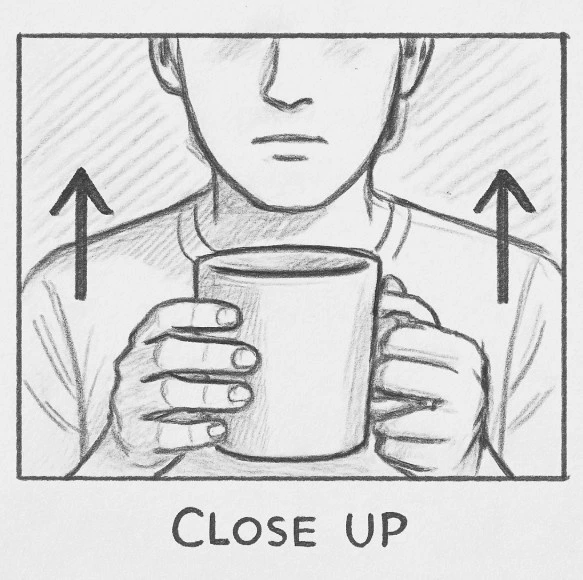
Think of your storyboard as the comic book version of your video. It serves a single, crucial purpose: translating the movie in your head into something other people can actually see. Many creators skip this step because they believe they lack the artistic skill to sketch a masterpiece, but that misses the point entirely. Stick figures are perfectly acceptable as long as they show the composition—where the subject is standing and how close the camera feels to them. If you can draw a circle for a head and a square for a camera frame, you have everything required to lock in the emotion of a scene before you ever touch the record button.
Since a drawing is static but video is moving, you need a way to indicate what happens during the shot. This is where simple arrows transform a sketch into a plan. By drawing a box around a character and adding arrows pointing inward, you indicate a “push in” or zoom, signalling to the viewer that this moment is important. These annotated sketches become your visual beats, acting as instructions for how the camera should behave to match the mood. You aren’t just drawing a person; you are drawing the viewer’s focus.
Visual clarity solves the creative problem, but it doesn’t solve the logistical one. A sketch of a coffee shop conversation tells you what the shot looks like, but it doesn’t tell you which lens you need, who needs to be on set at 8:00 AM, or in what order to film those angles to save time. To turn these emotional sketches into an actionable schedule, we need to translate the art into data using a shot list.
The Shot List: Why This 'Blueprint' is Your Camera’s Practical To-Do List
While your storyboard captures the feeling of a scene, the shot list captures the physics of it. Think of this document as the construction blueprint that tells you exactly what materials—lenses, lights, and actors—are required to build that vision. Without it, you might know you want a “sad close-up,” but you won’t know if you need a specific lens or a tripod until you’re scrambling on set. It turns abstract creative ideas into a concrete checklist that you can physically cross off, bridging the gap between imagination and execution.
The true power of this list lies in its ability to reorganize time. Beginners often try to film a video in chronological order—scene 1, then scene 2—which wastes hours moving lights and resetting cameras. A well-organized shot list allows you to group every shot facing the same direction or requiring the same lighting setup. By filming all your “Subject A” close-ups at once before turning the camera around for “Subject B,” you cut your production time in half and keep your energy focused on performance rather than equipment management.
You don’t need expensive software to build this; a simple spreadsheet works perfectly as long as it includes the right details. This data improves communication with your crew or just keeps you honest when filming solo. To ensure you have a functional roadmap, every shot list should contain these five essential columns:
- Shot Number: A unique ID (like 1A, 1B) to track video files during editing.
- Shot Type: Defines the subject size (e.g., Wide, Medium, Close-up).
- Camera Angle: Specifies perspective height (e.g., Eye-level, High Angle).
- Lens/Gear: Notes specific tools (e.g., “50mm lens” or “Gimbal”) to speed up swaps.
- Description: A brief summary of the physical action occurring in the frame.
The 'Master Map' Strategy: Why Combining Visuals and Lists Cuts Production Time by 40%
Relying solely on a storyboard requires your team to guess technical details from a sketch, while a text-only list forces them to mentally visualize the framing. This separation creates a dangerous “interpretation gap” where mistakes thrive. By merging these documents into an integrated pre-production workflow, you create a “Master Map” where the creative vision sits directly beside the technical instructions. The drawing shows the emotion, and the adjacent text confirms the lens or movement, ensuring everyone understands both the why and the how instantly without constant discussion.
Efficiency skyrockets when you stop flipping between different pages or apps. When you can see the character’s posture in the sketch and read the specific prop requirements in the next column, you naturally spot inconsistencies before recording begins. This visual verification is your best defense for avoiding continuity errors, such as a prop mysteriously jumping from the left hand to the right between cuts. Instead of wasting time clarifying basic angles, you spend that energy perfecting the performance, effectively reducing onset production delays by keeping the momentum alive.
The real payoff arrives during the inevitable rush of the shoot day. Taping this combined document to a clipboard allows you to answer “what is the shot?” and “what gear do I need?” with a single glance. This eliminates the mental fatigue of toggling between artistic intent and logistical reality, freeing you to focus on directing. With the benefits clear, the next step is building a layout that keeps your production moving.
How to Create a Hybrid Shot List Template That Everyone Understands
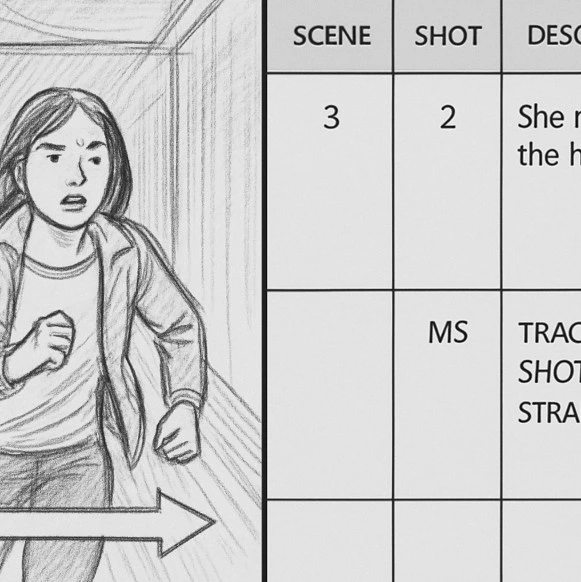
You don’t need expensive subscription software to organize your shoot like a pro. A simple spreadsheet is often the best tool for creating a hybrid shot list template that serves as your project’s “Single Source of Truth.” By placing your sketches directly next to your camera notes, you ensure your creative vision and logistical needs speak the same language, making the plan accessible to everyone from the actors to the camera operator.
Constructing this layout works best when you follow a left-to-right flow, moving from the artistic concept to the hard data. Open a blank sheet and set up these four essential columns to guide your production:
- Scene & Shot Number: This acts as your unique ID, which is critical for keeping video files organized during editing.
- The Visual Reference: Create a tall cell for your storyboard sketch or a reference photo to instantly establish the framing.
- Action Description: Briefly summarize the movement within the frame, such as “Subject walks to window.”
- Technical Specs: Dedicate columns to practical details like lens choice, camera angle, and necessary equipment.
Customizing this grid transforms a standard form into a visual production bible that bridges the gap between “creative” and “technical” thinkers. When your team can verify the lens choice while seeing the intended emotion in the sketch, you eliminate the friction that usually slows down a shoot. With your template ready, the next challenge is populating it with the right content.
From Script to Screen: Translating Story Beats into Actionable Shot Sequences
Looking at a script page can feel abstract because a single sentence like “John makes coffee” actually hides a dozen potential camera angles. Your job is to act as a translator, turning those written instructions into a sequence of specific visual tasks by identifying “beats”—moments where the action or emotion shifts enough to warrant a new perspective. Instead of filming an entire scene from one spot, you break the action down into smaller chunks to keep the audience engaged and ensure the editor has options later.
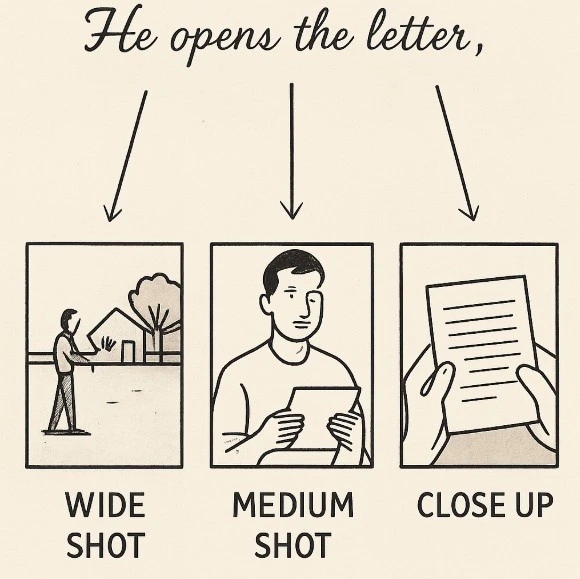
Reliability on set comes from using the standard “Wide, Medium, Tight” formula, a strategy filmmakers call “coverage.” For a script beat like “He opens the letter,” you rarely just shoot one angle; you plan a Wide Shot to establish his isolation in the room, a Medium Shot to capture his facial reaction, and a Close Up of the paper to reveal the handwriting. This approach functions like an insurance policy for your edit, guaranteeing you have the visual pieces required to control the pacing of the scene.
Missing these variations often results in a final video that feels flat or static, forcing the viewer to stare at the same image for too long. By explicitly listing these three variations for key moments in your hybrid template, you ensure you don’t wrap the shoot until you have every piece of the puzzle, taking the guesswork out of the production day. With your scene broken down into necessary angles, the final step is describing them with precise terminology to avoid confusion.
Decoding Camera Language: Terms That Make Your Shot List Professional
While “Wide” or “Close Up” tells us how much of the scene we see, camera movement determines how the audience feels about it. A static camera works perfectly for stable, informational shots, but adding motion guides the viewer’s eye and injects necessary energy into the story. Writing “move the camera” isn’t specific enough for your plan; you need precise terms to ensure the shot you imagine is the one you actually capture.
Standardizing your vocabulary prevents confusion on set and clarifies your creative intent. Here are the six universal terms to add to your shot list’s “Movement” column:
- Pan: Rotating the camera horizontally from a fixed point (like turning your head “no”).
- Tilt: Angling the camera up or down (like nodding “yes”).
- Dolly: Physically moving the camera toward or away from the subject to increase intimacy or reveal context.
- Truck: Moving the entire camera sideways, often to follow a subject walking across the frame.
- Pedestal: Moving the camera vertically up or down without tilting, used to reveal height or new elements.
- Zoom: Changing the lens focal length to make the subject appear closer without moving the camera itself.
Using these terms forces you to think about the motivation behind the movement rather than just adding style for style’s sake. A “Dolly In” creates emotional tension, while a “Zoom” feels mechanical or retro depending on the execution. Once you have your shots labeled with the correct motion, you face the final reality of production: you rarely have enough time to shoot them all.
Saving Your Shoot: How to Prioritize Your Shots When Time Runs Out
Even the most carefully planned shoots eventually face the reality of a setting sun or a dying battery. When you have twenty minutes left at a location but five shots still on your list, panic often leads to bad decisions. To prevent this, successful creators add a simple “Priority” column to their shot list during the planning phase to ensure production efficiency. By marking every row as either a “Must-Have” essential or a “Nice-to-Have” extra, you decide which moments carry the story’s weight long before the pressure of the shoot day begins.
This system functions as insurance for your narrative. For example, if you are filming a travel vlog, the wide shot establishing the location is likely a “Must-Have” because the audience needs context, whereas a stylized close-up of a coffee cup might be a “Nice-to-Have” insert. How do directors use storyboards on set to save the day? They look at that priority tag and instantly cut the coffee cup shot without hesitation when time gets tight, ensuring they walk away with a coherent sequence rather than a collection of pretty but unconnected clips.
Making these triage decisions on set doesn’t just save the filming day; it is the first step in streamlining post-production. Editors waste hours trying to assemble scenes from missing pieces, but a prioritized list guarantees that the fundamental building blocks of your scene are present on the drive. Once you understand how to structure this data mentally, the next logical step is finding the right software to automate the process.
Streamlining Your Workflow: Best Digital Tools for Independent Storyboarding
While Hollywood studios rely on complex platforms with steep learning curves, independent creators need agility and accessibility more than expensive features. Moving your digital storyboarding software to the cloud allows you to drag-and-drop reference images instead of drawing, which is a lifesaver if your artistic skills are limited to stick figures. Furthermore, these tools enable you to share your vision with a remote editor or client instantly, ensuring everyone agrees on the visual plan before you unpack a single camera.
Selecting the right platform for independent film production depends entirely on your specific workflow and budget. Here are three accessible options to help you transition from paper to digital:
- Boords: Best for an all-in-one visual interface that simplifies creating animatics.
- Canva: Ideal for drag-and-drop simplicity using stock photos and free templates.
- Google Sheets: The most flexible free option for combining detailed, text-heavy storyboard and shot list tools.
With your software selected, you are ready to assemble these elements into a cohesive
Your Visual Production Roadmap: A 3-Step Plan for Your Next Project
Gone are the days of showing up to a location hoping inspiration strikes while the light fades. By merging the emotional vision of a storyboard with the logistical power of a shot list, you have turned a vague idea into a concrete blueprint. You are no longer just guessing; you are buying yourself creative freedom. When the technical details are decided beforehand, your mind is free to focus on performance and storytelling during the actual shoot.
It is easy to view pre-production as boring homework that delays the fun of filming, but this preparation is the safety net that allows you to take risks. A solid plan ensures you spend less time troubleshooting gear and more time capturing the perfect take.
Ready to transform your workflow? Use this 24-hour planning checklist for your next video:
- Sketch the Beats: Draw your three most critical moments to lock in the visual emotion.
- List the Logistics: Translate those drawings into a technical list of lenses, angles, and equipment.
- The Combined Review: Walk through your location with both documents to ensure your vision matches reality.
The next time you press record, you won’t feel the anxiety of the unknown. You will feel the confidence of executing a vision you have already perfected on paper. That shift from reactive to proactive is exactly what creates professional results.
Take the Guesswork Out of Your Next Shoot with Studiovity
At Studiovity, we believe the bridge between a brilliant idea and a cinematic masterpiece is built during pre-production. Our platform is specifically designed to turn the “Master Map” strategy into your daily reality, seamlessly integrating your storyboards and shot lists into a single, fluid digital workspace.
By automating technical logistics and organizing your “Must-Haves” in real-time, we empower you to stop worrying about the how and start focusing on the why of every frame. Whether you are sketching your first beat or prioritizing a complex shoot day under a setting sun, Studiovity provides the professional-grade tools needed to execute your vision with absolute confidence.
Plan smarter, film faster, and bring your stories to life with precision.