
The filmmaking industry has entered a new era. Directors no longer need to rely only on physical sets, green screens, or expensive location shoots. Instead, production companies utilize Virtual Production Stages to create realistic digital environments. These environments respond instantly to camera movement and lighting. This innovative approach has completely transformed how teams bring films, television shows, commercials, and streaming content to life.
Furthermore, virtual production combines LED volume stages, real-time rendering engines, motion capture, camera tracking, and advanced planning software into one seamless workflow. As a result, filmmakers gain greater creative control. They also reduce production delays and unexpected costs.
However, many people still wonder how this technology actually works. The answer lies in understanding each step of the production pipeline. Every single stage plays an important role, from concept development to final delivery. Therefore, this guide explains the complete workflow and shows how teams organize every phase for maximum efficiency.
What Are Virtual Production Stages?
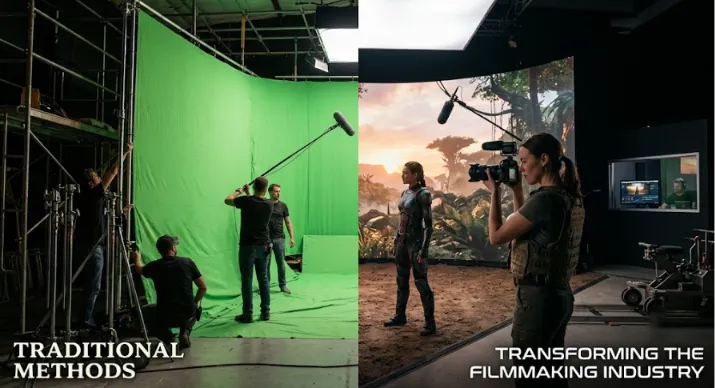
Virtual Production Stages are specialized studios that use massive LED walls instead of traditional green screens. These walls display high-quality digital environments. Game engines like Unreal Engine generate these backgrounds in real time.
Unlike conventional visual effects workflows, this technology allows directors, cinematographers, and actors to see the final environment during filming. Consequently, creative decisions happen immediately instead of months later during post-production.
The technology package also includes:
LED volume walls
Camera tracking systems
Motion capture equipment
Real-time rendering software
Advanced lighting systems
Production planning software
Asset management tools
Together, these technologies create an immersive filming environment. Because of this, physical and digital worlds blend naturally.
Stage 1: Pre-Production Planning
Every successful project begins long before cameras roll. Planning remains the foundation of production because digital environments require extensive preparation.
During pre-production, filmmakers define:
Story requirements
Locations
Camera movements
Visual styles
Virtual environments
Required assets
Technical specifications
The production team also decides which scenes will use practical sets. Meanwhile, they select other scenes to appear inside the LED volumes. Because virtual production depends heavily on preparation, producers spend additional time reviewing every scene before filming starts.
Script Breakdown
The script serves as the blueprint for the entire production. Production coordinators analyze every page to identify:
Characters and props
Costumes and vehicles
Visual effects
Digital environments
Special equipment
Lighting requirements
A detailed script breakdown helps every department prepare accurately. Furthermore, it prevents costly surprises during filming. Modern production management platforms can automate much of this process. Consequently, teams can tag scenes, organize assets, and assign requirements in minutes.
Storyboarding and Previsualization
Once the script breakdown finishes, artists create storyboards. These storyboards help directors visualize camera angles, character positions, scene composition, blocking, and lighting direction.
Next comes previsualization (Previs). Previs transforms storyboards into animated sequences that simulate the final film. Therefore, directors can experiment with different shots before production begins. Creative decisions become easier while production risks decrease significantly.
Building Digital Environments
Virtual production relies on highly detailed 3D environments. Artists create:
Cities and forests
Mountains and space stations
Historical locations
Interior sets
Fantasy worlds
These environments often include realistic lighting, dynamic weather, interactive objects, high-resolution textures, and natural reflections. Since everything renders in real time, optimization becomes extremely important. Artists balance visual quality with rendering performance to maintain smooth playback inside LED volumes.
Stage 2: Virtual Art Department (VAD)
The Virtual Art Department acts as the bridge between creative vision and technical execution. Its responsibilities include:
Creating digital assets
Optimizing environments
Managing 3D models
Preparing textures
Testing lighting
Building virtual props
Collaborating with VFX teams
Instead of waiting until post-production, the Virtual Art Department prepares assets before filming begins. Consequently, directors can review scenes in advance and make adjustments without delaying production.
Stage 3: Technical Setup
After assets are complete, technicians prepare the Virtual Production Stages for operation. This process includes installing:
LED walls and ceilings
Camera tracking sensors
Motion capture systems
Render servers
Synchronization equipment
Lighting control systems
Every device must communicate perfectly with the rendering engine. Even slight tracking errors can break the illusion of realism. Therefore, the crew calibrates the system with careful attention before filming starts.
Camera Tracking
One of the most important technologies in this workflow is camera tracking. Tracking systems monitor:
Camera position
Rotation
Lens data
Focus distance
Zoom level
As the camera moves, the digital background updates instantly. This synchronization creates realistic perspective shifts that make digital environments appear physically present. Without accurate tracking, the illusion quickly disappears.
Real-Time Rendering
Real-time rendering powers the entire workflow. Instead of rendering scenes over several hours, modern engines generate frames immediately. This allows directors to:
Change lighting
Adjust environments
Modify weather
Replace locations
Move objects
Experiment with camera angles
Creative teams no longer need to imagine the final scene because they see it during filming. As a result, collaboration improves dramatically.
Stage 4: Production on the LED Stage
Once technical setup finishes, filming begins. Actors perform in front of LED walls displaying the virtual environment. Unlike green screen productions, performers can actually see landscapes, buildings, spacecraft, mountains, and moving objects. This visibility creates more natural performances. Meanwhile, cinematographers benefit from realistic reflections and accurate environmental lighting produced directly by the LED panels.
Live Collaboration
Virtual production encourages collaboration between departments. Instead of working separately, teams communicate continuously. Directors collaborate with:
Cinematographers
Production designers
Visual effects supervisors
Virtual artists
Lighting technicians
Camera operators
Changes happen immediately. For example, the team can replace a sunset with a sunrise within seconds. Similarly, weather conditions can shift from sunny to stormy without changing locations. This flexibility dramatically improves creative experimentation.
Stage 5: Post-Production
Although many visual effects appear during filming, post-production remains essential. Editors refine:
Picture edits
Audio and music
Color grading
Visual effects
Final compositing
Because much of the work already happens during production, editors often spend less time fixing background issues. Consequently, production schedules become shorter.
Advantages of Virtual Production Stages
Filmmakers utilize Virtual Production Stages to gain numerous advantages for projects of every size.
Faster Production: Teams capture final-quality footage during filming. Therefore, fewer revisions happen later.
Lower Travel Costs: Digital environments replace many physical locations. This reduction lowers transportation and accommodation expenses.
Better Collaboration: Every department views the same environment in real time. As a result, communication improves throughout production.
Greater Creative Freedom: Directors can experiment freely without rebuilding physical sets. Creative possibilities expand significantly.
Improved Lighting: LED walls generate natural environmental lighting. Actors, costumes, and props receive realistic reflections automatically.
More Predictable Scheduling: Weather delays become less common because digital environments remain consistent. Production timelines become easier to manage.
Challenges of Virtual Production
Despite these advantages, the process presents several distinct challenges.
High Initial Investment
LED stages require significant equipment costs. Consequently, small productions often rent established Virtual Production Stages instead of building their own custom studios.
Technical Expertise
Specialized operators must manage rendering engines, camera tracking, LED calibration, and network synchronization. Therefore, experienced crews remain absolutely essential.
Extensive Planning
Virtual production leaves less room for last-minute improvisation. Every department must prepare carefully before filming begins.
How Production Management Software Supports Virtual Production
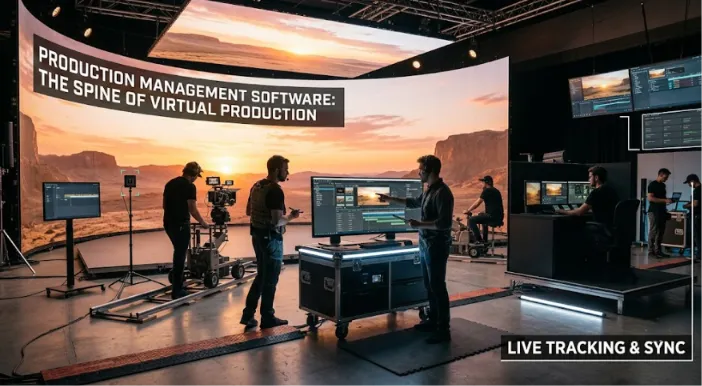
Technology alone cannot organize a complex production. Modern production management platforms help teams coordinate every task from script development to final delivery.
Production software simplifies:
Script writing and breakdowns
Storyboarding and shot lists
Scheduling and budgeting
Asset management
Instead of switching between multiple tools, production teams manage the entire workflow from a single platform. This centralized approach reduces communication gaps and improves production efficiency.
Best Practices for Successful Virtual Production
Teams achieve better results when they follow proven workflows. Some essential practices include:
Complete script breakdowns before production.
Build digital assets early.
Test LED environments thoroughly.
Verify camera tracking before filming.
Keep departments aligned throughout production.
Conduct technical rehearsals.
Prepare backup workflows.
Maintain organized production documentation.
Careful preparation consistently produces smoother filming days.
The Future of Virtual Production
Virtual production continues to evolve rapidly. Artificial intelligence now assists with environment generation, asset creation, scheduling, and production planning. Real-time rendering engines continue to improve every year, making digital environments even more realistic. Cloud collaboration also enables production teams across different countries to work together without delays.
As hardware becomes more affordable, independent filmmakers will gain greater access to virtual production technology. Consequently, productions of every size will benefit from faster workflows and lower overall costs.
Final Thoughts
Clearly, Virtual Production Stages have fundamentally changed modern filmmaking. By combining LED stages, real-time rendering, camera tracking, and advanced planning tools, filmmakers can create immersive cinematic worlds while maintaining greater creative control.
Success, however, depends on much more than advanced technology. Thorough pre-production, organized workflows, detailed scheduling, and strong collaboration remain the keys to every successful virtual production.
As virtual production becomes increasingly accessible, filmmakers who embrace these workflows will produce projects faster, manage budgets more effectively, and deliver higher-quality results. Whether you create feature films, television series, commercials, or independent productions, understanding how these environments work will help you prepare for the future of filmmaking.