
Have you ever arrived at a shoot—even a simple backyard setup—and realized you have no idea where to place the camera? That dreaded “blank page” feeling instantly crushes your creative momentum. In practice, avoiding this onset anxiety requires a fundamental mindset shift from being a reactive “recorder” to a proactive “planner.” Therefore, a reliable shot list and storyboard software should be utilized by creators to streamline this transition.
Think of your digital pre-production workflow through a simple blueprint analogy. While your script is the dream, your storyboard acts as the architectural sketch, and your shot list becomes the essential shopping list for materials. According to industry veterans, utilizing reliable film planning tools is the only way to successfully bridge this gap between imagination and execution.
Rather than drowning in messy manual spreadsheets, modern creators use Studiovity as a digital assistant that automatically organizes your brain. This software guides you through three key phases: visualizing the creative vibe, locking down technical logistics, and syncing everything together so you never duplicate work. Consequently, choosing the right shot list and storyboard software can completely transform your workflow.
Mastering these shot list and storyboard tools ensures you never waste precious daylight guessing what to shoot next. Ultimately, leveraging these filmmaking resources guarantees your entire crew—even if it is just a friend—understands your vision perfectly.
Transforming Your Script Into a Visual Roadmap: Digital Storyboarding for Independent Filmmakers
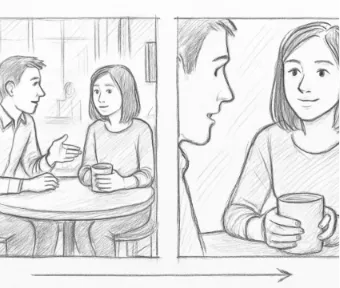
Staring at a perfectly written script without knowing what the scene should look like through a lens can feel completely overwhelming. Translating the emotion in your head into a physical camera setup bridges this exact gap. Creating a digital storyboard for independent filmmakers acts as a comic book version of your movie that brings your scene’s basic intent to life.
You absolutely do not need to be a talented artist to make this work. Studiovity’s tools let you focus entirely on composition framing—which simply means deciding where your actors and props sit within the screen’s borders. Whether you use basic shapes or built-in digital figures, the goal is to capture the overall vibe rather than creating a museum masterpiece.
This rough sketch process is where you establish visual hierarchy, a design rule that ensures your audience’s eyes are drawn immediately to the most important element on screen. By visualizing scenes with cinematic storyboards early, you guarantee your main character or crucial prop easily stands out from the background clutter.
Moreover, getting these ideas out of your head and into software speeds up crew communication significantly because everyone can instantly see your vision. As you utilize these filmmaking resources, make sure every frame clearly shows four essential elements:
Subject: Who or what is the main focus?
Action: What is the subject currently doing?
Camera Angle: Are we looking up, down, or straight at them?
Background: What environment surrounds them?
Once you have these rough visuals laid out, your creative dream is finally grounded in reality. The next step is translating those inspiring sketches into actionable logistics that your whole team can follow through detailed cinematic shot lists.
Building Your Production 'Shopping List': How to Create Detailed Cinematic Shot Lists
Showing up to film a scene without a checklist is like going grocery shopping without a recipe. Your storyboard sketches your dream house, but your shot list is the specific lumber required to actually build it. This document transforms those emotional drawings into a practical schedule so your crew knows exactly what to do.
Capturing a scene successfully requires “coverage,” which simply means filming enough different camera angles to give your editor choices and avoid costly reshoots. If you only film a dialogue scene from one viewpoint, you are stuck with that single perspective. Proper coverage ensures you capture the extra medium shots and close-ups necessary to build a complete, engaging sequence.
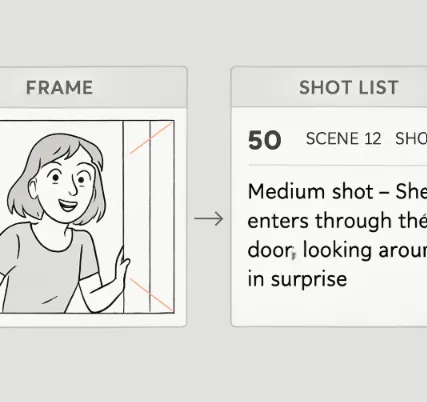
Translating your creative vision into technical instructions involves building high-quality cinematic shot lists. This means attaching “metadata”—specific data about how the camera operates—to every single picture. Instead of just telling your team to “film the coffee cup,” you are providing the exact blueprint needed to capture the moment accurately.
A reliable shot list breaks down every setup using a clear checklist of this technical metadata:
Shot Type: Is this a tight close-up or a wide establishing shot?
Angle: Are you shooting straight at eye level or looking down?
Lens: Do you need a wide view to show the room or a zoomed-in focus?
Movement: Is the camera locked on a tripod or following the actor?
Equipment: Do you need any extra stabilizing gear or special lights?
Managing all these details on a manual spreadsheet can quickly drain your creative energy before you even press record. Thankfully, Studiovity acts as a digital assistant by generating automatic camera angle and movement labels as you build your plan. This smart automation handles the tedious organizing for you, directly reducing production delays through detailed shot planning.
Turning artistic ideas into a logistical checklist guarantees you never go home missing the day’s most crucial shot, seamlessly connecting visual and technical steps to eliminate double work. Therefore, relying on dedicated shot list and storyboard software is essential for precision.
The Studiovity Secret: Linking Storyboards to Shot Lists to Eliminate Double Work
Picture this: you realize a wide angle isn’t working for your coffee shop dialogue scene, so you sketch a dramatic close-up instead. In a normal workflow, you now have to track down your separate spreadsheet and rewrite all the technical details to match your new drawing. This constant back-and-forth between visual sketches and text documents is exactly where mistakes happen and creative momentum dies.
Fortunately, mastering how to link shot lists to storyboards changes this frustrating dynamic entirely. Instead of treating your visual plan and your logistical list as two isolated islands, Studiovity merges them into one intelligent ecosystem. It serves as a powerful shot list and storyboard software that bridges the gap between text and imagery.
Comparing digital pre-production against traditional paper storyboarding highlights exactly why modern tools are so essential. When you tweak a camera angle on your sketch, the corresponding technical data updates itself automatically without any extra typing.
This level of pre-production workflow optimization acts like a digital assistant that organizes your brain for you. Because you can sync changes across your entire production plan instantly, you completely eliminate the risk of your crew looking at an outdated list on shoot day. By relying on this automated synchronization rather than manual data entry, creators routinely reduce administrative time significantly during pre-production.
Freeing up that mental energy allows you to step onto your set feeling confident rather than overwhelmed by paperwork. Because your visual ideas are permanently locked to your technical instructions, you never have to do the same work twice.
Streamlining Collaboration and Reducing Delays: Organizing Scenes by Location and Lighting
Moving gear from the kitchen to the living room, only to realize you needed one more kitchen shot, drains daylight and creative energy. Instead of shooting in script order, the secret is organizing film scenes by shooting location. Grouping every kitchen shot into one time block stops you from moving heavy tripods back and forth, cutting hours off your schedule.
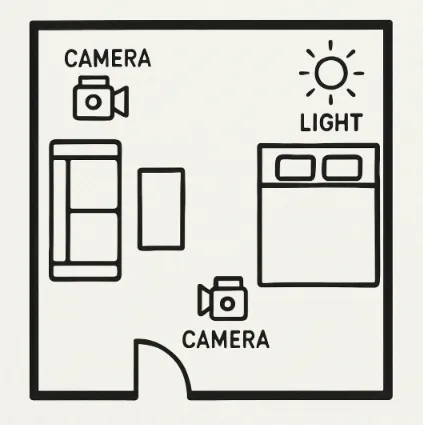
After establishing where you will shoot, map the space using camera blocking and lighting diagrams. Blocking is simply drawing a map that shows where actors stand and the camera goes. Adding a lighting diagram—a sketch showing where your main light source sits—gives your Director of Photography (camera operator) and Gaffer (lighting expert) a clear visual guide. Planning these equipment moves in advance decreases on-set setup time drastically because your team knows exactly what to do.
Using production management software for creative teams takes the guesswork out of this spatial planning. Studiovity lets you attach these simple floor plans directly to your location groups, ensuring everyone shares the exact same visual blueprint.
To lock in this efficiency, use this 3-step prep routine the night before a shoot using your exported plans:
Download your location-based shot list to your phone.
Share the visual overhead maps with your crew.
Review the gear placement to anticipate your first morning setup.
From Vision to Video: Your Action Plan for a Stress-Free Shoot
Transitioning from a reactive recorder to a prepared director requires reliable film planning tools. Beat the fear of starting production by executing a simple pre-flight checklist before every shoot.
First, sketch just three frames for your main scene. This process helps create a visual shot library to secure your core creative vision. Next, translate those simple images into a basic shot list. This is why using a dedicated shot list and storyboard software makes the process incredibly smooth.
Finally, invite your collaborators to the project to experience the benefits of cloud-based film planning through instant, real-time crew updates. Modern productions require modern solutions, and finding the best shot list and storyboard software will give you a competitive edge.
Proper planning reduces on-set anxiety and streamlines the entire production process. By arriving with a clear visual and logistical roadmap, you maximize your shooting time and hand over a thoroughly organized project to your post-production team. Thus, investing in a robust shot list and storyboard software is the ultimate key to independent filmmaking success.