Script Breakdown Explained: Elements, Process & Pro Tips for Filmmakers
You arrive on set for your first short film. The camera is ready, and the actors are hyped. Suddenly, you realize no one brought the vintage 1970s telephone mentioned on page four. The shoot stops immediately. This nightmare is exactly why every Script Breakdown matters.
Have you ever wondered how Hollywood producers read a 100-page story and instantly estimate costs? They understand the key difference between a creative document and a production blueprint. Think of your screenplay as a sketch of a house. The breakdown becomes the master list of every brick, wire, and nail needed to build it.
Transforming cinematic ideas into a logistical plan requires careful script analysis. Industry professionals know guessing leads to budget issues and delays. So, if you ask why a script breakdown is important for budgeting, the answer is simple. It removes financial guesswork and helps you plan like a professional.
The Blueprint Phase: Why Every Great Movie Starts with Identifying Production Requirements
First, turning a script into a real film requires clear logistical mapping. This step connects creative vision with an actual budget. Identifying production requirements helps isolate physical elements in every scene. As a result, producers can plan the shoot more effectively.
For example, imagine a simple scene with two characters arguing on a park bench while feeding pigeons. To a writer, it is emotional dialogue. However, a breakdown reveals hidden costs instantly. You need actors (Cast), breadcrumbs (Props), and possibly an animal wrangler. This clearly explains what script breakdown elements look like in pre-production.
Moreover, catching these details early prevents costly mistakes on set. Once you identify all physical items, the next step is estimating how long each scene will take. Therefore, accurate scheduling depends on precise measurement.
Mastering the Eighths: Using the Pizza Metaphor for Precise Script Measurement
Instead of guessing scene length, professionals use a fraction system. This method improves accuracy in script analysis. Think of each page as a pizza divided into eight slices. A short insert may take only 1/8, while a dense scene could take 8/8.
To apply this method without software, follow these steps:
Measure the text block from top to bottom margin.
Divide the area into eight equal sections.
Count the sections your scene occupies and note the fraction.
By using this system, you can estimate shooting time more accurately. As a result, you avoid vague scheduling mistakes. Once pages are divided, the next step is tracking elements within them.
Lining the Script: A Step-by-Step Guide to Color Coding Your Production Elements
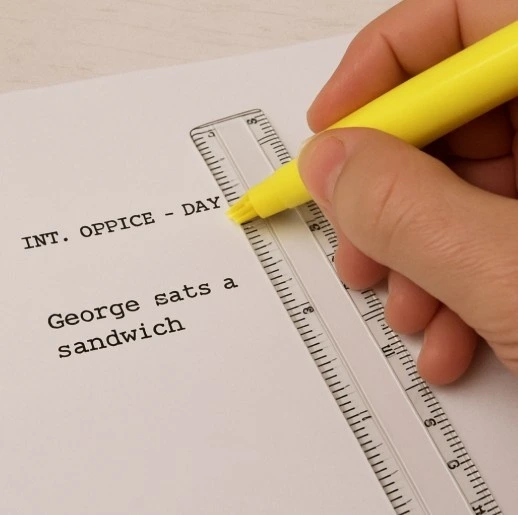
Now that your pages are divided, you need to identify hidden details. This is where lining a script becomes essential. Use a ruler and draw a vertical line through action blocks. This helps map moments to specific camera setups.
Next, use highlighters for color coding. This step ensures every department notices key elements. Use standard colors:
Red: Cast
Orange: Stunts
Blue: Special Effects
Purple: Props
For instance, if a character drinks from a coffee cup, highlight it as a prop. However, if a lamp sits in the background, leave it unmarked. This process makes your Script Breakdown visually clear and easy to follow.
Props, Stunts, and Cast: Categorizing What Actually Costs Money
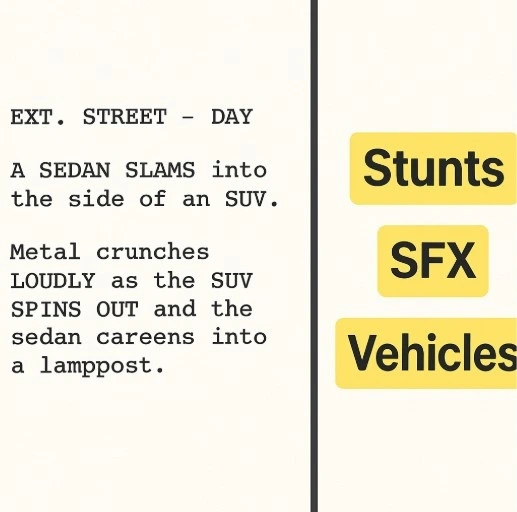
Consider a scene where a hero drinks coffee while a taxi crashes nearby. The jacket is wardrobe, and the coffee cup is a prop. The taxi is a picture vehicle, while the crash is a stunt. Water bursting from a hydrant becomes a special effect.
Therefore, accurate categorization prevents budget leaks and safety risks. When identifying stunts and effects, you highlight high-risk actions. Focus on these key categories:
Cast
Stunts
Special Effects
Picture Vehicles
Props
Wardrobe
Set Dressing
Background Extras
By organizing these elements, your Script Breakdown becomes a clear checklist for every department.
Manual Sheets vs. Movie Magic: Choosing the Right Digital Breakdown Tools
Initially, manual highlighting helps you learn the process. However, transferring data into sheets becomes time-consuming. As projects grow, digital tools become essential.
Modern software uses digital tagging. For example, clicking “exploding car” automatically tags it as a special effect. It also syncs with your production board.
Popular tools include:
Final Draft Tagger
StudioBinder
Movie Magic Scheduling
Choosing the right tool depends on your project size and budget. Ultimately, digital tools simplify your Script Breakdown and improve workflow efficiency.
From Breakdown to Call Sheet: How the 1st AD Builds a Realistic Shooting Schedule
On set, planning is everything. The 1st Assistant Director uses breakdown data to avoid risks. For example, they prevent scheduling outdoor scenes during bad weather.
Since films are not shot in order, scenes get grouped by location. This saves both time and money. A coffee shop scene on page two and ninety may be shot on the same day.
Finally, this process leads to the call sheet. It tells every department what to prepare. A well-executed Script Breakdown ensures smooth production and fewer surprises.
Final Checklist: Your Path from Script to Set
A strong breakdown keeps your production efficient and organized. It reduces chaos and avoids costly mistakes.
Start your next project with these steps:
Read the script fully without marking
Line scenes and divide into eighths
Tag elements like Cast, Props, and Wardrobe
By following this structured approach, your Script Breakdown will prepare you for a smooth and successful shoot.
Streamline Your Script Breakdown with Studiovity
Take your script breakdown process to the next level with Studiovity. Instead of manually highlighting, tagging, and transferring data, Studiovity lets you automate everything in one place. From AI-powered script breakdowns to shot lists, scheduling, and call sheets, it transforms your screenplay into a complete production-ready workflow. Whether you’re an indie creator or a professional team, Studiovity helps you save time, reduce errors, and bring your vision to life faster.
Script breakdown elements are the production requirements hidden inside every scene: the characters, background actors, props, set dressing, wardrobe, makeup, locations, vehicles, animals, stunts, effects