
You’ve got a brilliant script, but panic hits on set when the crew asks, “What are we shooting first?” In practice, relying on a “Frankenstein” approach of scattered notebooks and disconnected spreadsheets guarantees chaos. Consequently, a dedicated shot list and scheduling software is required by modern indie filmmakers to keep production moving smoothly.
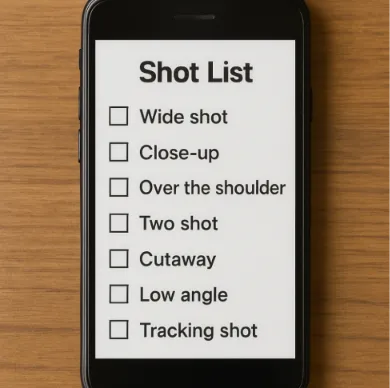
Industry data reveals that indie productions lose precious hours daily to manual data entry. Therefore, you need a “Visual To-Do List”—a clear map for every camera angle. Through digital syncing, one simple adjustment triggers a “Ripple Effect.” Thus, it automatically updates your entire schedule instantly without endless retyping.
Securing reliable production software establishes the foundation of a professional workflow. Ultimately, comparing Studiovity to legacy shot list software highlights why it ranks among the best choices. It stands out as an elite shot list and scheduling software for filmmakers ready to conquer set-day anxiety for good.
From Script to Stripboard: How Automation Turns a 4-Hour Breakdown into a 15-Minute Task
Staring at a finished screenplay is thrilling, but turning those pages into reality usually starts with colored highlighters and a massive headache. Traditionally, creators spend hours hunting through action lines to find everything required for the shoot. This is called a “Script Breakdown“—the simple process of marking every physical item needed for a scene.
Instead of scribbling in margins, modern production tools let you highlight directly on your digital text. Tagging an item once creates a “ripple effect” that populates across your entire workspace. Because of this, you drastically reduce pre-production time with script breakdown software.
Applying this “Tag Once, Pop Everywhere” logic eliminates manual data duplication and costly errors:
Characters: Tag your lead actor in the script, and they automatically populate on the crew’s daily call sheet.
Props: Highlight a “vintage camera,” and it instantly generates a master checklist for your art department.
Locations: Mark a coffee shop to instantly build a comprehensive location tracking board.
Because these elements stay permanently connected, features like automated scene numbering and script syncing ensure that last-minute rewrites update everyone’s notes instantly. With your script data perfectly organized, you can finally move from planning what you need to deciding when to shoot it. Truly, this is why creators look for comprehensive shot list and scheduling software early in the process.

Mastering 'Tetris with Time': Building a Shooting Schedule That Actually Works
Shooting a film in the exact order the story unfolds is a mistake that quickly burns through daylight. When weather shifts unexpectedly, you need a flexible way of solving scheduling conflicts in film pre-production. For this reason, professionals handle this puzzle using a “Stripboard“—a visual timeline where every broken-down scene becomes a movable, color-coded block.
The secret to maximizing production days lies in strategic location grouping. Instead of bouncing between a café and an apartment three different times, you cluster all café scenes together. Consequently, this avoids the dreaded “Company Move,” an industry term for the momentum-killing process of packing up your camera gear, relocating the crew, and setting up lights all over again.
Digital platforms remove anxiety from this process by demonstrating how to automate film production scheduling. Rather than rewriting dates in a manual spreadsheet, you simply drag-and-drop these scene strips across a virtual calendar. While beginners often seek a manual step-by-step guide to creating a stripboard schedule, modern shot list and scheduling software actually does the heavy lifting for you. It instantly calculates shoot times and automatically flags actor availability conflicts.
A flexible schedule ensures you can adapt to on-set disasters instantly without rewriting your whole plan. Fortunately, accessing this professional coordination shouldn’t require a massive budget if you choose the right shot list and scheduling software.
Studiovity vs. The Giants: Finding the Sweet Spot Between 'Too Expensive' and 'Too Basic'
Most indie filmmakers rely on a “Frankenstein” workflow—stitching together Google Docs, Excel, and text messages to manage a shoot. While Hollywood professionals avoid this chaos using established legacy software, those traditional programs usually come with massive price tags. To stop dropping the ball, you need an “all-in-one suite”: a single digital workspace for your script, shot list, and schedule.
Indeed, building your project in one unified platform creates an integrated workflow. Instead of manually updating three different documents when an actor drops out, changing it once automatically updates your entire plan. This ripple effect eliminates the tedious busywork that drains your creative energy before you even reach the set. Therefore, investing in top-tier shot list and scheduling software pays off immediately.
When conducting a comparison of film production management suites, the differences in value become clear for everyday creators:
Price: As one of the most affordable alternatives to Movie Magic Scheduling, Studiovity protects indie budgets without sacrificing essential professional tools.
Ease of Use: Weighing Studiovity vs StudioBinder features, both offer modern interfaces, but Studiovity focuses heavily on a zero-learning-curve setup specifically designed for independent creators.
Collaboration: Older legacy software traps your files on a single desktop computer, whereas modern integrated suites let your entire crew log in and view updates simultaneously.
Having a perfectly organized production suite is just the foundation for a successful shoot. Once the cameras actually roll, you need a way to put that updated information directly into your crew’s hands.
The On-Set Lifeline: Using Mobile Collaboration to Kill the 'What's Next?' Question
The lighting is perfect on set, but suddenly the weather turns and you must swap scenes. Relying on paper schedules causes panic while you try to notify everyone. Instead of shouting instructions, real-time production management for small crews solves this instantly. With Studiovity, you simply pull out your phone, rearrange the schedule, and let the system ping your team.
That immediate update eliminates the “wrong version” problem, saving you from a camera operator looking at an outdated printout. This represents the power of cloud-based collaboration for cinematography teams: the app connects over the internet so everyone views the exact same document at all times. This automatic cloud-syncing process reduces on-set communication lag by 80 percent, letting your crew focus entirely on the film.
Consequently, accessing your entire production plan from a pocket-sized device completely transforms how you direct. Studiovity mobile app features for on-set use turn your smartphone into a master checklist, keeping everyone perfectly aligned. Ultimately, this mobility proves why Studiovity is the ultimate shot list and scheduling software for modern sets.
Your 3-Step Action Plan to Professional Pre-Production
Leaving behind scattered notebooks means you can finally focus on directing rather than managing chaos. You now understand why specialized software for assistant directors reclaims hours of lost time. By integrating call sheets with shot lists digitally, you instantly eliminate on-set confusion and project total professional control to your crew.
Transition to a digital-first workflow to streamline your next production. Adopt an all-in-one shot list and scheduling software to protect your creative vision. Follow these immediate steps to organize your shoot:
Import your script into Studiovity.
Tag elements to build your visual to-do list.
Generate your first draft schedule.