
You’re on set losing precious daylight, and your actors are waiting while you desperately shuffle through papers to find the next shot. In practice, this exact moment—where creative excitement crashes into logistical chaos—happens because of a massive disconnect in your planning.
Mastering the “Blueprint vs. Calendar” framework prevents this on-set disaster. Your creative wishlist is the blueprint detailing exactly what the camera needs to see, while your timeline acts as the calendar dictating when the crew actually works. Therefore, understanding the distinct roles of a Shot List vs Shooting Schedule is essential for a smooth production.
Industry data reveals that dividing a Shot List vs Shooting Schedule into separate spreadsheets triggers the dreaded manual update trap, where tweaking one angle forces you to rewrite your entire day. Thankfully, film production workflow automation fixes this. By streamlining cinematography shot lists into unified software, your vision and logistics finally sync automatically.

The Shot List: Capturing Every Creative Detail Before the Camera Rolls
Have you ever finished a shoot only to realize you forgot a vital close-up? A shot list is your creative blueprint, acting as a direct communication bridge between the director and cinematographer so everyone shares the exact same vision.
Planning this wishlist means capturing “coverage”—the different camera angles needed to edit a scene seamlessly. For a simple coffee shop chat, you might need a Wide Shot (WS) to establish the room, an Over-The-Shoulder (OTS) connecting characters, and a Medium Close-Up (MCU) for emotional reactions.
To prevent costly coverage gaps, master four core components. Defining these details streamlines your camera angle and lighting organization, perfectly preparing your digital storyboard and shot list integration:
Shot Type: The framing size.
Angle: The camera’s perspective.
Movement: How the lens travels.
Description: The specific action.
Translating these ideas into reality is your next step. Once your blueprint is complete, you must build a shooting schedule to turn your vision into a realistic workday.
The Shooting Schedule: Turning Your Vision into a Realistic Workday
While your shot list is the creative blueprint, your shooting schedule is the ultimate reality check. Movies are rarely filmed in script order, so you must organize your day around practical logistics rather than the story’s timeline through Scene Grouping—filming all scenes at one location together.
Grouping shots by similar lighting and camera positions minimizes Setup time, which is the physical labor spent adjusting equipment between takes. Mastering this aspect of managing film location logistics can easily save your production over two hours a day.
Protecting crew health and actor availability means budgeting time for more than just recording. You must account for lunch breaks, a Company Move (traveling between locations), and Striking (packing up gear), which is why creators often rely on Assistant Director scheduling software to calculate these crucial gaps automatically.
Perfecting this timeline is difficult enough on its own. However, the real frustration begins when you encounter the hidden cost of managing shot lists and schedules in separate apps.
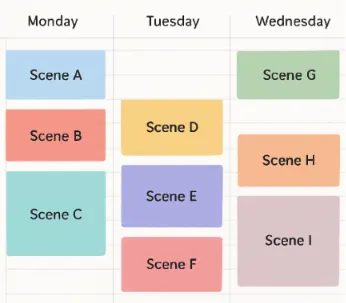
The Hidden Cost of Managing Shot Lists and Schedules in Separate Apps
Updating a shot list only to realize your calendar is completely out of date creates a dangerous workflow known as a manual sync error. Every time you tweak a camera angle, you lose hours of pre-production time re-typing that exact same data.
This back-and-forth destroys accurate version control—the ability to know which document contains the most current information. When the difference between Shot List vs Shooting Schedule updates isn’t perfectly matched, “Spreadsheet Hell” quickly drains your indie budget through costly on-set mistakes like:
Double-booked actors.
Missed equipment rentals.
Wrong scene numbers.
Escaping this chaos requires adopting best practices for film production scheduling rather than juggling multiple tabs. By reducing production delays with digital planning, you avoid these disconnects entirely. Consequent errors disappear when you stop treating the Shot List vs Shooting Schedule as separate, isolated tasks.
How Studiovity Syncs Your Creative Vision with Production Reality
Imagine if your creative blueprint automatically updated your calendar. That is exactly what happens when you use Studiovity. Instead of copying data between spreadsheets, this platform connects every camera angle directly to your daily timeline.
Because these documents are fundamentally linked within the software, you eliminate manual updates with one-click synchronization. If your simple coffee shop scene suddenly needs an extra close-up, just add it to your list. The schedule adjusts automatically, making these integrated pre-production planning tools capable of reducing your prep time by up to 50%.
Beyond saving hours of typing, this cloud-based film project management approach transforms crew communication. Utilizing real-time production collaboration platforms ensures your whole team sees the latest plan instantly, meaning your lighting director and actors never show up to set holding yesterday’s outdated printout.
Furthermore, you can easily contrast your progress by tracking a Shot List vs Shooting Schedule side-by-side in real-time. Leaving scattered files behind gives you the confidence to focus entirely on directing your cast rather than managing paperwork.
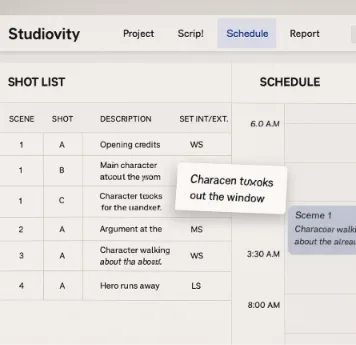
Three Steps to Building a Dynamic Production Plan in Studiovity
Starting from a blank document feels overwhelming, but mastering the scene breakdown to shooting schedule process is remarkably simple. First, Studiovity automates the heavy lifting by “tagging” your uploaded script to instantly highlight required actors and props.
With those physical elements identified, you can confidently transition from script to screen in three phases:
Tag your script: Let the software automatically spot your cast and gear.
Build your shot list: Add creative camera angles directly to those scenes.
Drag into the schedule: Use the drag-and-drop interface to slide shots into daily time slots.
Adapting to last-minute weather delays is now effortless—just drag a scene to tomorrow’s column. Learning how to organize a film shoot efficiently removes logistical stress, optimizing film crew coordination. Hence, balancing a Shot List vs Shooting Schedule becomes a seamless task.
From Planning Chaos to Production Mastery
You no longer have to choose between creative vision and logistical reality. By mastering the core difference between your creative “what” and your logistical “when,” you have evolved from simple point-and-shoot habits to a planned, professional filmmaking approach.
The traditional struggle of managing a Shot List vs Shooting Schedule often drains creative energy through messy, disconnected spreadsheets. By embracing film production workflow automation, your logistics now adapt instantly to your artistic choices, protecting your valuable time and production budget.
Instead of managing disconnected spreadsheets, building your scene lists directly within integrated software allows your creative blueprint to natively transform into a reliable, unified daily plan. Ultimately, unifying your Shot List vs Shooting Schedule is the ultimate key to independent filmmaking success.