
We’ve all been there: It’s 4 PM, the sun is setting fast, and you still have three critical pages to shoot. Every filmmaker understands scenes are shot out of chronological order. Therefore, a Professional Shooting Schedule must be created by production teams as a meticulous plan, serving as your production’s insurance policy against chaotic overruns.
According to veteran production managers, indie creators lose up to thirty percent of their pre-production time battling cell formatting rather than actually strategizing. This “spreadsheet friction” drains creative energy, making any generic filming schedule template a massive liability. Consequently, you don’t need a massive studio budget to escape this anxiety.
Enter the digital stripboard, the modern evolution of physical production strips that lets you organize scenes by dragging color-coded blocks. Instead of manually updating spreadsheet rows, Studiovity automatically syncs every adjustment across your entire workspace.
Mastering this software transforms your workflow through a predictable, four-phase journey from importing your script to printing your final call sheet. Building your first Professional Shooting Schedule strips away the logistical mystery so you can focus entirely on your creative vision.
Step 1: Moving From Script to Data—The Power of Automated Script Breakdown
Staring at a completed PDF or Fountain script, your first instinct might be to start copying scene headings into a spreadsheet. However, this manual process practically guarantees missing vital details. Instead, modern cloud-based film production management tools use script parsing—a feature that automatically reads your file and extracts the critical information.
Studiovity handles this heavy lifting instantly, eliminating 90% of manual data entry errors right at the import stage. Think of your screenplay as a complex recipe; before you cook, you must identify your ingredients. Through metadata tagging (electronically highlighting and categorizing text), the software pulls out specific requirements for every story beat.
These requirements are known as Scene Elements—the tangible pieces needed on set. After the automated breakdown runs, always verify these four essential elements:
Cast: The actors required.
Props: Items physically handled by actors.
Wardrobe: Specific costume needs.
Locations: Where the scene takes place.
Catching these details early, especially tagging special equipment like a drone for a public park shoot, identifies hidden production costs before you spend a single dime. By creating an integrated script breakdown and Professional Shooting Schedule, you build a flawless foundation. With your data clearly extracted, you now understand the basics of how to organize film scenes for practical shooting.
Step 2: Mastering the Digital Stripboard—Organizing Scenes Like a Pro
Shooting a movie in the exact order it was written quickly drains a budget. To maximize efficiency, producers use a digital stripboard for film production—a workspace where your script becomes a flexible puzzle. Think of it as a stack of index cards you can easily shuffle to group scenes by practical logistics rather than story chronology.
Visual cues immediately reduce the mental load of scheduling when you view these digital strips. Industry-standard color-coding automatically highlights your lighting requirements at a glance. For instance, white strips represent Interior Day scenes, while blue strips signify Exterior Night scenes, letting you quickly spot lighting trends without reading full scene descriptions.
Unscheduled scenes sit safely in a holding area called the Boneyard, ready to be dragged and dropped into your active timeline. As you move these elements, any practical guide to film stripboard creation recommends filling your schedule one block at a time. Once a shoot day reaches capacity, you simply insert Day Breaks—solid dividers that establish exactly when the crew goes home.
Mastering this visual scene organization and day breaks workflow ensures your production flows seamlessly. Thus, learning how to structure a Professional Shooting Schedule prevents your crew from constantly tearing down and resetting equipment. With your days neatly divided by lighting needs, you set the stage for minimizing expensive company moves.

Step 3: Reducing Company Moves—The Secret to Saving 3 Hours Per Day
Imagine packing up a living room set, driving across town, and unpacking at a diner just for a two-page scene. This is a Company Move—relocating your entire cast and crew mid-shoot. Every relocation costs roughly two to three hours of usable filming time. Minimizing these expensive shifts is the ultimate secret to keeping your project profitable and your crew happy.
Instead of burning daylight in transit, try streamlining production workflow with Studiovity by filtering your digital stripboard by physical location. You can easily batch-schedule all diner scenes together for maximum efficiency, regardless of script order. Catching these geographical clashes early is one of the best benefits of an automated Professional Shooting Schedule. This mirrors professional unit production manager workflow optimization, ensuring your team spends more time rolling cameras and less time loading trucks.
Before locking in your freshly grouped locations, use this quick checklist:
Check lighting: Do your batched scenes match the available daylight or require a massive relight?
Verify cast overlap: Are the required actors actually available for this consolidated day?
Confirm ‘Company Move’ time: If you absolutely must relocate, did you budget three hours for the transition?
With your locations strategically secured, you can turn your attention to managing talent and ensuring legally compliant turnarounds.
Step 4: Managing Talent and 'Turnarounds' Without a Math Degree
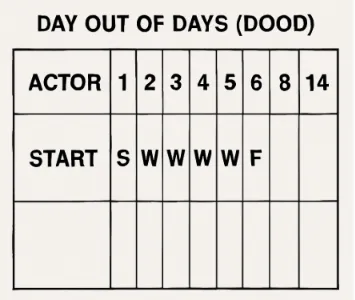
Figuring out if it is cheaper to pay an actor for three days of waiting or to send them home can break an indie budget. This is solved by a “Day out of Days” (DOOD) report, a tool tracking exactly when cast members start, work, hold, and finish. Studiovity automates this day out of days report generation visually, letting you group an actor’s scenes together to prevent paying for idle time.
While protecting funds is vital, ensuring crew safety is non-negotiable. Imagine wrapping a grueling night scene at 2 AM, only to schedule a 6 AM sunrise shoot. This creates a “Turnaround Violation”—failing to provide legally required rest between shifts. Studiovity instantly flags these dangerous gaps, aiding in managing production delays in digital schedules before a burnt-out crew halts your momentum entirely.
That complex puzzle of matching cast availability against mandatory rest periods is where technology steps in. You can leverage Studiovity’s AI-assisted scheduling as a smart assistant rather than a replacement. The system analyzes locations, contracts, and safety rules to suggest a functional shooting order, offering a solid draft you can confidently refine into a finished Professional Shooting Schedule.
Once the logistics are securely locked, sharing this optimized plan with department heads is effortless. By embracing real-time collaboration for production teams, your producers immediately view the safe schedule from their devices. With the human element organized, your verified plan is ready to be converted into daily call sheets.
Step 5: From Plan to Action—Generating Professional Call Sheets in One Click
We’ve all feared an actor arriving at the wrong location due to a manual typo. Turning your stripboard into a Call Sheet—the daily blueprint handed to your cast and crew—used to require tedious data entry. By pulling data directly from your verified plan, generating professional call sheets from a Professional Shooting Schedule converts a four-hour manual chore into a five-minute automated export with 100% accuracy.
Rather than juggling messy documents, the best professional film scheduling software automatically populates your day’s logistical needs. Every comprehensive call sheet must include these top 5 items:
Weather
Hospital info
Crew Call (the exact time the team must arrive)
Scene List
Special Requirements
When unexpected rain forces changes, Version Control (tracking which document draft is newest) lets you manage production delays by simply updating the master schedule and instantly notifying everyone. When evaluating Studiovity vs Studiobinder for scheduling, Studiovity’s real-time mobile updates ensure that if logistics shift at midnight, nobody arrives at dawn by mistake.
Your New Workflow: From 'Hoping' to 'Knowing'
Moving from scattered spreadsheets to a centralized system fundamentally changes how you approach filmmaking. You no longer have to cross-reference cast availability with location permits manually. Recognizing this professional shift means you can now execute a complete “Script-to-Call-Sheet” process in three hours or less using a reliable Professional Shooting Schedule. Remember that in production, time is money; every hour saved on logistics is an hour earned for creative directing.
To solidify these skills, migrate your current informal planning into a structured format this week. Take an existing short film script you currently manage in a notebook and import it to build your first stripboard. As you master Studiovity’s scheduling tools, focus primarily on streamlining production workflow rather than perfecting every detail immediately. Group your scenes by location, insert your day breaks, and watch the logistics organize themselves.
Stepping onto a set with a bulletproof plan offers an unmatched level of confidence. You are no longer just hoping to finish before the sun sets; you are commanding a standardized, professional operation. Embrace this organized foundation to keep your creative vision thriving within the safety of a functional schedule.
https://blog.studiovity.com/best-shooting-schedule-software-for-filmmakers-in-2026-studiovity/