Manual vs Software Script Breakdown: Which Is Better for Filmmakers?
You’ve just finished formatting the final page of your cinematic masterpiece, and creative energy is running high. In the world of Manual vs Software Script Breakdown, panic suddenly sets in. You realize you forgot to rent the specific vintage camera the entire scene revolves around. As a result, missing even one crucial item can grind a shoot to a halt. Therefore, professional filmmakers treat pre-production planning as a mandatory step.
While the script tells the story, a script breakdown works like a grocery list and prep schedule. In other words, it turns creative ideas into actionable tasks. Deconstructing a story into elements like actors, props, and locations makes production manageable. Consequently, your budget stays under control.
According to industry knowledge, the most expensive mistakes happen before filming begins. However, many creators still see this phase as tedious. In reality, it is a system designed to protect your workflow. Moreover, every hour saved in prep gives you more time to focus on directing.
Would you rather spend four hours reading with a red pen, or ten minutes using software? Naturally, filmmakers ask why script breakdown sheets matter for indie films. The answer is simple: they protect limited resources. Therefore, choosing how to build them becomes the next challenge in the Manual vs Software Script Breakdown process.
Navigating film pre-production tools does not have to feel overwhelming. Instead, comparing manual methods with software reveals what fits your needs. Ultimately, resolving the Manual vs Software Script Breakdown debate helps you work faster and stay organized.
Why Every Scene is a List of Ingredients: Defining the Breakdown Elements
Think of your screenplay as a recipe. First, you check ingredients before cooking. Similarly, you must identify everything before filming. These are called breakdown elements.
To begin with, scan the script carefully. Then, identify every person, object, and requirement for each scene. After that, group them by department so each crew member knows their role.
The main categories include:
Cast: Speaking characters
Props: Objects handled by actors
Locations: Physical settings
Costumes: Wardrobe details
Vehicles: On-screen transport
Additionally, careful reading reveals hidden needs. For example, extras or special effects tools may be required. As a result, early planning prevents costly surprises.
The Filmmaker's Ruler: Mastering Page Eighths for Precise Scheduling
Counting full pages is a common mistake. However, scenes vary in complexity. Some take minutes, while others take days.
To solve this, professionals use page eighths. Each page is divided into eight equal parts. Then, scenes are measured based on space occupied. For instance, a scene taking three sections becomes “3/8.”
As a result, scheduling becomes more accurate. Furthermore, this system helps estimate workload clearly. Understanding this method is essential before choosing tools in the Manual vs Software Script Breakdown workflow.
The Tactile Advantage: A Step-by-Step Manual Script Marking Guide
For indie filmmakers, manual breakdowns are cost-effective. You only need a ruler, pen, and highlighters.
This method, known as “lining,” involves marking scenes and highlighting elements. First, separate scenes with lines. Then, use colors to mark specific elements.
The standard system includes:
Red: Cast
Yellow: Extras
Orange: Stunts
Purple: Props
Blue: Special Effects
As a result, everyone understands the requirements instantly. However, this process takes time. Therefore, many creators switch after evaluating the Manual vs Software Script Breakdown trade-offs.
The Digital Revolution: Automated Script Breakdown Software Features
Digital tools simplify the process significantly. Instead of manual searching, software scans scripts automatically.
For example, recurring props are detected instantly. Moreover, items are stored in a database without extra effort. This removes repetitive tasks.
Additionally, reports can be generated in one click. Departments receive ready-made lists. Therefore, software becomes a strong option in the Manual vs Software Script Breakdown comparison.
Movie Magic vs. StudioBinder: Choosing Your Digital Production Assistant
Digital tools fall into two categories. First, desktop software works offline. Second, cloud-based tools allow online collaboration.
Each option has advantages. Offline tools offer stability. Meanwhile, cloud tools provide flexibility.
Key differences include pricing, usability, and accessibility. As a result, indie filmmakers prefer subscriptions. However, large productions may choose traditional systems.
Reducing Human Error: Why Software Beats the Highlighter for Large Crews
Manual updates take time. Moreover, they can cause confusion. A small change may require multiple corrections.
In contrast, software updates everything instantly. Therefore, all departments stay aligned.
This creates a single source of truth. As a result, errors are reduced and workflows improve.
The Hidden Cost of Free: Cost-Benefit Analysis for Indie Filmmakers
Manual methods appear free. However, they consume valuable time. Consequently, creative work suffers.
Instead, consider software as an investment. A small fee can prevent costly delays. When evaluating the Manual vs Software Script Breakdown, always factor in time and efficiency.
Beyond the Breakdown: Syncing with Your Shooting Schedule
A breakdown alone is not enough. You must convert it into a schedule.
Stripboards help organize scenes efficiently. Then, scenes are grouped by location and availability.
Digital tools make this faster and easier. Therefore, scheduling becomes more flexible.
The Hybrid Strategy: When to Use Highlighters and When to Use Apps
You do not need to choose one method. Instead, combine both approaches.
Start with manual reading. This builds a deeper understanding. Then, switch to software for organization.
As a result, you balance creativity and efficiency.
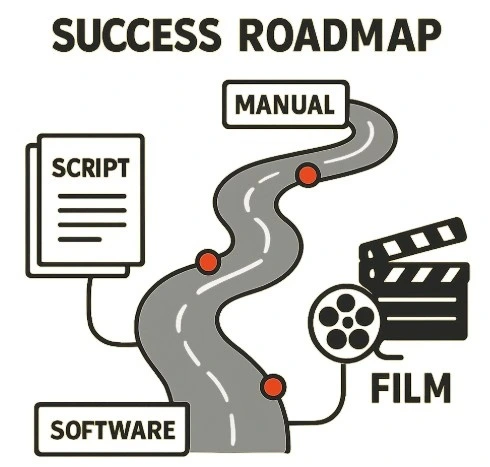
Building Your Production Roadmap: Which Path Should You Take?
Pre-production does not have to feel overwhelming. Instead, it should feel structured and clear.
The Manual vs Software Script Breakdown choice depends on:
Budget
Crew size
Script length
To begin, test both methods on one scene. Then, choose the one that feels more effective.
Ultimately, mastering this process turns your script into a production-ready plan.
Simplify Your Script Breakdown with StudiovitySimplify Your Script Breakdown with Studiovity
Whether you prefer manual methods or modern tools, the smartest filmmakers combine creativity with efficiency—and that’s exactly where Studiovitycomes in. From AI-powered script breakdowns to instant scheduling and call sheets, Studiovity helps you turn complex scripts into clear, production-ready plans in minutes. Stop juggling spreadsheets and start focusing on storytelling—because with Studiovity, your entire pre-production workflow just works.
Script breakdown elements are the production requirements hidden inside every scene: the characters, background actors, props, set dressing, wardrobe, makeup, locations, vehicles, animals, stunts, effects