
The art of screenplay writing is as much about structure as it is about storytelling. Therefore, understanding the nuances of how to format a screenplay is crucial for any writer aspiring to break into the film industry. Many aspiring professionals often overlook how to format a screenplay, yet proper script formatting ensures absolute clarity. Furthermore, it reflects a deep level of professionalism. Consequently, this visual polish significantly influences how producers and directors receive your work. This comprehensive guide will elucidate the industry standards of how to format a screenplay with illustrative examples.
Ultimately, mastering the art of how to format a screenplay is akin to learning a new language. For this reason, it involves understanding the intricate balance between creative expression and technical precision. A well-formatted script serves as a clear roadmap for directors, actors, and production teams because it guides them through the narrative with ease. By adhering to industry standards, you signal to industry professionals that you take your craft seriously. Thus, they will see that your screenplay is ready for their consideration.
A strict set of rules governs screenplay formatting and dictates exactly how the script should appear on the page. Indeed, this is exactly how to format a screenplay effectively. These rules are not arbitrary; rather, they facilitate ease of reading. Additionally, they ensure that all creative and technical personnel can interpret the script consistently. This standardized approach allows for a uniform reading experience, regardless of who picks up the script, ensuring that the focus remains entirely on the content rather than deciphering the format.
The Standard Script Layout
A screenplay is typically printed on 8.5″ x 11″ bright white three-hole punched paper, with the text aligned on the left margin and a ragged right margin. The font of choice is 12-point Courier, which ensures approximately one minute of screen time per page. This consistency in layout not only aids in estimating the runtime of the script but also maintains a professional appearance that aligns perfectly with industry expectations.
The choice of 12-point Courier font is not merely aesthetic; instead, it plays a highly functional role in the pacing of the script. Each page formatted in this font and layout roughly equates to one minute of screen time, providing a reliable metric for producers and directors. This predictability in timing is crucial during the pre-production phase because it directly aids in budgeting and scheduling, underscoring the importance of adhering to the standard script layout.
Key Components of a Screenplay
Title Page: Your screenplay should start with a title page that includes the screenplay’s title, your name, and contact information. This page is not numbered. The title page serves as the first impression and should be simple yet informative, offering a glimpse into the creative world within.
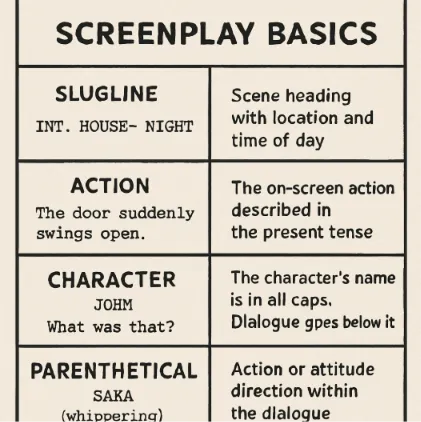
Scene Headings: Also known as slug lines, scene headings indicate where and when a scene takes place. They are formatted in all caps and consist of three parts: INT. or EXT. (interior or exterior), location, and time of day (e.g., DAY or NIGHT). These headings provide essential information that guides the reader through the story’s temporal and spatial journey.
Action Lines: These lines describe the setting, character actions, and any immediate visuals. They are written in present tense and should be concise yet descriptive. Action lines are crucial for setting the tone and atmosphere of a scene, allowing the reader to visualize the unfolding narrative.
Character Names: When a character is first introduced, their name is capitalized in the action lines. In dialogue, character names are centered and capitalized. This distinction helps the reader quickly identify who is speaking, maintaining the script’s readability and flow.
Dialogue: Dialogue follows the character’s name, centered on the page. Parentheticals can be used to indicate how a line should be delivered or actions accompanying dialogue. Effective dialogue is key to character development and plot progression, and its formatting ensures clarity and impact.
Transitions: Used to indicate how one scene moves to another, transitions like CUT TO: or FADE OUT are aligned to the right. While less common in modern scripts, transitions can still play a vital role in guiding the narrative flow when used strategically.
Scene Headings: Establishing Location and Time
Scene headings, or slug lines, are essential for setting up the context of a scene. They are succinct, yet they provide critical information about the scene’s location and timing. By clearly establishing the environment and time of day, scene headings help the reader visualize the scene’s setting and mood, ensuring a seamless narrative experience. Knowing how to format a screenplay requires mastering these:
INT. CAFÉ – DAY
EXT. PARK – NIGHT
Variations in Scene Headings
Occasionally, additional specificity is needed. For instance, if a scene takes place inside a moving vehicle, the scene heading might read: INT. CAR - MOVING - DAY. Such variations provide clarity and prevent confusion, especially in complex narratives where multiple locations or times are involved.
While standard scene headings suffice for most scenarios, certain scenes require more detailed descriptions to convey unique aspects of the setting. For instance, a scene occurring inside a spaceship might read: INT. SPACESHIP - COCKPIT - NIGHT. These nuanced headings ensure that every aspect of the scene is accurately communicated, aiding directors and production designers in bringing the script to life.
Writing Action Lines
Action lines are your opportunity to paint a vivid picture of the setting and action. They should be economical and evocative, bringing the scene to life without overburdening the reader with excessive detail. Striking the right balance between description and brevity is essential, as overly detailed action lines can detract from the pacing and flow of the script. This is a core part of how to format a screenplay.
The bustling café is filled with people. JANE, a young woman in her 20s, sips her coffee while reading a book.

Crafting Effective Action Lines
Use the Present Tense: Screenplays are always written in the present tense to convey immediacy. This creates a sense of urgency and engagement, drawing the reader into the unfolding action.
Be Descriptive, Not Verbose: Your goal is to give just enough detail to allow the reader to visualize the scene. Avoid lengthy descriptions that may bog down the narrative, focusing instead on key elements that enhance the visual storytelling.
Introduce Characters with Precision: When introducing a character, provide a brief, distinctive description. This helps the reader form an immediate impression, making it easier to follow character interactions and developments throughout the script.
Crafting Dialogue: The Heart of the Screenplay
Dialogue is where your characters’ voices come alive. It should be natural yet purposeful, revealing character and advancing the plot. Effective dialogue captures the essence of a character’s personality while driving the story forward, making it an indispensable component of a compelling screenplay. Learning how to format a screenplay means learning to space dialogue correctly.
JANE (sarcastically) Oh, sure, because that’s worked out so well in the past.
Using Parentheticals
Parentheticals can guide actors on how to deliver a line or indicate a small action accompanying the dialogue. Use them sparingly and only when the subtext isn’t clear. Overuse of parentheticals can clutter the dialogue, so they should be employed judiciously to enhance clarity without overwhelming the reader.
JANE (whispering) I can’t believe you did that.
Parentheticals serve as subtle cues that enrich the dialogue, providing insight into a character’s emotional state or intentions. They offer valuable guidance to actors, helping them interpret the scene’s nuances and deliver a more authentic performance. However, restraint is key; excessive parentheticals can disrupt the flow and distract from the dialogue’s natural rhythm.
Transitions: Guiding the Flow
Transitions are less common in modern screenplays but can be used to enhance the rhythm and pacing of your screenplay. They offer a way to seamlessly shift between scenes, contributing to the overall narrative cohesion. Professional writers know how to format a screenplay using these sparingly:
FADE OUT.
CUT TO:
When to Use Transitions
To Mark a Major Shift: Use transitions to signify a significant change in time or location. They can effectively highlight pivotal moments in the story, drawing attention to critical shifts in the narrative.
To Enhance Dramatic Effect: Transitions can underscore a dramatic moment, but they should be used judiciously to avoid disrupting the narrative flow. Their strategic placement can heighten tension or emphasize emotional beats, enriching the storytelling experience.
Transitions, when used thoughtfully, can serve as powerful storytelling tools. They guide the audience through the narrative, providing visual and temporal cues that enhance the viewing experience. However, their sparing use is crucial to maintaining the script’s pacing and ensuring that the focus remains on the story itself.
Formatting Software: Tools of the Trade
While it’s possible to format a screenplay manually, screenwriting software like Final Draft or Celtx can significantly streamline the process. These programs automatically format your script according to industry standards, allowing you to focus on the creative aspects of writing. Understanding how to format a screenplay becomes much easier with these tools. The efficiency and convenience offered by these tools make them indispensable for both novice and seasoned screenwriters.
Benefits of Using Screenwriting Software
- Efficient Formatting: Automated formatting ensures consistency and adherence to industry standards. This eliminates the risk of formatting errors, allowing writers to concentrate on refining their narrative and character development.
- Time-Saving Templates: Preloaded templates for different script elements save time and reduce errors. These templates provide a structured framework, enabling writers to quickly draft and revise their scripts without worrying about formatting intricacies.
- Collaboration Features: Many programs offer features that facilitate collaboration, essential for team projects. Real-time sharing and editing capabilities enhance communication and streamline the creative process, making it easier to work with co-writers, directors, and producers.
Conclusion: The Craft of Screenplay Formatting
Mastering how to format a screenplay is an essential skill for any aspiring screenwriter. By adhering to industry standards, you ensure that your script is professional, readable, and ready for production consideration. Use this guide as a reference to hone your formatting skills, and remember that clarity and precision are paramount in bringing your story to life on the screen.
Screenplay formatting is more than a technical requirement; it is an integral part of the storytelling process. A well-formatted script not only facilitates production but also enhances the reader’s engagement and understanding of the narrative. By investing time in mastering how to format a screenplay, you lay the foundation for a successful screenwriting career, opening doors to new opportunities in the competitive film industry.
Elevate Your Script with Studiovity
Ready to put these industry standards into practice? Studiovity simplifies how to format a screenplay by completely automating the technical details. Its intuitive interface instantly applies standard layout margins, 12-point Courier fonts, and proper slug lines. Therefore, you can bypass manual formatting stress altogether. Furthermore, the platform features robust collaboration tools and time-saving templates built for modern storytellers. Step up your formatting game and bring your story to life seamlessly with Studiovity.