
You have a great video idea, but the moment filming starts, everything feels chaotic. Forgotten angles, fading daylight, and confused actors quickly take over. In practice, winging a shoot guarantees missed frames and wasted time. To prevent this chaos, shot list software is used by smart creators to streamline their pre-production. Just as houses need architects, videos require pre-production blueprints. A successful shoot relies on translating your creative vision into concrete technical execution.
Instead of panicking about what to record next, you can use this platform as a seamless vision-to-execution bridge. Therefore, it permanently streamlines film production planning, ensuring your visual storytelling workflow remains completely stress-free from the very first take
Turn Your Script into a Visual Map Without Being an Artist
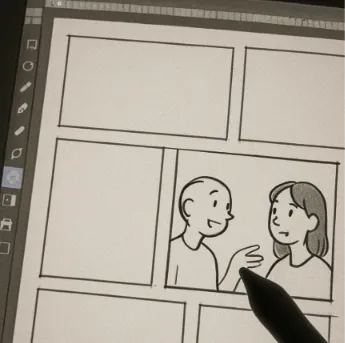
You don’t need to be an artist to plan a great video. Many beginners wonder why use storyboarding software if they can barely draw a stick figure. Studiovity solves this by letting you build a simple, comic-book version of your movie using basic photos and digital placeholders.
Building a visual map transforms a flat script into a living scene. Using the digital storyboard creation tools inside the app, you can easily drag and drop reference images into clear panels. This visually organizes your narrative flow, allowing you to see exactly how moments connect without ever staring at messy notebooks.
Think of these panels as blueprints for your set. Consequently, they allow you to easily plan your blocking—which simply means where your actors will move during a scene. Dropping basic placeholders into a frame helps you apply professional director’s vision board techniques to everyday projects, guaranteeing you always know where characters stand.
Once your visual sequence feels right, you are ready to translate those pictures into specific instructions. It is time to step forward and use dynamic shot list software to create a technical shot list that acts as your ultimate camera checklist.
Create a Technical Shot List That Acts as Your Ultimate Camera Checklist
Turning your creative vision into reality requires an actionable plan. While your storyboard shows the flow of the story, a shot list acts as the ultimate checklist for your camera. It translates those visual sketches into concrete, technical instructions so you never forget to record a crucial moment on shoot day.
Managing these details used to mean drowning in messy spreadsheets. Now, by choosing a dedicated shot list software like Studiovity, mapping camera angles to script scenes directly inside the app instantly organizes your day. You can categorize your setups by equipment needs and completely avoid manual data entry, saving hours of typing through automated camera shot numbering.
Practical shot list examples for a simple coffee product reveal include:
Wide Shot (Eye Level, Tripod): Establishes the scene showing the whole cafe counter.
Medium Shot (Low Angle, Handheld): Focuses on the barista proudly holding the new coffee bag.
Close-up (Top-Down, Tripod): Captures the detailed texture of steaming water hitting fresh grounds.
Grouping these shots by angle and movement keeps your production moving smoothly without confusing your crew. Furthermore, keeping everything updated if the story changes requires a smart connection: syncing your script, storyboard, and shot list automatically through your shot list software.
The Magic Link: Syncing Your Script, Storyboard, and Shot List Automatically
Making a late script change usually means hours of frustrating paperwork. When you rewrite dialogue or cut a scene, you suddenly have to hunt down every matching sketch and camera note to fix them. This constant rewriting highlights the main difference between Studiovity and traditional storyboarding. Instead of managing piles of disconnected paper, you get a smart system that keeps every piece of your project automatically connected.
Behind the scenes, this cinematography planning and shot list software acts as your personal assistant. If you alter an action in the script, the magic link instantly updates your visual sketches and camera checklists to reflect that choice. By relying on these integrated script to storyboard tools, you completely eliminate the nightmare of handing your crew an outdated plan.
Total confidence on shoot day is finally possible because you know every document matches perfectly. In addition, you can manage last-minute creative adjustments in real-time without manually rewriting a single page. Now that your entire digital binder is perfectly organized and seamlessly synced, you are ready to stop wasting time on set by tracking progress in real-time.

Stop Wasting Time on Set by Tracking Progress in Real-Time
Imagine walking onto your location, opening your smartphone, and knowing exactly what needs to be filmed next. Instead of shuffling through messy papers, Studiovity lets you check off completed frames directly from your pocket. By actively tracking what is finished and what is pending, you effectively prevent production delays with shot list software features that keep everyone focused on the ultimate goal.
To guarantee a smooth shoot day, you need a solid foundation before anyone yells “action.” Creating a production-ready shot list means verifying these four essential details in your app:
Are all “must-have” scenes prioritized at the top?
Is the needed camera equipment noted for each angle?
Have you assigned a realistic time estimate for every setup?
Are your actors linked to their specific required shots?
Sharing this digital blueprint completely transforms how your team works together. Meanwhile, when the whole crew can see live updates on their own devices, it elevates your collaborative filmmaking project management from chaotic guesswork to professional efficiency.
Your Action Plan for a Professional Planning Workflow
By streamlining film production planning through Studiovity, you transition from relying on guesswork to executing a clear visual blueprint. This powerful shot list software helps you stay organized effortlessly.
Apply this simple workflow to move from script to shot list in under an hour. Master how to organize shots for a film using this three-day beginner schedule:
Day 1: Access Studiovity shot list templates to jumpstart your next video.
Day 2: Build your visual storyboard, focusing purely on story flow.
Day 3: Auto-sync your boards into a technical checklist for your camera using your production’s chosen shot list software.
Start with a single scene to see immediate results. Imagine walking onto your next set knowing exactly where the camera goes, saving hours of wasted time while effortlessly guaranteeing a professional shoot.
https://blog.studiovity.com/best-shot-list-software-for-filmmakers-in-2026-studiovity/