
Imagine having a billion-dollar movie idea in your head, but you cannot draw a straight line. Traditionally, this is where the creative journey ends for many talented storytellers. Industry data reveals that planning complex scenes—a crucial step known as the pre-visualization workflow—acts as a massive bottleneck, demanding weeks of expensive hand-drawn sketches. Today, AI Storyboarding in Filmmaking changes the rules by acting as your tireless digital artist’s assistant. Instead of wrestling with stick figures, directors just type a description to watch stunning cinematic frames appear in seconds. This empowerment marks the biggest shift in indie cinema since digital cameras. Moreover, it proves you no longer need an illustrator’s skills to direct a masterpiece.
How AI Replaces Weeks of Hand-Drawn Sketches with Instant Pre-Visualization
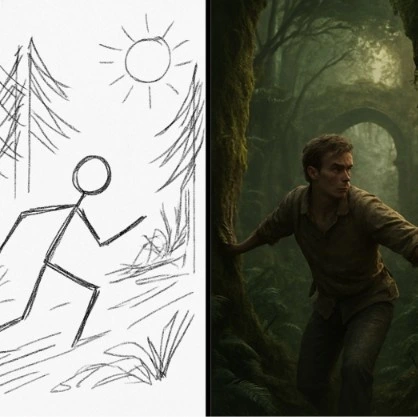
In the old days of Hollywood, mapping out an action sequence took weeks of expensive, hand-drawn sketching. Today, directors can practically time-travel, seeing their entire movie before they even pick up a camera. This shift toward automated storyboarding allows creators to embrace rapid visual prototyping. As a result, a simple idea transforms into full cinematic frames instantly.
Think of this process like sculpting with clay, where you can easily chip away and adjust the scene until it perfectly matches your vision. This iterative design completely flips the expected schedule while dramatically reducing pre-production costs:
- Traditional Method: 40 hours of tedious sketching to visualize a single scene.
- AI Method: 4 hours of generating and refining to perfect the entire sequence.
Because mistakes are now incredibly cheap to fix, even independent filmmakers can afford to experiment fearlessly before stepping on set. In addition, instructing this technology to get the exact shot you want relies on the script-to-image process: treating the AI as your digital artist. Therefore, AI Storyboarding in Filmmaking gives creators more speed, flexibility, and control than ever before.
The Script-to-Image Secret: How to Talk to Your AI 'Digital Artist' Assistant
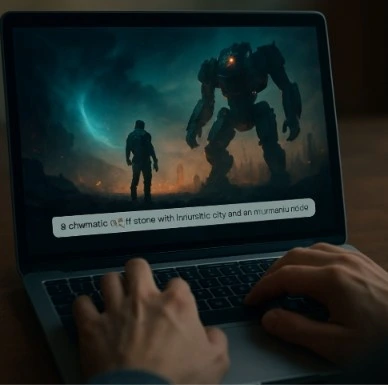
Imagine describing a vivid dream to a highly skilled painter who works at the speed of light. That is exactly what happens when you use modern text-to-image tools. Instead of sketching by hand, you act as the director giving written instructions—known as a “prompt”—to your digital artist assistant.
Mastering this communication relies on a simple three-step formula: Subject, Setting, and Lighting. When converting film scripts into AI images, you translate the written action into specific visual keywords. For example, you might type a “wide-shot of an astronaut, neon city setting, dramatic nighttime shadows” to perfectly capture a tense sci-fi mood. Furthermore, adding basic camera terms like “close-up” guides the software effortlessly, allowing you to frame the exact emotion you want without needing a professional film degree.
Building an entire sequence requires tweaking these descriptions until the digital output matches your imagination. However, you might notice your futuristic hero randomly changing their spacesuit from frame to frame. Consequently, this highlights the challenge of keeping your digital actor visually consistent. Even so, AI Storyboarding in Filmmaking continues to simplify the creative process for directors worldwide.
Keeping Your 'Digital Actor' Consistent: Solving the AI Character Continuity Problem
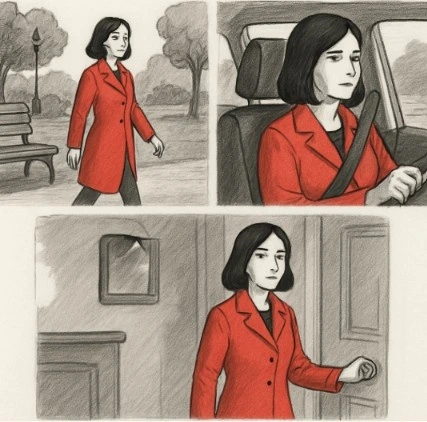
Think of your software as a digital actor who occasionally forgets their costume between scenes. If your hero wears a red coat in shot one but suddenly sports a blue vest in the next, your audience will be instantly confused. Directors solve this problem using “character anchors”—highly specific, locked-in descriptions of clothing and physical traits that get repeated in every single prompt. Mastering this character consistency is exactly what elevates your project from a random collection of pictures into a professional tool for AI Storyboarding in Filmmaking.
Refining these anchored scenes requires iterative adjustments. The system provides a rough draft on its first try, and you continuously perfect the outcome by tweaking your text until the image matches your original intention. Meanwhile, this iterative rhythm gives you absolute control over your final cinematic sequence. With your digital cast ready to perform, the next step is selecting the right software toolkit for your virtual studio.
Choosing Your Toolkit: Which AI Best Matches Your Director's Vision?
Navigating software ecosystems is like choosing the perfect camera lens; every option offers a unique strength. When comparing Midjourney vs Stable Diffusion for filmmakers, you are essentially balancing the classic trade-off of quick inspiration versus exact precision.
When evaluating AI for film storyboarding:
- Choose Midjourney if you want gorgeous, instant visuals to quickly pitch a sweeping sci-fi or fantasy concept.
- Choose Stable Diffusion if you demand total control over lighting and camera angles for a highly specific action sequence.
- Explore multimodal AI models if you need an advanced tool that understands your typed text, rough notebook sketches, and inspiration photos all at once.
Selecting the right platform depends entirely on your specific storytelling needs. Additionally, once you lock in your digital assistant, you can move from brainstorming to active pre-production and launch your first AI-powered storyboard. Today, AI Storyboarding in Filmmaking helps creators visualize stories faster while maintaining artistic freedom.
Your Weekend Pre-Production Blueprint: Launching Your First AI-Powered Storyboard
You once needed advanced drawing skills to map out a film. Now, you only need your imagination. Begin mapping out your visual story by picking a favorite script scene, writing a detailed text prompt, and generating three different visual versions. This simple exercise serves as your practical guide to integrating AI into cinematic pre-production. As a result, it proves you can translate complex ideas from your mind to the screen in an afternoon instead of a week.
Using AI for storyboarding provides a remarkably fast digital intern, but you are still the boss. The technology merely holds the pencil while you make the crucial creative decisions that give a movie its heart. Therefore, step confidently into the director’s chair and command these tools to bring your unique cinematic vision to life, free from the limitations of a sketchpad. Most importantly, AI Storyboarding in Filmmaking empowers filmmakers of every level to create better films with greater speed and efficiency.
Why Filmmakers Are Adopting Studiovity for AI Storyboarding
Studiovity combines screenplay writing, AI-powered storyboarding, shot listing, scheduling, call sheets, and production planning into one complete filmmaking platform. Filmmakers can instantly convert scripts into visual storyboards, organize scenes, collaborate with teams, and streamline the entire pre-production workflow from a single dashboard. In addition, Studiovity helps creators save time, reduce production costs, and bring cinematic ideas to life faster with powerful AI tools designed specifically for modern film production.