Through effective Storyboard Creation, your film ideas are turned into a clear visual plan before production begins. Consequently, this process helps directors, producers, cinematographers, and creative teams visualize every scene. They can organize shots easily. Furthermore, they can communicate ideas with confidence.
Whether you are creating a short film, commercial, documentary, music video, branded campaign, or feature project, a storyboard helps transform concepts into a structured shot-by-shot plan.
Instead of explaining ideas through scattered notes or lengthy discussions, your team can work from a shared visual reference. Therefore, you can plan scenes, refine creative decisions, and reduce confusion before cameras start rolling.
Start creating your storyboard today. Ultimately, you will give every department the visual direction they need for a smoother production workflow.
Plan Every Shot Before Production Begins
Pre-production is where creative ideas become practical decisions. Specifically, a well-designed storyboard helps teams understand how scenes should flow. They can see where cameras should be placed. Additionally, they learn how characters move and how the final sequence should feel.
With organized storyboard templates and practical storyboard examples, filmmakers can plan visuals faster. Thus, they identify challenges before production starts.
A structured Storyboard Creation workflow helps you:
Visualize the director’s creative vision
Align production teams and stakeholders
Identify missing shots and continuity issues
Improve location planning and scheduling
Create a clear roadmap for the crew
Present concepts professionally to clients and investors
Built for Film Teams That Need Clarity Fast
A storyboard is more than a collection of drawings. Rather, it is a communication tool that connects creative ideas with production execution.
It helps teams understand framing, camera movement, pacing, emotion, and storytelling choices before filming begins. However, you do not need advanced illustration skills to create an effective storyboard. Simple sketches, reference images, descriptions, and camera notes can provide enough direction for your team.
Use Storyboard Creation for:
Film and television pre-production
Commercial and advertising projects
Music video planning
Social media campaigns
Animation development
Pitch presentations
Director’s boards
Client approvals
Shot list preparation
What Makes This Storyboard Creation Workflow Different
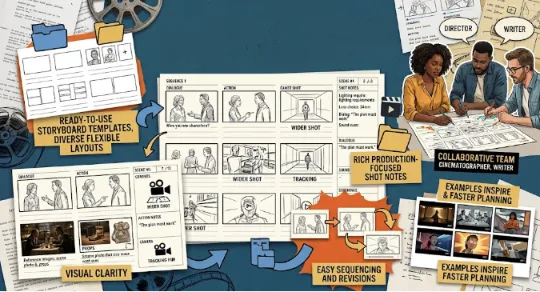
Ready-to-Use Storyboard Templates
Starting from a blank page can slow down creative planning. Therefore, flexible storyboard templates provide a structured foundation for organizing scenes, shots, dialogue, timing, and production notes.
Use simple layouts for early ideas. Alternatively, you can use detailed boards for professional presentations and production planning. Consequently, templates help filmmakers maintain consistency across projects while saving valuable preparation time.
Visual Panels for Every Scene
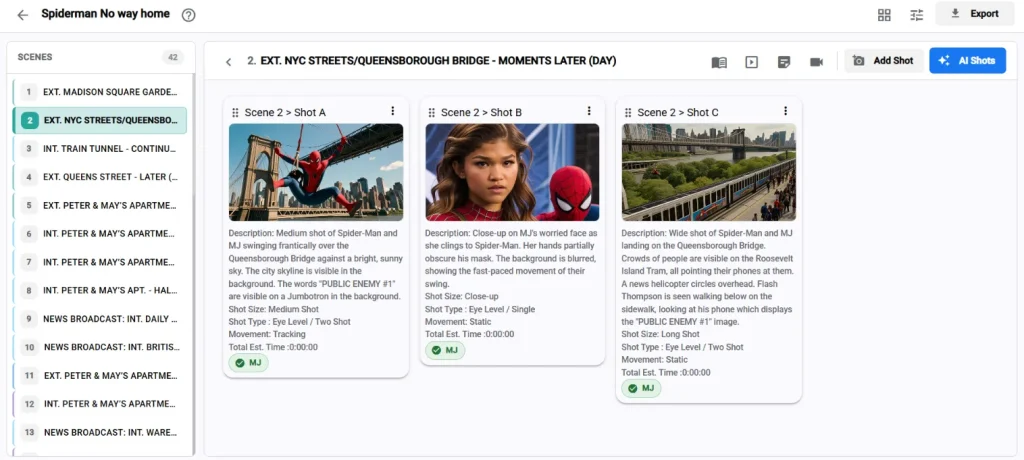
Each storyboard panel represents an important moment in your sequence. Therefore, you can add sketches, reference images, descriptions, character actions, camera directions, and visual notes.
The goal of storyboarding is not perfect artwork. Instead, the goal is helping everyone understand the intended shot. By breaking scenes into panels, teams can review pacing. Furthermore, they improve storytelling decisions and create stronger visual continuity.
Production-Focused Shot Notes
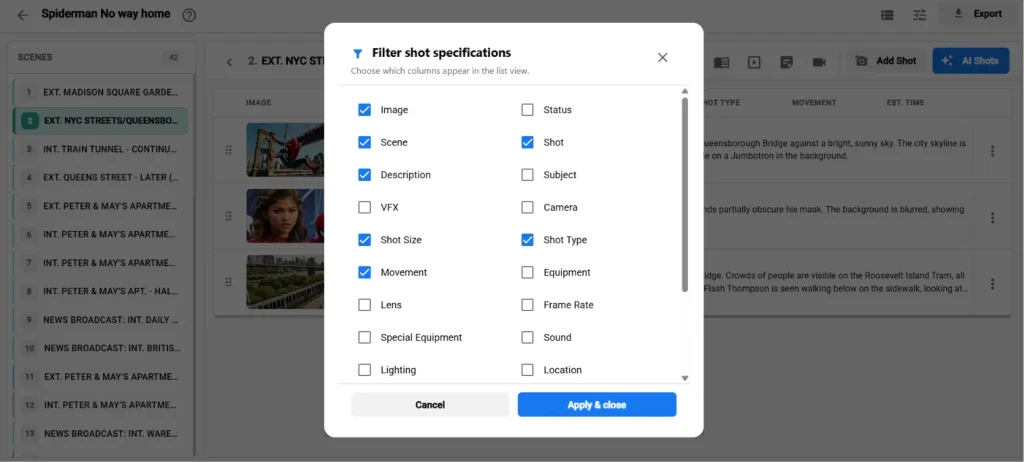
A useful storyboard includes more than visuals. Production teams need details that explain how each shot should be captured.
Additionally, you can add notes for:
Camera angles
Framing
Lens choices
Movement
Lighting requirements
Dialogue
Sound cues
Scene transitions
These details help every department understand the purpose behind each shot.
Easy Sequencing and Revisions
Film projects constantly evolve. Scripts change, locations shift, and creative decisions develop during pre-production.
However, a flexible Storyboard Creation workflow allows teams to rearrange scenes. They can update descriptions, modify panels, and create new versions without rebuilding everything. Thus, you keep your creative process flexible while maintaining an organized production reference.
Storyboard Examples for Faster Inspiration
When planning a project, reviewing storyboard examples can help filmmakers understand scene structure. They can study camera movement and visual storytelling techniques.
Consequently, examples provide inspiration for organizing shots, creating better compositions, and communicating ideas clearly. Use them as a starting point. Then, customize your storyboard based on your script, style, audience, and production goals.
Collaboration for Creative Teams
Film production involves multiple departments. These include directors, producers, writers, cinematographers, editors, and clients.
Therefore, a shared storyboard keeps everyone aligned throughout the pre-production process. Teams can use storyboards to:
Discuss scene ideas
Review shot coverage
Confirm visual direction
Collect feedback
Plan production requirements
Ultimately, early collaboration reduces expensive changes during filming.
Designed to Reduce Pre-Production Challenges
A storyboard should simplify filmmaking, not add extra complexity. Specifically, it provides a practical framework for turning creative ideas into production-ready plans.
Before the Shoot
Strategic Storyboard Creation helps identify what needs to be captured and what requires additional planning. You can discover missing establishing shots, unclear transitions, or incomplete visual sequences before they affect your schedule.
During Production Meetings
A storyboard creates a shared reference point for discussions about:
Camera setups
Actor blocking
Locations
Props
Wardrobe
Lighting
Visual effects
Instead of explaining ideas repeatedly, teams can review specific panels together.
On Set
A clear storyboard helps directors and cinematographers stay focused on planned coverage. Meanwhile, it allows flexibility when creative changes happen. Consequently, it ensures important visual moments are captured efficiently.
In Post-Production
Editors can use storyboards as a reference for understanding pacing, scene structure, and emotional flow while assembling the final cut.
Key Benefits of Storyboard Creation
Better Creative Alignment
A storyboard transforms abstract ideas into visible direction. Therefore, it ensures everyone understands the same creative vision.
Faster Decision-Making
Visual planning makes discussions more specific. Thus, teams can evaluate actual shots instead of relying on assumptions.
Improved Production Planning
Storyboards support shot lists, schedules, location planning, and department preparation.
Stronger Client Presentations
For agencies and branded content teams, professional storyboards help clients understand concepts before production begins.
Fewer Missed Shots
Visual planning reduces the risk of missing important coverage during filming.
Easier Collaboration
Keep feedback organized by discussing specific frames, sequences, and production decisions.
Feature Highlights
The comprehensive Storyboard Creation workflow includes essential tools for modern production teams:
Customizable storyboard templates
Scene and shot organization
Panel-based visual planning
Notes for action, dialogue, and camera direction
Flexible layouts for different production styles
Easy revisions and updates
Export-ready formats for meetings and presentations
Storyboard examples for planning inspiration
Collaboration-friendly organization
How It Works
Start With Your Script or Concept: Begin with a script, treatment, creative brief, or simple idea.
Select a Storyboard Template: Choose a layout that matches your workflow and project requirements.
Build Your Visual Sequence: Create panels for important scenes and add sketches, references, or descriptions.
Add Production Details: Include camera movement, framing, action, timing, and technical notes.
Review With Your Team: Share your storyboard with collaborators and gather feedback.
Prepare for Production: Finalize your sequence and use it as a reference during filming.
Who Should Use It?
Directors: Visualize creative ideas and communicate storytelling choices clearly.
Producers: Understand production requirements and improve planning accuracy.
Cinematographers: Review framing, movement, and visual priorities before shooting.
Agencies and Creative Teams: Create professional boards for campaigns and client approvals.
Independent Filmmakers: Plan professional productions without requiring large teams.
Video Marketing Teams: Organize promotional videos, social content, and branded storytelling.
Why Storyboarding Improves Film Pre-Production
A script explains what happens, but a storyboard shows how the audience experiences the story. Through regular Storyboard Creation, filmmakers can evaluate pacing, visual continuity, and emotional impact before production begins.
A storyboard does not limit creativity. Instead, it provides a flexible foundation that helps teams make better decisions and adapt quickly.
Common Use Cases
Pitching a Concept: Present film, commercial, or campaign ideas with clear visual direction.
Planning Complex Scenes: Prepare action sequences, emotional moments, and visual effects scenes.
Improving Shot Coverage: Ensure important wide shots, close-ups, reactions, and transitions are planned.
Supporting Shot Lists: Use storyboards as a foundation for production schedules and shooting plans.
Frequently Asked Questions
Do I Need Drawing Skills?
No. Storyboards focus on communication, not artwork. Simple sketches and notes are often enough.
Can I Use It for Commercials?
Yes. Targeted Storyboard Creation works for films, commercials, branded videos, and social content.
Are Storyboard Templates Included?
Yes. Templates help filmmakers start quickly and organize scenes effectively.
Can Storyboard Examples Help Beginners?
Yes. Examples provide guidance for layouts, shot structures, and visual storytelling.
Is Storyboarding Useful for Small Productions?
Absolutely. Even small teams benefit from better planning and fewer missed shots.
Bring Your Film Vision Into Focus
Great productions begin with clear planning. Storyboard Creation helps filmmakers visualize scenes, communicate ideas, and prepare teams before production costs increase.
With flexible storyboard templates, practical planning tools, and collaborative workflows, you can transform creative ideas into production-ready visual plans.
Start creating your storyboard today. Ultimately, give your next production the clarity it needs to succeed.