
The script comes before the ring light goes on.
Viewers decide whether to keep watching in the first few seconds. A script is how student creators win those seconds. Learning how to write a YouTube video script helps students plan a clear hook, useful sections and a natural call to action, instead of rambling into the camera. This guide covers formats, a step-by-step method and a class exercise. Studiovity’s education plans for student creators give classes professional scriptwriting tools at student prices.
Watch: writing scripts in two-column AV format
YouTube scripts don’t have to look like screenplays. This Studiovity video shows the AV script format, with visuals and audio side by side.
Which Format Should a YouTube Script Use?
Most YouTube videos don’t need full screenplay format. Two common options:
- Two-column (AV) script: visuals on the left, audio on the right. Best for tutorials, explainers and video essays with B-roll.
- Screenplay format: best for sketches, short films and scripted stories with characters and dialogue.
- Bullet outline: fine for vlogs, but plan the hook and ending word for word.
How to Write a YouTube Video Script in 6 Steps
1. Pick one viewer and one promise
Write down who the video is for and what they’ll get by the end. Your title and thumbnail should make the same promise.
2. Write the hook last
Once you know the payoff, write an opening of a few lines that shows the problem or the result. Skip long intros.
3. Break the body into sections
Split the video into three to five clear sections. These can become YouTube video chapters, which help viewers jump to what they need.
4. Plan visuals next to every line
In the visual column, note B-roll, screen recordings and graphics. Our guide on how to write on-screen text in a screenplay helps with captions and titles.
5. Write for the ear
Use short sentences and everyday words. If you’ll record narration, see how to write voice-over in a screenplay.
6. End with one call to action
Ask for one thing only: subscribe, watch the next video or comment with an answer.
Teaching Tip: The Table-Read Test
- Each student writes a two-minute script in two columns.
- Groups of four read scripts aloud while one person times them.
- Listeners mark the moment they would have clicked away.
- Writers rewrite the hook and any slow section, then read again.
Write YouTube Scripts in Studiovity
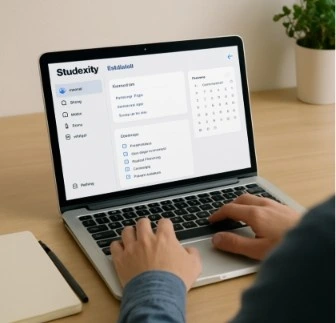
Studiovity’s AI screenwriting software with AV script mode supports both formats students need. The Audio-Visual mode gives an easy two-column layout with AI timing tools for auto-duration, and can generate images from a script’s visual descriptions. Screenplay mode formats scripts automatically, the AI assistant helps refine tone and fix errors, and the AI teleprompter lets creators record while reading their script. Scripts sync across web, iOS and Android and export to PDF.
On the education plan, faculty can review student scripts and grade collaboratively, with up to 150 seats per institute.
Key Takeaways
- Choose the format that fits the video: AV, screenplay or outline.
- Make one promise and pay it off.
- Split the body into sections that can become chapters.
- Read the script aloud before you film.
FAQ
Do YouTubers write full scripts?
Many do, especially for tutorials and essays. Others script only the hook, key points and ending, then talk freely in between.
How long is a script for a 10-minute YouTube video?
It depends on speaking speed. Time yourself reading a page aloud, then adjust the length to fit your target.
Is there student pricing for Studiovity?
Yes. Education plans are $18/mo billed monthly (10% off), $14/mo billed semi-annually at $84 (30% off) or $10/mo billed annually at $120 (50% off), compared with the $20 regular rate. Students, educators, registered institutes, accredited workshops and differently-abled creators are eligible.
Script It, Then Hit Record
Run the table-read test in your next class. When your creators are ready to script together, claim Studiovity student pricing for your class from $10/mo and give every student a two-column script workspace.