Scene planning is where many schedules quietly slip. The script is approved, the locations are pencilled, and then someone still has to translate every beat into camera coverage. That translation is slow when it lives only in a director’s head or a half-filled spreadsheet. An AI shot list generator compresses the first draft of that work so filmmakers can plan scenes faster and still leave room for craft.
Studiovity is film production software that turns a screenplay into shot lists and storyboards. Teams that want to move from reading a scene to scheduling it can start at the Studiovity shot list and storyboard tools and treat the generator as a planning accelerator rather than a creative replacement.
Where time disappears in traditional scene planning
On a typical indie schedule, time leaks in predictable places:
- Rewriting the same scene description into shot rows late at night
- Debating coverage without a shared document everyone can open
- Updating Excel after every creative change and losing version history
- Re-explaining framing to crew members who join mid-week
- Discovering missing inserts only when the AD asks for them on set
- Rebuilding lists after a script revision because nothing was linked to scene text
None of these tasks is glamorous. All of them delay the moment when the team can talk about performance, light, and pace. An AI generator does not remove creative meetings; it removes the empty grid that delays those meetings.
What an AI shot list generator actually does
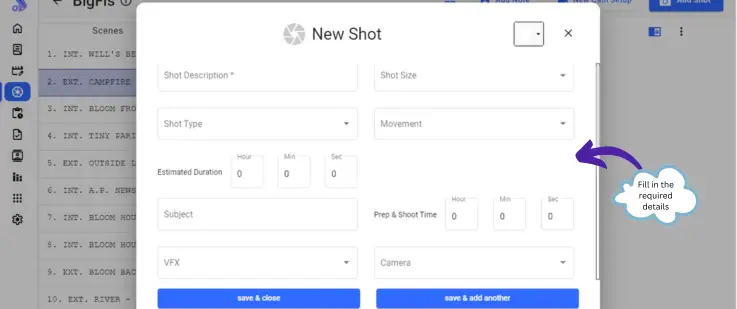
In practical terms, a generator reads scene text – action and dialogue – and proposes a structured set of shots. You get rows organised by scene, with suggested sizes and placeholders for angle and movement. Your job becomes editing and prioritising, not inventing structure from zero.
That matters for:
- Directors who want a draft before the first detailed DOP conversation
- 1st ADs who need a coverage map to estimate setups and company moves
- Producers who need to see whether a scene is over-covered for the allocated hours
- Cinematographers who want a starting list to attach lenses, filters, and lighting notes
- Production coordinators who need a document they can circulate without reformatting chaos
Speed comes from parallel work. While AI drafts coverage for scene 12, you can scout scene 14. While the AD builds day breaks, you refine the list inside the Studiovity shot list workflow instead of typing it from scratch.
A faster planning loop you can run this week
Morning: feed the locked scenes
Take the scenes you expect to shoot in the next block. Keep formatting clean. Confirm scene numbers match the production draft. Run them through an AI shot list generator so each scene gets a first coverage pass before lunch discussions begin.
Midday: director and DOP pass
Spend thirty to forty-five minutes on heavy scenes. Mark must-have shots clearly. Cut nice-to-haves that do not earn their setup time. Add movements that match your visual approach – static for dialogue tension, motivated pushes for reveals, handheld for disorder, locked frames for observational distance.
Afternoon: AD and production pass
Ask hard schedule questions: how many unique setups remain? How many company moves? Which shots share a camera position? Can reverse coverage be captured before lunch while wardrobe is already set? Merge rows that can be covered from one setup. This is where planning becomes faster than traditional methods, because the list already exists to edit.
Evening: share and freeze a version
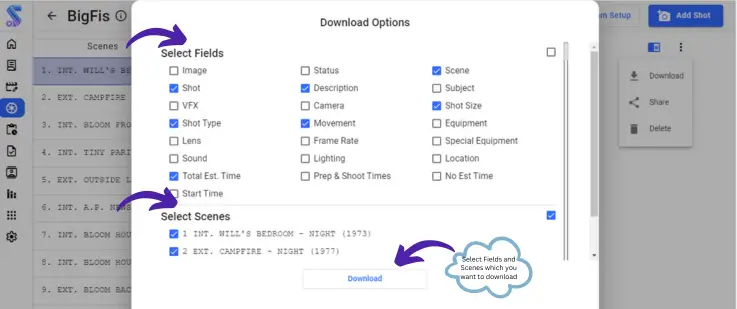
Export for the team. Put the version date and scene range in the file name. Faster planning fails when five people edit five copies. One shared list beats five heroic spreadsheets and a trail of WhatsApp screenshots.
Scene types that benefit most from AI drafting
Dialogue-heavy interiors. Generators are strong at proposing masters, overs, and singles. You trim for performance style and decide whether you need a floating camera or classical coverage.
Action with clear geography. Chase beats, entrances, exits, and courtyard crossings often map cleanly into wide coverage plus closer details and inserts.
Montage and time cuts. AI can seed a list of inserts and transitions you might forget when writing under deadline pressure.
Pickups and reshoots. When you only need fragments, generating from the relevant pages avoids rebuilding an old list by hand and missing a matching eyeline.
Scenes that still need heavy human design – long single takes, complex fight choreography, dance numbers, or experimental form – should use the generator as a safety net for inserts and reverse coverage, not as the author of the style.
Collaboration habits that keep the speed gains
Faster generation is wasted if the team cannot read the output. Agree on:
- Shot size abbreviations (WS, MS, MCU, CU, ECU, POV, OTS)
- Angle terms (eye level, high, low, bird’s eye, Dutch)
- Movement terms (static, pan, tilt, dolly in/out, track, crane, handheld)
- A single owner for version control (often the director or 1st AD)
- A simple priority mark for must-have versus optional coverage
Studiovity supports this kind of scene planning by connecting screenplay material to shot lists and storyboards so departments are not inventing parallel documents. Practical collaboration – shared lists, clearer camera notes, fewer duplicate files – is why production software beats disconnected sheets when the schedule is tight.
If your team works across cities, as many Indian indie productions do during prep, cloud-accessible lists reduce the lag between a director’s note and the AD’s stripboard update. Speed is not only generation; it is distribution.
Measuring whether you are actually faster
Track three simple metrics across two productions:
- Hours from locked script pages to first shared shot list
- Number of missing-insert surprises on set
- Minutes spent in morning debates about what the scene’s coverage even is
Optional fourth metric: number of mid-day list renumbers that confuse the camera report. If metric 1 drops and the others stay flat or improve, the generator is working. If you generate faster but still argue about basics every morning, fix vocabulary and version control before blaming the tool.
On-set habits that preserve prep speed
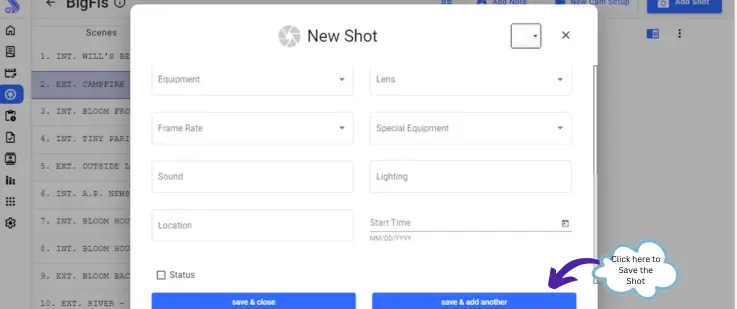
Even a fast plan fails if the set ignores it. Print or mirror the day’s shots for the camera team. After each setup, mark completion so the AD knows what remains before lunch. If the director invents a new shot, add it to the shared list immediately with a temporary number rather than leaving it only in verbal memory.
For multi-lingual crews common on Indian sets, keep shot descriptions plain. Avoid idioms. Pair critical frames with a reference image so language differences do not slow the setup. Speed gained in prep should survive the noise of production.
Equipment and movement notes that save minutes
When the AI draft suggests a dolly, decide in prep whether you truly need track or whether a lens change and blocking adjustment will do. Every avoided unnecessary lay of track is time returned to performance. Conversely, if a motivated push is central to the scene’s emotion, protect that setup in the schedule rather than demoting it to “if we have time.”
Add battery, media, and special rig notes beside unusual moves. A generator-dependent night exterior with a technocrane wish belongs in planning documents early, not in a surprised conversation at call time.
How Studiovity helps filmmakers plan scenes faster
Studiovity is built as film production software for the path from screenplay to shot lists and storyboards. That matters when you need camera shots, angles, and movements documented quickly, then refined with your AD and DOP. Instead of rebuilding coverage after every script tweak, you revise inside one planning flow and keep the team aligned on scene intent and setup count.
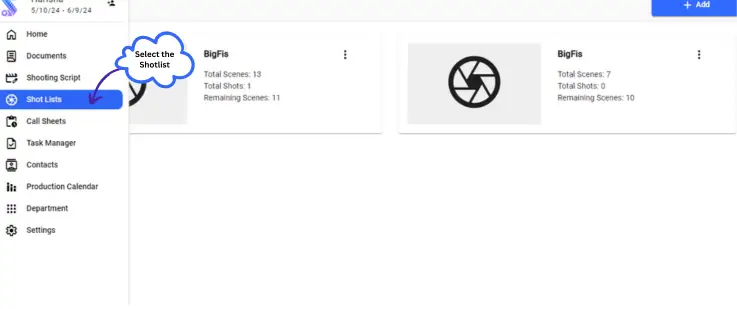
Try the workflow on a single busy scene first. Compare it with your last fully manual list for the same page count. Then roll the same method across the schedule using the Studiovity shot list and storyboard page.
Short comparison: generator draft versus blank sheet
| Task | Blank spreadsheet | AI generator draft |
|---|---|---|
| First coverage for a 3-page scene | Often one to two hours | Minutes for a draft, then focused edit |
| Consistency of field names | Easy to drift between people | Structured from the start |
| Risk of missing inserts | Higher under fatigue | Lower if you review carefully |
| Response to a script rewrite | Rebuild rows manually | Regenerate or revise linked coverage |
| Creative control | Full, but slow to reach a shareable state | Full after you edit with intent |
The point is not to remove taste. The point is to spend taste on decisions that matter – eyelines, emphasis, and pace – while the first structural draft arrives quickly.
Plan the next scene with a generator, edit with your crew, and protect the hours you reclaim for rehearsals and lighting. That is how filmmakers plan scenes faster without lowering the bar for coverage quality or on-set clarity.