
A digital call sheet is the online version of the daily production call sheet used to tell cast, crew, and departments where to be, when to arrive, what scenes are being shot, and what they need to know before stepping on set. Instead of building a document manually, exporting a PDF, chasing approvals, and sending revisions across scattered message threads, teams can create, update, and share production details through call sheet software. For film production teams, that shift means fewer version-control problems, clearer communication, and a smoother start to every shoot day.
Related video: Studiovity pre-production software with call sheet
Studiovity, a film production management platform, is built around the idea that production paperwork should support the creative process rather than slow it down. A digital call sheet fits naturally into that workflow because it connects planning, scheduling, departments, and on-set communication in one practical daily document.
How does a digital call sheet work?
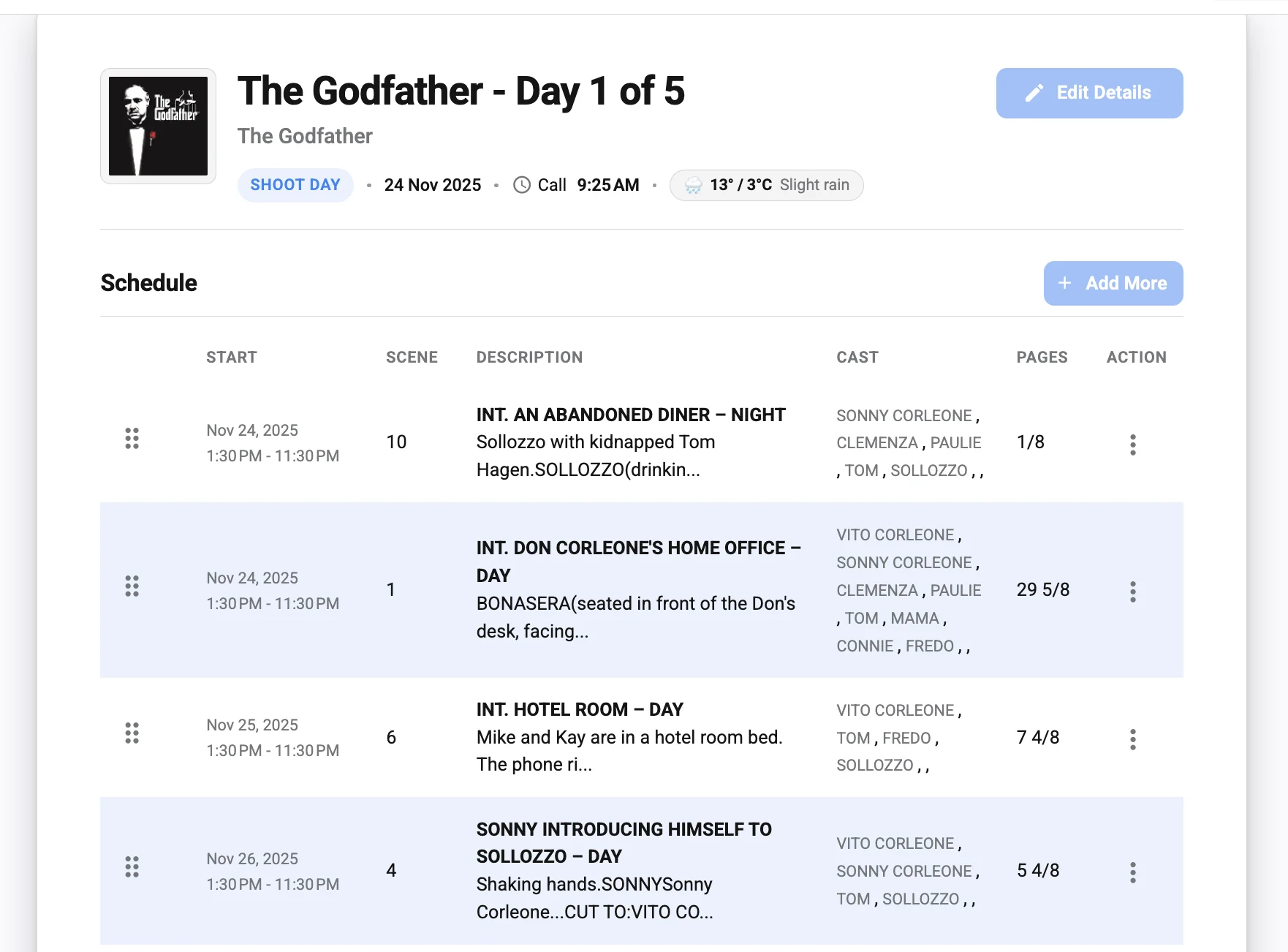
A digital call sheet works by turning the traditional film call sheet into an online, editable, shareable production document that can be updated and distributed quickly. It usually includes the same core information as a standard production call sheet—call times, locations, scenes, cast, crew, weather notes, parking details, emergency contacts, and department-specific instructions—but it is managed through a call sheet app or web-based platform rather than a static file.
The basic workflow is simple: the production team enters shoot-day details, reviews the information internally, sends the call sheet to the relevant cast and crew, and updates it if plans change. The real value comes from how much easier that process becomes when the call sheet is digital. Instead of asking everyone to check the “latest PDF,†production can point people toward a single updated source of truth.
That matters because film sets move fast. A location entrance changes. A cast call time shifts. A weather note becomes urgent. A department needs one extra instruction before wrap. When those updates are buried in texts, email chains, or separate spreadsheets, confusion spreads quickly. A digital call sheet reduces that friction by keeping the daily plan organized and easier to access.
The role of the call sheet in production management
A call sheet may look like a daily document, but it sits at the center of production coordination. It translates the schedule into action. Every person on set uses it differently: an actor checks their call time, the assistant director tracks the day’s work, the camera team reviews scene order, transportation confirms parking or pickup details, and production knows who needs what information before the day begins.
That is why a production call sheet needs to be more than a list of names and times. It has to be clear enough for a tired crew member to understand at a glance and detailed enough to prevent avoidable questions. If the call sheet is missing a location note, a department contact, or a timing change, the production team often pays for it in delays, phone calls, and repeated explanations.
In a broader film production management workflow, the call sheet connects pre-production planning with on-set execution. It reflects decisions already made in the schedule, shot plan, department prep, location plan, and cast availability. When those moving parts live in separate places, creating the call sheet becomes manual and error-prone. When they are managed through a connected platform such as Studiovity, the daily document becomes easier to prepare, review, and distribute.
The limits of traditional film call sheets
Traditional film call sheet workflows are familiar — teams that create digital call sheets gain faster updates, and they can still work for small or simple shoots. Many productions have used a call sheet template in a spreadsheet, word processor, or PDF layout for years. The problem is not the format itself; the problem is what happens when production details change.
A static call sheet often creates hidden administrative work. Someone has to collect updates from multiple departments, revise the file, export a new version, rename it correctly, send it out, and make sure no one relies on the previous copy. If a last-minute change comes in after distribution, the production team may need to send another email, another message, or another file. That is how crews end up asking, “Is this the final call sheet?â€
Common problems with manual call sheet workflows include:
- Version confusion: Multiple PDFs or attachments circulate, and not everyone knows which one is current.
- Duplicate data entry: Information from schedules, contact lists, and location notes is copied manually into the call sheet.
- Slow approvals: The document may need to pass through several people before it can be sent.
- Missed updates: A small change in call time, parking, or department notes may not reach everyone.
- Scattered communication: Updates are split across email, messaging apps, phone calls, and printed copies.
- Formatting problems: A useful call sheet template can become messy when extra scenes, departments, or notes are added.
These issues are not just administrative annoyances. They affect how confidently the crew starts the day. A clean, accurate, accessible call sheet helps everyone move in the same direction; a confusing one creates questions before the first setup begins.
Why productions are switching to digital workflows
Productions are switching to digital call sheet workflows because production teams need faster updates, cleaner communication, and better control over daily information. The modern set is rarely simple. Even modest shoots may involve changing locations, remote collaborators, multiple departments, shifting availability, and tight shoot windows.
A call sheet app can help production teams respond to that reality. Instead of rebuilding the daily plan from scratch, teams can work from structured information and make updates more efficiently. The benefit is not only speed; it is reliability. When the call sheet lives in software, the production team can reduce the chance of people working from outdated details.
Digital workflows also match how crews already operate. Cast and crew members are used to checking important information on their phones. Department heads may be moving between prep, set, and remote communication. Producers may need visibility without being physically present at every moment. A digital call sheet gives everyone a more practical way to access the day’s plan.
There is also a sustainability and organization benefit. Printed call sheets can still be useful in some situations, especially on sets where not everyone has easy device access. But relying entirely on printed packets or static files can create waste and clutter. A digital-first approach keeps the master information easier to manage, while still allowing production to print copies when the shoot requires it.
What should a digital call sheet include?
A digital call sheet should include all essential shoot-day information: production details, date, crew call, cast call times, scene information, location instructions, department notes, contacts, safety information, and any special instructions needed for the day. The best digital call sheet is not overloaded; it is complete, organized, and easy to scan.
Think of it as a daily operating guide for the set. It should answer the most common questions before they are asked: Where am I going? When do I need to be there? What are we shooting? Who do I contact? What should I prepare for? If the call sheet does not answer those questions clearly, the production office, AD team, or department heads will spend more time repeating the same details.
A practical digital call sheet usually includes:
- Production header Project name, production company or team name, shoot date, day number, and general call time.
- Key contacts Producer, director, assistant director, production coordinator, location contact, medic or safety contact, and department leads where relevant.
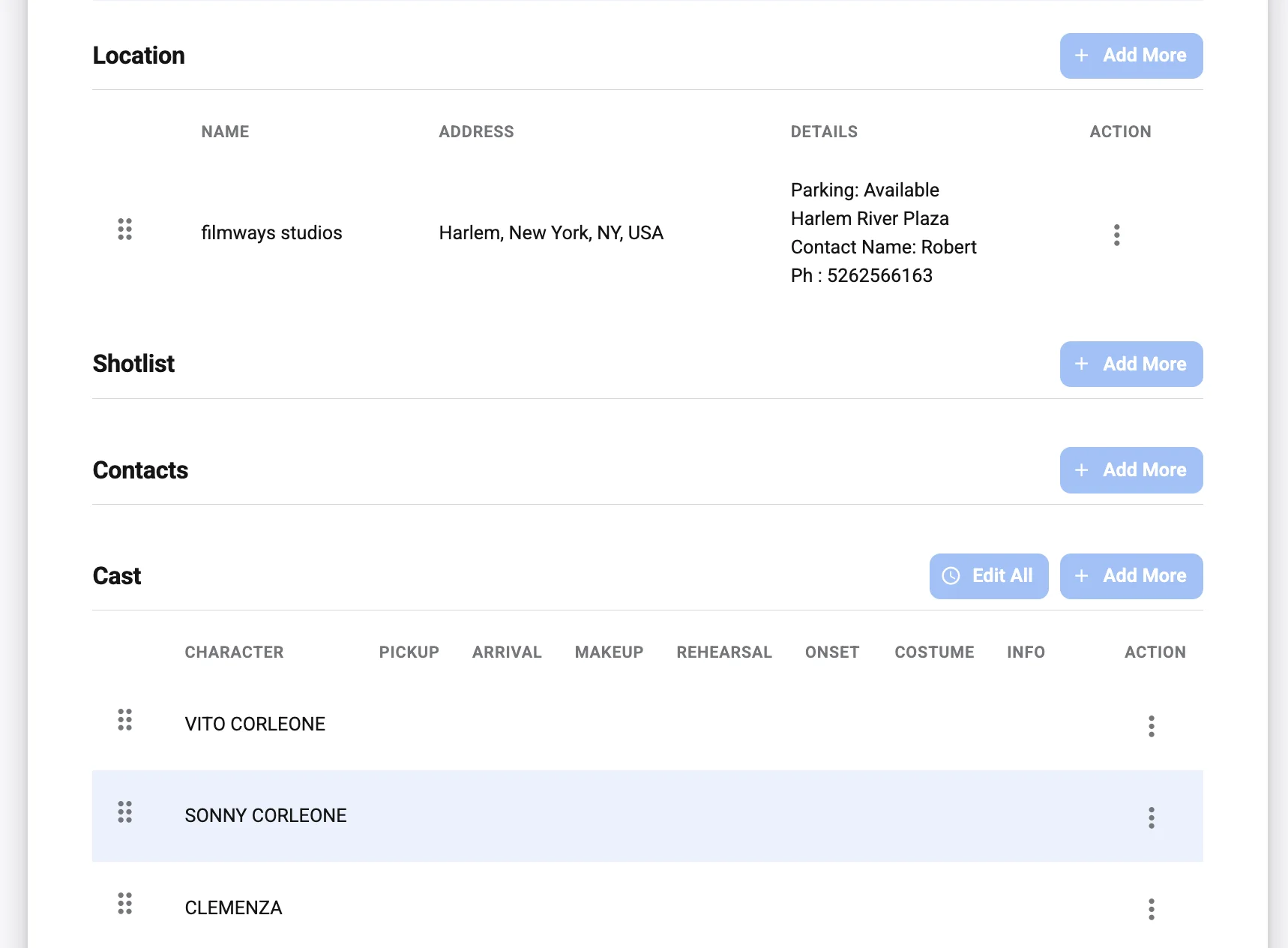
- Location details Address, parking instructions, map links if used by the production, nearest access points, holding areas, and any location restrictions.
- Schedule and scene order Scenes planned for the day, script pages or estimated workload if used, cast required, and basic timing notes.
- Cast information Individual call times, makeup or wardrobe call times, pickup information if applicable, and character references.
- Crew information Department call times, special prep notes, equipment reminders, and department-specific instructions.
- Weather and daylight notes Forecast summary, sunrise or sunset references when needed, and weather-related precautions.
- Safety and emergency information Emergency contacts, nearest hospital or medical guidance if included by the production, safety notes, and special hazard reminders.
- Additional production notes Meal information, parking limitations, walkie channels, dress code, company moves, or any sensitive instructions that need careful handling.
The exact details vary by production. A commercial shoot, short film, feature, music video, or branded content project may each need a different level of detail. The advantage of a digital call sheet is that the format can be structured while still staying flexible.
A simple call sheet example for a shoot day
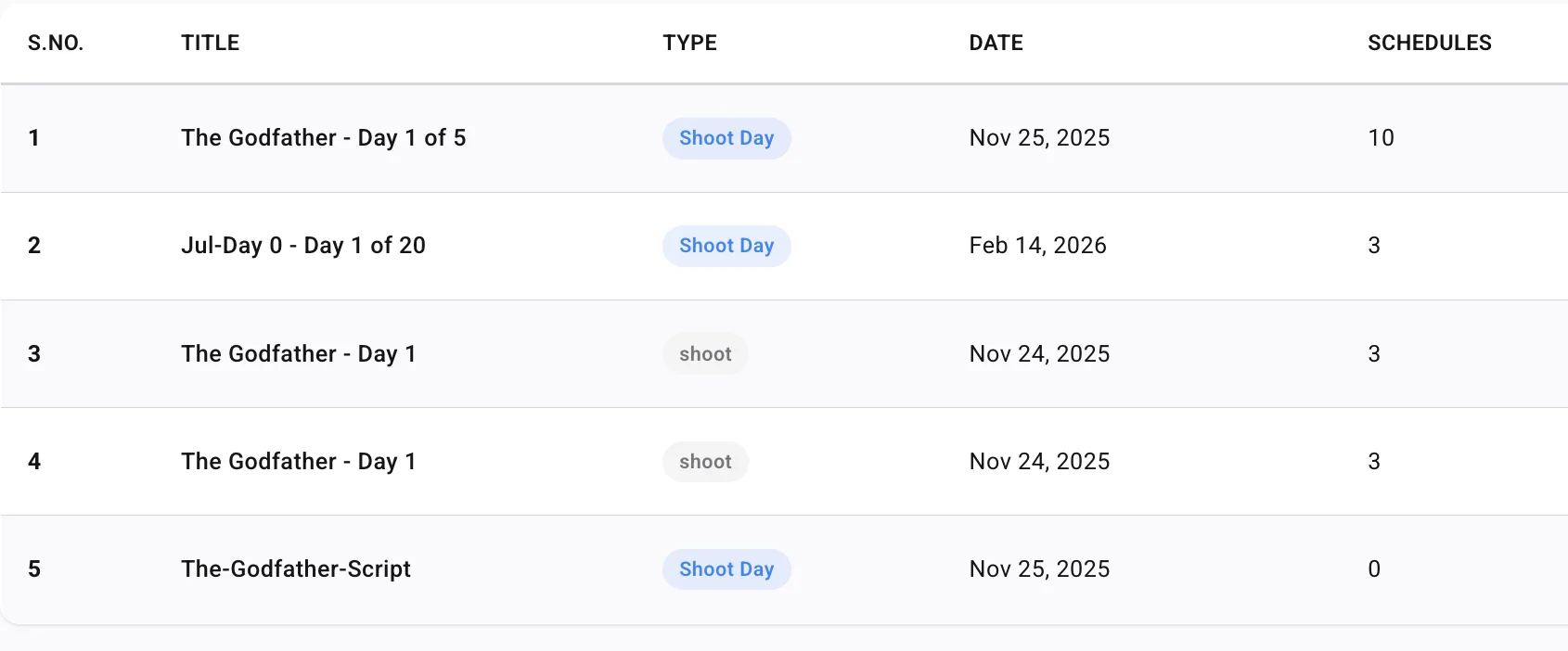
A call sheet example is helpful because it shows how the information comes together. Imagine a production shooting two interior scenes in the morning and one exterior scene in the late afternoon. The call sheet would not simply say “arrive at 7:00 a.m.†It would organize the day so each person understands their timing and responsibilities.
A simplified production call sheet might include:
- Project: Independent short film
- Shoot day: Day 3 of 8
- General crew call: 7:00 a.m.
- Location: Main apartment set
- Parking: Crew parking in assigned lot; no street parking near location
- Scenes: Scene 12, Scene 14, Scene 21
- Cast: Lead actor called at 7:30 a.m.; supporting actor called at 9:00 a.m.; background called at 2:00 p.m.
- Special notes: Quiet entry required before 8:00 a.m.; exterior scene depends on daylight; wardrobe continuity photos needed before first setup
- Safety note: Cables must be taped in hallway; limited space in kitchen set
- Meal: Lunch planned after completion of Scene 14
This is not a full call sheet template, but it shows the logic. The document groups information by use. The AD team can see scene order, cast can see personal timing, crew can see location and safety notes, and production can direct everyone to one reference point.
A digital version makes this more useful because changes can be handled quickly. If the exterior scene moves earlier, the production team can update the scene order and notify the people affected. If parking changes, the note can be corrected before people arrive at the wrong place. The call sheet becomes a living production tool rather than a file frozen at the moment it was exported.
Call sheet templates and call sheet software serve different needs
A call sheet template gives a production team a starting structure. Call sheet software gives the team a workflow for creating, updating, distributing, and managing the document. Both can be useful, but they solve different problems.
A template is often enough when the shoot is small, the crew is compact, and the schedule is stable. It helps the team remember the standard sections and produce a document that looks familiar. For student films, test shoots, or very small crews, a well-organized template may be perfectly workable.
However, templates have limits. They do not automatically solve version control, approvals, distribution, or updates. They also do not prevent manual copying errors when details are pulled from schedules, contact sheets, or department notes. As the production grows, the template becomes only one piece of a much larger coordination process.
Call sheet software is designed for that larger process. It supports the repeatable workflow around the document, not just the page layout. That distinction matters for producers, assistant directors, production coordinators, and department heads who need a dependable way to move from plan to execution.
When a template may be enough
A simple call sheet template can work well when the production has only a few people, one location, limited cast, and minimal schedule movement. In those cases, the main challenge is making sure the basics are listed clearly. The template provides structure without adding unnecessary complexity.
Even then, the team should be disciplined. One person should own the final document, updates should be clearly communicated, and file names should make version status obvious. A template can keep the document organized, but it cannot manage the communication around it by itself.
When software becomes the better option
Call sheet software becomes more valuable when the production has multiple departments, frequent changes, larger cast lists, location moves, or a need for faster distribution. It helps reduce the manual work that builds up around every shoot day. It also gives the production team a more consistent process from one day to the next.
For teams already managing schedules, breakdowns, scripts, and production details digitally, a digital call sheet is a logical next step. It keeps the daily communication layer connected to the broader production management workflow. That is where a platform like Studiovity can be especially useful for teams that want their planning tools to work together.
The practical benefits for producers and AD teams
Producers and assistant directors often feel the pain of call sheet problems first. They are the people answering questions, confirming details, correcting assumptions, and making sure the day begins on time. A digital call sheet can reduce that pressure by making important information easier to prepare and easier to share.
For producers, the benefit is visibility. A digital workflow helps them understand what is being sent out, what has changed, and whether the daily plan reflects the production’s current reality. For AD teams, the benefit is control. They can keep the day’s working document organized and make sure changes are reflected where the crew expects to find them.
A strong digital call sheet workflow can help with:
- Faster preparation: Reusable structures and organized fields can make daily call sheet creation less repetitive.
- Clearer distribution: Cast and crew can receive the information in a more accessible format.
- Better consistency: Each shoot day follows a familiar structure, reducing confusion.
- Cleaner revisions: Updates can be made without rebuilding the entire document from scratch.
- Department alignment: Notes for camera, sound, art, wardrobe, makeup, locations, and production can be kept in one daily reference.
- Reduced admin stress: The production team spends less time chasing scattered information.
The result is not magic. A digital tool still needs accurate input, thoughtful review, and clear responsibility. But when the process is organized, the tool helps the team move faster with fewer communication gaps.
Better communication on and off set
A call sheet is partly a document and partly a communication system. It tells people what to do before the day starts, but it also shapes how prepared they feel when they arrive. A well-built digital call sheet respects the crew’s time by making essential information easy to find.
On set, clarity matters because attention is divided. Crew members are loading gear, checking setups, managing actors, preparing locations, solving problems, and watching the clock. If they need to dig through several messages to confirm a basic detail, the system is not supporting them. A digital call sheet can give them a cleaner reference point.
Off set, the benefits are just as important. A producer may be reviewing tomorrow’s logistics from another location. A department head may need to confirm whether a cast member is required for a scene. A coordinator may be collecting final notes before distribution. When the call sheet is part of a digital production workflow, collaboration becomes less dependent on scattered files.
Fewer errors and stronger version control
One of the biggest reasons productions move to a digital call sheet is version control. In a manual workflow, there may be a “final,†“final revised,†and “final final†version of the same film call sheet. That is not just messy; it can be risky if people act on outdated call times or location details.
Digital workflows help by creating a clearer path for updates. Instead of sending another attachment and hoping everyone notices, the production team can revise the active call sheet and direct people to the latest information. This reduces ambiguity and makes it easier to correct small issues before they become set-wide problems.
Error reduction also comes from structure. When a call sheet app prompts the team to fill in standard fields, important information is less likely to be forgotten. A good workflow can remind production to think through location details, contacts, cast timing, safety notes, and department instructions before the call sheet goes out.
Of course, software cannot replace human review. Someone still needs to verify the schedule, confirm contacts, check spelling, and make sure sensitive information is handled appropriately. But the right system can make that review more focused and less chaotic.
Choosing a digital call sheet tool
Choosing a digital call sheet tool is not just about finding a nice layout. The best option is the one that fits the production’s real workflow. A beautiful document is less helpful if it is hard to update, difficult to distribute, or disconnected from the rest of production planning.
Before choosing a call sheet app or platform, production teams should consider how they actually work. Who creates the call sheet? Who approves it? Which departments send notes? How often do details change? Does the team need a standalone call sheet tool, or would it benefit from a broader film production management platform?
Use this checklist when evaluating call sheet software:
- Ease of use: Can the production team create and revise call sheets without unnecessary steps?
- Clear structure: Does the tool support the essential sections of a professional production call sheet?
- Distribution workflow: Is it simple to send the call sheet to the right people?
- Update handling: Can changes be made cleanly when plans shift?
- Department visibility: Can relevant notes be organized for cast, crew, and production departments?
- Production context: Does the tool connect well with scheduling, planning, or other production management needs?
- Scalability: Will it still work when the project becomes more complex?
- Accessibility: Can cast and crew access the information easily on the devices they use?
If your team is ready to move away from scattered PDFs and manual updates, explore Studiovity’s digital call sheet software (https://studiovity.com/call-sheet-software/). It is designed for film production management teams that want a more organized way to create, manage, and share call sheets as part of a connected production workflow.
Digital call sheets support different types of productions
Digital call sheets are not only for large feature films. They can be useful across many types of productions because nearly every shoot depends on accurate daily coordination. The size of the team may change, but the need for clear information remains the same.
For short films, a digital workflow can help small teams stay organized even when people are juggling multiple roles. For commercials and branded content, it can support fast-moving schedules where client, agency, and production details need to stay aligned. For episodic or multi-day projects, it can bring consistency to repeated shoot days and reduce the fatigue of rebuilding documents manually.
Music videos, documentaries, corporate shoots, and social content productions can also benefit when there are multiple locations, talent call times, or department-specific requirements. The call sheet does not need to be complicated; it needs to be appropriate for the day. Digital tools make it easier to scale the level of detail up or down.
That flexibility is important. A production team should not have to use the same amount of paperwork for every shoot. The right digital call sheet workflow lets the team keep the essentials visible while adapting the document to the size and complexity of the project.
A smoother transition from paper to digital
Switching from a familiar call sheet template to digital call sheet software does not have to be disruptive. The easiest transition starts by preserving what already works. If your team has a structure people understand, use that as the foundation, then improve the parts that create friction.
Start with one production or one shoot day. Build the digital call sheet, review it internally, and compare it with your current format. Ask whether the information is easier to find, whether updates are simpler, and whether the distribution process feels cleaner. The goal is not to digitize for the sake of digitizing; the goal is to make the production day easier to run.
A practical transition plan might look like this:
- Audit your current call sheet. Identify what information is essential, what is repeated, and what often causes questions.
- Standardize your sections. Decide how you want to present locations, contacts, scene details, cast timing, and department notes.
- Assign ownership. Make it clear who builds, reviews, approves, and sends the call sheet.
- Test with a small team. Get feedback from the people who use the document every day.
- Refine the workflow. Adjust the structure before rolling it out to larger productions.
- Keep backup options. Use printed copies when a location, crew preference, or technical limitation requires them.
This approach helps the team adopt a better process without losing confidence in the daily document. The call sheet is too important to treat as an experiment on a busy shoot day, so the transition should be deliberate and practical.
The future of the production call sheet is connected
The production call sheet is becoming less of a standalone document and more of a connected part of the production management ecosystem. That change reflects how productions already function. Scheduling, budgeting, breakdowns, locations, talent, crew, and daily logistics all influence one another.
When the call sheet is disconnected, the production team has to manually bridge those areas. When it is digital and connected, the daily plan can reflect the broader production workflow more naturally. This does not remove the need for experienced producers, assistant directors, coordinators, or department heads. It gives them a better system for turning decisions into clear instructions.
For Studiovity’s audience, that is the real point. A digital call sheet is not just a modern-looking version of a traditional form. It is a practical step toward more organized film production management, where teams spend less time managing document chaos and more time focusing on the work that belongs on screen.
Final takeaway
A digital call sheet helps productions organize the daily plan, communicate updates, and keep cast and crew aligned from call time to wrap. It carries the familiar purpose of a film call sheet, but improves the workflow around creation, revision, distribution, and access.
Templates still have their place, especially for simple shoots. But as productions become more complex, call sheet software offers a more reliable way to manage the details that keep a set moving. For teams looking to simplify production paperwork and build a stronger daily communication process, Studiovity offers a practical path toward a cleaner, more connected call sheet workflow.