
Digital call sheets help film teams move faster, communicate clearly, and reduce the confusion that often happens when schedules change. Whether you are managing a short film, commercial, branded video, documentary, or larger production, a well-built digital call sheet gives every cast and crew member the practical information they need for the next shoot day. This guide walks through what to include, how to structure it, and how to use a call sheet template or call sheet software without losing the human clarity that makes production run smoothly.
Related video: Film scheduling and call sheet creation in 30 seconds
What should a digital call sheet do for a production team?
A digital call sheet should answer the essential questions for the shoot day: who is needed, where they need to be, when they should arrive, what scenes or setups are planned, and who to contact if something changes. It is not just a schedule; it is the shared operating document for the day. The best film call sheets are easy to scan on a phone, clear enough for a first-time day player, and detailed enough for department heads to coordinate safely and efficiently.
In modern productions, the call sheet also acts as a communication bridge between planning and execution. The assistant director, producer, production manager, or coordinator may have the full context, but the rest of the team needs a clean version of that context without digging through separate emails, text threads, spreadsheets, or script breakdowns. A digital format makes that easier because the sheet can be distributed quickly, updated when needed, and stored for reference.
Good production call sheets reduce uncertainty. They help a grip know where parking is, a makeup artist know the first cast arrival time, a background performer know wardrobe notes, and a director know the intended scene order. When the document is organized well, people spend less time asking basic questions and more time doing the work they came to do.
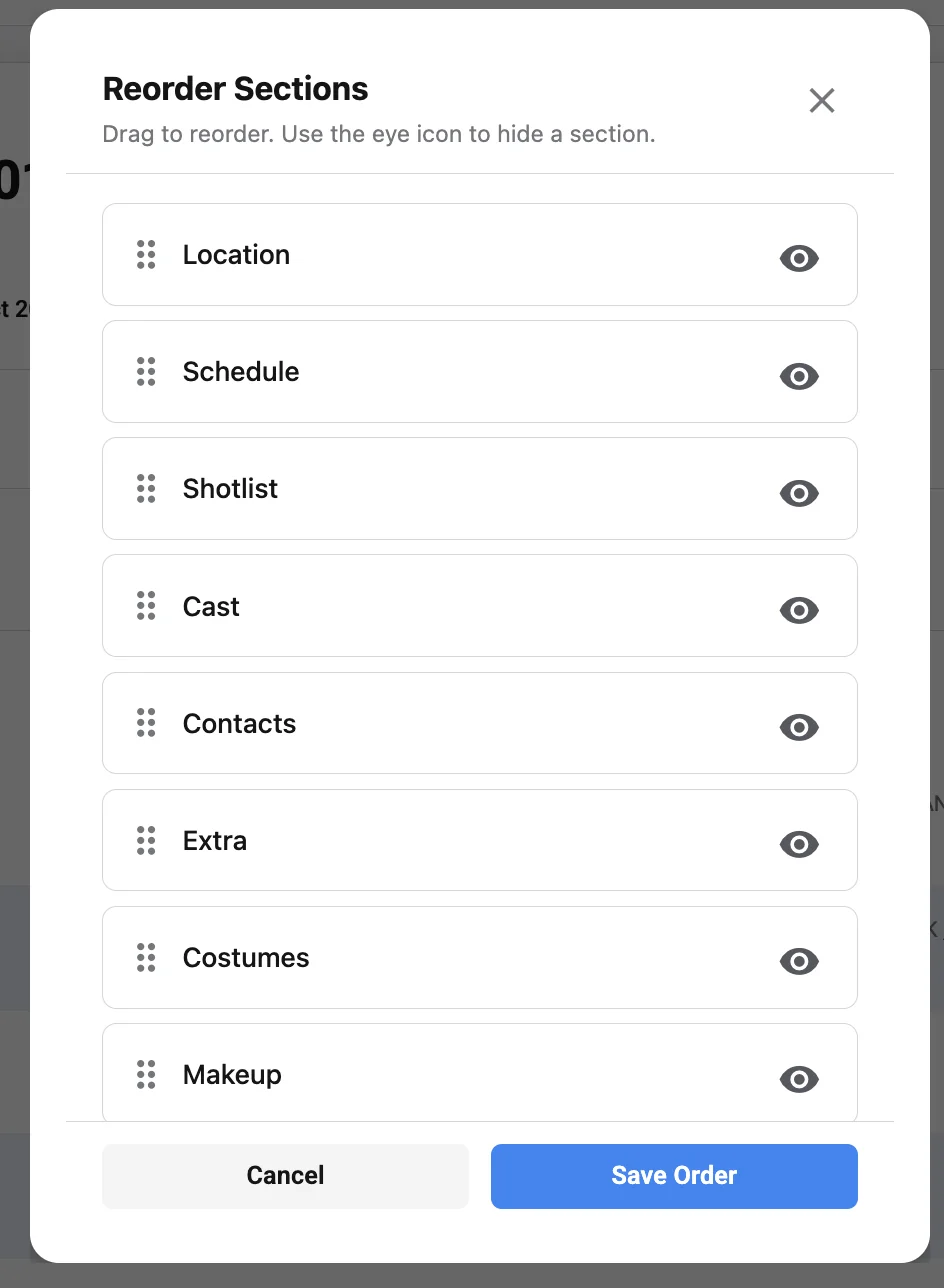
The essential parts of a digital call sheet
A call sheet can be simple or detailed depending on the size of the production, but the core information stays consistent. If you are learning how to create digital call sheets for modern film productions, start with the basics and only add complexity when it helps the team. A crowded document can be just as frustrating as an incomplete one.
Production title and shoot day information
Begin with the project title, production company or team name if relevant, shoot date, day number, and version or distribution time. If the production spans multiple days, include the day out of total days, such as “Day 3 of 8.†This helps everyone understand where the shoot day sits in the larger schedule.
Version control matters in digital workflows. If a call sheet changes after it has been distributed, mark it clearly as revised and include the time of revision. This prevents the common problem of crew members using different versions without realizing it.
Key contacts
Every call sheet should include the names and contact details for the people who can solve urgent production problems. This often includes the producer, director, first assistant director, production manager, production coordinator, location contact, transportation lead, medic or safety contact, and department heads when appropriate.
Keep this section practical. The purpose is not to list everyone involved in the project; it is to make sure the right person can be reached quickly. If there is a specific person handling late arrivals, parking problems, location access, or emergency communication, name that person clearly.
Call times
Call times are one of the most important parts of any call sheet. A general crew call may apply to most departments, but many productions need separate call times for cast, makeup, wardrobe, camera, lighting, sound, art, transportation, background, and specialty roles.
Digital call sheets should make call times visually obvious. If someone opens the sheet on a phone, they should not have to pinch, zoom, or search to find when they are expected. For larger productions, grouped call times or individual call times can prevent confusion.
Locations and parking
List the primary shooting location with enough detail to get people to the correct entrance, stage, unit base, holding area, or production office. If the parking location is different from the filming location, make that distinction impossible to miss. Include check-in instructions, shuttle notes, access codes if appropriate, and any restrictions that affect arrival.
Modern productions often move between practical locations, studios, offices, streets, homes, and remote environments. A digital call sheet should separate filming location, parking, crew holding, cast holding, catering, restrooms, and base camp when those areas are not obvious.
Schedule and scene plan
The shooting schedule tells the team what work is planned and in what order. Include scene numbers, short scene descriptions, script pages or estimated duration if used by the production, day or night status, interior or exterior notes, cast involved, and any major department needs.
This section should be detailed enough to support coordination but not so dense that it becomes unreadable. If a scene requires a special prop, stunt, vehicle, animal, smoke effect, company move, or sensitive location condition, add a clear note. The goal is to help departments anticipate needs before the camera rolls.
Cast, background, and talent details
Cast sections commonly include performer names, character names, status, call times, pickup times, makeup and wardrobe times, and set call. For privacy, be thoughtful about what personal information is included and who receives it. Digital tools can make it easier to limit distribution or send role-specific details, but the core sheet should still protect people’s information.
Background performers, extras, stand-ins, photo doubles, and specialty talent should have clear instructions. If they need to bring wardrobe options, avoid certain colors, arrive camera-ready, or check in at a specific holding area, say so directly.
Weather, daylight, and environmental notes
Weather affects wardrobe, equipment, makeup, safety, location access, sound, lighting, and company morale. Many production call sheets include sunrise, sunset, expected temperature, precipitation, and general weather conditions. For exterior days, this information can influence everything from lens choices to meal timing.
Environmental notes should be practical. If the location is muddy, cold, hot, dusty, loud, remote, difficult to access, or without reliable cell service, include that information. The more accurately people prepare, the fewer delays the team may face.
Safety, medical, and emergency information
Safety information should never be an afterthought. Include emergency contact procedures, nearest hospital or urgent care information when appropriate, on-set medic details, site-specific risks, and any production safety requirements. If there are stunts, weapons, vehicles, water work, animals, heights, weather exposure, minors, or intimate scenes, the call sheet should direct people to the proper safety protocols and responsible contacts.
Digital formats make safety notes easier to distribute, but they do not replace a safety meeting. Treat the call sheet as the written reminder and the on-set briefing as the live confirmation.
Building a digital call sheet from the ground up
The most reliable way to build a call sheet is to start with the shoot day’s actual production needs, not with a blank design. A beautiful layout is useful only if it communicates the right information. Before choosing a call sheet template or entering details into call sheet software, gather the source information that determines the day.
Start with the locked or current shooting schedule. Then confirm the location, parking plan, crew list, cast list, transportation needs, meal timing, safety notes, department requests, weather expectations, and contact chain. If any of these details are uncertain, mark them for confirmation rather than guessing.
A practical call sheet workflow looks like this:
- Collect the source documents. Use the schedule, script breakdown, crew list, cast list, location agreement, transportation plan, and department notes.
- Confirm the day’s objective. Identify the scenes, setups, interviews, inserts, pickups, or company moves planned for the day.
- Set the core times. Establish crew call, cast calls, meal timing, company moves, wrap targets, and any time-sensitive location restrictions.
- Build the contact hierarchy. Decide who should be contacted for production, location, safety, transport, and department-specific questions.
- Add practical arrival details. Include parking, check-in, holding, access instructions, and any restrictions that affect arrival.
- Review department needs. Add concise notes for camera, lighting, sound, art, wardrobe, makeup, locations, transport, and production support.
- Proofread for conflicts. Check names, times, scene numbers, addresses, phone numbers, and version labels.
- Send for approval. Have the appropriate producer, assistant director, or production lead review before distribution.
- Distribute clearly. Send the digital call sheet through the agreed channel and make sure recipients know whether acknowledgement is required.
- Track updates. If details change, issue a revised version and communicate what changed.
This workflow may sound formal, but it prevents the most common mistakes. Many call sheet problems come from small mismatches: a cast member has one time in an email and another on the sheet, the parking address leads to the wrong gate, or a revised schedule never reaches a department head. A repeatable process catches those issues before they become set delays.
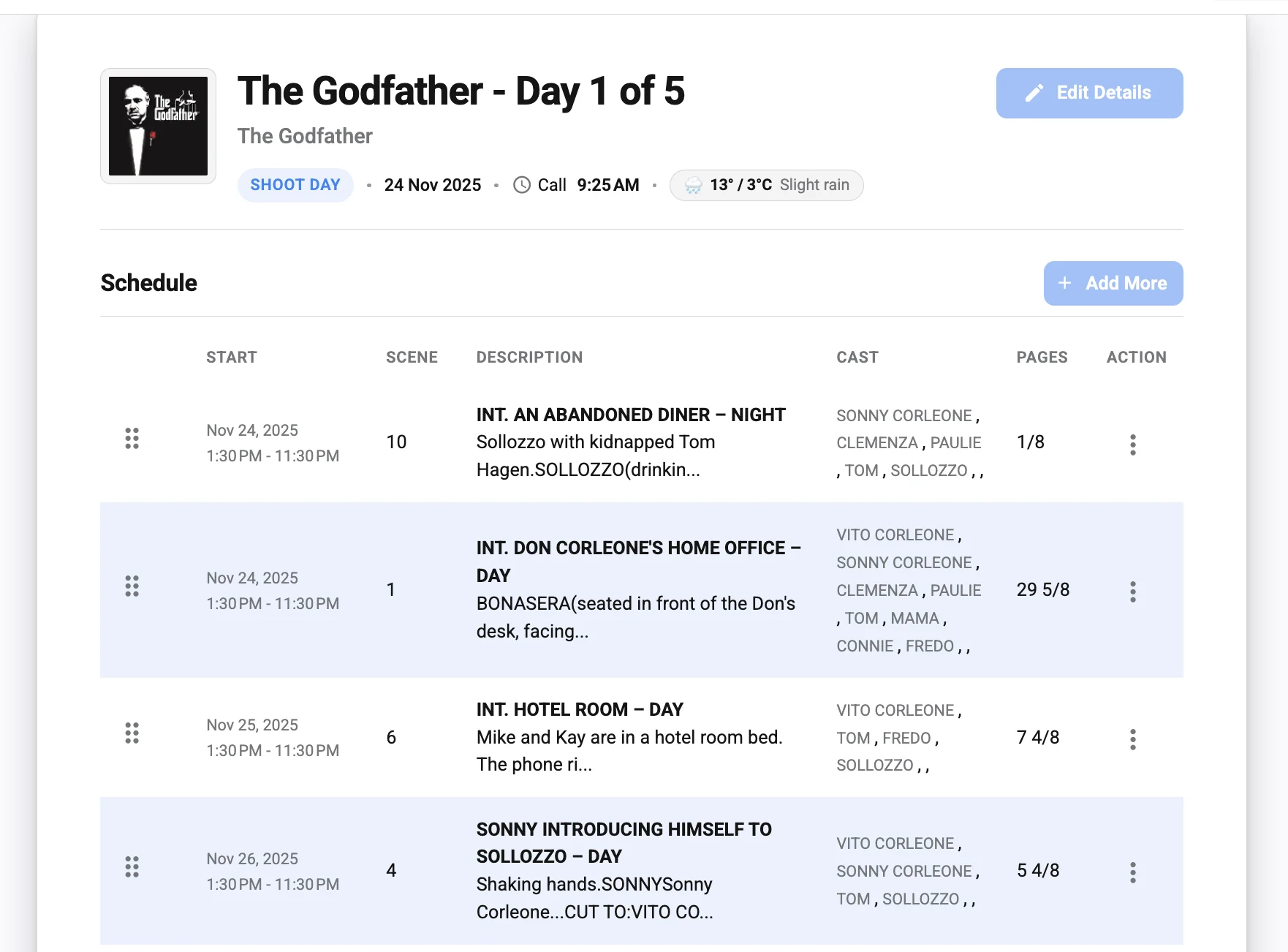
What makes digital call sheets different from paper ones?
Digital call sheets are easier to update, distribute, search, and store than paper sheets, but they also require stronger version control and cleaner formatting. A printed sheet can be handed out at wrap and pinned to a wall; a digital sheet may be opened on dozens of different phones, tablets, laptops, and email apps. That means readability, file naming, permissions, and update alerts are part of the production process.
Paper still has value in some situations. A printed copy at base camp, production office, video village, or the first AD’s station can help when batteries die or service fails. But for most modern productions, digital distribution is the primary method because crews are mobile, schedules change quickly, and teams often need the information before they arrive on location.
The main advantage of digital call sheets is speed. If weather shifts, parking changes, or a call time moves, the team can receive an updated version without waiting for physical copies. The main risk is confusion. If updates are sent casually across too many channels, people may not know which version to trust.
Digital call sheets help with remote coordination
Pre-production often happens across multiple locations. Producers, coordinators, department heads, and clients may not be in the same office, and some team members may join only for certain shoot days. Digital call sheets make it easier to coordinate across distance because everyone can review the same information before they travel.
This is especially useful for documentaries, corporate videos, travel shoots, commercials, and small independent productions. A crew member can check call time, location notes, weather, parking, and contact details from home, a hotel, or the road. That kind of access reduces morning-of uncertainty.
Digital sheets support faster revisions
Changes are normal in production. The question is not whether something will change, but how clearly the change will be communicated. Digital formats allow the production team to revise and resend the call sheet quickly, but every revision should be labeled.
A good revision note does not need to be long. It might say, “Revised at 8:40 PM: updated cast call for Scene 12 and parking entrance.†This helps recipients understand whether the revision affects them and whether they need to re-check the whole document.
Digital formats need mobile-first design
Many crew members will open the call sheet on a phone while standing in a parking lot, loading gear, or walking into a location. If the sheet is designed only for desktop viewing, important details may be missed. Mobile-first formatting means larger headings, logical spacing, concise notes, and a layout that does not rely on tiny tables.
PDFs are common because they preserve layout, but they must still be readable on small screens. If using call sheet software, preview the recipient view before sending. The sender’s dashboard may look organized while the delivered document feels crowded.
Choosing between a call sheet template and call sheet software
A call sheet template is often enough for small productions, student films, low-budget shorts, internal videos, or simple one-location shoots. Call sheet software is more useful when you need automation, contact management, acknowledgement tracking, repeatable scheduling, or faster revisions across multiple shoot days. The right choice depends on the scale of the project, the complexity of the schedule, and the team’s comfort with digital tools.
Templates are flexible and easy to customize. They can be built in a document editor, spreadsheet, or production planning file. The downside is that they rely heavily on manual entry, which means mistakes can slip in if the same information is copied across multiple days.
Software can save time by pulling from crew databases, cast lists, schedules, weather fields, and distribution lists. It may also help track who has viewed or confirmed the call sheet. The downside is that the team must learn the tool, keep data clean, and avoid assuming automation has caught every production-specific detail.
| Option | Best for | Strengths | Watchouts |
|---|---|---|---|
| Simple call sheet template | Small shoots, one-day productions, student films, lean crews | Easy to edit, low learning curve, flexible layout | Manual updates, higher risk of copy-paste errors |
| Spreadsheet-based template | Multi-person coordination, repeating formats, budget-conscious teams | Organized tables, easy sorting, useful for lists | Can become hard to read on mobile if not formatted carefully |
| Dedicated call sheet software | Multi-day shoots, larger crews, frequent revisions | Faster distribution, reusable contacts, possible confirmations, cleaner version control | Requires setup time and accurate data entry |
| Hybrid workflow | Productions that need flexibility with some automation | Combines planning documents with polished distribution | Needs clear ownership so updates do not split across systems |
The best system is the one your team will actually use correctly. A powerful tool cannot fix unclear communication, and a simple template can perform well when the production team is disciplined. Choose the workflow that reduces friction rather than the one that looks most impressive.
Strong call sheet examples have these qualities
Useful call sheet examples are clear, complete, and easy to act on. They do not overwhelm the reader with every production detail, but they do include the details that affect arrival, preparation, safety, timing, and communication. When reviewing sample layouts, pay less attention to decorative design and more attention to whether a crew member can quickly understand the day.
Strong examples usually share several traits:
- A clear top section: The project title, shoot date, general call time, location, and version are visible immediately.
- Readable call times: Cast, crew, department, and special call times are grouped logically and not buried in long paragraphs.
- Practical location notes: Parking, check-in, holding, and access instructions are separated from the filming address.
- A realistic schedule: The scene order or setup plan gives departments enough information to prepare without pretending every minute can be predicted perfectly.
- Relevant department notes: Notes are specific enough to be useful, such as wardrobe requirements, prop needs, sound concerns, or company move reminders.
- Visible safety information: Emergency contacts and site-specific risks are easy to find.
- Clean formatting: The layout works on phones and does not rely on tiny text, excessive columns, or unexplained abbreviations.
- Consistent naming: Cast, characters, scenes, and locations match the schedule and other production documents.
When looking at call sheet examples online or inside a production tool, adapt the structure to your project instead of copying it blindly. A feature film, interview shoot, music video, documentary field day, and commercial product shoot all need slightly different emphasis. The format should serve the day’s work.
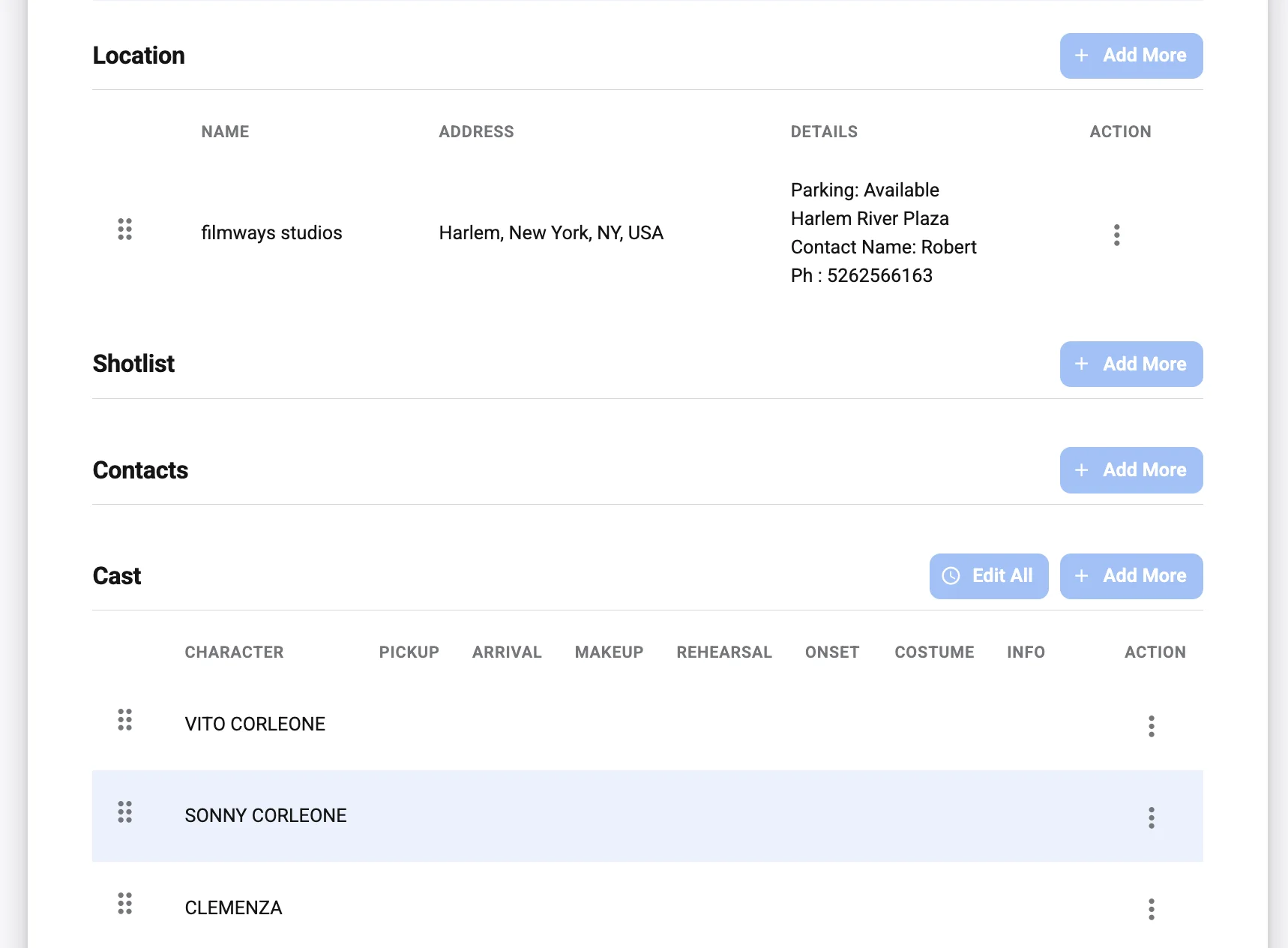
Designing the call sheet for readability
A call sheet is a working document, not a design portfolio. It should be attractive enough to read comfortably, but clarity matters more than style. If a production assistant has to search for the parking address while a van is waiting, the design has failed.
Use hierarchy to guide the eye. Place the most urgent information near the top: shoot date, call time, location, parking, and key contacts. Use headings, spacing, bold labels, and tables carefully. Avoid cramming too many columns into one section if the document will be read on a phone.
Keep the top section immediately useful
The first screen or first page should answer the most common arrival questions. Where am I going? When do I need to be there? Who do I call if I am late or cannot access the location? If the top section answers those questions, the call sheet already prevents many problems.
This does not mean every detail belongs at the top. Keep it focused. Put deeper schedule notes, cast lists, department instructions, and safety details in organized sections below.
Use plain language for instructions
Production teams often use shorthand, but not every recipient shares the same vocabulary. Abbreviations may be fine for standard scene details, but arrival instructions and safety notes should be plain. Instead of writing a vague note such as “Use south access,†explain which entrance, landmark, or check-in point the team should use.
Plain language is especially important for mixed teams. Commercial shoots, branded content, and independent films may include clients, agency representatives, new crew members, interns, background performers, or location staff. The call sheet should be understandable to everyone who needs to act on it.
Make updates impossible to miss
If a revised digital call sheet is sent, the revision should be visible in the file name, email subject, and document header. This is not overkill; it is basic version control. People often download files, forward emails, or save documents to their phones, so the version needs to travel with the document.
A simple file name can help: “ProjectName_CallSheet_Day03_Revised_840PM.†Inside the document, include a revision note near the top. If the change is significant, mention it in the message that accompanies the call sheet.
Information to confirm before distribution
The pressure to send a call sheet quickly can lead to avoidable errors. Before distribution, run through a final check that focuses on the details most likely to create confusion. This is especially important when using a copied call sheet template from a previous day.
Use this checklist before sending:
- Date and day number: Confirm the shoot date, weekday, and day count are correct.
- Version status: Make sure the call sheet is clearly labeled as draft, final, or revised.
- General call and special calls: Check that all call times match the latest schedule and department needs.
- Cast details: Confirm performer names, character names, makeup times, wardrobe times, and set calls.
- Location address: Verify the filming address, parking address, entrance instructions, and map links if used.
- Contact numbers: Test that key phone numbers are current and assigned to the right people.
- Scene numbers and descriptions: Match the call sheet against the current schedule or sides.
- Meal timing: Confirm planned meal periods, catering location, or meal instructions.
- Company moves: Include timing, destination, parking, and loading notes if the team moves during the day.
- Safety notes: Add any relevant risks, emergency contacts, medic details, or special briefings.
- Weather and daylight: Check that weather, sunrise, sunset, or exterior conditions are current enough for planning.
- Distribution list: Make sure the right cast, crew, clients, and support contacts receive the sheet.
This checklist does not need to slow the team down. Once it becomes routine, it can take only a few focused minutes. Those minutes are worth it if they prevent a missed call, wrong address, or late department setup.
Common mistakes that make call sheets harder to use
Even experienced teams can create call sheets that technically include the right information but are still difficult to use. Most issues come from unclear formatting, outdated details, or assumptions about what recipients already know. Digital tools reduce some problems, but they can also make it easier to send incomplete information quickly.
One common mistake is overloading the document. A call sheet should not become a dumping ground for every production note, creative reference, script comment, or private planning conversation. If a note does not help someone arrive, prepare, work safely, or coordinate the day, consider whether it belongs somewhere else.
Another mistake is hiding critical information in paragraphs. Long blocks of text are easy to skip, especially on mobile. Parking, access codes, safety warnings, and special call times should be separated visually.
A third mistake is unclear ownership. If no one knows who has final approval, different departments may send conflicting updates. Decide who owns the call sheet and who can authorize revisions.
Watch for these production call sheet issues in particular:
- Conflicting call times between the call sheet, email body, text message, and schedule.
- Old location details copied from a previous shoot day.
- Missing parking instructions for urban, studio, campus, or remote locations.
- Unclear department notes that say something is needed but not who is responsible.
- Tiny tables that become unreadable on phones.
- No revision label after changes are made.
- Unprotected personal information sent to a wider audience than necessary.
- Assumptions about meals, holding, or restrooms that leave crew guessing.
The fix is usually not complicated. Simplify the layout, confirm the source details, and write instructions as if the reader is arriving at the location for the first time.
Digital distribution and acknowledgement
Sending the call sheet is part of the production workflow, not the end of it. Once the sheet goes out, the team needs confidence that the right people received it and understand the key details. For small teams, a simple email or group message may be enough. For larger productions, acknowledgement tracking through call sheet software can be helpful.
The distribution message should be short and useful. Mention the project, shoot date, call sheet version, and any major notes that require attention. If recipients need to confirm receipt, say so clearly. If there are important changes from an earlier draft, list them briefly.
Avoid sending the final call sheet through too many channels unless there is a clear reason. If it goes out by email, text, chat app, and file link, make sure all channels point to the same final version. Multiple channels can improve reach, but they can also create confusion if one channel is updated and another is not.
Protect privacy in digital workflows
Digital call sheets can be forwarded, downloaded, screenshotted, and stored. That makes privacy and access important. Only include personal details that are necessary for the work, and think carefully before sharing phone numbers, addresses, hotel information, travel details, or sensitive notes broadly.
Some productions create different versions for different groups. For example, department heads may receive more detailed contact information, while background performers receive only the instructions they need. If using software, review the permission and distribution settings instead of assuming the default is right.
Store call sheets for production records
After the shoot day, the call sheet remains useful. It can help with production reports, payroll review, insurance questions, schedule history, continuity, and future planning. Keep a clean archive of final and revised sheets, organized by project and shoot day.
A consistent naming convention saves time later. Include the project name, date, shoot day, and version. If the production has many documents, store call sheets in a dedicated folder rather than mixing them with creative assets or camera files.
Adapting call sheets for different production types
Not every production needs the same level of detail. A scripted feature may rely heavily on scene numbers, cast status, sides, and department breakdowns. A documentary field shoot may need stronger location notes, interview timing, release reminders, and travel details. A commercial may need client arrival, product handling, agency contacts, and brand approval moments.
The structure should reflect the work. If the day is mostly interviews, the schedule might focus on subject arrivals, setup changes, room resets, and release forms. If the day is action-heavy, safety notes and stunt coordination become more prominent. If the day involves multiple locations, transportation and company move instructions deserve extra space.
Here are practical adjustments by production type:
- Short films and independent features: Emphasize scene order, cast calls, makeup and wardrobe timing, meal breaks, and location access.
- Commercials and branded content: Add client contacts, product notes, approval windows, agency attendance, and brand-sensitive instructions.
- Documentaries: Include interview subjects, release needs, travel timing, location sensitivities, and backup plans for changing conditions.
- Music videos: Highlight performance playback, wardrobe changes, art department needs, choreography timing, and location restrictions.
- Corporate video shoots: Make arrival instructions client-friendly and include security check-in, room names, executive schedules, and office rules.
- Remote or travel productions: Give extra detail on transportation, lodging coordination, weather exposure, cell service, and emergency plans.
Adapting the document does not mean reinventing it every time. Keep the same core structure, then add the details that matter for the specific shoot day.
Creating a reusable call sheet template
A reusable call sheet template saves time and helps maintain consistency across shoot days. The key is to build a template that prompts you for the right information without forcing every production into the same shape. A good template should be structured, but not rigid.
Start with sections you will almost always need: header, key contacts, locations, call times, schedule, cast, department notes, safety, weather, and distribution notes. Use placeholder text that reminds the preparer what to include. For example, under parking, a placeholder might say, “Include parking address, entrance, access instructions, shuttle details, and restrictions.â€
Keep the template clean. If you build it with too many optional sections, each call sheet will require heavy editing. Instead, create a strong base template and maintain a small set of optional blocks for special needs such as stunts, minors, animals, vehicles, travel, or night shoots.
Template fields worth including
A practical template may include these fields:
- Project title
- Shoot date and day number
- Final or revised version label
- General crew call
- Estimated wrap or production target
- Primary location
- Parking location
- Check-in instructions
- Key production contacts
- Emergency or safety contact
- Weather and daylight notes
- Scene or setup schedule
- Cast list and call times
- Background or extras notes
- Makeup and wardrobe times
- Meal timing and catering location
- Department notes
- Company move details
- Special equipment, props, vehicles, or effects
- Safety notes and site-specific risks
- Distribution and confirmation instructions
This list is not meant to make every call sheet longer. It is meant to help you decide what belongs. If a field does not apply, remove it rather than leaving blank clutter.
Using call sheet software without losing control
Call sheet software can make production coordination faster, especially when you are managing multiple shoot days, large contact lists, or frequent revisions. It can reduce repetitive data entry and make distribution more professional. Still, software works best when the production team treats it as a tool, not an autopilot system.
Before relying on any platform, decide who owns the data. Crew names, cast details, email addresses, phone numbers, locations, and schedule information must be accurate. If several people edit the same project, assign responsibility for final review.
Software can also encourage teams to include too much because adding fields feels easy. Resist that impulse. The final call sheet should still be lean, readable, and relevant. Automation should support clarity, not bury people under unnecessary detail.
When evaluating a tool, look for practical features:
- Easy contact importing and grouping
- Customizable templates
- Individual and department call times
- Mobile-friendly recipient views
- PDF export or printable options
- Revision labels and version history
- Delivery tracking or receipt confirmation
- Permission controls or selective distribution
- Weather or map support if useful to your workflow
- Simple duplication for future shoot days
A tool does not have to include every possible feature to be useful. The best fit is the one that matches how your production actually communicates.
Collaboration between departments
The call sheet often appears to come from one person, but it depends on many departments. Camera may need a pre-call. Makeup may need staggered talent arrivals. Art may need access before general crew call. Locations may need everyone off-site by a certain time. Sound may need a warning about nearby noise. These details only make it onto the sheet if departments communicate before the final version is built.
Create a deadline for department notes. If everyone sends updates at the last second, the call sheet becomes rushed and error-prone. A simple internal cutoff helps the preparer organize details, ask follow-up questions, and avoid conflicting instructions.
The assistant director or production lead should also decide what level of detail belongs on the sheet. Department-specific notes can be useful, but some planning details may be better handled in separate prep documents, tech scouts, shot lists, or department briefs. The call sheet should summarize what affects the day’s shared operation.
Making call sheets more useful on set
A digital call sheet is not just for the night before. It can be useful throughout the shoot day if the team knows where to find it. Department heads may reference it for scene order, production assistants may use it for arrivals, and producers may check contact details or company move timing.
Encourage the team to save or download the call sheet before arriving, especially if the location has weak service. If the day depends on digital access, keep backup copies available. A printed version at production base, a saved PDF on a coordinator’s phone, and a copy accessible to the first AD can prevent problems.
On set, the call sheet should work alongside live communication. If the schedule changes after call, the first AD or production lead still needs to communicate that change clearly. The call sheet is the plan; production is the reality. Good teams know how to keep the two aligned without pretending the document can predict everything.
A practical sample structure for your next digital call sheet
If you are starting from scratch, use a structure that follows the way people actually read the document. Put urgent arrival details first, then schedule and role-specific information, then safety and notes. This order helps the call sheet serve both quick reference and deeper planning.
A simple structure could look like this:
- Header: Project title, shoot date, day number, version, and general call time.
- Immediate arrival details: Main location, parking, check-in, access instructions, and late contact.
- Key contacts: Producer, first AD, coordinator, location contact, transportation, safety or medic.
- Weather and daylight: Conditions relevant to wardrobe, equipment, exterior work, and schedule.
- Schedule: Scene order, setup plan, company moves, meal timing, and wrap target.
- Cast and talent: Names, character names, call times, makeup, wardrobe, set call, and holding notes.
- Crew and department calls: General crew call plus special pre-calls or staggered arrivals.
- Department notes: Concise notes for camera, lighting, sound, art, wardrobe, makeup, locations, transport, and production.
- Safety and emergency: Emergency contact, nearest care location if appropriate, hazards, briefings, and required protocols.
- Distribution note: Confirmation request, revision note, or reminder to save the document offline.
This structure can be expanded or condensed. For a small interview shoot, the cast section may become a subject schedule. For a complex scripted day, the schedule and cast sections may need more detail. The principle stays the same: arrange the information in the order people need it.
Final takeaway
Digital call sheets work best when they combine accuracy, clarity, and thoughtful distribution. A strong sheet tells people where to be, when to arrive, what to prepare, who to contact, and what conditions may affect the day. Whether you use a simple call sheet template or dedicated call sheet software, the goal is not to create a perfect-looking document; it is to help the production move with fewer surprises.
If you are building your next set of film call sheets, start with the essentials, confirm every time and location, design for mobile reading, and label revisions clearly. The more practical the call sheet is, the more useful it becomes for everyone from producers and department heads to cast, background, and crew arriving on location before sunrise.