
A call sheet is one of the most practical documents on any production, but building one can take hours when information is scattered across schedules, crew lists, location notes, sides, transport plans, weather checks, and department updates. AI can help production teams create call sheets faster by organizing those moving parts, flagging gaps, and turning approved production data into a cleaner first draft. The real advantage is not replacing the assistant director team or production office; it is giving them faster ways to prepare, review, revise, and distribute accurate information before the next shoot day.
Related video: Studiovity AI mobile call sheet
Why do call sheets take so long to create?
Call sheets take time because they sit at the intersection of nearly every production decision. A single document has to translate the shooting schedule into clear, day-specific instructions for cast, crew, departments, vendors, locations, transport, safety, and production leadership. Even when a production runs smoothly, the call sheet is usually assembled under deadline pressure, after the schedule has shifted and while new details are still arriving.
For filmmakers and production teams, the challenge is rarely a lack of effort. The challenge is coordination. A revised scene order may affect cast call times, background holding, meal timing, company moves, parking, special equipment, and department pre-calls. A location update may change crew access, security, loading routes, basecamp placement, or weather planning. A late prop note may alter which department needs an earlier arrival.
Traditional call sheet creation often relies on manual copying, cross-checking, messaging, and formatting. Someone has to confirm what changed, where the source of truth lives, and which version is safe to circulate. AI scheduling software, smart scheduling solutions, and automated production tools can reduce that administrative drag by connecting information more clearly and helping the production office work from structured, updated data.
The production value of faster call sheets
A faster call sheet process is not simply a convenience for the production office. It affects the way the entire day is prepared. When call sheets are completed earlier, department heads have more time to ask questions, crew members can plan transportation and turnaround more confidently, and cast teams can confirm arrival windows without a rush of last-minute messages.
Speed also supports accuracy when it is paired with review. The goal is not to push out a call sheet before details are ready; the goal is to shorten the repetitive work so the AD team, production coordinator, UPM, line producer, and department heads can focus on judgment calls. Human review remains essential, especially for safety, union rules, child performer requirements, stunt work, special effects, location constraints, and sensitive information.
A well-designed AI workflow can help production teams move from “building everything from scratch†to “reviewing a complete draft.†That shift matters. Instead of spending late hours retyping names, reorganizing sections, and chasing missing details, the team can spend more time confirming whether the document actually reflects tomorrow’s shoot.
Where AI fits in the call sheet workflow
AI is most useful when it supports an existing production workflow rather than forcing the crew to adapt to a generic office process. Film and television production has its own rhythm: prep, shoot, wrap, revisions, approvals, and distribution. The call sheet is part logistics document, part safety guide, part schedule summary, and part communication tool.
Pulling details from approved production data
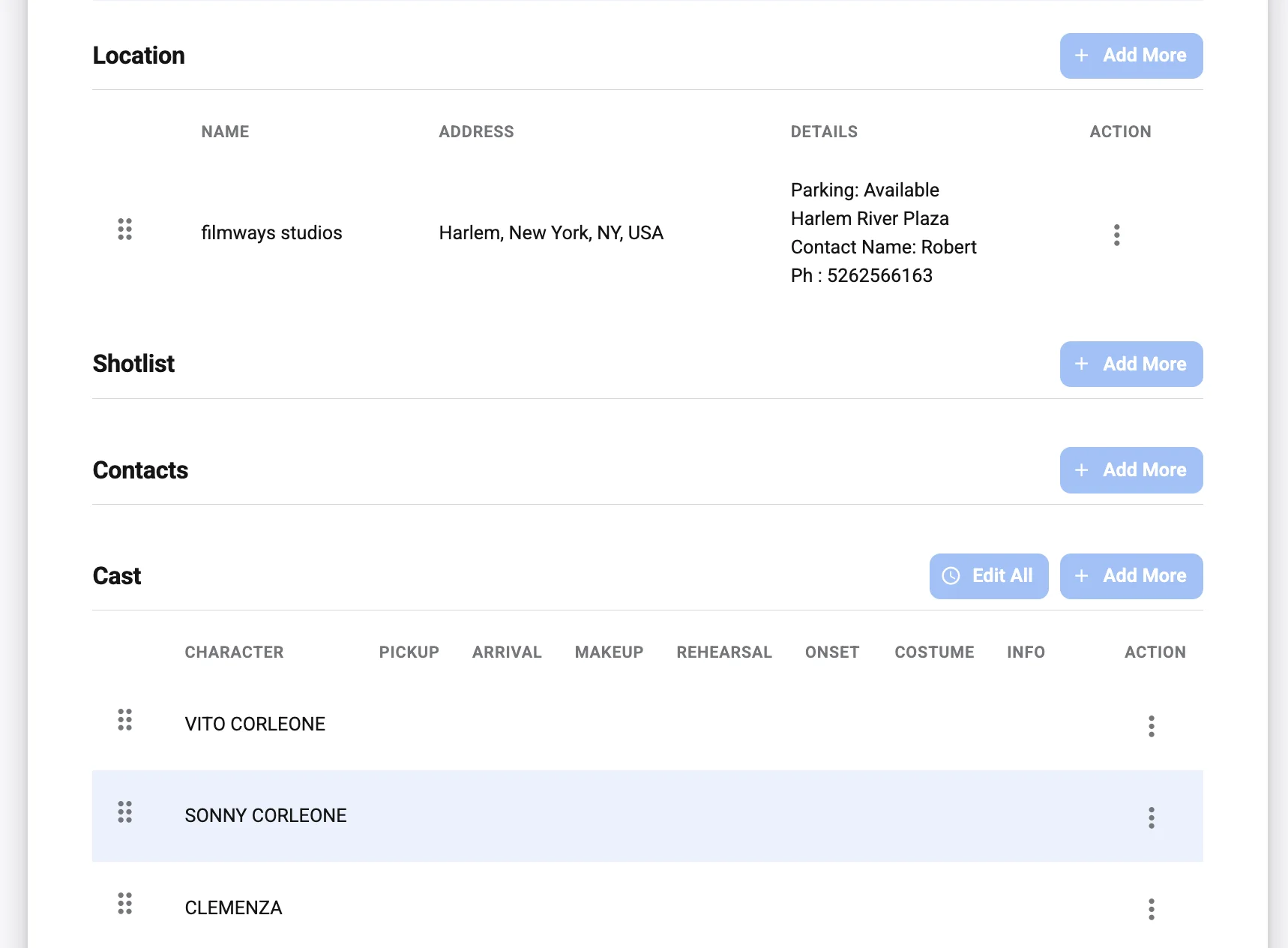
One of the strongest use cases for AI is helping gather details from existing materials. A production may already have the information it needs, but that information may live in separate places: the one-line schedule, stripboard, script breakdown, cast list, crew list, vendor notes, location agreement summary, transport grid, parking map, and daily production report.
AI can assist by identifying relevant details and presenting them in the right sections of a call sheet draft. For example, it may help extract scene numbers, set descriptions, page counts, cast IDs, company moves, location names, and department notes from structured inputs. When the source data is accurate and approved, this can dramatically reduce the amount of manual transfer work.
That does not mean every extracted detail should be accepted automatically. Production teams still need a clear review stage. The best use of AI is to create a faster starting point, not an unchecked final document.
Highlighting missing or inconsistent information
Many delays happen because the call sheet is almost complete but not quite ready. A cast member may have a call time but no transport note. A location may have a parking instruction but no map link. A scene may list practical effects but lack a safety reminder. A department may be mentioned in the schedule but missing from the contact or equipment section.
AI workflow optimization can help by scanning a draft for gaps, inconsistencies, and duplicate information. If the shoot day includes a night exterior, the system can prompt the team to confirm weather, lighting, turnaround, and meal timing details. If there is a company move, it can remind the production office to confirm travel time, destination address, loading instructions, and parking.
These prompts are valuable because call sheet mistakes are often small details with large practical consequences. A missing gate code or unclear loading zone can slow down a crew before the first shot. A mismatched call time can create confusion between cast, makeup, wardrobe, and transport. AI can help surface those risks earlier.
Formatting the document for faster review
Even after the information is collected, call sheet formatting can become a time sink. Productions often have preferred templates, network requirements, studio expectations, or internal layout standards. The document must be readable on phones, tablets, laptops, and printed copies. It must also prioritize the information crew members need quickly.
Automated production tools can help place information into a consistent structure: general call, weather, nearest hospital, key contacts, shooting schedule, cast calls, background calls, department notes, locations, maps, parking, meals, safety notes, and advance schedule. When formatting is handled reliably, the production team can focus on the content itself.
A consistent layout also improves usability. Crew members learn where to look for the details that matter to them. Over time, fewer questions come back to the production office because the document becomes easier to scan under real set conditions.
A practical AI-assisted call sheet workflow
The most effective approach is not to hand the entire process to a tool. It is to create a controlled workflow where AI assists with preparation, humans approve the details, and the final call sheet reflects production leadership’s decisions. For many teams, that workflow can look like this:
- Start with approved source materials. Use the latest shooting schedule, cast list, crew list, location notes, script breakdown, and department updates. AI is only as reliable as the information it receives, so version control matters.
- Generate a first draft. Let the system assemble a call sheet draft using the production’s preferred template and the selected shoot day’s details. This draft should be treated as a working document, not a final release.
- Run consistency checks. Review the draft for missing call times, conflicting locations, unclear scene order, incomplete safety notes, missing contacts, or department notes that do not match the schedule.
- Send for department review. Share the relevant sections with the AD team, production office, locations, transport, makeup, wardrobe, camera, grip, electric, art, sound, and any other department that needs to confirm details.
- Lock human approvals. Make sure the 1st AD, UPM, production coordinator, producer, or other designated approvers sign off according to the production’s chain of command.
- Distribute through controlled channels. Send the final call sheet through the production’s approved communication method and make the version clear. Avoid multiple conflicting PDFs, screenshots, or message threads.
- Track changes for the next day. Capture late adjustments, notes from set, and lessons learned so tomorrow’s draft starts with better data.
This workflow keeps creative and logistical authority with the production team. AI handles the repetitive assembly and review support, while experienced crew members make the decisions that require context.
Smart scheduling solutions reduce revision pressure
Call sheets are only as stable as the schedule behind them. When scheduling is handled in disconnected spreadsheets or separate message chains, the call sheet becomes the place where every conflict finally appears. That creates pressure late in the day, when there is the least time to solve it.
Smart scheduling solutions can support production teams by making schedule changes easier to see before the call sheet is built. If scenes are moved, cast availability changes, or a location window tightens, the system can help identify downstream effects. This is where ai project planning becomes especially useful: it connects the shoot day to the broader production plan.
For example, moving a scene from morning to afternoon may affect actor availability, child performer timing, background count, meal placement, company moves, or equipment prep. A human scheduler may catch these details, but an AI-assisted system can help prompt the team to check them earlier. The result is not a perfect schedule with no changes; productions always change. The result is a more visible chain of consequences.
Scheduling support for AD teams
Assistant directors are already thinking several steps ahead. They are balancing page count, company moves, performance needs, director priorities, location realities, daylight, crew capacity, and safety. AI scheduling software can support that work by organizing options and showing how a schedule adjustment may affect the rest of the day.
This can be especially helpful during prep, when a production is still exploring the most efficient order of work. AI can help compare versions, surface potential conflicts, and keep relevant details connected to each scene. The AD team still makes the final recommendation, but the process becomes less dependent on manually rebuilding the same information again and again.
Better handoffs between prep and shoot
Many call sheet problems begin before the call sheet is ever drafted. If prep documents are incomplete or inconsistent, the production office has to resolve those inconsistencies during daily paperwork. That can lead to late nights, rushed approvals, and avoidable confusion.
AI workflow optimization can help by creating cleaner handoffs between prep documents and shoot-day paperwork. Scene breakdowns can connect more clearly to cast calls. Location notes can carry into the logistics section. Department requirements can stay attached to the day they affect. When information moves forward cleanly, the call sheet becomes a polished daily plan rather than a rescue operation.
What should production teams automate first?
Production teams should automate the repetitive, rules-based parts of call sheet creation first, while keeping creative, safety, labor, and logistical judgment under human control. The best starting points are usually data entry, formatting, version comparison, missing-detail prompts, contact list updates, and schedule-to-call-sheet transfer. These tasks are high-effort, time-sensitive, and easy to review once a draft exists.
A useful way to prioritize automation is to ask which tasks slow the team down without requiring nuanced production judgment. If a coordinator spends time copying cast IDs into a template, automation can help. If a 1st AD is deciding whether a complex stunt should move earlier in the day, that is a human decision supported by data, not replaced by software.
Consider automating these call sheet tasks first:
- Template population: Fill standard sections such as production title, shoot day, crew call, weather, nearest hospital, basecamp, parking, and contact blocks.
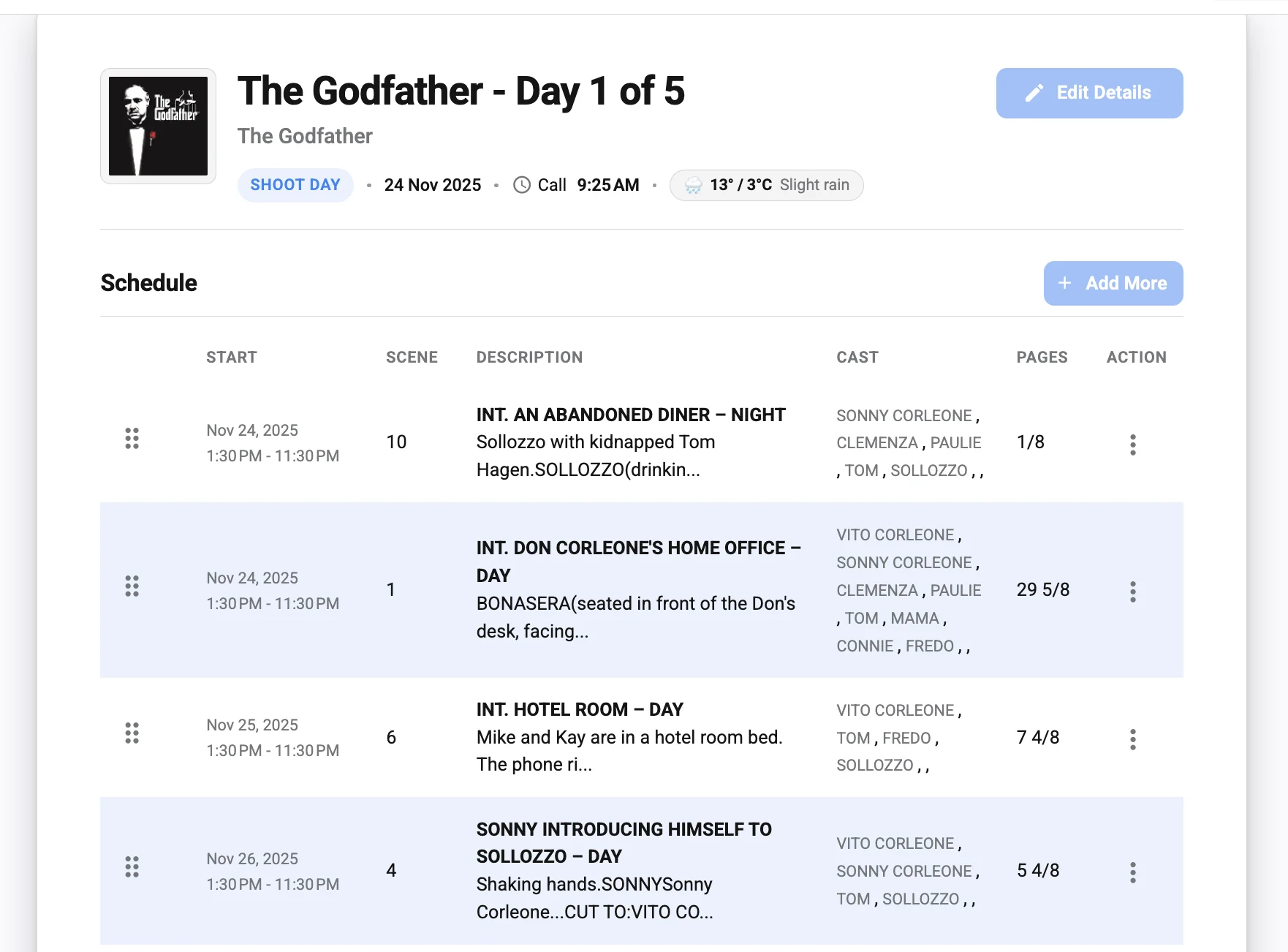
- Schedule transfer: Pull scene numbers, set names, descriptions, page counts, day or night indicators, cast IDs, and estimated order from the approved schedule.
- Cast and crew details: Insert names, roles, call times, pickup notes, fitting or glam details, and department groupings from approved lists.
- Location logistics: Add addresses, parking instructions, holding areas, basecamp notes, access requirements, security instructions, and company move details.
- Department notes: Organize notes for camera, grip, electric, sound, art, props, wardrobe, makeup, locations, transport, VFX, SFX, stunts, catering, and health and safety.
- Consistency checks: Flag missing information, conflicting call times, duplicated entries, outdated versions, incomplete addresses, or scenes that do not match the selected shoot day.
- Distribution preparation: Export a clean PDF or mobile-friendly version with visible versioning and approval status.
This staged approach helps teams build trust. Rather than overhauling the entire production workflow at once, they can start with tasks that save time immediately and are simple to validate.
The human review layer remains essential
AI can accelerate call sheet creation, but a professional production still needs human accountability. A call sheet is not just an administrative file; it guides real people through a real workday, often under complex physical, financial, and safety constraints. Incorrect information can cause delays, missed calls, compliance issues, or unnecessary stress.
Human review should be built into the process rather than treated as a final glance. The AD department needs to confirm the shooting order and timing. Production should verify logistics, contacts, meals, and transport. Locations should confirm access, parking, and neighborhood requirements. Department heads should review notes that affect their crews. Safety-related details should receive particular attention.
This is where a clear approval chain matters. If everyone can change the call sheet, version control breaks down. If no one knows who has final approval, distribution gets delayed. AI tools should support permissions, comments, approvals, and change tracking so the team can see what has been reviewed and what still needs attention.
Sensitive information requires care
Call sheets often contain personal phone numbers, pickup details, location addresses, hotel information, performer details, and other sensitive production data. Any use of AI or automated production tools should account for privacy, access control, and information security. Not every crew member needs every detail, and not every tool should receive confidential production materials.
Before using AI in the call sheet process, production leaders should decide what information can be entered into the system, who can access it, and how final documents will be distributed. For some projects, that may mean limiting sensitive details, using approved platforms only, or separating internal logistics from widely distributed documents. The faster workflow should never come at the expense of responsible data handling.
Safety notes should never become generic filler
A common risk with any template-driven process is that safety language becomes routine and easy to ignore. AI can help remind teams to include safety details, but it should not generate vague warnings that feel detached from the actual work. Safety notes should be specific to the day’s locations, scenes, weather, stunts, animals, vehicles, weapons, minors, effects, water work, heights, or other relevant conditions.
The practical standard is simple: if a crew member reads the call sheet, they should understand what deserves extra attention that day. AI can prompt the question, but the production team must provide the real answer.
AI project planning connects the call sheet to the full production
Call sheets are daily documents, but they are shaped by the full production plan. If a production is behind schedule, if a key actor has limited availability, if a location is only available for one day, or if a complex sequence requires multiple departments to prep in advance, the call sheet reflects those pressures. AI project planning can help teams see how daily decisions connect to larger production goals.
For example, an AI-assisted planning system might help organize dependencies across the schedule. A scene cannot shoot until a set is dressed, a vehicle is cleared, a prop is ready, or a performer is available. When those dependencies are visible, the call sheet can reflect the actual readiness of the day instead of simply listing scenes in a preferred order.
This matters on features, episodic work, commercials, branded content, documentaries, and smaller independent productions. The scale may change, but the need is the same: production teams need a reliable picture of what is planned, what is confirmed, and what could create delays.
Better visibility for producers and production management
Producers and production managers often need to understand the practical implications of schedule changes quickly. If a day becomes more complex, they need to know whether it affects overtime risk, transport, rentals, location costs, department staffing, or company moves. AI tools can help summarize those changes, making it easier to discuss options before the call sheet is locked.
This does not replace production judgment or budgeting expertise. It simply gives the team a clearer starting point for conversation. Instead of waiting until the call sheet draft exposes a problem, leadership can see potential pressure points earlier in the planning cycle.
Stronger communication across departments
Every department reads the call sheet through a different lens. Camera looks at equipment and scene order. Grip and electric look at location needs, power, rigging, and company moves. Sound checks environments and special recording concerns. Art, props, wardrobe, and makeup focus on continuity, character needs, and prep timing. Locations, transport, catering, and production support the movement and care of the crew.
AI workflow optimization can help by organizing department-specific notes without burying them in a crowded document. It can also help ensure that a note entered during prep does not disappear before the shoot day. When departments receive clearer, more relevant information, the call sheet becomes a stronger coordination tool.
Common call sheet bottlenecks AI can reduce
Every production has its own workflow, but certain call sheet bottlenecks appear again and again. They are not always dramatic. Often, they are small frictions that compound under time pressure.
A professional AI-assisted workflow can help reduce bottlenecks such as:
- Late schedule changes: AI can help compare the previous schedule with the current version and show which call sheet sections may need updates.
- Manual retyping: Information from approved lists and schedules can be transferred into the call sheet template with fewer copy-and-paste errors.
- Version confusion: Change tracking and approval status can make it clearer which draft is current and who has reviewed it.
- Incomplete department notes: Prompting can remind teams to confirm special gear, prep time, safety concerns, or location-specific instructions.
- Contact list errors: Centralized data can reduce outdated phone numbers, misspelled names, or inconsistent job titles.
- Location ambiguity: Structured location fields can separate basecamp, parking, holding, set, catering, and nearest hospital details.
- Distribution delays: Once approved, the final call sheet can be exported and shared more quickly through controlled channels.
Reducing these bottlenecks does not make production effortless. It makes the paperwork less fragile. That gives the team more bandwidth for the unpredictable parts of filmmaking.
Choosing AI scheduling software for production work
Not every scheduling platform is designed for production realities. A general business calendar tool may be useful for meetings, but it usually does not understand scene numbers, cast IDs, company moves, day-out-of-days, page counts, locations, split days, department pre-calls, or the approval rhythm of a shoot. Production teams should look for tools that respect the way film and media projects are actually made.
When evaluating ai scheduling software or automated production tools, focus on workflow fit before novelty. A tool with impressive features can still create friction if it requires double entry, weak permissions, or awkward exports. The best solution is the one your team can use consistently under real production pressure.
Use this checklist when comparing options:
- Production-specific fields: Can the tool handle scenes, cast IDs, locations, departments, call times, company moves, and production notes?
- Template flexibility: Can your team use a call sheet layout that matches its existing standards and approval requirements?
- Version control: Does the system clearly show the latest draft, revision history, and final approved call sheet?
- Permissions: Can sensitive details be limited to the right users or roles?
- Data import and export: Can the tool work with your current schedules, breakdowns, spreadsheets, contacts, or PDFs without creating duplicate work?
- Collaboration: Can department heads review or comment on relevant sections without overwriting the entire document?
- Mobile readability: Is the final call sheet easy to read on set from a phone?
- Reliability under deadlines: Does the system remain simple when the team is tired, the schedule changes, and the call sheet needs to go out quickly?
- Human approval controls: Can the team prevent unapproved drafts from being distributed by mistake?
A good tool should make the production office feel more organized, not more dependent on troubleshooting. If the system adds steps without reducing risk or time, it may not be the right fit.
Implementation starts with clear production habits
AI works best when the underlying production process is disciplined. If crew lists are outdated, schedule versions are unclear, and department notes arrive in scattered messages, an AI tool may simply process messy information faster. Before expecting automation to solve call sheet delays, production teams should define how information enters the workflow.
Start by identifying the source of truth for each major category. The shooting schedule should have an owner. The cast list should have an owner. Location notes, transport notes, crew contacts, and department requirements should each have a clear path into the call sheet process. Once those paths are defined, automation can support them.
It also helps to create naming conventions. A schedule dated one way in one folder and another way in a message thread can create confusion. A call sheet draft labeled “final†before approval can cause distribution mistakes. Small process habits make a major difference when the team starts using smart scheduling solutions.
Train the team around the workflow, not just the tool
Adopting AI is not only a software decision. It is a workflow decision. The team needs to know when drafts are generated, who reviews which sections, how comments are resolved, who approves the final, and where the final call sheet is distributed.
Short, practical training can be more effective than a long technical rollout. Show the AD team how schedule updates flow into the draft. Show department heads how to review their notes. Show production office staff how to check version history and export the final. The goal is to make the tool feel like part of the production rhythm.
Start with one shoot day or one unit
For productions that are new to AI-assisted workflows, a pilot approach is often safer than a full reset. Test the process on one shoot day, one block, one unit, or one type of project. Compare the experience with the previous workflow. Look for time saved, fewer missing details, cleaner approvals, or easier distribution.
A pilot also reveals practical issues. Maybe the template needs adjustment. Maybe department notes should be entered earlier. Maybe only certain users should edit call times. These lessons are easier to handle before the system becomes central to the entire production.
The best results come from structured inputs
AI tools become more useful when information is structured. A paragraph of loosely written notes may be understandable to a coordinator, but it is harder for a system to place correctly. A defined field for parking, another for basecamp, another for set address, and another for crew entrance creates cleaner output.
This is especially important for call sheets because the same type of information appears repeatedly. Every shoot day needs core logistics. Many shoot days need cast calls, department notes, weather, safety, maps, and meal information. If those details are entered in predictable places, the call sheet can be assembled more quickly and reviewed more confidently.
Structured inputs also help with future planning. If a production learns that company moves often cause delays, it can look back at how those moves were planned. If night exteriors regularly need more detailed weather notes, the workflow can be improved. AI project planning becomes stronger when the production’s own data is organized well enough to learn from.
Practical examples of AI-assisted call sheet creation
To understand how AI can help production teams create call sheets faster, it helps to picture the workflow in common production scenarios.
On a commercial shoot, the schedule may shift because a client priority changes or a location window narrows. AI can help update the scene or setup order, prompt the team to confirm talent call times, and keep agency or client arrival details aligned with the revised plan. The production team still approves the plan, but the revision work becomes less manual.
On an independent feature, the AD team may be managing limited resources across many locations. Automated production tools can help carry forward location notes, cast IDs, department requirements, and company move details so each day’s call sheet does not have to be rebuilt from scattered documents. That can be especially valuable when the same small team is handling multiple production office roles.
On episodic work, consistency matters across blocks, directors, locations, and units. AI workflow optimization can help maintain a standard call sheet structure while allowing day-specific details to change. Department heads can find information in familiar places, and production management can review changes more efficiently.
On documentary or unscripted projects, the call sheet may be more fluid, but logistics still matter. Crew calls, interview locations, travel notes, releases, gear needs, and safety details must be communicated clearly. AI can help organize changing plans into a usable daily document, even when the creative path remains flexible.
Risks to avoid when using AI for call sheets
AI can be useful, but it can also create problems if adopted carelessly. The biggest risk is false confidence. A cleanly formatted call sheet can look correct even when the underlying information is wrong. Production teams should never mistake polish for approval.
Another risk is over-automation. If a tool changes call times, department notes, or location details without the right people reviewing them, the workflow becomes dangerous. Automation should reduce manual effort, not bypass communication. Any AI-assisted process needs boundaries around what the system can suggest, what it can populate, and what requires human signoff.
Teams should also avoid tool sprawl. If scheduling, contacts, maps, department notes, and call sheet distribution all live in disconnected systems, AI may add another layer instead of solving the problem. The goal is a clearer workflow, not a more complicated one.
A responsible approach includes:
- Keeping one approved source of truth for core production data.
- Requiring human review before distribution.
- Limiting access to sensitive information.
- Making draft and final status visible.
- Training users on what the tool can and cannot do.
- Reviewing early results and adjusting the workflow.
These safeguards keep AI in the right role: a production support system, not the production decision-maker.
The future of call sheets is faster, clearer, and more connected
The call sheet will remain a central production document because crews need a shared plan. What will change is the amount of manual labor required to prepare it. As ai scheduling software, smart scheduling solutions, and automated production tools become more production-aware, teams will be able to generate stronger drafts, check details earlier, and distribute approved information with less friction.
The best future is not one where AI replaces the AD department, production coordinators, or production managers. It is one where those professionals spend less time retyping and reconciling information and more time solving the real problems that affect the shoot. Filmmaking will always require judgment, communication, and adaptability. AI simply gives production teams a better way to manage the administrative load around those responsibilities.
For teams exploring How AI Can Help Production Teams Create Call Sheets Faster, the most practical starting point is to examine the current workflow. Where does information slow down? Where do mistakes enter? Which sections take the most manual effort? Which approvals cause bottlenecks? The answers will show where AI can deliver the most value first.
Key takeaways for production teams
AI can make call sheet creation faster when it is used to support a disciplined production process. The strongest use cases are drafting, formatting, checking, updating, and organizing information that already exists in approved production materials. The weakest use case is asking AI to make production decisions without context or review.
For filmmakers, AD teams, coordinators, and production managers, the path forward is practical: clean up source data, automate repetitive work, keep humans in charge of approvals, and protect sensitive information. Start small, test the workflow, and refine it around the way the crew actually works.
A faster call sheet is valuable because it gives the whole production more clarity before the day begins. When the right information reaches the right people sooner, the set starts with fewer unanswered questions and more attention available for the work that matters most: making the day safely, efficiently, and creatively.