
Call sheets are the daily operating plan for a production, but building them by hand can drain time from work that actually needs a producer’s judgment. Automation helps production teams turn schedules, contacts, locations, and department notes into cleaner, more consistent call sheets without starting from a blank document every day. If you have ever searched for “How to Automate Call Sheet Creation for Your Next Production,†the practical answer is to standardize your information, choose the right call sheet software or workflow, and create a repeatable approval process before anything goes out to cast and crew.
Related video: Film scheduling and call sheet creation in 30 seconds
Why should production teams automate call sheets?
Production teams should automate call sheets because every shooting day depends on accurate, timely, and consistent information. A call sheet is not just a form; it is the document that tells people where to be, when to arrive, what scenes are being shot, who is needed, what to bring, and who to contact if something changes. When that document is built manually from scattered emails, text threads, spreadsheets, and outdated PDFs, small mistakes can travel fast.
Automation does not remove the need for a sharp production team. Instead, it removes repetitive formatting, copying, and cross-checking from the process so the assistant director, production coordinator, producer, or production manager can focus on decisions. You still need someone to confirm call times, review safety notes, approve the schedule, and make judgment calls. The difference is that automated call sheets help your team spend less time rebuilding the same structure and more time verifying the information inside it.
For filmmakers working on short films, commercials, branded content, music videos, documentaries, episodic work, or independent features, the benefits are practical. A reliable system can make each shooting day easier to plan, distribute, revise, and archive. It also gives your crew a more professional experience because each document looks familiar, contains the expected details, and arrives through a predictable channel.
The real problem with manual call sheet creation
Manual call sheets often begin with good intentions. Someone opens a previous file, duplicates it, changes the date, updates the scenes, adjusts the cast list, checks weather, adds parking notes, and exports a PDF. That may work for a very small shoot, but the process becomes fragile as soon as the production adds more crew, locations, company moves, background performers, stunts, vehicles, minors, animals, specialty equipment, or overnight changes.
The most common issue is not that the template is bad. It is that the information feeding the template lives in too many places. The schedule may be in one file, the crew list in another, location details in an email, parking instructions in a text message, and safety notes in a separate document. Each time someone creates call sheets manually, they must collect those details again and hope nothing has changed since the last version.
Manual production paperwork also creates version-control problems. A coordinator may send a draft to the producer, the assistant director may make changes, a department head may request an update, and someone else may still be looking at an earlier export. By the time the final goes out, it can be difficult to know which notes made it into the document and which were missed.
What information should be automated first?
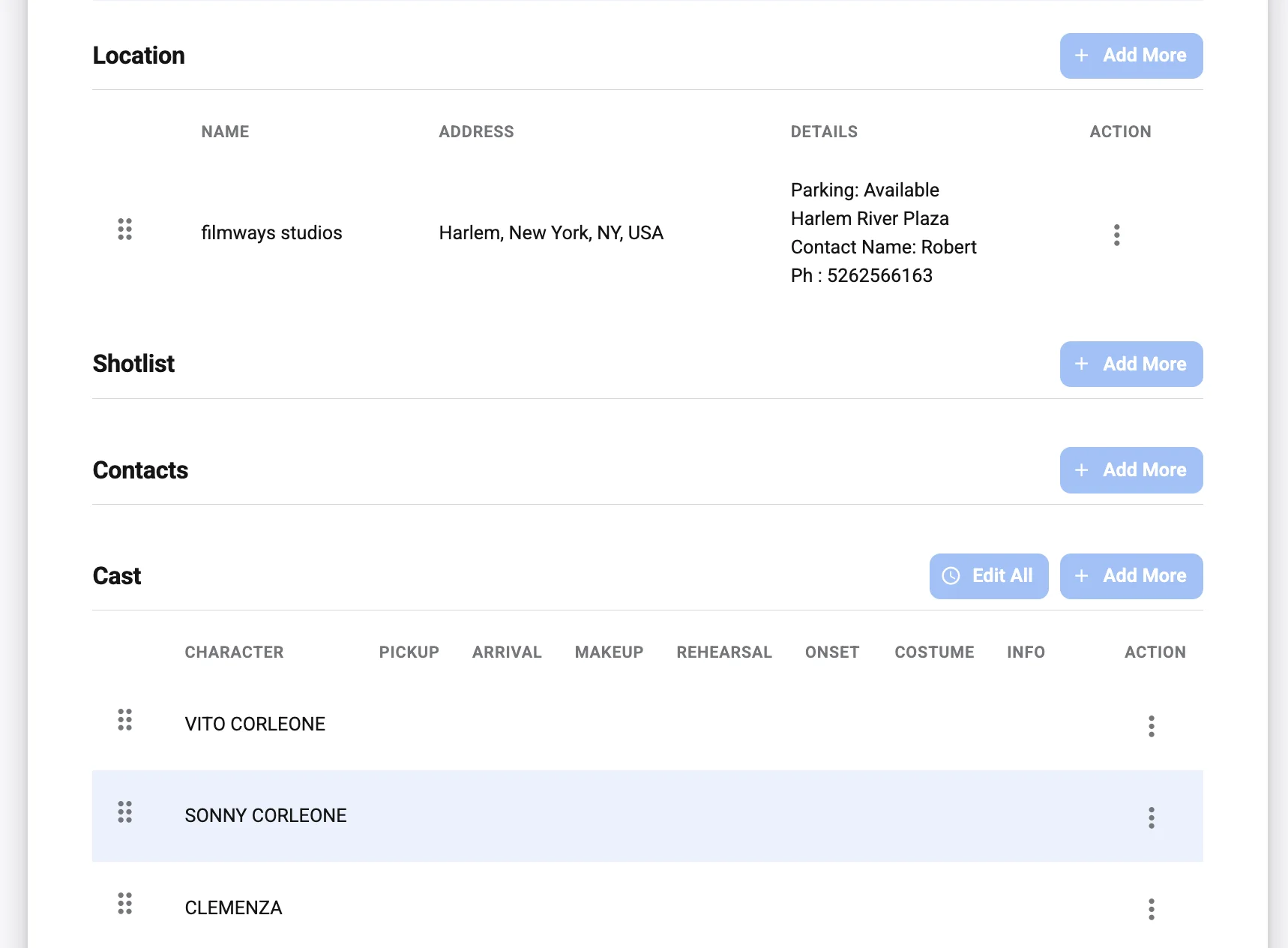
The best information to automate first is the information that repeats, comes from a reliable source, or needs to appear in the same place every time. Start with crew contacts, cast details, location addresses, department headers, production company information, emergency contacts, schedule blocks, and distribution lists. These fields are ideal because they are easy to standardize and costly to retype incorrectly.
A practical automation workflow begins with separating fixed information from day-specific information. Fixed information includes the production title, core team, company contacts, insurance or emergency details where applicable, department structure, and frequently used locations. Day-specific information includes call times, scenes, cast needed, weather, meal timing, parking notes, company moves, special equipment, and safety considerations.
Once you understand that difference, you can build a system that does not ask your team to recreate the entire call sheet from scratch. Instead, the team updates the variables for the next shoot day, reviews the output, and distributes the approved version.
Information that usually belongs in your core database
Your core production data should be clean, consistent, and easy to access. Whether it lives in dedicated call sheet software, a production management platform, or a well-managed spreadsheet, it should serve as the trusted source for repeatable details.
Include fields such as:
- Production details: project name, production company, episode or shoot day, key contacts, and general production notes.
- Crew directory: names, roles, departments, phone numbers, emails, and any approved communication preferences.
- Cast directory: performer names, character names, contact details, pickup notes, fitting or makeup needs, and representative contacts when relevant.
- Locations: location names, full addresses, maps or access notes, parking instructions, holding areas, restrooms, basecamp, and load-in details.
- Emergency and safety contacts: nearest emergency information, on-set safety contacts, production office contacts, and any production-approved emergency procedures.
- Recurring vendors or resources: catering, transport, equipment vendors, studio contacts, security, medics, and location representatives.
These details are not always glamorous, but they are the foundation of automated call sheets. When the source information is organized, the final document becomes easier to generate and easier to trust.
Information that still needs human review
Automation can prepare the document, but production leadership should still review the details that affect safety, timing, and logistics. Call times need context. A department may need an earlier pre-call because of a lighting setup, a makeup effect, a vehicle rig, a company move, or a specialty prop. A location note may seem minor until it affects truck parking or crew access.
The most important human-reviewed fields often include:
- Final cast and crew call times
- Scene order and estimated schedule
- Meal timing and turnaround considerations
- Safety notes, stunts, intimacy, weapons, vehicles, animals, water work, weather exposure, or special effects
- Location access, parking, holding, and load-in instructions
- Department-specific pre-calls
- Transportation and shuttle details
- Late changes from the director, producer, location manager, or assistant director
Automation should make these reviews easier, not invisible. A strong workflow highlights what changed, routes the draft to the right people, and prevents distribution until the final version is approved.
Choosing between call sheet templates, a call sheet generator, and full call sheet software
Filmmakers often use the terms loosely, but there is a useful difference between call sheet templates, a call sheet generator, and call sheet software. Templates give you structure, generators help you produce documents faster, and software usually manages data, approvals, distribution, and sometimes tracking in one workflow. The right choice depends on the scale of your production, the number of revisions you expect, and how many people need access.
A small one-day shoot may only need a polished template and a disciplined coordinator. A multi-day commercial, short film, or independent feature may benefit from a call sheet generator that pulls from a crew list and schedule. A larger production with frequent changes may need dedicated call sheet software so the team can centralize contacts, create call sheets, manage versions, send updates, and keep records.
| Option | Best for | Strengths | Watchouts |
|---|---|---|---|
| Call sheet templates | Very small shoots, students, low-complexity days, one-off projects | Easy to start, inexpensive, flexible, familiar | Manual entry, version issues, more risk of missed updates |
| Call sheet generator | Small to mid-size teams that want faster document creation | Speeds up formatting, can reuse data, often easier than building from scratch | Quality depends on input data and review process |
| Call sheet software | Productions with multiple shoot days, larger crews, more approvals, or frequent revisions | Centralizes information, supports repeatable workflows, can improve distribution and version control | Requires setup, team adoption, and clear permissions |
The key is not to choose the most complex tool by default. Choose the workflow that matches the pressure on your production. If the production has only ten people and one location, a clean template may be enough. If the production has daily revisions, multiple departments, background performers, and changing logistics, a more automated system can save your team from unnecessary friction.
Building a reliable automated call sheet workflow
Automation works best when it follows the way production teams already make decisions. You do not want a rigid system that forces the assistant director or production office to fight the tool. You want a workflow that reflects the normal path from schedule planning to draft review to final distribution.
A strong automated workflow usually includes five stages: collect, structure, generate, review, and distribute. Each stage should have a clear owner. If no one owns the crew list, the data gets stale. If no one owns approvals, drafts linger. If no one controls final distribution, multiple versions can circulate.
1. Collect your production information in one place
Before you can create call sheets automatically, you need a central source of truth. That source may be a production management platform, call sheet software, or a carefully maintained spreadsheet. What matters is that your team agrees where the current information lives and who is responsible for updating it.
Start with the details that cause the most retyping: names, roles, phone numbers, emails, cast IDs, character names, department groupings, location addresses, and recurring notes. Then add scheduling details as they become available. Keep old files for reference, but do not let them become unofficial sources.
A practical rule is simple: if a detail will appear on more than one call sheet, it belongs in the central system. That keeps each new call sheet from becoming a fresh copy-and-paste exercise.
2. Standardize fields before you automate
Automation is only as clean as the data behind it. If one crew member is listed as “Director of Photography,†another as “DP,†and another as “Cinematographer,†the output may become inconsistent. If phone numbers are formatted differently or departments are named in multiple ways, the call sheet may look less professional and become harder to scan quickly.
Standardization does not need to be complicated. Decide how names, roles, phone numbers, addresses, and department labels should appear. Use the same format across your system. If you work with different types of productions, create a few standard variations rather than reinventing the structure each time.
This is where good call sheet templates remain valuable, even when you use automation. The template defines what the finished document should look like. The automation simply fills it with the right information.
3. Connect the schedule to the document
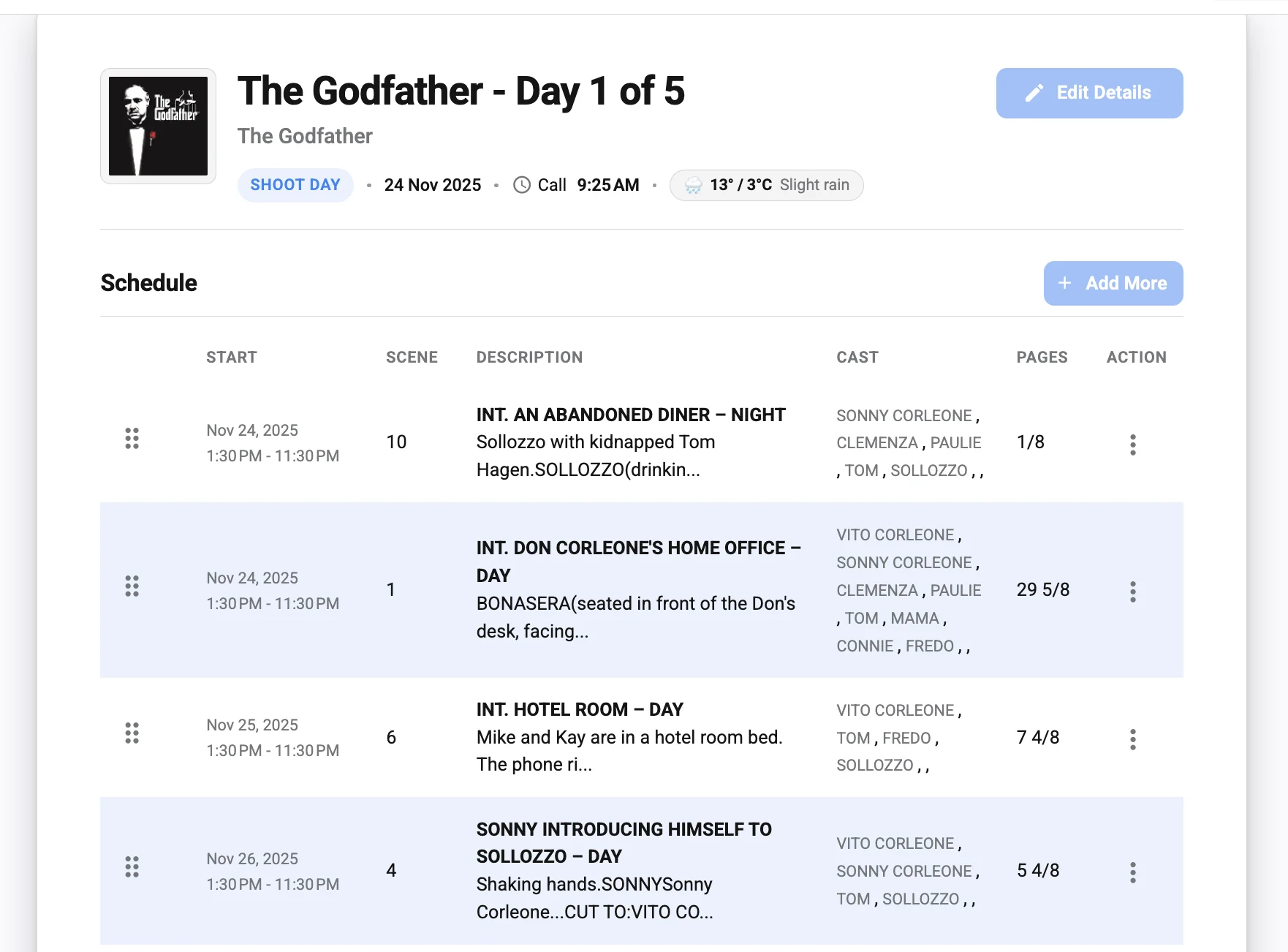
The daily shooting schedule is the heart of the call sheet. To automate it well, your schedule information needs to be structured enough to flow into the document. That means scenes, descriptions, locations, cast needs, page counts or estimated work, and timing notes should be entered in a consistent way.
You do not need to overcomplicate this step. The goal is to avoid rewriting the schedule manually for every call sheet. If your scheduling tool exports clean information, use that. If you are working from a spreadsheet, keep the columns consistent. If you are using call sheet software, make sure the schedule and contact data are linked correctly before generating the draft.
The schedule should still be reviewed by the assistant director or the person responsible for the day’s plan. Automation can place the information, but it cannot understand every creative or logistical priority unless the team enters and reviews it carefully.
4. Generate a draft, not a final
One of the biggest mistakes in automation is treating the first generated document as final. A call sheet generator can quickly assemble the draft, but the draft still needs production review. Think of automation as the first pass that eliminates formatting labor, not as the final authority.
Your review should include a line-by-line check of call times, scene details, cast needs, location instructions, contacts, safety notes, weather references if used, and any department-specific requirements. If the production has a formal approval chain, route the draft to the assistant director, producer, production manager, or other relevant decision-maker before it is released.
This draft-first mindset keeps automation safe. It gives the team speed without giving up control.
5. Distribute the approved version consistently
Distribution is where many otherwise organized workflows become messy. If one person sends a PDF by email, another posts an update in a group chat, and someone else forwards an old version, the crew may not know what is current. Automated call sheets are most useful when the distribution method is consistent and the final version is clearly marked.
Use one primary channel whenever possible. This may be email, a production platform, a secure link, or another approved communication system. Make the final call sheet easy to access, and make revisions obvious. If a revised call sheet goes out, label it clearly and communicate what changed.
For sensitive productions, be careful about who receives which information. Not every detail belongs in every person’s inbox. Your workflow should respect privacy, security, and production-specific access rules.
A practical checklist for automated call sheets
Before you rely on automation during production, test your workflow with a realistic shoot day. Use an actual crew list, real locations, a sample schedule, and the kind of notes your team normally handles. A test will reveal missing fields, confusing labels, formatting problems, and approval gaps before the pressure of production begins.
Use this checklist before your next shoot:
- Confirm the source of truth. Decide where contact lists, location data, schedule information, and production notes will live.
- Clean the contact database. Remove duplicates, update roles, verify spelling, and make sure departments are grouped logically.
- Review the template structure. Confirm that the layout includes the sections your production needs without cluttering the page.
- Map fields correctly. Make sure names, roles, call times, locations, and scenes appear in the right places when generated.
- Set permissions. Decide who can edit data, who can generate drafts, who can approve final documents, and who can distribute them.
- Create a revision process. Establish how changes will be labeled, approved, and communicated after the first version goes out.
- Test on mobile. Many crew members read call sheets on phones, so the document should be legible on smaller screens.
- Archive final versions. Save the final call sheet for each shoot day in a consistent location for records and wrap paperwork.
- Protect private information. Only include contact details, addresses, or sensitive notes that are necessary and approved for distribution.
- Build in review time. Do not schedule automation so tightly that no one has time to catch mistakes.
This checklist may feel basic, but it protects the production from the most common failure: automating a messy process. Clean inputs, clear ownership, and disciplined review are what make automated call sheets dependable.
How to create call sheets that crew members actually use
To create call sheets that people use, design them for quick decisions under real production conditions. Crew members may read the document late at night, early in the morning, in a parking lot, in a van, or between setup changes. The information needs to be organized, scannable, and specific enough to prevent unnecessary follow-up messages.
A good call sheet answers the immediate questions first: when do I report, where do I go, who do I contact, what scenes are being shot, and what should I know before I arrive? Automation helps by keeping these answers in the same place each time. Familiar structure reduces the amount of hunting a crew member has to do.
Keep the top section clear
The top of the call sheet should communicate the day’s essentials quickly. Include the production name, shoot day or date, general crew call, primary location, key contacts, and any urgent notes that affect arrival. Avoid overloading the top with long paragraphs unless the note is truly critical.
If the day includes a company move, unusual parking, security gate, shuttle, weather concern, or safety issue, make that detail easy to notice. Automation can help by using dedicated fields for critical notes rather than burying them in a general text block.
Make department details easy to scan
Different departments use the call sheet differently. Camera may look for pre-call and equipment notes. Wardrobe may check cast timing. Makeup may need staggered arrivals. Locations may need company moves and access instructions. Transportation may need pickup times and parking details.
A strong layout groups information so each department can find what it needs quickly. That does not mean creating a long, cluttered document for every possible note. It means placing the most relevant information in predictable sections and avoiding vague instructions.
Use plain language for logistics
Call sheets are working documents, not creative essays. Use clear language for parking, entrances, holding, basecamp, meals, and safety notes. If a location is difficult to access, explain the route in practical terms. If crew must not park in a certain area, say so directly.
Automation can reproduce location notes accurately, but those notes still need to be written clearly. A confusing note repeated automatically is still confusing. Review recurring location instructions after each shoot day and improve them if crew members ask the same questions repeatedly.
Common mistakes when automating call sheets
The most common automation mistakes come from moving too quickly. Production teams are busy, and it is tempting to set up a tool, import a crew list, and assume the process is solved. In reality, automation needs a little preparation to become reliable.
Avoid these mistakes:
- Using old templates without cleaning them. A template copied from a previous production may contain irrelevant sections, outdated contacts, or formatting that no longer fits your workflow.
- Importing messy data. Duplicate crew members, inconsistent job titles, missing phone numbers, and old email addresses can create confusion in the final document.
- Skipping approval steps. Automated drafts should still be reviewed by the people responsible for schedule, safety, and logistics.
- Sending too many versions. If revisions are frequent, crew members need clear version labels and a single place to find the latest document.
- Overloading the call sheet. Automation can make it easy to add more information than the crew needs. Include what is useful, not everything available.
- Ignoring mobile readability. Dense layouts, tiny tables, and crowded text can be frustrating when viewed on a phone.
- Failing to protect sensitive details. Contact information, private addresses, talent details, or security notes should be handled with care.
- Not training the team. Even a simple system needs clear expectations for who updates information, who approves it, and who sends it.
The fix is usually not complicated. Slow down during setup, test the workflow, and document the process so the team does not have to guess during production.
Automation improves collaboration, not just formatting
The biggest advantage of automated call sheets is not simply that they look cleaner. It is that they create a shared workflow around daily production information. When everyone knows where data lives, how drafts are generated, and who approves final versions, the production office becomes more coordinated.
This matters because call sheets sit at the intersection of many departments. A location change affects transportation, camera, lighting, catering, cast, background, security, and more. A revised call time may affect hair and makeup, wardrobe, pickups, and meal planning. If each change must be manually copied into several places, the risk of a missed update grows.
With a structured system, updates can be handled more deliberately. The team can change the source data, generate a revised draft, review the affected sections, and distribute a clear update. That process is still human-led, but it is less dependent on memory and manual retyping.
When a simple template is still enough
Not every production needs advanced automation. A small documentary interview, a student project, a single-location short, or a tiny branded shoot may not justify a full software setup. In those cases, well-designed call sheet templates can be the most practical option.
A template is enough when the crew is small, the schedule is simple, the shoot has few moving parts, and one person can confidently manage the document. The template should still be clean, organized, and reviewed carefully. It should include the essential details without pretending to be a large-scale production document.
However, even template-based workflows can borrow automation principles. Keep a reusable contact list. Maintain a standard location notes document. Use consistent file names. Create a simple approval process. These habits make your call sheets more professional without requiring a complex system.
When to move to a call sheet generator or software
You should consider a call sheet generator or dedicated call sheet software when manual work starts creating delays, confusion, or avoidable errors. If your team is copying the same information into new files every night, sending multiple corrected PDFs, or chasing contact details across messages, the workflow is ready for improvement.
A generator may be the right middle step if you want faster creation but do not need a full production management system. It can help you create call sheets from structured information while keeping the process lightweight. This is often useful for small production companies, freelance producers, or teams that handle repeat shoots with similar structures.
Full call sheet software becomes more attractive when you need centralized data, approval controls, distribution support, team access, and a consistent archive. It is especially useful when several people contribute to the call sheet or when the production has many shoot days. The tool should reduce coordination friction, not add another layer of busywork.
A sample automation workflow for your next production
Here is a practical workflow you can adapt for a small to mid-size production. It is intentionally straightforward so the team can actually use it under pressure.
Pre-production setup
Create a central contact list for cast, crew, vendors, and key production contacts. Standardize department names, role names, phone formatting, and email formatting. Build or choose a call sheet template that reflects the way your production works, including sections for schedule, cast, locations, parking, meals, safety notes, and department-specific information.
Next, enter your confirmed locations with complete access details. Add recurring notes such as parking restrictions, load-in paths, holding areas, production office contacts, and site rules. If you plan to use call sheet software, import the data and test how it appears in a generated document.
Before each shoot day
Update the daily schedule with scenes, locations, cast, timing notes, and any expected company moves. Add department pre-calls and special requirements. Confirm location notes, meal plans, weather-related considerations if applicable, transportation details, and safety notes.
Generate the draft call sheet from the system. Review it against the latest schedule and production notes. Make sure the document reflects the actual plan, not an earlier version of the plan.
Approval and distribution
Send the draft to the appropriate reviewer or reviewers. This may include the assistant director, producer, production manager, line producer, location manager, or department leads depending on the production. Collect changes in one place so the final document does not become a patchwork of conflicting notes.
Once approved, export or publish the final call sheet. Send it through the agreed distribution channel and label the version clearly. If changes occur later, generate a revised version and make the revision obvious.
After the shoot day
Archive the final call sheet with the production records. Note any recurring confusion from the day. If crew members struggled with parking instructions, revise the location note. If a department consistently needs a field that is missing, add it to the template. Automation should improve over the course of the production.
Practical tips for smoother adoption
A new workflow only works if the production team trusts it. If the system feels confusing, incomplete, or slower than the old method, people will create workarounds. The goal is to introduce automation in a way that supports the team’s habits while improving consistency.
Start with a pilot. Use the automated workflow for a test day or a low-risk shoot before relying on it for a complicated production day. Ask the people who read and approve call sheets what was clear, what was missing, and what took too long.
Keep the process documented. A short internal guide can explain where data lives, how to update it, how to generate a draft, who approves it, and how final versions are sent. This is especially helpful when a coordinator, assistant, or department representative steps in during a busy week.
Do not automate every detail immediately. Begin with the highest-value fields: contacts, locations, schedule blocks, and recurring notes. Once those are stable, add more advanced fields or distribution features. A gradual rollout is often more reliable than a complicated system that no one has time to maintain.
The human side of automated call sheets
Automated call sheets can make a production feel more organized, but they should never make communication feel impersonal. A call sheet is still a promise from the production team to the crew: this is the plan, this is where you need to be, and this is what you need to know to work safely and efficiently.
That means tone matters. Notes should be professional, direct, and respectful. If there is a difficult parking situation, explain it clearly. If the day involves sensitive material or special safety requirements, make the expectations visible. If a department has an unusual call time, make sure the reason is reflected where needed.
Good automation supports that communication by reducing distractions. When your team is not fighting formatting, searching for phone numbers, or rebuilding tables late at night, they have more attention available for the details that shape the day.
Final takeaways for filmmakers and production teams
Automated call sheets are not about replacing production judgment. They are about giving filmmakers and production teams a cleaner system for turning reliable information into a useful daily plan. Whether you use call sheet templates, a call sheet generator, or full call sheet software, the goal is the same: create call sheets that are accurate, readable, timely, and easy to revise.
Start by organizing your data, standardizing your fields, and choosing a workflow that matches your production size. Treat every generated document as a draft until it has been reviewed by the right people. Keep distribution consistent, revisions clear, and sensitive information protected.
If your current process depends on copying details from old files and hoping nothing gets missed, it may be time to build a better system. Automated call sheets can make the next production day smoother before anyone even arrives on set.