
A production call sheet is the daily operating document that tells cast, crew, vendors, and departments where to be, when to report, what scenes are scheduled, and what conditions affect the workday. A free call sheet generator helps production teams create that document faster, with fewer formatting errors and a more consistent professional standard. Whether you are organizing a short film, commercial, music video, branded content shoot, or independent feature, the right workflow turns a call sheet from a routine form into a reliable command center for the day.
Related video: How to generate an industry-standard call sheet in Studiovity
If your search began with “Free Call Sheet Generator: How to Create Professional Production Call Sheets,†the practical goal is clear: you need a simple way to build, review, and distribute accurate production information without rebuilding the same document from the beginning each time. This guide explains what belongs on a film call sheet, how to use a generator or call sheet template effectively, and what to check before sending the final version to the production team.
What should a professional production call sheet include?
A professional production call sheet should include the production title, shoot date, general crew call, location details, weather, emergency information, schedule, scene breakdowns, cast call times, department notes, parking instructions, nearest hospital, and key contacts. The document should be clear enough that a crew member can open it, understand the day’s priorities, and arrive fully prepared without needing several follow-up messages.
For filmmakers and production teams, the value of a call sheet is not only administrative. It protects the schedule, supports safety, reduces uncertainty, and creates a shared reference point across departments. A strong movie call sheet helps the assistant director team coordinate movement, gives department heads the information they need to prepare equipment and personnel, and allows cast members to understand their reporting obligations with precision.
A free call sheet generator can simplify this process by prompting users to add the correct information in the correct order. Instead of relying on memory, the tool guides the production office or assistant director team through each required field. That structure is especially useful when time is limited, locations are changing, or multiple versions of the schedule are being reviewed.
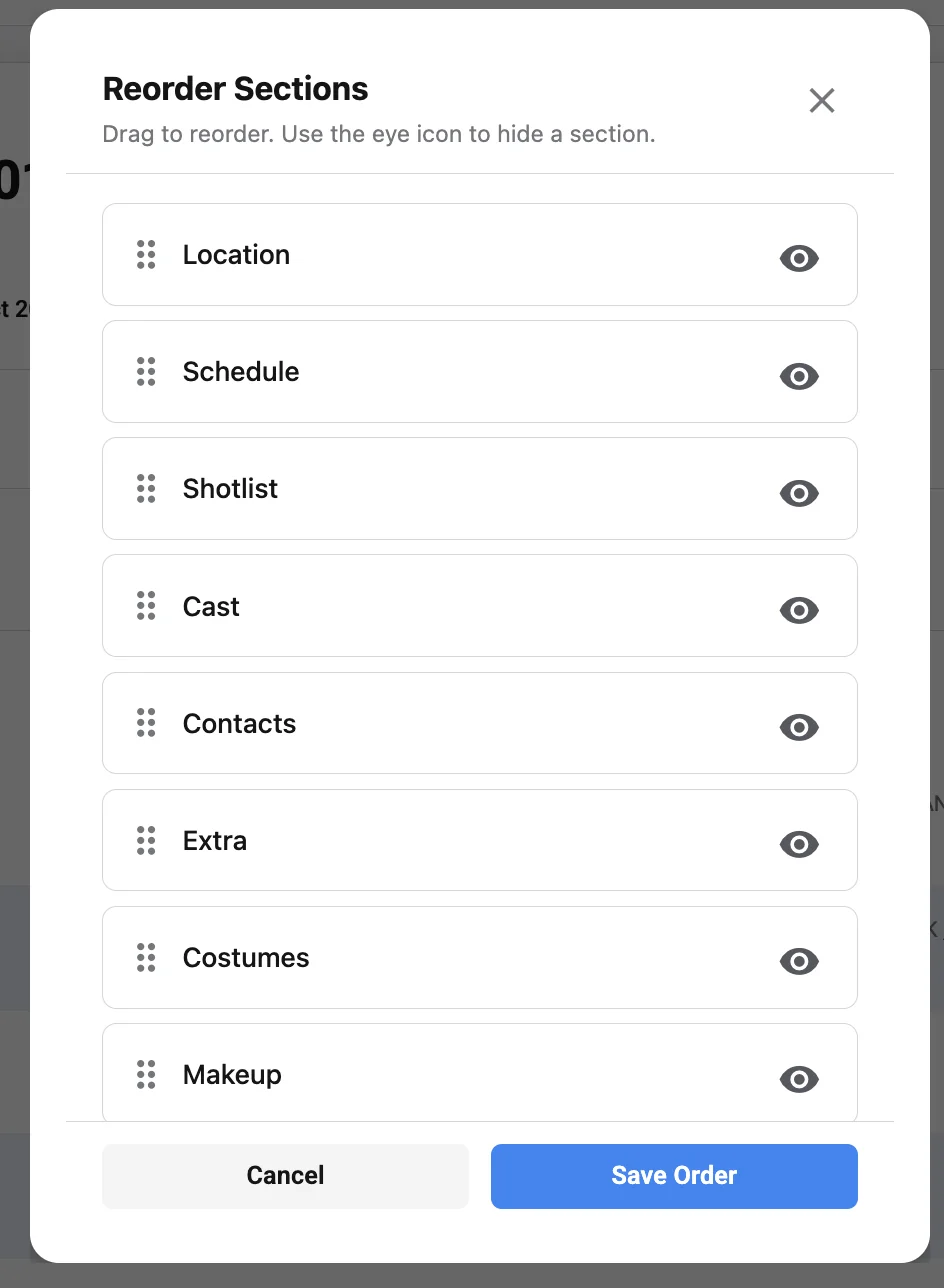
The role of the call sheet in production planning
A call sheet is issued for a specific shoot day and is usually distributed before the workday begins, often after the shooting schedule, location logistics, and cast availability have been confirmed. It translates planning documents into daily execution. While a stripboard, one-line schedule, or production schedule may show the larger plan, the production call sheet tells people exactly what is happening now.
The document also creates alignment between creative and operational priorities. A director may be focused on performance and coverage, while the cinematographer is considering light, camera movement, and time of day. Production management is monitoring company moves, meal timing, turnaround, transportation, and budget pressure. The call sheet brings those concerns into one structured document so the day can proceed with discipline.
In professional environments, incomplete call sheets can create avoidable delays. If parking details are missing, crew members may arrive late. If hospital information is absent, safety response becomes less efficient. If scene numbers or cast IDs are inaccurate, department preparation may be compromised. For that reason, the call sheet should be treated as an operational document rather than a simple schedule.
Core sections of a film call sheet
A well-built film call sheet follows a familiar structure so crew members can find information quickly. The exact layout may differ from one production company to another, but the essential categories remain consistent. A call sheet app or generator should make these sections easy to create, edit, and review.
Production and shoot day details
The top section should identify the production clearly. Include the project title, production company or responsible entity if applicable, shoot date, day number, and general crew call. If the project has multiple units, clarify whether the call sheet applies to main unit, second unit, splinter unit, stills, or another team.
This section should also include sunrise and sunset times when relevant, especially for exterior scenes, day-for-night work, golden-hour photography, or time-sensitive location access. Even on smaller productions, these details help everyone understand the practical limits of the day.
Key contacts and emergency information
A professional call sheet should provide key phone numbers for the production office, producer, production manager, first assistant director, location manager, transportation contact, and other essential personnel. It should also include emergency contacts and the nearest hospital or emergency medical facility.
This information must be easy to locate. In a stressful moment, no one should need to search through messages or separate documents to find medical or logistical contacts. When using call sheet software, ensure the emergency details appear prominently and are not buried in a secondary note field.
Locations, parking, and transportation
Location information should include the full address, parking instructions, base camp if applicable, holding areas, wardrobe and makeup locations, and any restrictions that affect arrival. If shuttle transportation is required, include pickup points and timing. If the location has multiple entrances, specify the correct one.
Production teams should avoid assuming that a single address is enough. Large facilities, campuses, public parks, studios, and remote locations often require additional instructions. Clear directions reduce late arrivals and minimize unnecessary calls to production staff at the beginning of the day.
Schedule and scene breakdown
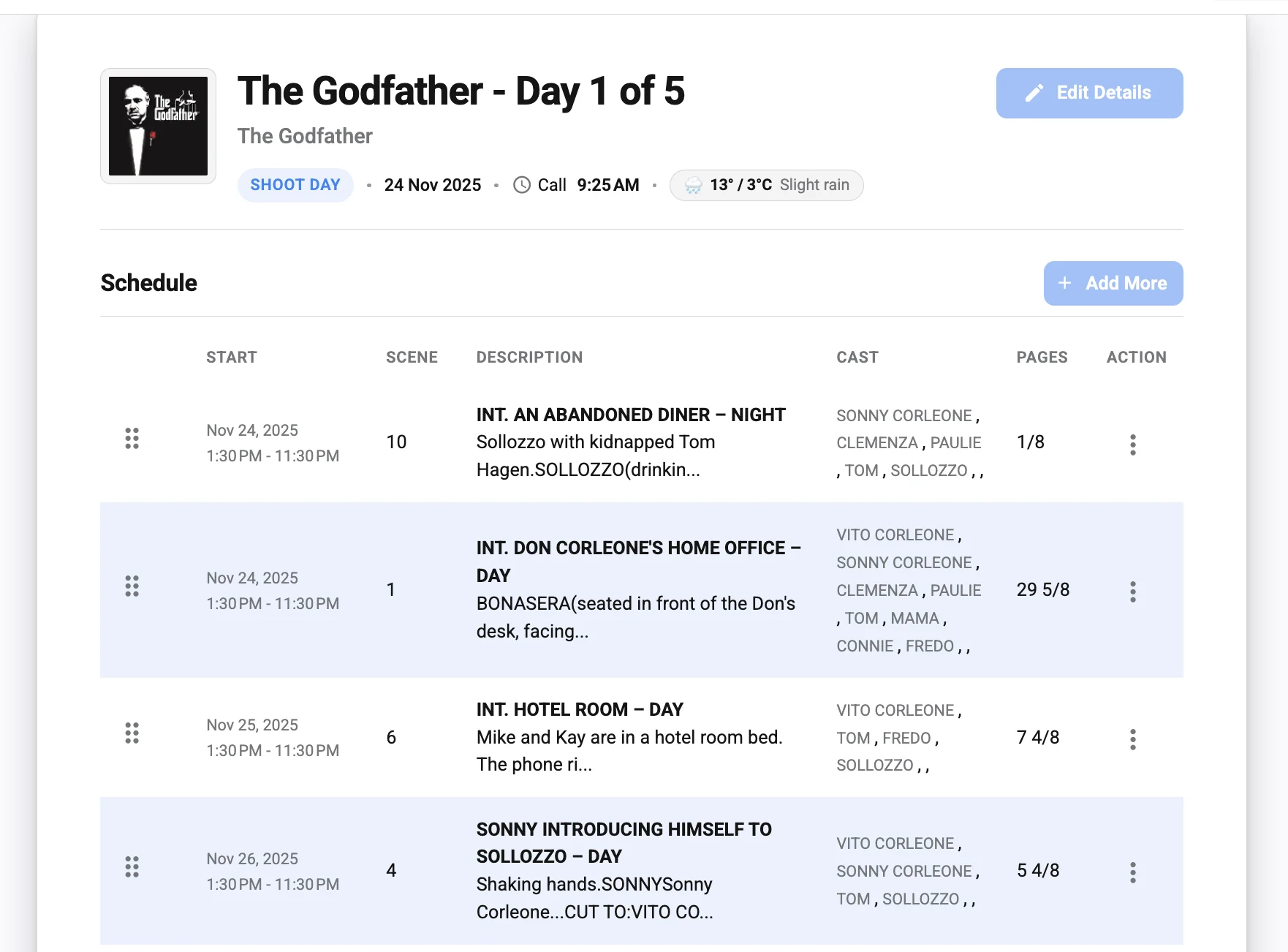
The schedule section should list scenes or setups planned for the day. Include scene numbers, script pages or estimated page count where applicable, set or location names, day or night designation, cast involved, and a concise description. The level of detail should be sufficient for departments to understand what they are preparing without exposing unnecessary confidential story information.
This is where a strong call sheet template becomes especially useful. A consistent scene table helps departments scan the day quickly. Camera, grip and electric, art, props, wardrobe, hair and makeup, sound, special effects, and production can all use the same reference point when preparing their work.
Cast, background, and department calls
Cast call times should be precise and separated by need. A performer may have a pickup time, hair and makeup call, wardrobe call, set call, and estimated wrap. Background performers may require separate holding instructions, check-in locations, and wardrobe notes.
Department call times should also reflect the reality of the workday. Pre-call departments may need earlier access for lighting, dressing, rigging, catering, or transportation. A movie call sheet that lists only one general time may be insufficient for complex shoot days.
Weather, safety, and special notes
Weather affects wardrobe, equipment protection, lighting, transportation, and safety. Include forecast information, temperature range, precipitation risk, wind considerations, and any environmental conditions that may affect the day. For exterior shoots, this section can be critical.
Safety notes should be specific and relevant. If the day includes stunts, animals, weapons, water work, driving scenes, intimacy work, minors, drones, smoke, loud effects, hazardous terrain, or public interaction, the call sheet should identify the required precautions and responsible department contacts. A generator can provide fields for these notes, but production leadership must still ensure the content is accurate and complete.
Why use a free call sheet generator instead of starting from scratch?
A free call sheet generator reduces repetitive formatting work and helps production teams create a more complete document by following a structured workflow. Instead of manually rebuilding tables, headers, contact sections, and schedule blocks, users can enter the day’s details into prepared fields and generate a polished call sheet faster.
The advantage is not only speed. A reliable generator encourages consistency across shoot days. When each day’s call sheet follows the same format, crew members learn where to find the information they need. This improves readability and helps departments compare one day to the next without confusion.
A generator can also reduce common omissions. When a blank document is used, it is easy to forget a weather field, nearest hospital, parking note, or department-specific call. A guided tool makes those omissions more visible during preparation. It does not replace professional judgment, but it supports a more disciplined review process.
For emerging filmmakers, a free tool can also provide a practical introduction to professional production documentation. Students, independent producers, and small commercial teams may not need a full enterprise system immediately. A free call sheet generator can bridge the gap between informal planning and production-ready documentation.
Benefits for different types of production teams
Different productions use call sheets in different ways, but almost every organized shoot benefits from a standard document. The scale may change, yet the need for clear instructions remains the same.
- Short films: A generator helps small teams look organized and communicate efficiently, especially when crew members are working across multiple roles.
- Independent features: Consistent call sheets support continuity over a longer schedule, where many shoot days, cast combinations, and locations must be tracked.
- Commercials and branded content: Client-facing productions benefit from polished documentation and clear location, timing, and contact information.
- Music videos: Fast-moving schedules, multiple setups, playback requirements, talent timing, and styling needs can be organized more clearly in a structured call sheet.
- Documentary shoots: Even when the plan is flexible, call sheets can clarify crew calls, interview locations, travel details, and key contacts.
- Student films: A template-based workflow teaches production discipline and helps new filmmakers understand standard industry expectations.
A call sheet does not need to be unnecessarily complex. The best version is the one that gives the right people the right information at the right time. A free tool is useful when it makes that process easier without adding administrative friction.
Free generator, template, app, or software: choosing the right workflow
The terms call sheet generator, call sheet template, call sheet app, and call sheet software are sometimes used interchangeably, but they usually describe different levels of functionality. Choosing the right option depends on the scale of the production, the number of collaborators, and how often information changes.
| Option | Best for | Main advantage | Possible limitation |
|---|---|---|---|
| Free call sheet generator | Small to mid-size shoots that need a fast document | Guided fields and quick formatting | May offer fewer advanced collaboration features |
| Call sheet template | Teams comfortable editing documents manually | Flexible and easy to customize | More risk of formatting errors or missing information |
| Call sheet app | Productions that need mobile access and faster updates | Convenient review, sharing, and on-set access | Requires team adoption and device access |
| Call sheet software | Larger or recurring productions with complex needs | More robust production management features | May require setup time, training, or subscription costs |
A template can work well when the production is simple and the person preparing the sheet understands the required sections. However, templates can become inefficient if every revision requires manual formatting. A generator improves the process by standardizing layout and prompting for essential information.
A call sheet app can be useful when team members need to access the document on mobile devices, receive updates, or review details while moving between locations. More advanced call sheet software may include contact management, schedule imports, approval workflows, distribution tracking, and integration with other production tools. Those features can be valuable, but they are not always necessary for smaller projects.
The best approach is the one that matches the production’s complexity. A two-day short film may only need a clean generator and careful review. A multi-week feature with multiple locations, background performers, transportation logistics, and frequent revisions may require more comprehensive software.
How do you create a movie call sheet step by step?
To create a movie call sheet, start with confirmed production details, build the schedule around scenes and locations, add cast and department call times, verify logistics and safety information, review the document with key department heads, and distribute the final version clearly. The process should be methodical because every inaccurate field can create confusion on set.
1. Confirm the production day information
Begin with the basic identifiers: production title, shoot date, day number, unit, and general crew call. Confirm whether the day includes a company move, split schedule, night work, or special access restrictions. If the call sheet is for a revised schedule, update the version or revision note so recipients understand they are looking at the current document.
This step seems simple, but it prevents significant confusion. A production may have several drafts circulating during prep. Clear date and version information helps ensure that departments are not preparing from outdated instructions.
2. Build the schedule from reliable source documents
Use the latest shooting schedule, stripboard, or assistant director notes as the basis for the day’s scene order. Include only the scenes planned for that call sheet unless there is a specific reason to reference additional material. Confirm scene numbers, set names, cast IDs, page counts, and day or night designations.
If the schedule is still changing, avoid distributing too early unless the document is clearly marked as preliminary. A call sheet should be as stable as possible when sent, even though revisions sometimes become necessary.
3. Add cast and department calls
Enter cast call times with attention to each performer’s required preparation. Hair, makeup, wardrobe, rehearsal, blocking, and transportation may all affect arrival timing. If a performer is not needed at general crew call, their call time should reflect the production’s actual plan.
Department calls should be coordinated with production leadership and department heads. Lighting pre-rig, art department dressing, location access, catering setup, and transportation movements may require staggered reporting times. A good call sheet reflects those practical needs rather than forcing every team into one schedule.
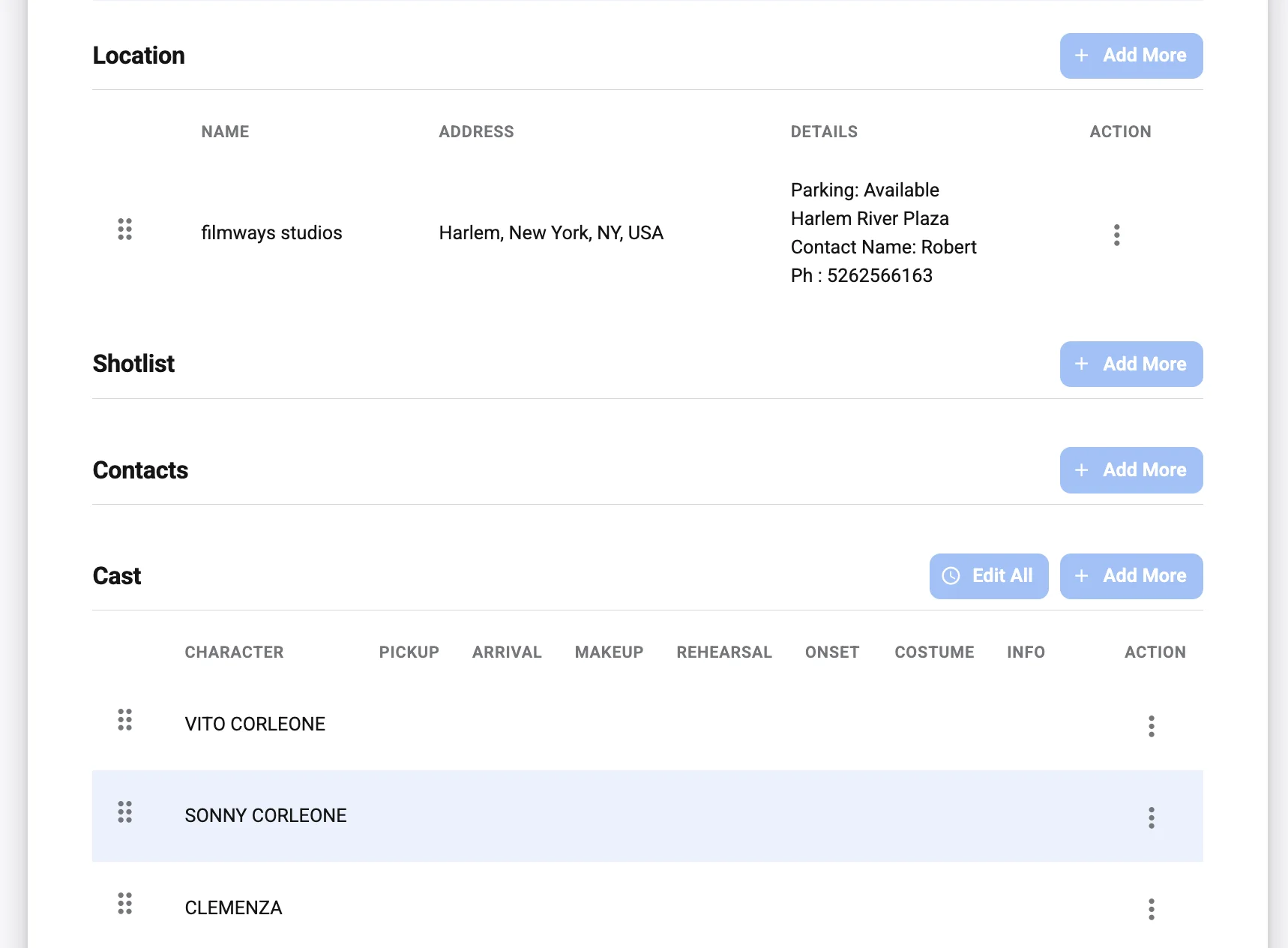
4. Enter location and movement details
Provide exact location information, parking instructions, holding areas, base camp, shuttle timing, and any security or access requirements. If the production is moving between locations, include the expected move time and destination details. If crew members should not park directly at the filming location, state that clearly.
Logistics should be written for someone who has never visited the site. This does not mean the document must be long; it means the instructions must remove ambiguity. When using a generator, take advantage of dedicated fields for notes rather than placing all details into a single crowded paragraph.
5. Include weather and safety notes
Add weather information that affects the day’s work. For exterior shoots, consider how temperature, rain, wind, sunlight, and terrain may affect crew preparation. For interior shoots, weather may still affect parking, load-in, holding, and company moves.
Safety notes should be reviewed carefully. If the day includes unusual activity, confirm that the appropriate personnel, permits, supervision, and communications are in place. The call sheet should not attempt to replace a safety meeting, but it should identify important conditions before the crew arrives.
6. Review, approve, and distribute
Before sending the final production call sheet, review it for spelling, times, addresses, contact numbers, scene accuracy, and formatting. It is helpful for the assistant director, production manager, location team, and relevant department heads to check their sections. On larger productions, approval may follow a formal chain.
Distribution should be consistent. Send the call sheet through the agreed channel, whether that is email, production software, a call sheet app, or another approved method. If a revision is required, clearly label the update and ensure recipients know which version supersedes the previous one.
Quality control before sending the call sheet
Even when using a free call sheet generator, the final document requires human review. Tools can organize information, but they cannot always detect whether a call time is unrealistic, an address is incomplete, or a department note conflicts with the schedule. A short quality-control pass can prevent avoidable disruption.
Use the following checklist before distribution:
- Confirm the date and day number. Make sure the shoot date, weekday, and production day align with the master schedule.
- Verify every time. Check general call, cast calls, department pre-calls, meal timing, company moves, and estimated wrap.
- Check all addresses. Confirm filming location, parking, base camp, holding, and hospital details.
- Review scene information. Ensure scene numbers, descriptions, cast IDs, locations, and day or night labels are accurate.
- Validate contact numbers. Test or confirm key phone numbers for production, locations, transportation, and emergency contacts.
- Clarify parking and access. Include gate codes, security instructions, shuttle details, or loading restrictions when applicable.
- Assess safety notes. Identify hazards, special equipment, minors, animals, stunts, vehicles, weapons, or weather-sensitive work.
- Check formatting on mobile and desktop. Many recipients will read the document on a phone, so legibility matters.
- Remove outdated notes. Templates often carry information from prior shoot days; delete anything that no longer applies.
- Label revisions clearly. If a call sheet changes after distribution, make the revised version unmistakable.
This checklist should become part of the production routine. Over time, it helps teams build confidence in the accuracy of each daily document.
Common call sheet mistakes and how to avoid them
Many call sheet problems come from rushing, copying old documents, or assuming that information is obvious. A professional workflow reduces those risks by treating the document as a final operational reference.
One common mistake is overcrowding the call sheet with notes that are not relevant to the day. While detail is important, unnecessary information makes the document harder to scan. Keep the content focused on what recipients need to execute that specific shoot day.
Another issue is inconsistent naming. If a location is called one name in the schedule, another name in the scene table, and a third name in the parking notes, confusion can follow. Use consistent labels for locations, sets, cast members, and departments.
Outdated information is also a frequent problem. A call sheet template copied from the previous day may retain old weather notes, hospital details, scene descriptions, or department instructions. Before sending, read the document as if you are seeing it for the first time.
Finally, avoid unclear revision practices. If multiple versions are sent without clear labels, crew members may prepare from the wrong document. Use revision notes, timestamps if appropriate, and direct language indicating which version is current.
Making a call sheet readable for the entire crew
A call sheet must serve many readers at once. The first assistant director may study the scene order closely, while a grip may look primarily for call time, location, parking, and department notes. A cast member may check pickup time, makeup call, set call, and wardrobe requirements. The document should support each of those use cases without becoming visually overwhelming.
Good formatting is therefore not cosmetic; it is functional. Use clear headings, adequate spacing, readable tables, and consistent alignment. Avoid small text that becomes difficult to read on mobile devices. If color is used, it should improve navigation rather than distract from the information.
Consider the order in which readers need information. The top of the document should answer immediate arrival questions: what production, what date, what time, where to go, and who to contact. More detailed scene and department notes can follow. A strong generator or call sheet software platform should preserve that hierarchy automatically.
Accessibility should also be considered. Documents that rely entirely on color coding may be difficult for some readers. Important information should be communicated through text, labels, and structure, not color alone.
How can a call sheet app improve on-set communication?
A call sheet app can improve on-set communication by making call sheets easier to access, update, and reference from mobile devices. When used correctly, it reduces dependence on scattered messages and helps the team consult one organized source for daily production details.
The main benefit is availability. Crew members are often away from laptops while loading equipment, traveling, standing by, or preparing a setup. Mobile access allows them to confirm call times, addresses, parking details, contacts, and notes without searching through email attachments.
Some app-based workflows may also support faster revision distribution. If a location changes or a call time is adjusted, production can issue a revised document through the agreed system. However, updates must still be managed carefully. A fast update is only useful if everyone understands that it is official and replaces the earlier version.
A call sheet app does not eliminate the need for production discipline. The information still has to be accurate, reviewed, and approved. The app simply provides a more efficient delivery and access method when the production team is prepared to use it consistently.
Turning a basic call sheet template into a professional document
A call sheet template is often the starting point for smaller productions. It provides a ready-made structure that can be customized for a specific project. With careful preparation, a template can produce a document that is clear, professional, and appropriate for serious production work.
The first step is to remove anything that does not apply. Generic sample fields, placeholder text, old logos, unused sections, and irrelevant department notes should be deleted. A clean template communicates competence and avoids confusing the reader.
The second step is to standardize formatting. Use consistent time formats, capitalization, scene labels, phone number styles, and section headings. A production call sheet should look deliberate, not assembled from unrelated documents.
The third step is to protect the template from accidental damage. If multiple people are entering information, work from a duplicated copy rather than the master version. Lock formulas or formatting if the file type allows it. Store the master template in a location where the production office can access it, but avoid uncontrolled edits.
The fourth step is to develop production-specific conventions. Decide how cast IDs will appear, how company moves will be noted, how revisions will be labeled, and where special instructions will live. Once the team understands the system, daily call sheet creation becomes faster and more reliable.
Best practices for distribution and revisions
The call sheet is only effective if recipients receive and recognize the correct version. Distribution should be planned as part of the production workflow, not handled informally at the end of the day.
Choose one primary distribution method and communicate it clearly. Email may be sufficient for smaller teams. Larger productions may rely on dedicated call sheet software, production management platforms, or approved messaging channels. Whatever the method, avoid sending unofficial updates through multiple disconnected channels unless there is a clear protocol.
Subject lines and filenames should be specific. Include the production title or abbreviation, shoot date, day number, and revision status when appropriate. This makes it easier for recipients to find the correct document quickly.
When revisions occur, explain what changed. If the update affects only parking, state that. If call times have changed, make the affected groups clear. A revised call sheet should not force every recipient to compare documents line by line to determine whether their responsibilities changed.
It is also wise to maintain a record of distributed versions. Production teams may need to confirm what was sent, when it was sent, and to whom. Even on smaller productions, organized recordkeeping supports accountability.
Security, privacy, and sensitive production information
Call sheets often contain personal contact information, location details, talent names, schedule information, and other sensitive production data. For that reason, distribution should be limited to people who need the document for legitimate production purposes. Avoid posting call sheets publicly or sharing them through unsecured channels.
If the production involves recognizable talent, private residences, confidential creative material, minors, or restricted locations, review what information is necessary for each recipient group. Some teams may use separate versions or limit certain details to essential personnel. The goal is to balance operational clarity with privacy and security.
A free call sheet generator should be evaluated with this in mind. Before entering sensitive data into any tool, production teams should understand how the tool handles information, whether accounts are required, and how documents are stored or exported. When in doubt, avoid adding unnecessary personal details and follow the production’s data-handling policies.
Practical example of a call sheet workflow
Consider a small independent film shooting two interior scenes and one exterior scene in a single day. The production has eight principal cast members, a modest crew, one primary location, street parking limitations, and a planned exterior scene near sunset. Without a structured process, the producer or assistant director might send several separate messages about timing, parking, wardrobe, and weather.
A better workflow begins with the latest schedule. The assistant director enters the production title, date, general call, location, parking instructions, and nearest hospital into the call sheet generator. The scene table lists the two interior scenes first, followed by the exterior scene timed for the appropriate light. Cast call times are staggered based on when each performer is needed for hair, makeup, wardrobe, and blocking.
Department notes clarify that art department has an earlier pre-call to dress the interior, grip and electric require load-in access through a specific entrance, and wardrobe needs cast to arrive camera-ready only if previously instructed. Weather notes identify the expected exterior conditions, and production notes explain where crew should avoid parking.
Before distribution, the producer checks the location details, the assistant director reviews timing, and the department heads confirm their notes. The final call sheet is exported, labeled with the shoot date, and sent through the production’s agreed channel. If the exterior scene moves earlier, a revised call sheet is issued with the change clearly noted.
This example shows why a generator is useful. The tool does not make creative decisions, but it gives the team a dependable structure for translating those decisions into daily instructions.
Features to look for in call sheet software
When a production outgrows a simple template, more advanced call sheet software may be worth considering. The right features depend on the scale of work, but several capabilities are broadly useful.
Look for software that supports reusable contacts, cast lists, department information, and location details. Re-entering the same information every day increases the chance of errors. A system that stores production data can make daily document creation more efficient.
Revision management is another important feature. Productions often change quickly, and software should make updates clear. The ability to generate revised versions, label changes, and distribute current documents can help prevent confusion.
Export options also matter. Some recipients may prefer PDF documents, while others rely on mobile views or email. A professional workflow should allow the production team to share the call sheet in a format that is easy to read and archive.
Security and permissions should not be overlooked. If the software stores personal information, production teams should consider who can access, edit, export, and distribute that data. A convenient tool should still support responsible information management.
A professional call sheet supports a professional set
A well-prepared call sheet communicates more than logistics. It signals that the production values time, safety, clarity, and coordination. Crew members notice when documents are accurate, readable, and distributed with enough time to prepare. That confidence can improve the tone of the workday before anyone arrives on set.
A free call sheet generator is most effective when paired with professional production habits. Confirm information before entering it. Keep formatting consistent. Review sensitive details. Label revisions clearly. Use the tool to support judgment, not replace it.
For filmmakers building repeatable workflows, the call sheet is one of the most important daily documents to standardize. Whether you begin with a call sheet template, adopt a call sheet app, or move into full call sheet software, the objective remains the same: give every person on the production the information they need to do their work safely, efficiently, and professionally.
Key takeaway
A strong call sheet turns a complex shoot day into a clear operating plan. By using a free call sheet generator, production teams can save time, reduce formatting errors, and create a more consistent document for cast, crew, and department heads. The best results come from combining the efficiency of a generator with careful review, accurate scheduling, clear distribution, and professional attention to safety and logistics.