
Learning film production involves much more than operating a camera, writing dialogue, or editing footage. While those creative skills are essential, successful productions rely on structured systems that keep every department working toward the same goal. For aspiring filmmakers, mastering Film Production Workflows for Students means understanding how a project moves from script to screen through organized planning, clear communication, and consistent execution.
Professional filmmakers rarely rely on improvisation alone. Instead, they follow repeatable workflows that transform ideas into finished productions. These workflows include script development, script breakdowns, scheduling, storyboarding, shot lists, call sheets, production calendars, and post-production planning. By learning these processes early, students develop habits that prepare them for internships, freelance projects, and professional film sets.
Fortunately, students do not need a Hollywood-sized production to learn these skills. Whether producing a short documentary, a classroom exercise, a commercial spec, or a capstone project, the same principles apply. Teams should plan carefully, assign responsibilities, communicate updates, monitor progress, and adapt when challenges arise. As a result, every production becomes more organized and every creative decision becomes easier to execute.

Why Workflow Matters More Than “Just Shooting”
Many beginner filmmakers are eager to begin filming as soon as an idea takes shape. Although that enthusiasm is valuable, rushing into production without preparation often creates unnecessary problems. Missing props, incomplete schedules, unclear responsibilities, and inconsistent footage can quickly turn an exciting project into a stressful experience.
A well-defined workflow provides a roadmap for the entire production. Instead of guessing what comes next, every team member understands their responsibilities before filming begins. Consequently, collaboration becomes smoother because everyone works from shared documents, agreed timelines, and clearly assigned tasks.
Moreover, organized workflows help students:
- Turn scripts into practical production plans.
- Identify cast, props, wardrobe, equipment, and location requirements.
- Build realistic schedules around classes and personal commitments.
- Communicate expectations before every shoot.
- Track revisions so everyone uses the latest version of each document.
- Produce professional materials that strengthen future portfolios.
Rather than limiting creativity, structured workflows give filmmakers the confidence to focus on storytelling. When logistics are under control, directors and crew members can devote more attention to performance, cinematography, and visual storytelling.
Start with the Script, Even if the Project Is Small
Every production begins with a story. For narrative films, that story usually starts as a screenplay. Documentary projects often begin with a treatment, interview outline, or research document, while branded content may use an AV script or creative brief.
Regardless of the format, the script becomes the foundation of every production decision. Producers use it to estimate resources, cinematographers study it to design visual coverage, production designers identify locations and props, and editors anticipate continuity and pacing.
Before detailed planning begins, students should aim to “lock” the script. A locked script does not mean revisions are impossible. Instead, it simply indicates that the current draft is stable enough for the team to begin production planning.
However, if changes are introduced later, those revisions should be communicated immediately. Even a seemingly minor adjustment—such as adding a new location, introducing another character, or changing a daytime scene to night—can affect scheduling, budgeting, equipment, and crew assignments. Therefore, maintaining version control becomes an important part of Film Production Workflows for Students.
For beginners, one simple rule applies: whenever the script changes, review the production plan as well.
Break the Script into Production Elements
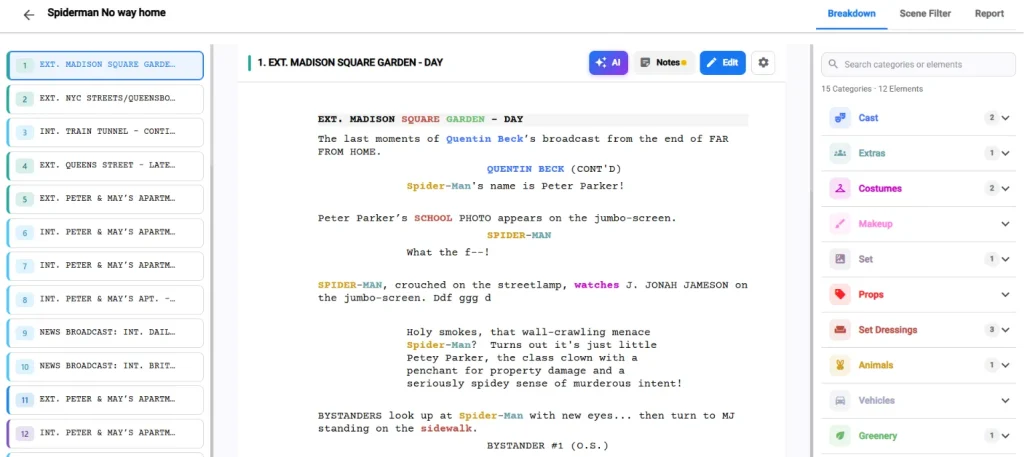
Once the screenplay is approved, the next step is the script breakdown. This process transforms creative ideas into practical production tasks by identifying every element required to film each scene.
Instead of reading only for story, students begin reading like producers. Every scene should be examined carefully to identify production requirements, including:
- Cast members and extras
- Locations
- Props and set dressing
- Wardrobe and makeup
- Vehicles or animals
- Special effects or visual effects
- Sound requirements
- Lighting requirements
- Camera equipment
- Safety considerations
As students complete this exercise, they quickly recognize how production complexity varies from scene to scene. A brief conversation inside a classroom may require minimal preparation. In contrast, a short scene involving rain, moving vehicles, multiple actors, or practical effects demands significantly more planning.
Consequently, script breakdowns help teams anticipate challenges before arriving on set. They also reduce expensive last-minute decisions because every department understands what must be prepared in advance.
Today, many digital production platforms simplify this process by connecting scripts directly to production documents. Rather than maintaining separate spreadsheets for every department, students can work from one centralized workspace.
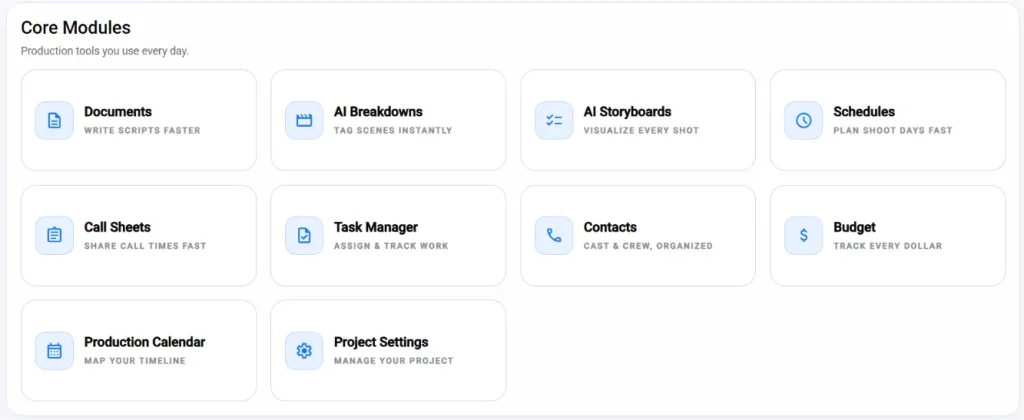
For example, Studiovity for Education brings together screenwriting, AI-powered script breakdowns, storyboards, shot lists, scheduling, call sheets, budgeting, production calendars, task management, and cast and crew management within a single collaborative environment. This integrated workflow allows instructors to teach professional production practices while helping students stay organized throughout every phase of a project.
Build a Realistic Student Production Schedule
Scheduling is one of the most valuable skills students can develop because even outstanding creative ideas depend on effective time management. A thoughtful schedule protects productions from unnecessary delays, reduces stress, and helps everyone understand what needs to happen each day.
Unlike professional productions, student films often face unique challenges. Crew members balance academic schedules, equipment must be reserved through campus facilities, locations may have limited availability, and actors frequently volunteer around other commitments.
Because of these constraints, students should avoid scheduling scenes according to script order. Instead, they should organize filming around efficiency whenever possible.
For example:
- Shoot every scene at the same location during one production block.
- Schedule actors according to their availability.
- Allocate additional time for technically demanding scenes.
- Group similar lighting setups together.
- Minimize company moves whenever possible.
Additionally, a production schedule should include far more than shooting hours alone. Teams should also plan for equipment setup, rehearsals, lighting adjustments, meal breaks, transportation, company moves, data backups, and equipment returns.
Most importantly, students should always include contingency time. Unexpected weather, technical issues, traffic delays, or performance adjustments are common on every production. Therefore, building realistic buffers helps projects stay on schedule without sacrificing quality.
By practicing structured scheduling from the beginning, students gradually develop professional habits that will benefit them throughout their filmmaking careers. More importantly, they learn that successful productions are rarely the result of luck—they are the result of careful preparation, thoughtful collaboration, and consistent execution.
Turn the Schedule into a Production Calendar
While a shooting schedule focuses on individual filming days, a production calendar provides a complete view of the entire project timeline. It helps students understand that filmmaking is not only about what happens on set. Instead, every stage, from early development to final delivery, requires planning and coordination.
A production calendar allows teams to track important milestones, assign ownership, and identify potential delays before they affect the project. Furthermore, it teaches students how professional productions manage multiple moving parts simultaneously.
A useful student production calendar should include milestones such as:
- Script development and approval deadlines
- Table reads and rehearsals
- Script breakdown completion
- Location scouting
- Casting or interview confirmations
- Equipment reservations
- Shot list and storyboard reviews
- Final schedule approval
- Call sheet preparation
- Production days
- Footage backup and organization
- Rough cut deadlines
- Feedback screenings
- Final export and submission dates
Additionally, a production calendar helps students understand how one delay can impact the entire workflow. For example, a postponed location approval may affect the shooting schedule, actor availability, equipment bookings, and editing timeline.
This broader perspective is an important part of Film Production Workflows for Students because it moves filmmaking beyond individual tasks. Instead of focusing only on their own department, students learn how every role contributes to the success of the complete production.
Digital collaboration tools can make this process easier by keeping deadlines, responsibilities, and project updates in one place. With a centralized production calendar, students can monitor progress while instructors can guide teams through each stage of development.
Create Shot Lists That Support the Story
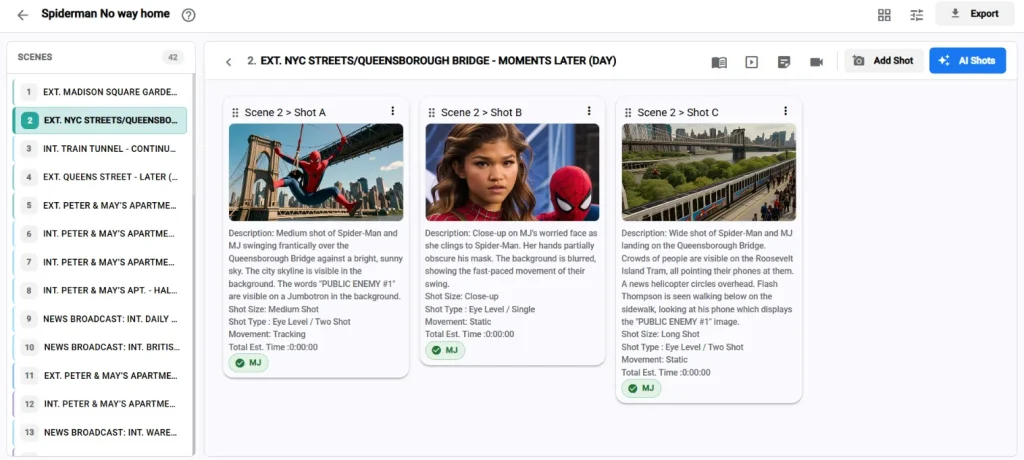
A shot list is much more than a technical checklist. It is a visual roadmap that helps filmmakers decide how a scene will communicate with the audience. While a script explains what happens, a shot list explains how the camera will capture those moments.
Therefore, students should learn to create shot lists with storytelling goals in mind. Every shot should have a purpose. Does it establish the environment? Highlight a character’s emotion? Reveal important information? Build suspense? Maintain continuity during editing?
When each shot serves a clear function, filmmakers can make better decisions when time becomes limited.
A basic student shot list should include:
- Scene number
- Shot number
- Shot type, such as wide shot, medium shot, close-up, or insert
- Camera angle or movement
- Subject and action details
- Equipment or lens notes when necessary
- Audio considerations
- Priority level
Furthermore, adding priorities helps student crews work efficiently. Essential shots should be identified first, followed by useful coverage and optional creative shots. As a result, directors and cinematographers know which shots must be protected if the schedule becomes challenging.
For example, a dialogue scene may require a wide establishing shot, a two-shot, individual close-ups, and reaction shots. However, if time runs short, the crew should understand which images are necessary for the scene to function in the edit.
This approach teaches students an important professional lesson: filmmaking is not about capturing everything possible. Instead, it is about capturing what best serves the story.
Use Storyboards When the Scene Needs Visual Clarity
Although not every student project requires detailed storyboards, they become extremely valuable when scenes involve complex movement, visual effects, limited shooting time, or challenging production requirements.
A storyboard allows different departments to share the same visual expectation before arriving on set. The director, cinematographer, production designer, and editor can discuss creative choices early rather than solving problems during filming.
Moreover, storyboards help students think visually. They encourage filmmakers to consider composition, camera movement, actor positioning, transitions, and emotional impact before production begins.
Students can use storyboards for:
- Important emotional moments
- Opening and closing sequences
- Action scenes
- Complex camera movements
- Visual effects shots
- Scenes requiring specific blocking
However, the purpose of storyboarding is not artistic perfection. Simple sketches, reference images, or digital frames can communicate ideas effectively. The goal is alignment between creative departments.
When combined with a shot list, a storyboard becomes a powerful production guide. Together, these tools help students move from abstract ideas to practical visual decisions.
Prepare Call Sheets Like a Professional Crew
A call sheet is one of the most practical documents students can learn to create. It transforms a production plan into clear instructions for the cast and crew before the shoot day.
A professional call sheet answers important questions:
Where should everyone arrive?
What time should they report?
Which scenes are being filmed?
Who is responsible for each department?
What equipment or materials are required?
What safety information should everyone know?
A complete student call sheet generally includes:
- Project title
- Shoot date
- Call time
- Location details
- Meeting point and parking instructions
- Weather information when relevant
- Scene numbers and script pages
- Cast and crew details
- Department notes
- Meal and break schedules
- Emergency contacts
- Safety reminders
Additionally, call sheets create accountability. When every crew member receives the same information, misunderstandings become less common. Everyone understands the plan, their responsibilities, and the expectations for the day.
For student productions, this simple document can significantly improve organization. It also introduces learners to the same communication practices used on professional sets.
Modern production platforms make call sheet creation even easier by connecting schedules, crew details, and scene information automatically. Studiovity’s education platform includes production management tools such as call sheets, calendars, collaboration features, and task management systems that help students experience professional workflows in an academic environment.
Assign Roles Before the Shoot Day
One of the most common mistakes among beginner filmmakers is assuming everyone will simply contribute wherever needed. While this approach may work for a very small exercise, it quickly creates confusion as projects become more complex.
Professional productions succeed because responsibilities are clearly assigned. Even a small student crew benefits from understanding who manages each part of the process.
Common student production roles include:
Producer: Handles planning, resources, permissions, scheduling, and communication.
Director: Leads creative decisions, works with actors, and guides the overall vision.
Assistant Director: Supports the director by managing timing, set organization, and production flow.
Cinematographer: Plans camera choices, lighting approaches, and visual style.
Sound Recordist: Captures clean production audio and monitors sound quality.
Production Designer: Manages props, costumes, locations, and visual details.
Script Supervisor: Tracks continuity, scene progress, and production notes.
Editor: Organizes footage and prepares the project for post-production.
On smaller projects, one student may manage multiple responsibilities. That is completely normal. However, every task should still have a clear owner.
Furthermore, assigning roles teaches students how their decisions influence other departments. A director’s creative choice affects scheduling. A production designer’s requirements affect budgeting. A cinematographer’s approach affects equipment needs.
Understanding these connections is a fundamental part of learning Film Production Workflows for Students.
Keep Communication Centralized
Communication problems are among the biggest challenges in student productions. Often, important information becomes scattered across different messaging apps, personal folders, and informal conversations.
One student may have the latest script version. Another may have updated location details. Someone else may know about a schedule change. Consequently, the crew wastes valuable time searching for information instead of creating.
A centralized communication system solves this problem by giving everyone one reliable source of information.
An effective system should include:
- One shared project workspace
- Organized folders for approved documents
- Clear file naming conventions
- Version tracking for important materials
- A task board for assignments
- One official channel for urgent updates
Additionally, teams should establish simple communication rules. For example, major schedule changes should be confirmed in writing, and everyone should check the latest documents before production begins.
Studiovity’s education solution supports this approach by providing a connected workspace where instructors can review scripts, monitor project progress, and guide students through professional production practices. Students can collaborate on creative projects while developing portfolio-ready workflows.
Ultimately, strong communication is not only about sharing information. It is about ensuring that every person on the team understands the current plan and can make confident decisions.
Practice the Workflow on Small Projects First
Students do not need a large-scale production to understand professional filmmaking processes. In fact, smaller projects often provide the best learning environment because teams can experiment, identify mistakes, and improve quickly.
A short scene, classroom exercise, or simple documentary can teach the same principles used on larger productions. The difference is that smaller projects allow students to see the connection between planning and results more clearly.
For beginners, a practical workflow might look like this:
- Write a short script with a simple concept, limited characters, and manageable locations.
- Break down the script to identify cast, props, wardrobe, equipment, sound, and location requirements.
- Create a realistic shooting schedule based on available time and resources.
- Develop a shot list that separates essential shots from optional creative coverage.
- Prepare a call sheet with clear instructions for every crew member.
- Complete the production day while following the planned workflow.
- Back up footage immediately after filming.
- Organize files and begin the editing process.
- Review the final result and identify improvements for the next project.
Furthermore, repeating this process across multiple projects helps students build confidence. Each production becomes an opportunity to improve planning, communication, and problem-solving skills.
Instead of viewing pre-production as extra work, students begin to understand that preparation protects creativity. When the crew knows the plan, filmmakers have more freedom to experiment and make creative decisions during production.
This is why practicing Film Production Workflows for Students on smaller projects creates a strong foundation for future professional work. The habits developed during simple exercises often become the same habits required on commercial sets, independent films, and larger productions.
Review the Workflow After Production
The filmmaking process does not end when the camera stops recording. Post-production is also a valuable learning stage where students can evaluate their decisions and improve future projects.
After completing a film, teams should conduct a short production review or debrief. The purpose is not to criticize individuals. Instead, the goal is to understand what worked, what created challenges, and how the workflow can improve.
A productive post-production discussion can include questions such as:
- Did the script provide enough information for planning?
- Were all important production elements identified during the breakdown?
- Was the schedule realistic?
- Which shots were most valuable during editing?
- Were call sheets clear and distributed on time?
- Did every crew member understand their responsibilities?
- What caused delays or unexpected problems?
- What changes should be made for the next project?
Moreover, reviewing the workflow teaches students an important professional habit: continuous improvement. Experienced filmmakers constantly analyze their processes because every production provides new lessons.
For example, a team may discover that they underestimated setup time, forgot to capture additional sound recordings, or needed stronger communication between departments. These observations become practical improvements for future projects.
Therefore, reflection transforms mistakes into experience. Instead of simply completing assignments, students learn how professional productions evolve through evaluation and adaptation.
The Real Lesson: Creativity Needs Structure
Film education is not only about learning camera techniques, editing software, or storytelling theory. It is also about understanding how creative teams collaborate to bring ideas to life.
A strong workflow does not reduce creativity. Rather, it creates the structure that allows creativity to survive real-world challenges. When filmmakers understand schedules, responsibilities, communication systems, and production planning, they spend less time solving avoidable problems and more time focusing on storytelling.
For students, mastering Film Production Workflows for Students creates valuable professional advantages. They become better prepared for internships, independent productions, client projects, and future careers in the entertainment industry.
Additionally, workflow knowledge helps students become stronger collaborators. Film is a team-based art form, and every creative decision affects multiple departments. A director’s vision influences cinematography. A script change impacts production design. A scheduling decision affects the entire crew.
Understanding these connections allows students to approach filmmaking with greater confidence and professionalism.
For educators and student filmmakers, the best way to teach production workflows is through practical experience. Choose a project, follow the process from script development to final delivery, and treat every stage as part of the craft.
Tools such as Studiovity for Education can support this learning process by connecting screenplay development, AI-powered script breakdowns, storyboarding, scheduling, budgeting, call sheets, collaboration, and production management in one platform. With academic plans, institutional options, and education-focused solutions, Studiovity helps film programs provide students with experience that reflects modern industry practices.
Build Future-Ready Filmmakers Through Better Workflows
The future of filmmaking requires more than creative talent. Successful filmmakers must also understand planning, teamwork, organization, and efficient production management.
By introducing students to professional workflows early, film schools and media programs can help learners bridge the gap between classroom projects and real production environments. Students who understand how to move from an idea to a finished film are better prepared to contribute confidently on professional sets.
Ultimately, every production is a learning opportunity. Whether creating a one-minute exercise or a graduation film, students should approach each project with the same mindset: plan carefully, communicate clearly, execute responsibly, and learn from every outcome.
Film Production Workflows for Students are not simply production methods. They are the foundation for developing disciplined, creative, and industry-ready filmmakers.
If you are building a classroom, workshop, or student film program, give learners more than assignments. Provide them with a repeatable production system they can carry into every future project. By teaching structured workflows today, educators help students become the filmmakers of tomorrow.