
You have the perfect script and a talented crew, yet by 2:00 PM on day one, you are already three hours behind. In practice, this lack of planning triggers “sunset panic,” where directors watch the daylight fade before they even film the main climax. Therefore, utilizing a reliable shooting schedule software becomes essential for independent filmmakers.
Separating a professional production from a chaotic home movie requires a Shooting Schedule (a detailed timeline of what happens every hour on set). Think of this document as a GPS for your film, streamlining pre-production workflows so nobody guesses where they need to be.
Adopting the Studiovity Shooting Schedule Tool provides this exact roadmap. This digital assistant replaces on-set anxiety with total control, avoiding costly film production delays while ensuring you finish every scene.

The $500 Mistake: Why Manual Scheduling Causes Costly Production Delays
Imagine having five people waiting around because a location wasn’t ready. If you are paying your team even a modest day rate, a 30-minute delay isn’t just annoying—it gets expensive. This quickly leads to Production Overtime (the extra cash you pay out of pocket when a shoot runs longer than planned). Suddenly, that short wait turns into a $500 mistake.
Trying to manage these moving parts with a basic spreadsheet usually causes more headaches. Traditional grids are incredibly brittle, meaning if one actor runs late or it rains, the whole plan breaks and you must manually rewrite everything. If your goal is avoiding costly film production delays, relying on static paper documents simply won’t work anymore. Consequently, a modern shooting schedule software is required to keep track of these fluid changes.
Respecting your team’s time with a reliable schedule instantly boosts set morale. People perform better when they aren’t standing around, maximizing film crew efficiency across the board. Upgrading to shooting schedule software for independent filmmakers eliminates this stress entirely.
From Script to Stripboard: Organizing Your Scenes Like a Pro with Studiovity
Turning your script into an actionable plan starts with a simple reality check: you rarely film chronologically. Before arranging days, you need a “Script Breakdown“—the process of identifying every scene’s physical requirements so no prop or costume gets left behind.
Achieving seamless script breakdown and scheduling integration takes three straightforward steps:
Highlighting: Tagging crucial on-screen elements like actors and props.
Categorizing: Assigning those tags to specific production departments.
Ordering: Prepping those identified scenes for logical filming.
Once tagged, the Studiovity shooting schedule tool generates a “Stripboard” (a visual list where scenes become digital, drag-and-drop colored cards). Instead of driving across town twice in one day, you can quickly group these strips by ‘Location.’ Filming all your coffee shop scenes in a single afternoon, regardless of story order, is the ultimate on-set time-saver.
Furthermore, this advanced shooting schedule software lets you visualize your entire production timeline effortlessly. Efficient digital film stripboard management instantly transforms a chaotic shoot into a smooth operation.

Let the Software Worry: How Automated Conflict Detection Acts as Your Safety Net
Moving colored strips around your digital board feels incredibly satisfying until you realize you just scheduled your lead actor to be in a coffee shop and a park at the exact same time. Even on a short film, juggling cast availability is a mental math nightmare. This is where an advanced shooting schedule software steps in as your production safety net.
Instead of relying on fragile spreadsheets, Studiovity automatically cross-references your planned dates against real-world constraints. If you try filming at a rented location on a closed day, or accidentally double-book a performer, the system instantly flags the error before the crew ever arrives on site. These built-in Studiovity features for assistant directors and indie creators naturally remove the anxiety of human error.
As a result, mastering scheduling logistics for film scenes is significantly easier when a digital shooting schedule software constantly double-checks your work in the background.
Real-Time Collaboration: Keeping Your Crew Synchronized and Efficient
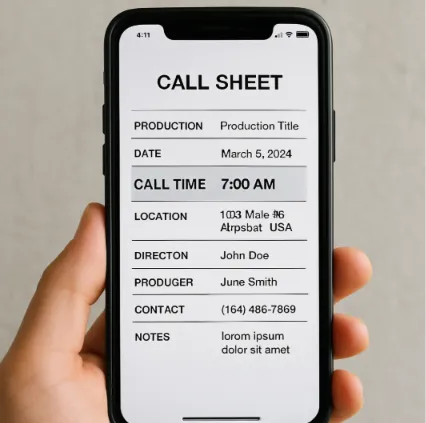
Nothing creates panic faster than a sudden location change when half your crew is already driving to the wrong place. Professional sets prevent this using a Call Sheet (a daily document telling everyone exactly when and where to report). Yet, typing these manually takes hours, and paper copies become useless the second your plans shift.
By using cloud-based production management tools, you can leave the printer behind and centralize your production notes. If a sudden rainstorm forces you to swap scenes, real-time collaboration for film production ensures every crew member’s phone updates instantly. Your entire team stays on the exact same digital page without needing a chain of frantic group texts.
Rather than formatting spreadsheets late at night, automated call sheet features within your shooting schedule software generate these professional itineraries in seconds. The system automatically pulls your schedule data to include:
Call Time: The exact moment each person needs to arrive.
Location: GPS-friendly addresses for the set.
Weather: Daily forecasts so everyone dresses appropriately.
Nearest Hospital: A vital safety precaution for emergencies.
Your 3-Step Action Plan to Start Filming This Weekend
Making a movie is like cooking a 5-course meal without a recipe—chaos is guaranteed. However, by utilizing a modern shooting schedule software instead of traditional paper scheduling, you protect both your time and your crew’s energy.
Build your professional ‘Day 1’ schedule in under 30 minutes using these three practical steps:
Import Script: Upload your script to automatically pull scenes.
Tag Elements: Highlight your props and verify actor availability.
Generate Schedule: Arrange scenes to ensure a smooth first shoot.