Have you ever had a movie playing in your head, but lacked the drawing skills to share it? Directors rely on pre-production to map out their shots, acting just like architects drafting a blueprint before building a house. Today, AI Storyboard Tools help filmmakers turn those ideas into visual scenes much faster than traditional methods.
Historically, planning these visual sequences required hiring professionals to hand-draw storyboards. Imagine George Lucas trying to personally sketch his complex vision for the Death Star trench run! Today, AI storyboard software acts like lightning-fast sketch artists, letting you simply describe a dream to a computer and see it instantly.
In practice, this technology completely transforms modern filmmaking by turning basic words into polished scenes. Creators no longer need a pencil to bridge the gap between imagination and professional pre-visualization. As a result, AI Storyboard Tools unlock cinematic storytelling for everyone.
The Digital Sketch Artist: Generating Instant Frames from Your Script
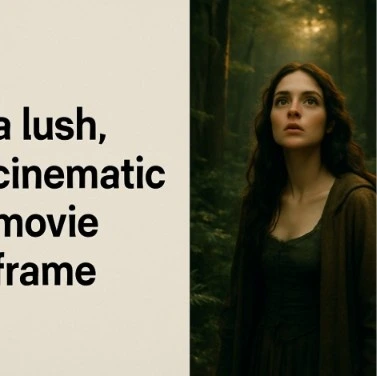
Mapping out a movie once required months of expensive hand-sketching. Now, AI storyboard software acts like a blazing-fast digital sketch artist that draws exactly what you describe. Instead of struggling with stick figures, anyone can instantly translate ideas into professional artwork through a process called frame generation.
Guiding this tool requires a surprisingly simple skill called cinematic prompt engineering. Think of it as telling the computer exactly what the camera sees. By combining your subject, environment, and lighting into a single descriptive sentence, you achieve stunning text to image storyboard generation without needing a film degree.
This method slashes planning time by up to 90%. Consequently, filmmakers can experiment with bold visual ideas much faster. Many creators now depend on AI Storyboard Tools to test different cinematic styles before production begins. Try using these basic formulas for common movie moments:
- The Hero Shot: “A cowboy standing in a dusty town square, wide angle, high noon lighting.”
- The Suspense Close-up: “Close-up of a detective’s eyes, heavy rain, glowing neon city lights.”
- The Sci-Fi Reveal: “Massive glowing spaceship over a modern city, looking up from the street, cinematic.”
Generating these breathtaking individual shots is undeniably magical. However, the real challenge begins when you need that exact same cowboy or detective to look identical across twenty different scenes.
The Secret to Visual Flow: Maintaining Character Consistency in Every Frame
AI can sometimes change a person’s face from picture to picture, creating a massive problem for visual storytelling. Viewers must recognize your hero whether they are quietly sitting in a diner or running from an explosion. This seamless connection is called visual continuity, and it is exactly what transforms random concept sketches into a cohesive, believable movie plan.
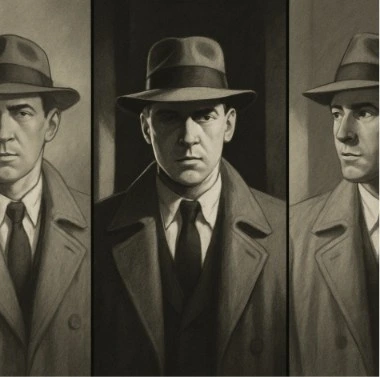
To solve this shifting identity issue, modern AI Storyboard Tools use a clever technique to “anchor” your digital actor. Instead of describing your protagonist from scratch every time, you teach the software their exact appearance just once. The system locks in those specific facial features and outfits, achieving consistent character rendering across completely different locations and action scenes.
With your star actor securely cast and instantly recognizable in every shot, your creative focus naturally shifts to how the audience views them. Therefore, mastering the language of the camera becomes the next critical step for your production.
Directors in Control: Using Cinematic Prompts to Define Your Camera Style
Having a consistent hero lets you step straight into the director’s chair. You are no longer just generating random art; you are crafting dynamic camera angle visualization. By typing simple filmmaking terms, you dictate the virtual lens and the aspect ratio—the exact shape of your image, like a widescreen theater display.
Changing where the camera sits instantly alters the mood. Arranging actor positions alongside camera placement is known as scene blocking. For seamless shot list generation, add these five essential commands to your text prompts while using AI Storyboard Tools:
- Wide Shot: Shows the full location, quickly establishing the world for the viewer.
- Close-Up: Focuses tight on a face, forcing the audience to feel the character’s emotion.
- Low Angle: Looks upward, naturally making your hero appear powerful and dominant.
- High Angle: Looks downward, creating a sudden sense of weakness or vulnerability.
- Over-the-Shoulder: Drops the viewer directly into an intimate conversation between two people.
Mastering these cinematic concepts gives you precise control over the software’s final output. In addition, this visual blueprint fundamentally opens up pre-production, cutting costs and speeding up the creative process for everyone.
Pre-Production for Everyone: Cutting Costs and Speeding Up Your Creative Process
Hollywood studios spend millions paying artists to map out every shot, a luxury indie filmmakers cannot afford. Thankfully, artificial intelligence levels the playing field by reducing pre-production costs by up to 80 percent. Instead of waiting weeks for expensive sketches, creators can now generate a complete visual blueprint over a single weekend.
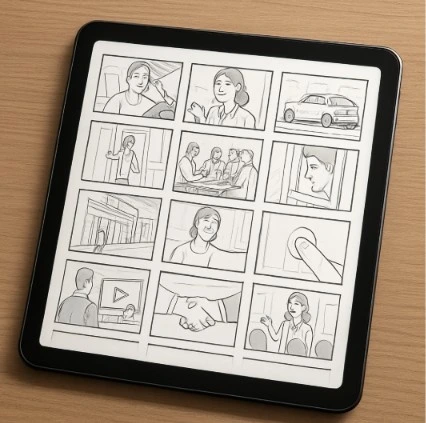
Visualizing your movie is also about proving your concept works to the outside world. When trying to convince actors or investors to join your project, handing them stunning concept art is incredibly persuasive. By arranging these generated images into a clear presentation, you instantly build a pitch deck visualization that rivals high-budget studio proposals.
Today, many creators rely on AI Storyboard Tools to present ideas professionally before filming even starts. Think of this technology as an ever-patient co-creator, not a replacement for human talent. Engaging in collaborative digital storyboarding means the AI acts as your personal sketch artist, freeing you to focus entirely on directing the emotion of your scene.
These efficient mechanics and massive savings allow creators to transition smoothly from written words to visual wonders. As filmmaking evolves, AI Storyboard Tools continue reshaping how directors plan and communicate cinematic ideas.
From Words to Wonders: Your Action Plan for AI-Driven Storytelling
You no longer need to be a master illustrator to get the movie out of your head. AI Storyboard Tools bridge the gap left by traditional sketching, allowing anyone to start visualizing films immediately. Pick a dream scene, type a clear description into a storyboard generator, and watch your mental movie spring to life.
Each described shot builds confidence. Furthermore, these tools exist to serve your unique vision, turning the blank page from a barrier into a creative playground. It is time to step out of the audience and into the director’s chair.
Why Studiovity Is the Perfect Choice for AI Storyboarding
Modern filmmakers need more than standalone image generators. Studiovity combines AI-powered storyboarding with professional filmmaking tools designed for real production workflows. From screenplay writing and AI script breakdowns to shot lists, scheduling, and call sheets, the platform helps creators move smoothly from concept to camera-ready production.
With intelligent visual planning, consistent character generation, cinematic shot creation, and collaborative pre-production tools, Studiovity allows directors, producers, and indie filmmakers to visualize scenes faster while keeping the entire production organized in one place. Whether you are creating a short film, commercial, web series, or feature movie, Studiovity transforms ideas into production-ready visuals with speed and precision.