
Turn your film concept into a clear, production-ready visual plan before the cameras roll. Storyboard creation is used by directors, producers, cinematographers, agencies, and creative teams to map every scene with confidence, communicate the vision faster, and reduce costly confusion on set.
Whether you are planning a short film, commercial, documentary sequence, music video, branded campaign, or feature concept, you can move from rough idea to organized shot-by-shot structure in one streamlined workspace. Start building your storyboard today and give every department the visual direction they need before production begins.

Plan every shot before production gets expensive
Pre-production is where creative ideas become practical decisions. A strong storyboard makes that process easier by showing how scenes will flow, where the camera will be placed, what action needs to happen, and how the final sequence should feel. Instead of relying on scattered notes, long email threads, or last-minute explanations, your team can work from a shared visual reference. You can use ready-to-edit storyboard templates, browse practical storyboard examples, and create your own boards for any production style.
With a dedicated storyboard creation workflow, you can:
Clarify the director’s vision before shoot day
Align creative, production, and client stakeholders
Identify missing shots, continuity issues, and scene gaps early
Save time during location scouting, scheduling, and shot planning
Give crew members a visual roadmap they can actually use
Present concepts professionally before investing in production
Built for film teams that need clarity fast
Great storyboards are not just drawings; they are communication tools. They help your team understand rhythm, framing, movement, emotion, and intent before production begins. This product is designed for creators who need a flexible way to plan visually without slowing down the creative process. You do not need to be a professional illustrator to create useful boards. You should start with simple panels, add notes, arrange shots, and refine the sequence as your script evolves.
Use it for:
Narrative film pre-production
Commercial and advertising concepts
Music video planning
Social video campaigns
Animation planning
Pitch decks and treatment development
Director’s boards
Client approvals
Production meetings
Shot list preparation
What makes this storyboard creation workflow different
Ready-to-use storyboard templates
Skip the blank page and start with layouts designed for real production planning. Choose from flexible storyboard templates that help you organize scenes, shots, notes, timing, dialogue, and camera direction. You can use templates for early creative exploration, formal client presentations, or practical crew documents. Keep your boards simple for fast ideation, or add more detail as the production becomes more defined.
Visual panels for every scene
Each panel gives you space to represent the key moment of a shot. Add rough sketches, reference visuals, frame descriptions, blocking notes, or camera direction. The goal is not perfection; the goal is clarity. By breaking scenes into panels, your team can see how the story moves from one moment to the next and make smarter decisions before production begins.
Shot notes that support real production needs
A beautiful storyboard is helpful, but a useful storyboard includes the details your crew needs. Add notes for framing, action, lighting, lens ideas, movement, transitions, sound cues, or production concerns. This helps departments understand not only what should be captured, but why each shot matters.
Easy sequencing and revisions
Film ideas change. Scripts evolve. Clients request adjustments. Locations shift. Your storyboard should be able to keep up. Rearrange panels, update shot descriptions, duplicate sequences, refine notes, and create alternate versions without rebuilding everything from scratch. Keep the planning process fluid while maintaining an organized production reference.
Storyboard examples for faster inspiration
When you need direction, reviewing storyboard examples can help you understand how to structure scenes, communicate camera movement, and simplify complex action. Use examples as a creative reference, then adapt your own storyboard to fit your script, tone, pacing, and production requirements.
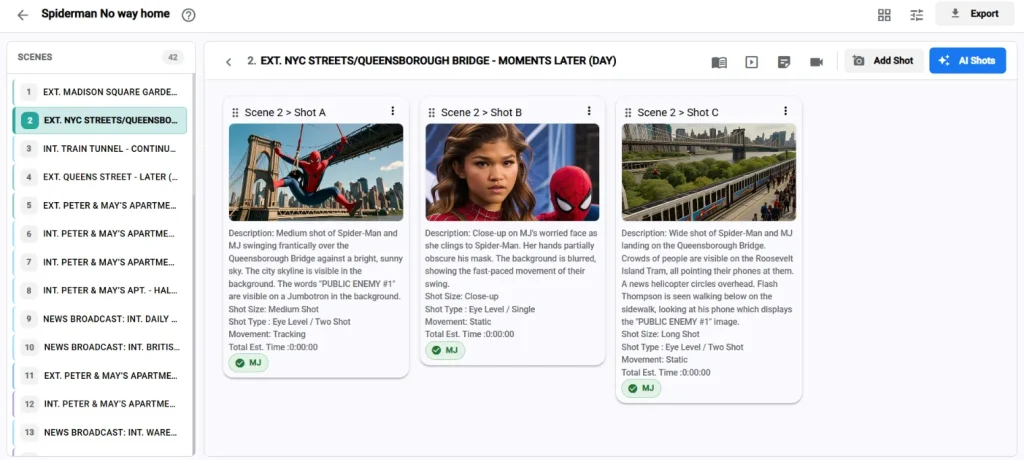
Collaboration for creative teams
Pre-production often involves directors, producers, cinematographers, writers, editors, clients, and department leads. A shared storyboard keeps everyone aligned. Use the board to discuss scene intent, confirm shot coverage, plan transitions, and collect feedback before decisions become expensive on set.
Designed to reduce pre-production friction
A storyboard should make production easier, not create another complicated step. This product gives you a practical structure for turning ideas into action.
Before the shoot
Use storyboard creation to clarify what must be captured, what can be simplified, and what needs more planning. By mapping the sequence visually, you can spot issues before they affect the schedule. For example, you may discover that a scene needs an establishing shot, a reaction shot, a cleaner transition, or a better visual connection between moments. These discoveries are much easier to fix during pre-production than during editing.
During production meetings
A storyboard gives the team a shared reference. Instead of explaining a scene repeatedly, you can point to the panel sequence and discuss specific choices. This is especially useful when reviewing:
Camera setups
Actor blocking
Location requirements
Props and wardrobe needs
Lighting plans
Scene transitions
Continuity details
Visual effects consideration
On set
A clear storyboard can help the team move faster. Directors can reference planned coverage, cinematographers can understand framing intent, and producers can track whether essential moments have been captured. Even when creative changes happen on set, a storyboard provides a foundation for smarter decisions.
In post-production
Storyboards can also support editors by showing the intended structure of a scene. When the footage reaches post-production, the visual plan can help explain pacing, emotional beats, and transition ideas.
Key benefits
Better creative alignment: Make sure everyone understands the same vision before production starts. A storyboard removes ambiguity and turns abstract ideas into visible direction.
Faster decision-making: When shots are mapped visually, creative and logistical decisions become easier. Teams can discuss specific panels instead of debating vague concepts.
More efficient production planning: Use your storyboard to support shot lists, schedules, location plans, and department prep. A strong visual plan helps identify what each scene requires.
Stronger client presentations: If you create commercial, branded, or agency work, a polished storyboard can help clients understand the concept before the shoot. It can also reduce revision cycles by showing exactly how the finished piece may unfold.
Fewer missed shots: Storyboards help ensure the essential visual beats are captured. This reduces the risk of discovering missing coverage later in the edit.
Easier collaboration: Keep creative feedback focused. Discuss the frame, the action, the note, and the sequence instead of searching through disconnected documents.
Feature highlights
Our storyboard creation product includes the essential tools teams need to move from script to visual plan:
Customizable storyboard templates for different production needs
Scene and shot organization for structured planning
Panel-based layouts for visual sequencing
Space for notes, dialogue, action, and camera direction
Flexible formatting for rough concepts or polished presentations
Reusable layouts for recurring production workflows
Easy revision support as scripts and concepts change
Export-friendly structure for meetings, pitches, and production prep
Practical storyboard examples to guide layout and planning decisions
Collaboration-friendly organization for teams and stakeholders
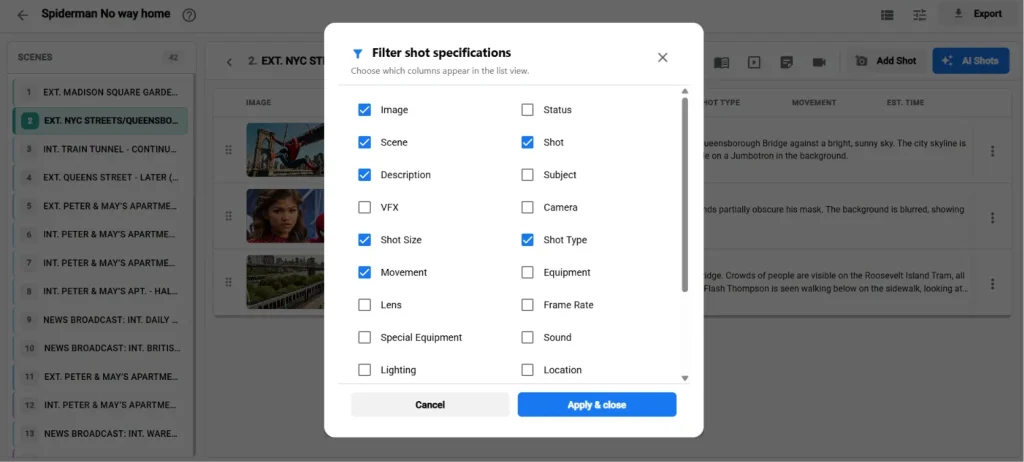
Practical specifications
This solution is designed to support a wide range of film and video pre-production workflows. Exact technical requirements may vary depending on your setup, plan, and delivery needs, but the product is built around flexible, production-ready use. Typical usage includes:
Project-based storyboard organization
Multiple scenes or sequences per project
Adjustable panel layouts
Support for visual references and written production notes
Export or sharing options for review and approval workflows
Reusable templates for consistent formatting
Revision-friendly structure for evolving scripts
If your team has specific workflow, file, or collaboration requirements, you can choose the setup that best fits your production process.
Pricing and plan options
Every production has different needs. A solo filmmaker planning a short film does not require the same workflow as an agency producing multiple client campaigns or a studio coordinating a larger production. Flexible pricing options are available so you can choose the plan that matches your project scale and collaboration needs.
Common plan types may include:
A starter option for individual creators and small projects
A professional option for filmmakers, agencies, and production teams
A team option for collaborative workflows and higher project volume
A custom option for organizations with specific requirements
Because pricing can vary by features, users, usage, and support needs, the best next step is to review the available plan options or request a recommendation based on your production workflow. Choose the plan that fits your next production and start planning with more confidence.
How it works
Start with a script, scene idea, or concept: Begin with the creative material you already have. This might be a finished script, a treatment, a client brief, or a rough outline.
Select a storyboard template: Choose a layout that fits your planning style. Use simple panels for fast ideation or more detailed storyboard templates for production-ready documentation.
Build the visual sequence: Add panels for each key moment. Include sketches, references, shot descriptions, or visual notes. Focus on the frames that matter most to the story.
Add production details: Include camera movement, framing, action, dialogue, sound cues, timing, or scene notes. These details help turn the storyboard into a useful pre-production document.
Review with your team: Share the sequence with collaborators, clients, or department heads. Gather feedback while changes are still easy to make.
Refine and prepare for production: Update panels, adjust shot order, clarify notes, and use the final storyboard to support your shoot plan.
Who should use it?
Directors: Translate your vision into a clear visual sequence and communicate intent before production begins.
Producers: Use the storyboard to understand production requirements, reduce uncertainty, and keep planning conversations focused.
Cinematographers: Review framing, movement, coverage, and visual priorities early in the process.
Agencies and creative teams: Create persuasive boards for client approval, campaign planning, and internal alignment.
Independent filmmakers: Plan professional-looking sequences without needing a large pre-production department.
Video marketers and content teams: Organize branded videos, product stories, social campaigns, and promotional content before filming.
Why storyboarding improves film pre-production
Film production depends on shared understanding. A script explains what happens, but a storyboard shows how the audience may experience it. With strong storyboard creation, your team can evaluate pacing, shot logic, emotional beats, and visual continuity before the shoot. This helps prevent miscommunication and gives every collaborator a stronger sense of the final piece. A storyboard does not lock you into one rigid plan. It gives you a smarter starting point. When challenges arise, you can adapt with a clearer understanding of what the scene needs to accomplish.
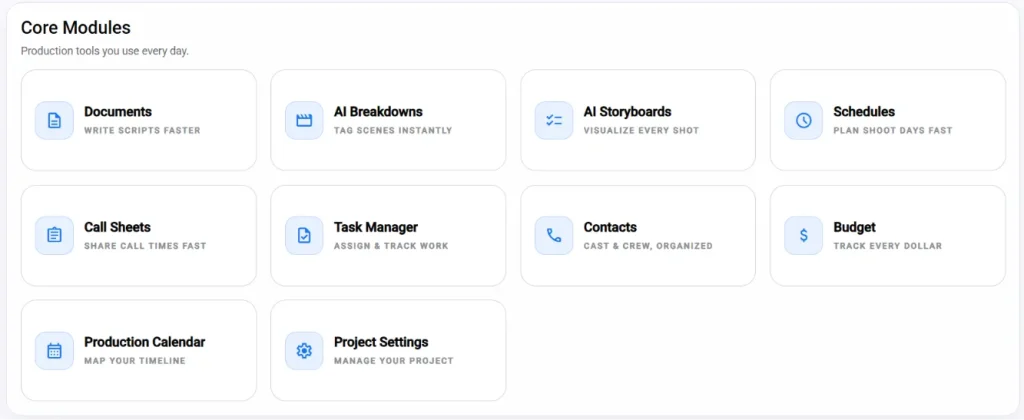
Common use cases
Pitching a concept: Use a polished storyboard to show the visual direction of a film, commercial, or campaign. This can help stakeholders understand tone, structure, and key moments quickly.
Planning complex scenes: Action sequences, emotional transitions, visual effects moments, and multi-location scenes often benefit from careful visual planning.
Improving shot coverage: Use your board to check whether a scene has the necessary wide shots, close-ups, inserts, reactions, and transitions.
Reducing revision confusion: When clients or collaborators request changes, you can update specific panels instead of reworking an entire concept document.
Supporting a shot list: Your storyboard can become a practical reference when building a shot list, schedule, or production plan.
Frequently asked questions
Do I need to be good at drawing? No. A storyboard is most valuable when it communicates clearly. Simple sketches, reference visuals, and written notes can be enough to guide a team.
Can I use this for commercials and branded content? Yes. The workflow is suitable for narrative projects, commercials, social videos, agency concepts, and many other production formats.
Are storyboard templates included? Yes, the product is designed around flexible storyboard templates that help you start quickly and structure your work clearly.
Can I use storyboard examples for inspiration? Yes. Storyboard examples can help you understand layout, pacing, shot structure, and production notes before creating your own board.
Is this useful for small productions? Absolutely. Even a small crew benefits from a clear visual plan. Storyboarding can help independent filmmakers and lean teams stay focused and avoid missed shots.
Bring your film vision into focus
The best productions start with clear decisions. A storyboard helps you see the film before you shoot it, align your team before problems arise, and communicate your vision before production costs increase. If you want a faster, clearer, and more professional way to plan scenes, this storyboard creation product gives you the structure to do it. Start your storyboard today, explore ready-to-use storyboard templates, and turn your next production into a visual plan your whole team can follow.