
What is a Shot List? The Ultimate Beginner’s Guide
Imagine standing on location with your actors ready and the camera charged. Suddenly, total silence falls as everyone looks at you to ask, “What do we film next?” Attempting to shoot a video without a plan is like trying to bake a cake without a recipe—you might have the ingredients, but the result is usually a mess.

A shot list resolves this panic before it starts. Simply put, this document is a checklist of every camera angle required to tell your story. Think of it as a mental safety net; whether you are filming a thirty-second YouTube intro or a dramatic scene, the list ensures you never get home only to realize you forgot the most important close-up.
Experienced creators use this tool to save both time and sanity. In practice, top directors often spend more hours planning on paper than they do behind the lens. This guide moves you from pointing and shooting to crafting a vision, providing the blueprint needed to lead your next production with total confidence.
The 'Grocery List' for Your Film: Defining the Shot List and Its Purpose
Think of your script as a dinner menu—it tells you what the final meal looks like, but it doesn’t help you shop for the ingredients. A shot list acts as your grocery list. It translates the creative story into a logistical checklist of every single camera angle, zoom, and movement required to build the scene. Without it, you are just wandering the aisles hoping you grab everything you need to cook dinner.
Walking onto a set without this document is a recipe for chaos. When the sun is setting and your battery is dying, you don’t have time to debate camera angles. Every director needs a shot list for efficiency; it allows you to group similar shots together—filming all the kitchen scenes at once, for example—rather than running back and forth to follow the script’s chronological order.
Beyond just camera angles, this document serves as the brain of your production. By clearly defining what information is included in a shot list, you solve four specific problems before you even hit record:
- Communication: Tells your camera operator (or friend) exactly what to frame.
- Time Management: Helps you estimate how long the day will take.
- Asset Tracking: Ensures props and costumes are ready for specific angles.
- Equipment Planning: Identifies if you need a tripod or stabilizer for the next setup.
But while a list tells you what to film, it doesn’t show you how it looks. That’s where the visual debate begins.
Shot List vs. Storyboard: Which One Do You Actually Need?
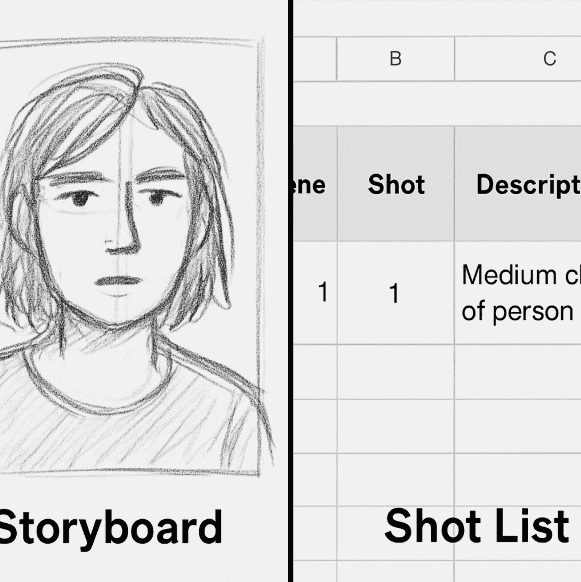
While a shot list organizes your schedule, a storyboard organizes your frame. Think of a storyboard as a comic book strip of your video. It visualizes the composition, showing exactly where actors stand and what the background looks like. In contrast, the shot list is the spreadsheet powering the production, detailing the specific gear, movements, and actions required to capture that drawing. These differences matter because a beautiful drawing doesn’t tell you which lens to grab from the bag or how long the setup will take.
Deciding which tool to prioritize often depends on your shoot’s complexity. Intricate action sequences or specific visual jokes usually demand a storyboard so everyone understands the goal immediately without long explanations. However, for a simple interview or a standard dialogue scene, cinematography planning for video production can often rely solely on a detailed shot list. You don’t need to be a skilled artist to create a great video, but you absolutely must be an organized manager, which is why the text-based checklist often takes precedence for solo creators.
Professional directors rarely choose one over the other; instead, they treat them as two halves of the same map. The storyboard provides the creative inspiration, while the shot list ensures you actually capture it on schedule. Combining sketches with your spreadsheet creates a bulletproof plan that answers both “what does this look like?” and “how do we execute it?” To build that logistical half effectively, you need to understand the specific data points that keep a shoot running smoothly.
The 5 Essential Columns: Anatomy of a Pro-Level Beginner Shot List
Opening a blank spreadsheet can feel overwhelming, but a functional shot list template doesn’t need complex formulas or color-coding to work. The goal is simply to transfer the movie playing in your head into a format that anyone holding a camera can understand. By stripping away the clutter, you create a roadmap that prevents you from forgetting critical footage when the pressure is on.
To capture the essential elements of a camera shot list, you only need five specific columns to keep your production moving:
- Shot Number: A unique ID (like 1, 2, or 1A) that lets you reference specific takes during editing.
- Location/Scene: Indicates where the filming happens, helping you group shots by location rather than story order.
- Shot Size/Angle: The specific instruction on how to frame the subject (e.g., Wide, Close-Up).
- Action/Description: A one-sentence summary of what happens, such as “Host lifts coffee cup” or “Actor walks through door.”
- Equipment: The gear required for that specific line, like a tripod, gimbal, or specific lens.
Efficiency relies on shorthand, especially when camera angles and shot types are explained in the narrow columns of a spreadsheet. Instead of writing out “Medium Close Up” twenty times, professionals use MCU, which frames the subject from the chest up to capture emotion without losing body language. You might also use OTS (Over the Shoulder) for dialogue, framing one person from behind another. Learning these acronyms keeps your document clean and readable at a glance.
Listing your gear in the final column solves one of the biggest time-wasters on set: constant re-rigging. If you know shots 3, 7, and 12 all require a tripod and a zoom lens, you can film them individually without dismantling your setup. This logic leads directly to the most powerful way to hack your schedule.
How to Categorize Your Shots for Speed: The Efficiency Secret
If you try to film your video in the exact order the audience watches it, you will waste hours moving lights and tripods. This linear approach is the fastest way to drain your battery and your patience. Instead, learning how to create a shot list for film effectively means embracing block shooting. This technique involves organizing scenes for efficient filming by staying in one spot until you’ve exhausted every angle needed there, drastically cutting down your production time.
Think of this process like grocery shopping; you don’t go to the dairy aisle for milk, leave to get bread, and then drive back for cheese. You grab everything in the dairy aisle at once. Your shot list allows you to “batch” your filming day using a simple hierarchy:
- Group by Location: Film everything in the kitchen first, regardless of where it appears in the story.
- Group by Angle: Shoot all your Wide shots while the camera is set up, then move in for Close-Ups.
- Group by Lighting: Capture everything facing the window while the sun is out, then turn around for the darker interior angles.
Managing production schedule with shot lists also means prioritizing your “heavy lifting” for the start of the day. You should tackle complex shots when your crew is fresh and natural light is consistent, saving simpler inserts for when energy dips later on. Once you understand this logic, you need a specific medium to organize it. Whether you prefer a physical notebook or a collaborative app, the right tool makes all the difference.
Digital vs. Paper: Choosing the Best Tools for Your First Shot List
While a crumpled napkin might work for a quick social media clip, most creators benefit from a tool that allows for easy editing and sorting. For simple shoots, a basic spreadsheet is often the best shot list template for beginners. Using a cloud-based option like Google Sheets allows you to rearrange rows by location or actor instantly, mimicking that “grocery aisle” efficiency. It also lets you share the plan with a friend or camera operator in real-time, ensuring everyone knows exactly what is being filmed next.
As your productions grow to involve more lighting gear or extra hands, you might outgrow static rows and columns. Digital shot listing software tools offer features that spreadsheets can’t match, such as automatically estimating how long your day will take based on your shot count. Apps like Shot Lister or StudioBinder allow you to check off completed angles directly on your phone, ensuring you never lose track of progress amidst the chaos of a shoot day.
Choosing the right platform depends entirely on your project’s scale. Review these common options to find your fit:
- Notebook/Index Cards: Best for solo vloggers who prioritize speed over detail.
- Google Sheets: Ideal for small teams needing a free, sortable, and shareable plan.
- Dedicated Apps: Worth the investment for narrative films requiring complex shot list examples and precise timing.
With your organizational tool ready, you need to fill it with more than just the main action.
Beyond the 'Must-Haves': Planning B-Roll and Safety Shots
Imagine you are editing an interview and the subject sneezes mid-sentence. Cutting that sneeze out creates a jarring visual “jump,” but this is exactly where B-Roll saves the day. B-Roll refers to supplemental footage—like a subject’s hands typing or a product spinning—that gets intercut with the main action to smooth over edits or establish a location. Including specific b-roll shot list examples in your plan, such as “close-up of pouring latte art” for a café scene, ensures you capture these vital ingredients to hide mistakes and keep viewers visually engaged.

Even when your main takes look perfect, seasoned creators always record a “safety shot”—an extra take just in case the first had a hidden focus issue or background noise. Knowing how to prioritize shots on set involves marking which angles are “must-haves” for the story and which are just “nice-to-haves” if time permits. This ensures you achieve full “coverage,” meaning you have recorded enough different angles of the scene that you won’t be stuck with a bad clip in the editing room.
Writing these requirements down acts as a universal language for anyone helping you film. Clearly distinguishing between your main action, safety takes, and extra details results in significantly improving on-set communication for crews, whether that crew is a team of hired pros or just friends with iPhones. When everyone understands exactly what is needed, nobody wastes time asking why you are filming a wrist instead of a face.
Your 3-Step Action Plan: Building Your First List Today
You no longer have to dread that awkward silence on set when the crew asks, “What’s next?” You now have the blueprint to turn your creative vision into a finished film without the stress. To create your first shot list template for beginners, block out thirty minutes and follow this simple workflow:
- Break it down: Read your script and highlight every distinct visual action.
- Fill the columns: Assign a shot size (like MCU) and angle to those moments.
- Group the logistics: Reorder the list to shoot everything facing one direction before moving the lights.
You can now see that planning isn’t homework—it’s freedom. A solid plan ensures you finish your day on time with every clip you need. Your first list doesn’t have to be Hollywood-perfect; it just has to exist. So grab a notebook, start listing, and go make something great.