
A call sheet generator helps production teams create accurate daily instructions for cast, crew, locations, timing, departments, and safety details. For filmmakers, producers, directors, 1st ADs, and coordinators, it turns a complex shoot day into a document everyone can follow. This guide explains what belongs in a professional production call sheet, how to use a call sheet template, and where software such as Studiovity can make the process faster and more reliable.
Related video: Streamline your production schedule with Studiovity’s call sheet feature
What is a film call sheet?
A film call sheet is the daily plan distributed before a shoot day, telling every cast and crew member where to be, when to arrive, what scenes are scheduled, and which practical details affect the day. It is usually prepared by the assistant director team or production office and approved by key production stakeholders before being sent out.
A strong movie call sheet does more than list call times. It coordinates departments, protects time, reduces confusion, and gives the team a shared operational reference. On a small independent shoot, it may be a lean one-page document. On a larger film or TV production, it can include multiple pages covering cast, background, transport, walkie channels, weather, parking, meal times, and special instructions.
Why a call sheet generator matters on set
A call sheet generator matters because production days change quickly, and manual documents can become outdated or inconsistent. When scenes shift, weather changes, actors have different call times, or locations move, a generator helps the production team update the document without rebuilding everything from scratch.
For a 1st AD, the call sheet is a control tool. For producers, it supports accountability and communication. For directors, it clarifies what creative work is realistically scheduled. For crew members, it answers practical questions before they slow down the day: Where do I park? What time is lunch? Which scenes are up? Who do I contact in an emergency?
A dependable call sheet process can help teams:
- Reduce avoidable delays by giving cast and crew the right time, place, and department notes.
- Improve communication between production, direction, camera, sound, art, wardrobe, makeup, transport, and locations.
- Standardize daily planning so every shoot day follows a familiar format.
- Create a record of decisions for production files, payroll support, and continuity of communication.
- Adapt faster when the shooting schedule template changes after rehearsals, tech scouts, or weather calls.
Essential elements of a call sheet template
The best call sheet template is clear, complete, and easy to scan under pressure. Whether you use a spreadsheet, PDF, or dedicated call sheet software, the structure should help the reader find their information in seconds.
Production details
Start with the project title, production company or unit name, shoot day number, date, and version status if revisions are possible. Include whether the day is interior, exterior, day, night, or mixed where helpful. These details orient the crew and prevent confusion when multiple units, episodes, or locations are active.
General crew call and key times
The general crew call is the headline time most crew members need first. Add breakfast, blocking, rehearsal, first shot target, meal break, company move, and estimated wrap when available. If departments have separate pre-calls, list them clearly so early crew do not mistake their time for the main unit call.
Location information
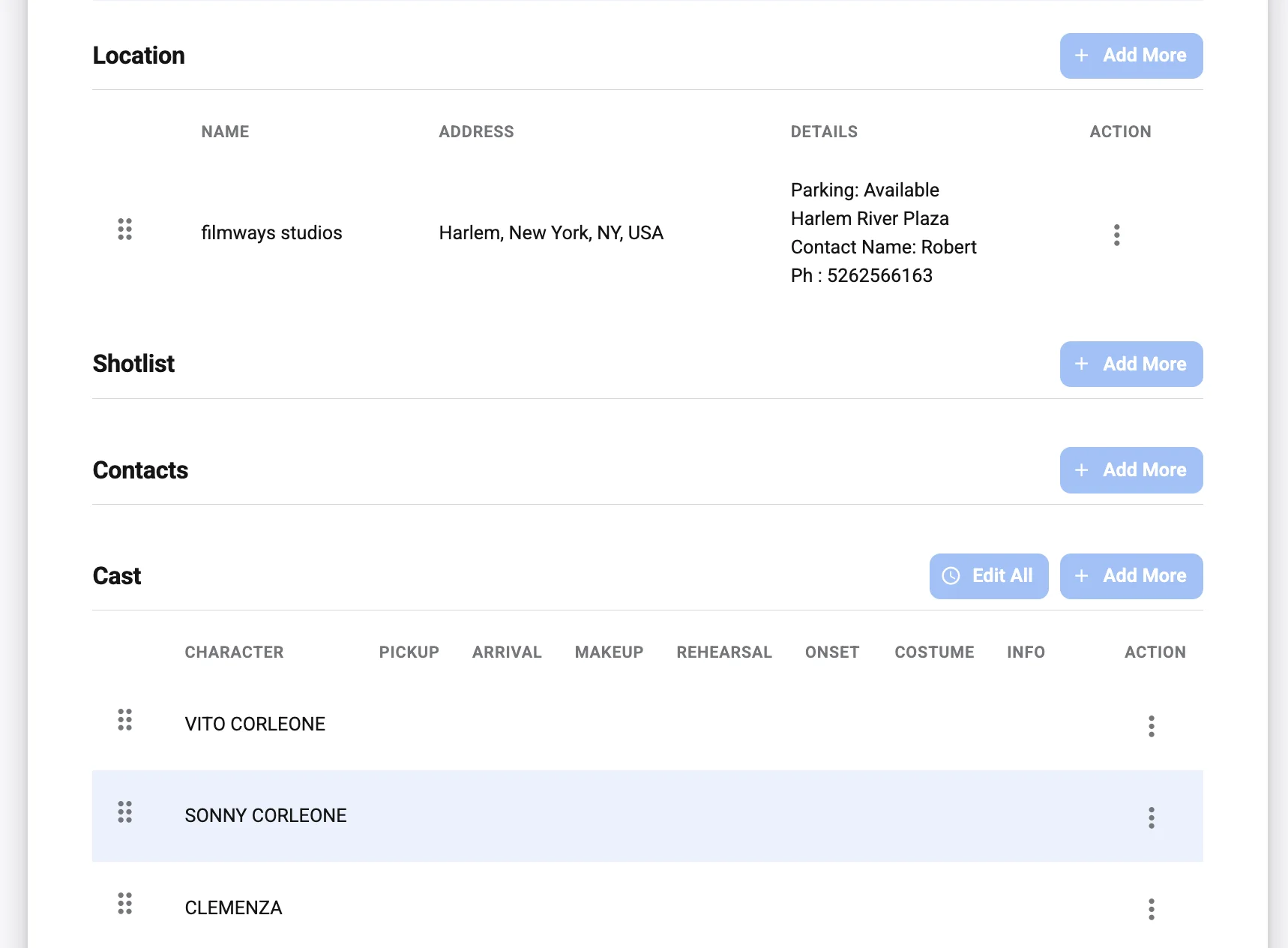
Every production call sheet should include the main location name, full address, nearest entrance, parking instructions, holding areas, and any access restrictions. If the location is hard to find, add practical notes such as gate codes, shuttle details, unit base, or map links. Avoid vague location labels that only make sense to the office.
Weather, sunrise, and sunset
Weather affects wardrobe, lighting, transport, stunts, sound, and safety. Include forecast conditions, expected temperature range, sunrise, sunset, and any weather-dependent notes. For exterior shoots, this helps the 1st AD and department heads protect the schedule and prepare backup plans.
Shooting schedule
The shooting schedule section lists scenes planned for the day, usually with scene numbers, set descriptions, page count, day or night notation, cast required, and a short scene summary. This is where the call sheet connects directly to the production plan. Keep it readable; too much script detail can clutter the page, while too little leaves departments guessing.
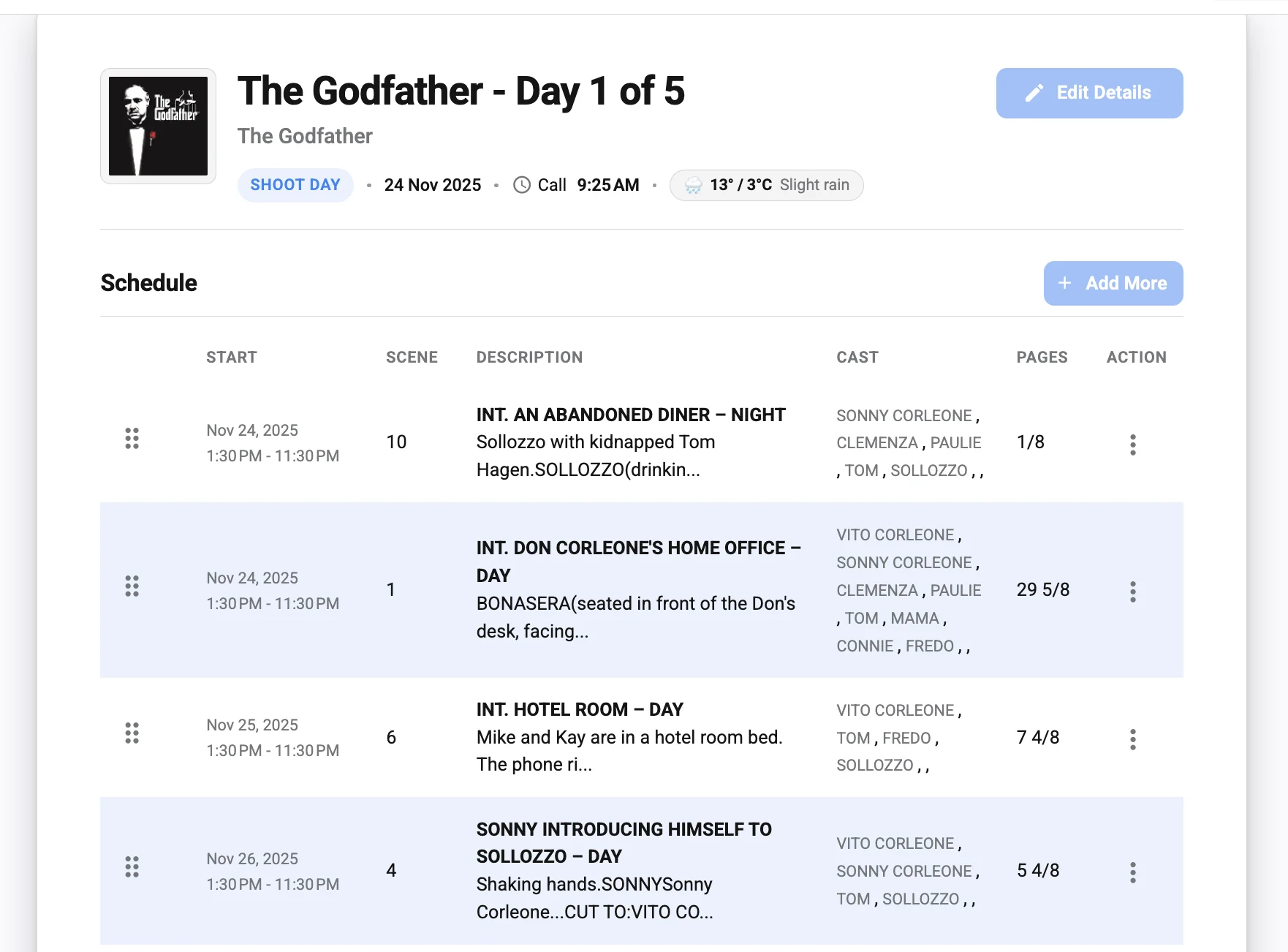
Cast list and call times
Cast information should show character name, actor name, status, pickup or arrival time, makeup and wardrobe time, set call, and wrap notes if known. Principal cast, supporting cast, background, stand-ins, photo doubles, and stunt performers may need separate sections depending on scale. Confidential contact details should be handled carefully and shared only as appropriate.
Crew contacts and departments
Include key production contacts such as producer, production manager, 1st AD, 2nd AD, production coordinator, location manager, medic, transport captain, and department heads. Crew lists should be organized by department so people can quickly find the right person. On busy sets, clear contact structure prevents small questions from escalating into delays.
Safety and emergency information
Safety details are not optional. Add the nearest hospital or emergency facility, medic contact, emergency meeting point, special hazards, PPE requirements, driving notes, and any stunt, water, animal, weapons, intimacy, or child performer considerations that apply. If safety information changes by location or scene, make it prominent rather than buried.
Department notes
Department notes help translate the schedule into action. Camera may need special rigging information, sound may need warnings about noise, art may need pre-dress access, wardrobe may need continuity notes, and makeup may need prosthetic timing. Keep these notes concise, specific, and assigned to the right department.
Logistics and transportation
Transport details can include pickup times, driver instructions, shuttle routes, vehicle parking, crew parking, load-in routes, and company move timing. If catering, holding, or restrooms are separate from set, mention that too. Practical logistics are often the difference between a smooth start and a scattered morning.
How do you create a professional movie call sheet?
To create a professional movie call sheet, start with the locked or latest approved schedule, confirm all department inputs, then build a clean document that prioritizes call times, location, scenes, cast, crew, safety, and logistics. The process should include verification before distribution, because even one incorrect time or address can disrupt the day.
A practical workflow looks like this:
- Review the shooting plan. Confirm scenes, page count, locations, cast needs, and any company moves with the 1st AD and production team.
- Collect department updates. Ask locations, transport, camera, lighting, sound, art, wardrobe, makeup, catering, and safety for day-specific notes.
- Confirm cast and background requirements. Check individual call times, pickup times, fittings, makeup, rehearsals, minors’ requirements, and special performer needs.
- Build the call sheet. Use your call sheet template or software to organize the information in a consistent format.
- Proofread critical fields. Double-check date, day number, location address, contact numbers, hospital information, scene list, and all call times.
- Get approval. The appropriate AD or production lead should review the final version before release.
- Distribute and track updates. Send the approved call sheet through the agreed channel and mark revisions clearly if anything changes.
This workflow works whether you are producing a short film, commercial, feature, series episode, documentary, or branded content shoot. The scale changes, but the logic remains the same: gather accurate information, organize it clearly, and distribute it before people need it.
Call sheet example: what a daily plan might include
A call sheet example for a simple interior shoot might begin with the project name, shoot day 6 of 18, the date, general crew call at 7:00 a.m., breakfast at 6:30 a.m., and first shot planned for 8:15 a.m. The location section would show the studio address, parking lot entrance, stage number, unit base, and contact for the location manager.
The schedule section might list three scenes in the same apartment set, including scene numbers, page counts, required cast, and a brief action summary. Cast details would show Actor A called for makeup at 7:15 a.m. and Actor B called at 9:00 a.m. if they are not needed until the second scene. Department notes might mention a practical lamp gag for lighting, a noisy refrigerator to control for sound, and a wardrobe change after lunch.
Even this basic example shows why a production call sheet must be specific. If the actor receives only the general crew call, they may arrive too early or too late. If sound is not warned about location noise, time may be lost solving a preventable problem. The value is in the details that help each person prepare.
Manual templates versus call sheet software
A manual call sheet template can work well for small shoots, especially when the schedule is simple and the team is compact. Spreadsheet and document templates are flexible, familiar, and easy to customize. They are also vulnerable to duplicate data entry, formatting issues, outdated versions, and missed updates when information changes late in the day.
Call sheet software is designed to reduce that friction. Instead of rebuilding a document every night, teams can generate call sheets from structured production information, reuse saved details, and keep formatting consistent. This is especially useful for episodic work, multi-location shoots, and productions where the AD team needs to revise and resend documents quickly.
Studiovity call sheet software is one relevant option for teams that want a more organized approach to call sheet creation. It provides product context for filmmakers looking beyond a static Essential Call Sheet Template for Filmmakers and toward a workflow built for production planning. You can explore it here: Studiovity call sheet software.
Best practices for clearer production call sheets
A good call sheet is not simply complete; it is usable. Crew members often read it late at night, early in the morning, in transit, or between tasks. Design and wording should help them act quickly.
Use these best practices when preparing your next film call sheet:
- Put the most important information first. Date, shoot day, general call, location, and key contacts should be easy to find.
- Use consistent labels. Do not switch between “set call,” “report,” and “arrival” unless each term has a defined meaning.
- Highlight changes. If a revised call sheet goes out, make changes obvious and include a version note.
- Keep notes actionable. Replace vague reminders with specific instructions, such as “park in Lot B and check in at Gate 3.”
- Protect sensitive information. Share personal contact details, performer information, and confidential creative details only with people who need them.
- Avoid overcrowding the page. If every line is bold, nothing stands out. Use hierarchy, spacing, and section headers.
- Confirm before sending. A clean-looking call sheet with incorrect information is worse than a plain one that is accurate.
Common mistakes to avoid
Many call sheet problems come from rushing the final step. After a long production day, it is tempting to copy yesterday’s document and make quick edits. That shortcut can work only if every inherited field is checked.
Watch for these common issues:
- Yesterday’s date, weather, hospital, or parking instructions left in the document.
- Cast call times that do not match makeup, wardrobe, transport, or scene order.
- Missing background, stand-ins, stunt performers, or specialty crew.
- Scene lists that do not reflect the latest shooting schedule template.
- No clear contact for emergencies, transport delays, or location access.
- Department notes that are too vague to guide preparation.
- Revised versions sent without explaining what changed.
The fix is a repeatable review process. Have one person build the call sheet, another proof critical details when possible, and the AD or production lead approve it before release. On fast shoots, even a short checklist can prevent costly confusion.
Choosing the right call sheet system
The right system depends on production scale, team workflow, budget, and how often your plans change. A solo filmmaker may be comfortable adapting a call sheet template. A commercial production team may need fast versioning and polished PDFs. A television production may need a system that supports recurring cast, multiple departments, and frequent schedule updates.
When evaluating your options, consider whether the system helps you:
- Build a professional movie call sheet without formatting from scratch.
- Connect call sheets with scheduling information.
- Save contacts, locations, and recurring production details.
- Create readable PDFs or digital versions for distribution.
- Revise, duplicate, and resend documents efficiently.
- Maintain consistency across multiple shoot days or episodes.
The goal is not to make the call sheet more complicated. The goal is to make the production day easier to understand before anyone arrives on set.
Final checklist before distribution
Before sending the call sheet, review the details that would cause the most disruption if they were wrong. Confirm the date, shoot day, general crew call, individual call times, location address, parking, hospital, emergency contacts, scene list, department notes, and distribution list. If revisions are possible, label the version clearly so nobody works from an outdated file.
A reliable call sheet generator, a disciplined approval process, and a well-structured template give your team a stronger start each day. Whether you use a simple document, an Essential Call Sheet Template for Filmmakers, or dedicated software, the purpose is the same: give every person the information they need to arrive prepared, work safely, and keep the production moving.