
We all have a cinematic vision, but the gap between dreaming and actually making a movie often feels massive. According to industry data, indie projects usually fail due to disorganized video production, not a lack of talent. To succeed, you must understand the filmmaking pipeline—the clear journey from writing your story (pre-production), to recording on set (production), to editing the final cut (post-production).
Ever spend more time hunting for scattered script notes than holding a camera? The finest software for filmmakers is completely focused on fixing this through seamless integration. By utilizing an integrated hub like Studiovity, you create a central “brain” for your project that instantly turns raw scripts into workable schedules, preventing the chaos that routinely ruins shoots.
Modern platforms now include smart helpers—AI assistants that organize your files and format documents without replacing your unique creative vision. With your logistical foundation firmly secured in one place, you are completely free to focus on the art of storytelling. This technology effortlessly guides your ideas from a blank page into reality.
Why Studiovity is the 'Brain' Your Script Needs in 2026
Writing your movie shouldn’t feel like typing into a static document. While creators often debate Studiovity vs Final Draft for modern screenwriters, the reality in 2026 is that your script must be a living blueprint. Older tools treat your story like a simple text file, but modern software for filmmakers turns those words into an actionable production plan.
Gone are the days of emailing “Script_Final_v3.pdf” back and forth. The real-time collaboration features in Studiovity screenwriting software allow you and your co-writer to edit the exact same scene simultaneously. Think of it like Google Docs, but purpose-built for filmmaking. If an actor suggests a dialogue tweak on set, everyone’s digital script updates instantly, eliminating costly confusion.
Once your story is written, the real magic happens through smart helpers. Using AI-driven script analysis tools, the software reads your dialogue and action lines to automatically spot what you need to film. Instead of reading through pages with a highlighter to find every prop, costume, or location, the system instantly generates a list of production requirements for you.
This leap from typing to planning changes how you work entirely. Consider these core differences:
Scheduling: Studiovity integrates your dates instantly, while legacy software is standalone writing.
Breakdowns: Modern platforms automate prop tracking, whereas older methods require manual entry.
Access: Cloud hubs keep crews aligned, instead of isolating the writer.
How to Automate Your Film Schedule and Save 20+ Hours of Planning
Moving from the script to the set feels overwhelming with so many moving parts. You already know every project needs a timeline and money, but discovering how to automate film production scheduling in 2026 separates a chaotic shoot from a smooth, professional operation. Studiovity bridges this gap with integrated scheduling, seamlessly synchronizing your storyboards directly with the daily shoot list so you never fall behind.
Instead of juggling multiple apps to figure out how to manage film budgets and talent casting digitally, you can centralize your entire workflow. The platform acts as your digital production assistant, handling the administrative tasks that usually drain small crews:
SMS notifications: Alerting your team instantly to sudden schedule or location changes.
Budget tracking: Updating your available funds the moment you approve a set expense.
Talent casting management: Organizing actor profiles, auditions, and contact details in one hub.
Equipment lists: Pulling exact gear needs directly from your automated script breakdowns.
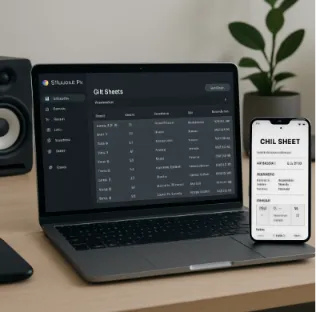
Clear communication on shoot day is equally critical to your success. By utilizing robust digital call sheet software, you eliminate paper waste and costly miscommunication. These smart documents send automated updates straight to your crew members’ phones, detailing exactly when and where they need to arrive. With your logistics running effortlessly in the background, your team is completely free to focus on capturing the perfect shot.
Essential Tools for Mobile Cinematography and Virtual Production
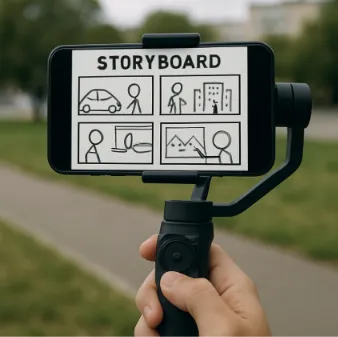
Visualizing your film before cameras roll is no longer a guessing game. By 2026, cross-platform screenwriting apps with integrated storyboarding let you map every angle from your phone, transforming text into a visual blueprint. You can even use your smartphone for “lens visualization”—a feature where your mobile app simulates how a scene looks through specific cinema lenses, helping you frame shots perfectly before renting gear.
Bringing impossible locations to life has also become surprisingly affordable. Achieving sci-fi landscapes once meant expensive travel, but modern virtual production software for filmmakers lets you project 3D environments from Unreal Engine onto an LED wall right in your garage. When paired with essential filmmaking tools for mobile cinematography, like advanced smartphone sensors and smart gimbals, you can shoot actors against these digital backdrops, blending real and virtual worlds effortlessly.
Tracking this footage on set previously required stacks of paper, but digital shot logs now handle the heavy lifting. A shot log records your best takes, and today’s tools instantly sync these on-set notes to your editing timeline, preventing endless clip-hunting. With your footage organized and effects captured in-camera, your project is ready for the post-production suite.
Choosing the Right Post-Production Suite: AI-Driven Editing for Faster Turnarounds
Now that your on-set footage is organized, the magic begins in the edit bay. Today’s editing applications operate like a smart assistant rather than a digital razor blade. Modern AI video editing tools can instantly transcribe dialogue and automatically stitch together a “rough cut”—the first, unpolished assembly of your story. This eliminates hours of tedious clip sorting, letting you focus immediately on pacing and emotion.
Choosing the best software for filmmakers usually comes down to Adobe Premiere Pro versus DaVinci Resolve. Premiere remains a highly versatile favorite for indie projects due to its seamless integration with other Adobe applications. Meanwhile, DaVinci Resolve provides an all-in-one powerhouse with an unbeatable free tier, favored by creators wanting premium capabilities without a monthly subscription.
Regardless of your chosen platform, geographical limits are history. Implementing a cloud-based post-production workflow allows remote editors to open your exact project simultaneously. While you trim scenes locally, a creative partner across the globe can add sound effects in real-time, ending the nightmare of emailing massive video files back and forth.
Before committing to a system, evaluate your project using this simple checklist:
Color grading needs: Does your story demand precise visual mood manipulation?
VFX requirements: Do you need complex, built-in motion graphics?
Team collaboration features: Will multiple people need to access the timeline simultaneously?
Once your edit is locked, your project is prepared for color grading and visual effects.
Achieving High-End Cinematic Looks with Advanced Color Grading and VFX Suites
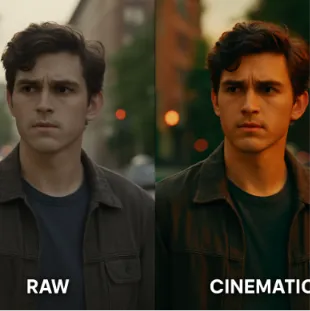
With your story fully assembled, the final step is giving your project a polished, theatrical finish. First, you must distinguish between color correction—fixing basic exposure so your footage looks natural—and creative styling. When looking at the top-rated color grading suites for 2026, DaVinci Resolve dominates the indie scene by offering free, studio-level tools, while Premiere Pro remains a strong contender for quick, intuitive tweaks.
Transforming basic footage into a moody thriller or a warm comedy is incredibly simple using LUTs (Look Up Tables). Think of a LUT as a sophisticated digital paint job that instantly applies a specific visual atmosphere to your clips. By applying these presets, anyone can recreate iconic visual styles—like that nostalgic, neon-tinted Stranger Things look—without needing years of professional color grading experience.
Beyond the color palette, completing your film requires accessible visual effects. You no longer need expensive external systems, as modern suites include affordable advanced VFX and motion graphics software for filmmakers that seamlessly integrates with your main editor for small team collaboration. Now that your project looks spectacular, you have everything needed to finalize your release.
Your 3-Step Action Plan to Launch a Professional Film Project Today
You no longer have to stare at a blank page overwhelmed by the logistics of filmmaking. You now possess the blueprint to build a customized stack of software for filmmakers that fits your specific budget and project scale. Ultimately, your technology should help you breathe, not stress you out, automating the tedious tasks so you can focus entirely on the art of your story.
To successfully execute a 30-day plan to move from a blank page to a scheduled production, simply follow this 3-step roadmap:
Draft and Break down in an integrated pre-production platform to centralize your script and schedules.
Shoot with mobile and digital tools to capture your vision efficiently while syncing logs directly to the cloud.
Polish in professional editing suites to give your project that seamless, cinematic finish.
A unified “home base” keeps your creative and logistical workflows in sync. Selecting the right software for filmmakers provides the vital glue holding your disparate apps and entire production together. Setting up a dedicated workspace today provides the structural foundation needed to successfully execute your film project.