
You have a blockbuster movie idea in your head. However, the inspiration dies the moment you open a blank document. This happens because fighting margins and centering dialogue drains your energy quickly. Therefore, professional formatting becomes a strict technical requirement instead of a creative choice. For this reason, writing in basic word processors is an absolute nightmare. Consequently, utilizing free screenwriting software is the best way to protect your creative momentum.
Furthermore, industry data reveals a sad truth. Thousands of writers quit early because they falsely believe they must spend $200 for professional tools. Instead, an industry-standard free screenwriting software acts like a smart personal assistant for beginners. It automatically handles all the spacing and layout rules. Thus, you can focus entirely on your characters rather than formatting mechanics.
So, why spend your hard-earned money on legacy programs when modern alternatives deliver identical, professional results? Specifically, finding the best free screenwriting software in 2026 unlocks platforms like Studiovity that actually outperform older paid giants. Today, the right free screenwriting software removes every financial barrier completely. As a result, you can turn that brilliant idea into a finished, industry-ready script immediately.
The "Word" Trap: Why General Writing Apps Kill Your Creative Momentum
Trying to manually center text or adjust margins for scene headings drains your creative energy. These headings are commonly called Sluglines. If you are learning how to format a professional screenplay for free, relying on general writing apps is a dangerous trap. Indeed, a dedicated free screenwriting software eliminates this dangerous formatting trap entirely. Producers expect strict industry-standard spacing. Therefore, manual layout errors usually lead to immediate script rejection before anyone even reads your story.
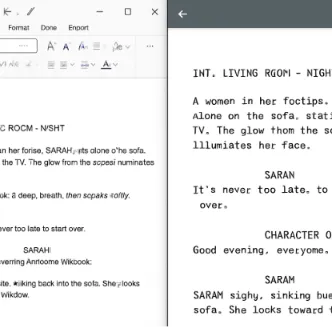
Fortunately, the best writing programs eliminate this formatting headache completely. They use a simple, lightning-fast “Tab-to-Transition” workflow. Instead of fighting the spacebar, you simply hit ‘Tab’ or ‘Enter’. Then, the software automatically knows to switch from an Action Line (what is happening on screen) to a character’s dialogue. Consider the difference:
Manual Formatting: You constantly adjust margins, guess at page breaks, and risk inconsistent spacing.
Auto-Formatting: You get instant scene transitions, perfect alignment, and a seamless writing experience.
Unlocking automatic screenplay formatting for no cost means you can finally focus entirely on your characters. In addition, consistent, properly formatted PDF exports guarantee a flawless, production-ready document whenever you share your work. This massive leap perfectly sets the stage for why Studiovity is the gold standard for free screenwriting in 2026.
Why Studiovity is the Gold Standard for Free Screenwriting in 2026
In 2026, you shouldn’t have to string together five different apps just to take a movie idea from a rough draft to a visual concept. While auto-formatting keeps your margins perfect, modern screenwriting demands more than just a smart typewriter. Therefore, today’s creators need an all-in-one hub that handles the heavy lifting of production planning alongside the writing process.
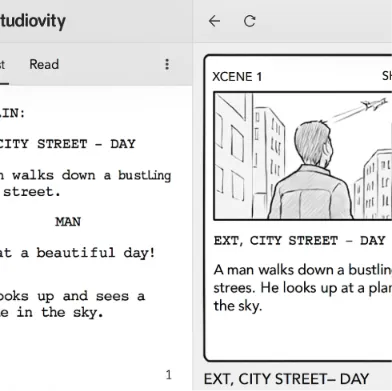
This is exactly where the modern standard shines. It offers powerful tools that previously cost hundreds of dollars. For instance, this free screenwriting software elevates the creative landscape by combining everything an aspiring writer needs into a single, intuitive workspace:
Cloud Collaboration Features: Write seamlessly with a partner in the exact same document at the exact same time.
Integrated Storyboarding and Script Breakdown: Instantly generate visual panels and lists of required props directly from your text.
Real-Time Cloud Sync: Your work stays automatically backed up whether you type on a laptop or review on an iPad.
Think of the teamwork aspect like “Google Docs for Movies”—you can write a dialogue scene with a friend in real-time without ever sending confusing files back and forth. Even more impressive is the “Smart Assistant” approach to prepping your script for actual filming. You do not need to manually read through 90 pages to highlight every prop, vehicle, and character needed for a shoot. Instead, the software analyzes your script and builds that breakdown for you in seconds. Then, you can sketch out exactly how those moments will look on camera using the free visual storyboard panels.
Having these premium capabilities available at zero cost creates a massive advantage for new creators trying to turn scripts into actual videos. Consequently, Studiovity’s seamless, future-proof environment often wins when weighing Studiovity vs Celtx for indie filmmakers because it removes the technical barriers of production planning. However, if you often write in places without reliable internet access, dedicated offline alternatives provide excellent solutions.
Beyond Studiovity: Top Free Alternatives for Offline and Open-Source Writing
Sometimes, the best way to write a blockbuster is to disconnect from the internet completely. While cloud-based tools are incredible for modern production, a screen full of complex menus can easily distract you from actual storytelling. If you prefer working in a quiet coffee shop or a cabin, you need a distraction-free workspace. Consequently, you might need a free screenwriting software with a reliable offline mode. These minimalist environments step in to offer stripped-down spaces where it is just you, your characters, and the blank page.
Finding the right fit often comes down to who ultimately controls the software. For example, you might have heard of top-rated open-source scriptwriting programs like Trelby. “Open source” simply means the software is built and maintained by a community of volunteers rather than a giant corporation. Therefore, it stays free forever and lives safely on your computer’s hard drive. Conversely, older web-based giants like Celtx offer robust tools, but their free versions frequently lock essential features or project limits behind a paywall.
For the ultimate distraction-free experience, a system called the “Fountain format” has quietly become one of the best free alternatives to premium software. Think of Fountain as a smart translator. You type normally in any basic text document, and the system automatically turns it into a perfectly formatted, industry-standard script. Here is how these different approaches stack up for your daily writing routine:
Trelby (Open Source): Pros: 100% free forever, works entirely offline, and your files are completely secure. Cons: The interface looks outdated, and there is no mobile app for your phone.
Celtx (Cloud): Pros: Familiar online workflow and includes helpful pre-production features. Cons: Strict limits on how many scripts you can write for free, and it requires an active internet connection.
Fountain Editors (Minimalist): Pros: Lightning-fast, works on virtually any device, and provides zero visual distractions. Cons: Requires learning a few basic typing rules, and lacks built-in storyboarding.
Choosing between a web platform and a quiet desktop app depends entirely on your personal creative habits. Once you establish your ideal workspace, seamless project synchronization ensures your ideas remain safely backed up. Thus, your finished pages are accessible from anywhere.
Write Anywhere: How to Sync Your Script Across Tablet and Desktop Without Sync Errors
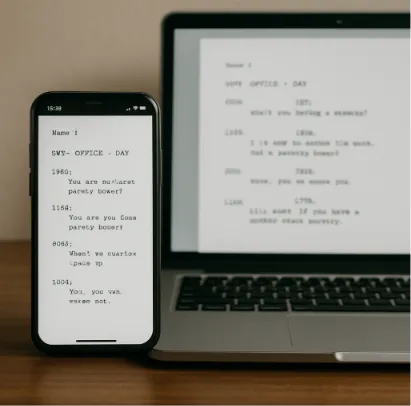
Inspiration rarely waits for you to sit at a desk. Because of this, many beginners wonder if they can write a movie script on a tablet. Absolutely. By using cross-platform scriptwriting tools, you can effortlessly draft a scene on your iPad and polish it later on your laptop. These tools work beautifully for remote teams or solo creators. This connected workflow maintains a single “source of truth” via cloud storage. Therefore, your progress updates instantly everywhere without accidentally duplicating files.
Behind this flexibility is reliable mobile sync, which silently saves your work in the background. However, you must protect those pages from getting trapped in a proprietary format. You do not want a format that forces you to buy specific software just to read them later. Therefore, always export your backups as a PDF or a universal Fountain file. Think of Fountain as a digital passport—it guarantees your raw text can be opened and automatically formatted by almost any app in the future.
Securing this future-proof setup means you never have to stress about losing a great idea on the go. Furthermore, the technical hurdles are officially cleared once your screens are perfectly aligned. This alignment successfully paves the way for immediate writing.
Your 30-Minute Launch Plan: From Blank Page to Finished Scene
Formatting rules no longer need to be a frustrating barrier blocking your creativity. Fortunately, the best free screenwriting software takes that heavy lifting completely off your shoulders. There is no need to spend a week’s rent on paid programs when professional-grade software exists right in your browser at no cost.
Your first goal is simply getting your ideas onto the page without needing a manual. Here is your 30-minute quick-start checklist to finish a two-page scene by the end of the day:
Sign up: Create a free account on a platform like Studiovity to access professional features instantly.
Set the scene: Type your very first scene heading to establish your setting.
Find the rhythm: Implement the ‘Tab-Enter’ rhythm to effortlessly switch between dialogue and action.
Export: Organize plot points and character arcs, then download your professional PDF.
You now understand screenwriting fundamentals well enough to start right now. By choosing the right primary tool, you completely remove the technical friction of the past. So, stop fighting the margins and focus on what actually matters: your finished pages.