
A multiple location call sheet keeps a moving production day understandable. It tells cast, crew, drivers, department heads, and production support teams where to be, when to move, what to bring, and who to contact if the plan changes. When your film call sheet is built with location management in mind, it becomes more than a daily notice: it becomes the control document for the entire shoot day.
Related video: How to generate an industry-standard call sheet in Studiovity
For a single-location day, a basic call sheet template may be enough. For a day with company moves, split units, staggered cast calls, parking changes, and different access rules, the call sheet format needs more structure. The goal is simple: nobody should have to guess which address applies to them, when travel begins, or what happens if one location runs late.
What makes a multiple location call sheet different?
A multiple location call sheet is different because it must communicate movement, not just attendance. A standard call sheet tells people where the day starts; a multiple location call sheet tells people how the day flows from one place to another, which teams move together, which teams stay behind, and how each location affects timing, parking, meals, equipment, safety, and communication.
That means the location section cannot be treated as a small address block. It should connect directly to the shooting schedule template, scene order, transport plan, cast call times, and department-specific needs. If Location A is an exterior street scene, Location B is a controlled interior, and Location C is a night pickup, each place may have different crew needs, restrictions, and reset time.
The biggest mistake is trying to squeeze a complex day into a single-location call sheet example. It may look clean on paper, but it creates uncertainty on set. A strong multiple location call sheet gives each location enough context so people can make good decisions without calling production every few minutes.
The role of the film call sheet in a moving production day
A film call sheet is the daily operating plan for a production. It usually includes production details, weather, nearest hospital, emergency contacts, crew and cast call times, scene information, locations, parking, meal information, department notes, and wrap-related details. On multi-location days, every one of those sections becomes more sensitive because a small misunderstanding can affect the next move.
Think of the call sheet as the bridge between planning and execution. The schedule may show what needs to be filmed. The location management team may know the permits, parking, and access rules. The assistant director team may know timing and company moves. The call sheet brings those details into one document that everyone can use.
A good film call sheet does not try to explain every production decision. Instead, it gives the right information to the right people at the right level of detail. Cast need to know when to arrive, where to report, and whether they move. Crew need call times, parking, equipment access, department notes, and company move timing. Drivers need exact pickup and drop-off points. Production needs a shared reference when changes happen.
Start with the shooting schedule before building the call sheet
Before opening a call sheet template, review the shooting schedule. The schedule tells you what scenes are planned, where they happen, which cast and departments are needed, and how the day is expected to progress. If the call sheet does not match the schedule, confusion starts before the first call.
Use the shooting schedule template as your source of truth for scene order and estimated timing. Then translate that plan into a clear daily document. Avoid copying the schedule blindly. A schedule is usually built for planning; a call sheet is built for communication. The call sheet should simplify the day without hiding important movement details.
When reviewing the schedule, look for anything that affects location flow. Does the day begin at one location and finish at another? Is there a company move after lunch? Are some crew members pre-called to a second location? Does cast travel separately from the main crew? Are there scenes that require special gear at only one location? These questions shape the call sheet format.
A helpful prep checklist includes:
- Confirm all scene numbers and descriptions so the call sheet matches the current schedule.
- Verify each location name and address with the location management team before distribution.
- Identify company moves and note whether the full crew, partial crew, or specific departments are moving.
- Check cast requirements by scene so performers are not called to the wrong location too early.
- Confirm parking, basecamp, holding, and restroom access for each location.
- Review daylight, weather, and noise concerns when they affect scene order or timing.
- Make sure emergency information is relevant to the active location or clearly separated by location.
Build the location section as the backbone
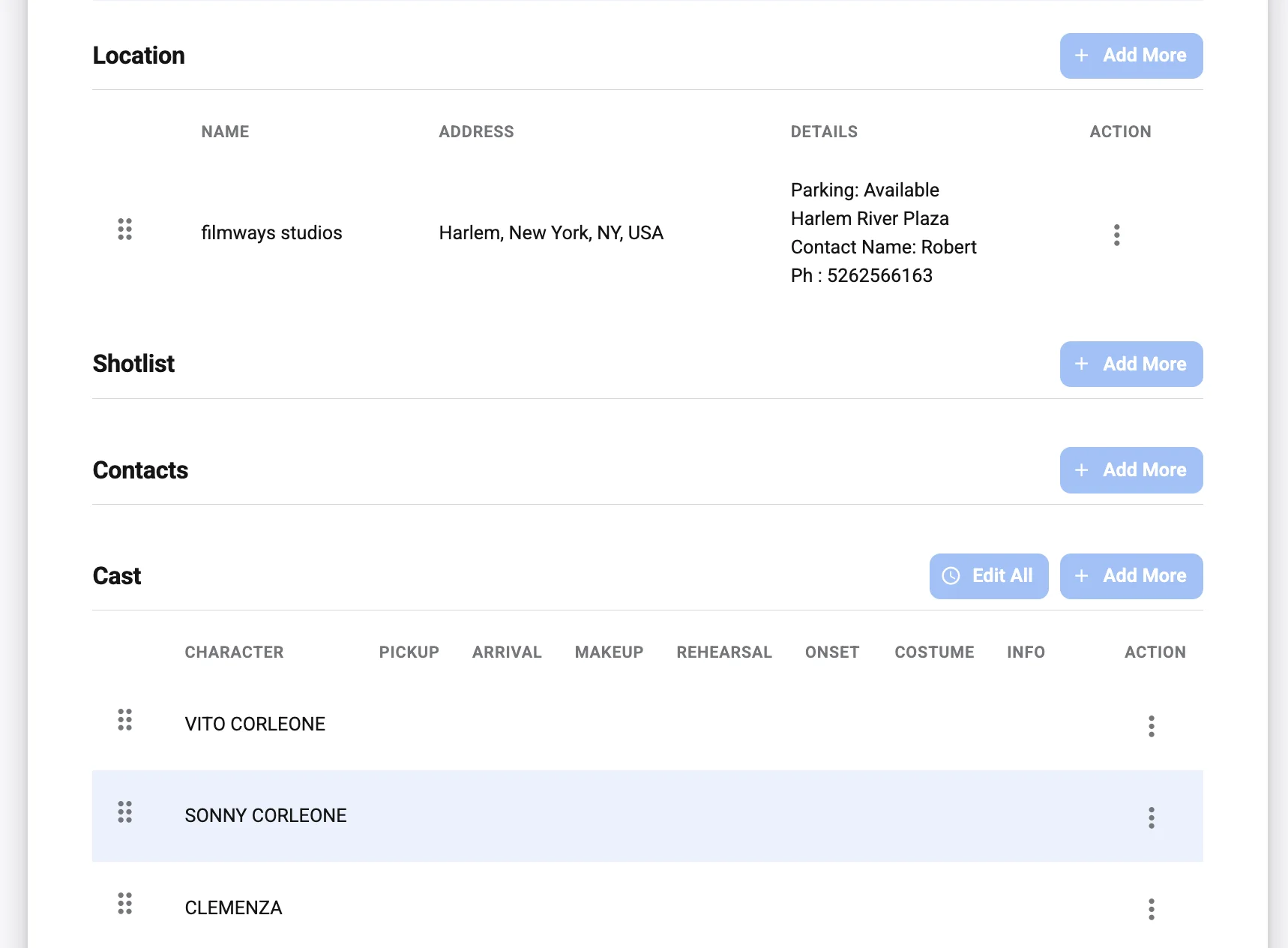
For a multiple-location shoot, the location section should do more than list addresses. It should organize the day around where work happens. Each location block should be easy to scan, especially on a phone, because people often check call sheets while in transit, loading gear, or arriving at basecamp.
A practical location block can include the location name, filming address, nearest cross street, parking address, basecamp address, holding area, access notes, contact person, permitted hours, and any restrictions that affect departments. If parking and filming are in different places, never let the filming address stand alone. Crew may drive directly to the wrong spot, causing delays before the day begins.
For location management, clarity is protection. The location manager or location team often handles property owners, neighbors, permits, police support, parking, load-in, and site restoration. When the call sheet reflects their information accurately, it reduces unnecessary calls and helps the crew respect the location.
A clear location block format
Use a consistent structure for every location, even if one location has fewer details. Consistency helps the crew find information quickly.
| Location detail | What to include | Why it matters |
|---|---|---|
| Location name | Short production-friendly name | Helps crew match the location to the schedule |
| Filming address | Full address or approved reporting point | Prevents wrong arrivals |
| Parking | Crew parking address and instructions | Separates parking from set when needed |
| Basecamp | Address or description | Helps cast, makeup, wardrobe, and transport |
| Access notes | Entrances, elevators, gates, stairs, badges | Reduces bottlenecks at arrival |
| Location contact | Name or department contact | Gives crew a route for location-specific questions |
| Restrictions | Noise, smoking, footwear, photos, protected areas | Protects permits and property relationships |
| Move timing | Estimated departure and arrival | Keeps the day aligned across departments |
How should you show company moves?
Company moves should be shown as their own timeline events, not hidden in notes. A company move affects transportation, meal timing, equipment loading, background holding, cast readiness, and department resets, so it deserves a clear place in the call sheet. The best call sheet format makes the move visible in the schedule section and reinforces it in the location notes.
Write the move in plain language. Include the estimated wrap at the first location, load-out or travel time if relevant, estimated arrival at the next location, and the next work call or ready-to-shoot time. If some departments move earlier, call that out separately. For example, art, grip, electric, or locations may need a pre-call at the next site while the main unit finishes scenes elsewhere.
Avoid vague language such as “move after scene 12†unless the crew already has a detailed timing reference. Scene timing can shift quickly. A better note would be: “Company move to Location B after Scene 12; department heads check with 1st AD before load-out.†This gives people the plan while acknowledging that production will control the exact release.
For complex days, consider adding a mini movement table:
| Movement | Who moves | From | To | Notes |
|---|---|---|---|---|
| First arrival | Main crew | Crew parking | Location A | Check in at basecamp before going to set |
| Pre-rig move | Selected crew | Location A | Location B | Only departments listed in department notes |
| Company move | Main unit | Location A | Location B | Do not self-release before AD announcement |
| Final pickup | Small unit | Location B | Location C | Cast and crew listed only |
This type of table turns a dense day into a readable plan. It is especially useful when the production includes multiple parking areas, split call times, or staggered department movement.
Match cast and crew call times to each location
A call sheet example for a simple shoot might list one general crew call and individual cast calls. That is not enough when locations change during the day. Each call time should make sense in relation to where that person needs to be and when they are actually needed.
Cast call times should specify reporting location, makeup or wardrobe timing, set-ready time, and whether the performer is expected to travel with production. If a performer works only at Location B, do not bury that detail in the scene list. Put the correct report location near their call time so it is impossible to miss.
Crew call times also need location awareness. A general crew call at Location A may work for most departments, but production assistants, locations, art, transportation, grip, electric, and catering may have different location requirements. If a department must report directly to the second location, spell it out.
A useful structure is:
- General crew call: main location, parking, and basecamp.
- Department pre-calls: who reports early and where.
- Cast calls: report time, makeup or wardrobe time, set-ready time, and location.
- Background calls: holding location, check-in process, and movement plan.
- Driver or transport calls: pickup points, shuttle plan, and company move support.
- Wrap or release notes: especially for cast or departments not continuing to later locations.
This prevents one of the most common multi-location problems: people arriving at the first address simply because it appears first on the call sheet.
Connect scenes to locations without clutter
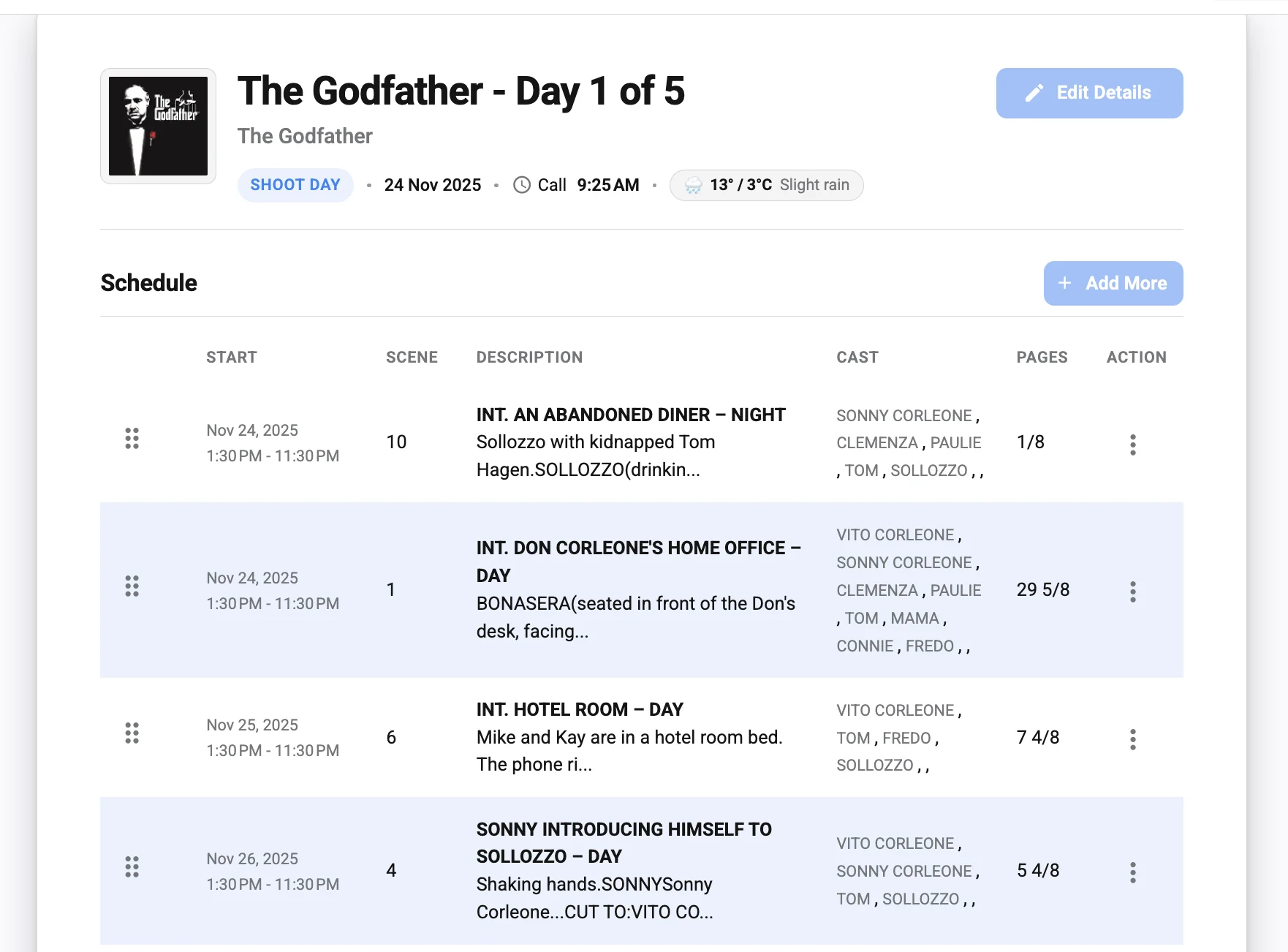
The scene section should help people understand what is being filmed, where it is happening, and who is needed. It should not become a full production binder. The trick is to include enough information to guide the day while keeping the page readable.
For each scene, include the scene number, short description, page count or estimated size if your production uses it, cast IDs, location, day or night, and any essential notes. If your call sheet template allows grouping scenes by location, use that approach for multi-location days. It helps crew members see the location flow at a glance.
For example, instead of mixing every scene into one long list, organize the scene section like this:
- Location A: Apartment exterior
- Scene 8: Character arrival, day exterior
- Scene 9: Dialogue at entrance, day exterior
- Location B: Office interior
- Scene 14: Meeting sequence, day interior
- Scene 15: Insert shots, day interior
- Location C: Alley pickup
- Scene 22: Night pickup, exterior
This is only a simple call sheet example, but the structure is what matters. The crew can immediately see the progression of the day, and departments can prepare gear, props, wardrobe, and lighting needs around each location.
Give location management its own practical notes
Location management in film and TV production is not just about finding attractive places to shoot. It involves access, permissions, neighborhood impact, movement, safety, parking, property protection, and communication between production and the people who control or live near the location. A multi-location call sheet should support that work.
The location notes section should be specific, but not overloaded. Include the rules that the crew must follow to keep the location usable and the production relationship intact. If the crew cannot block a driveway, smoke near an entrance, photograph private areas, use certain restrooms, or place gear against walls, the call sheet should say so clearly.
This is also where you can include arrival instructions. A location may have a front address, but the approved crew entrance may be through a side gate or loading dock. A building may require sign-in at security. A residential location may require quiet arrivals before a certain hour. These details are small until they are missed.
Useful location management notes include:
- Approved crew entrance and check-in route.
- Areas that are off-limits to cast and crew.
- Load-in and load-out instructions.
- Parking restrictions and shuttle rules.
- Neighbor sensitivity or quiet zones.
- Trash, recycling, and restoration expectations.
- Restroom access and holding areas.
- Whether signs, cones, mats, or protective coverings are required.
When these notes are accurate, they protect time and trust. They also help new crew members behave professionally even if they were not part of the location scout or production meeting.
Use a call sheet template that can handle complexity
A basic call sheet template can work for small shoots, but multi-location days need flexible sections. If your template forces all location details into one small field, the document will either become cramped or incomplete. Choose a call sheet format that lets you separate location blocks, movement notes, department instructions, and cast details.
Many productions begin with a call sheet template google docs setup because it is easy to copy, share, and edit. That can be useful for small crews or early planning, especially when the team already works in shared documents. The risk is version control. If multiple people edit the same document, someone needs to own the final version and clearly label the distributed call sheet.
Dedicated production tools can help when the schedule, cast, locations, and call sheet need to stay connected. For example, Studiovity offers call sheet software (https://studiovity.com/call-sheet-software/) designed to create and distribute digital call sheets from production scheduling information. For multi-location work, the value is not just a cleaner document; it is reducing repeated manual entry and keeping schedule-to-set communication easier to manage.
Whether you use software, spreadsheets, PDFs, or a shared document, the best call sheet template is the one your team can read quickly and trust completely. A beautiful template that hides essential location details is less useful than a plain one that prevents confusion.
A practical multiple location call sheet structure
There is no single universal call sheet format for every production, but the structure below works well as a starting point. Adjust it based on your production size, union or workplace requirements, local rules, and internal workflow.
Header and production details
Start with the production title, shoot day, date, main contacts, weather if used, sunrise and sunset if relevant, and emergency information. For multiple locations, make sure the header does not imply that the first address is the only reporting point. If different groups report to different places, highlight that early.
Daily overview
Add a short summary of the day’s movement. This can be a compact line such as: “Morning at Location A, company move to Location B after lunch, small pickup unit to Location C.†This helps everyone understand the shape of the day before reading the details.
Location blocks
List each location in the order it appears in the production day. Include filming address, parking, basecamp, access notes, and restrictions. If one location is only for parking or holding, label it clearly so no one mistakes it for set.
Schedule and scene list
Use the shooting schedule template as the basis for your scene order, but make it readable for the day’s crew. Group scenes by location when possible. Include company moves as visible schedule events.
Cast and background
List cast by ID, character, performer, call time, makeup or wardrobe time if needed, set-ready time, and report location. For background, include holding location and movement instructions.
Crew and departments
Include crew call, department pre-calls, special location assignments, and key contacts. If one department reports straight to a later location, make that instruction bold or place it near the department name.
Transportation and parking
Separate transport instructions from filming addresses. Include shuttle notes, vehicle restrictions, crew parking, cast parking, truck parking, and any timing related to company moves.
Safety and location rules
Include emergency contacts, nearest hospital or medical instructions if your production uses that format, hazards, weather concerns, and location-specific rules. If safety details differ by location, label them by location.
Distribution and revision notes
Add a version number or timestamp when the call sheet is updated. Multi-location days change quickly, and people need to know whether they are reading the latest version. Avoid sending multiple unlabeled PDFs or screenshots.
Create a simple call sheet example before the real one
Before building the final document, sketch a plain-language call sheet example of the day. This does not need to be formatted beautifully. It is a planning draft that helps production, ADs, transportation, and location management catch problems before the official call sheet goes out.
A rough example might read:
- 7:00 AM: Crew parking opens at Lot A.
- 7:30 AM: General crew call at Location A basecamp.
- 8:30 AM–11:30 AM: Scenes 8 and 9 at Location A.
- 11:30 AM: Selected crew released to pre-rig Location B.
- 12:30 PM: Lunch.
- 1:30 PM: Company move to Location B.
- 2:15 PM–6:00 PM: Scenes 14 and 15 at Location B.
- 6:30 PM: Small unit moves to Location C for pickup.
This kind of rough call sheet example reveals gaps quickly. You may notice that the truck parking plan is missing, a performer is called to the wrong place, or the second location needs an earlier location assistant. Fixing those issues in a draft is easier than correcting them after distribution.
Avoid common multi-location call sheet mistakes
Multi-location days are vulnerable to small errors because every detail is connected. An unclear parking note can delay crew call. A missing company move can cause departments to pack too late. A wrong address can send cast to the wrong side of town. The call sheet should remove these risks wherever possible.
Common mistakes include:
- Listing only filming addresses and forgetting parking, basecamp, or holding.
- Using one general call time when departments need different locations.
- Hiding company moves in scene notes instead of placing them in the schedule.
- Failing to label revised versions after timing or address changes.
- Copying old location notes from a previous shoot day without checking them.
- Sending a document that looks final before location management has approved it.
- Overloading the page with notes so the most important details are hard to find.
The best fix is a review workflow. Have the assistant director team check timing, location management check addresses and rules, transportation check movement, and production check contacts and distribution. Even on a small shoot, a second set of eyes can catch problems the template will not.
Keep the final call sheet readable on set
A call sheet is often read under pressure. People check it while walking, driving with a hands-free route already loaded, standing in a parking lot, or preparing gear. Readability matters.
Use clear section headings, consistent spacing, bold labels, and short notes. Do not bury the most important location details in long paragraphs. If a note applies only to Location B, put it under Location B rather than in a general notes section. If a call time applies only to one person or department, place it beside that person or department.
Digital readability is just as important as print readability. Many crew members will open the call sheet on a phone, so avoid tiny tables that only work on a laptop. If you use a call sheet template google docs file, test the exported PDF before sending it. Make sure addresses, call times, movement notes, and emergency details are visible without excessive zooming.
Final review checklist before distribution
Before sending the call sheet, slow down for one final review. Multi-location mistakes are often obvious only when you read the document like someone who was not in the planning meeting.
Use this checklist:
- Does every person know where to report first?
- Are filming, parking, basecamp, and holding locations clearly separated?
- Are company moves visible in the schedule?
- Do cast call times match the scenes and locations where they are needed?
- Are department pre-calls and special report locations clearly marked?
- Has location management approved addresses, access notes, and restrictions?
- Are transportation and shuttle instructions complete?
- Are emergency and safety details current for the day?
- Is the file name or version label clear?
- Has the final call sheet been distributed through the agreed channel?
If any answer is uncertain, fix it before sending. A call sheet is not just a document; it is a promise that the production has a plan.
The takeaway for stronger multi-location production days
Building a call sheet for multiple shooting locations is about clarity, movement, and trust. Start with the shooting schedule, confirm details with location management, build location blocks that separate filming from parking and basecamp, and make company moves impossible to miss. Then review the final document from the perspective of cast, crew, drivers, and department heads.
A strong multiple location call sheet does not need to be complicated. It needs to be accurate, readable, and organized around the way the day will actually unfold. Whether you use a simple call sheet template, a call sheet template google docs workflow, or dedicated production software, the same principle applies: every location detail should help the team arrive prepared, move smoothly, and protect the shoot day.