
You’ve spent weeks drawing the perfect scenes, but on the day of the shoot, everything falls apart because you lost the sunlight. In practice, this “sunset trap” ruins countless projects where the creative dream hopelessly fights the logistical workday. Therefore, using the right Storyboard and Shooting Schedule Software is essential for keeping your project on track.
Wondering exactly why is pre-production planning important for indie films? Avoiding this video production disaster provides the clearest answer. Successful creators know sketching ideas is only half the battle; your true superpower comes from protecting your budget by connecting those visual concepts to practical execution. Consequently, implementing a dedicated Storyboard and Shooting Schedule Software can save your budget before you ever step on set.
Thankfully, leveraging the Studiovity Storyboard + Shooting Schedule bridges that exact gap. This integrated workflow automatically translates your artistic vision into a strict daily calendar, ultimately eliminating the chaos of disorganized filming so you can focus on directing.
The Digital Comic Book: How Studiovity Storyboards Fix 'Vision Drift' Before You Shoot
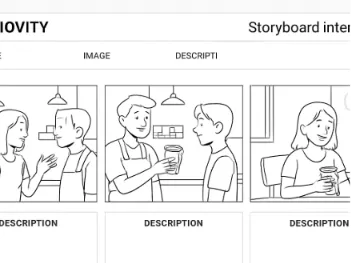
You pictured a tense coffee shop scene, but on set, the crew sets up something completely different. This frustrating gap between your idea and their understanding is “Vision Drift.” To stop it, successful creators use visual storytelling tools for filmmakers to build storyboards—essentially, a digital comic book of the movie.
Translating these sketches into action requires a “Shot List,” which is a simple checklist of every specific camera setup you need. Any good step-by-step guide to digital storyboarding will also emphasize defining your “Aspect Ratio,” which is just the physical shape of your video frame, like a wide movie screen or a tall phone screen. Because of this, reliable Storyboard and Shooting Schedule Software is crucial for managing these details. Instead of worrying about drawing perfectly, you can clearly communicate your vision by attaching four essential technical notes to every frame:
Shot Size: How much we see (e.g., a “Wide Shot” for the room or a “Close-Up” for a face)
Angle: Where the camera sits (high or low)
Movement: How the camera physically travels
Lens: The visual perspective
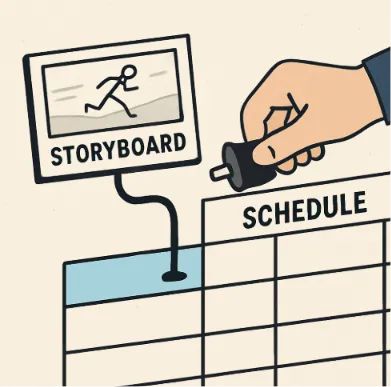
When those frames are locked, the studiovity storyboard shooting schedule link works like invisible magic. Changing a single drawing instantly updates your daily plan, seamlessly moving you into playing logistics Tetris.
Playing Logistics Tetris: Why a Dynamic Shooting Schedule Is More Than Just a Calendar
Have you ever wondered why successful movies rarely go over budget? They treat their project timeline like a puzzle, purposely “Shooting Out of Order” to save time. Instead of filming a coffee shop conversation exactly how the story unfolds, a dynamic schedule becomes the silent hero of production by grouping tasks logically. Furthermore, an all-in-one Storyboard and Shooting Schedule Software makes this optimization effortless.
Mastering this logistics Tetris requires “Scene Grouping,” where you capture all shots facing one direction before moving the camera. This avoids a “Unit Turn”—the painfully slow process of relocating all your lights to face the opposite wall. By using “Location Flipping” to finish every scene in one area before moving elsewhere, you are directly reducing production delays through better scheduling. Therefore, choosing a comprehensive Storyboard and Shooting Schedule Software streamlines your entire setup process.
When learning how to create a production timeline from a script, assign realistic time blocks so you never lose daylight. Use the 3-2-1 Rule for scheduling:
The 3-2-1 Rule for Scheduling:
3 hours for heavy scenes (emotional acting).
2 hours for medium scenes (standard dialogue).
1 hour for quick shots (simple inserts).
These blocks keep your crew moving effortlessly.
The Pre-Production Bridge: How Syncing Boards to Schedules Saves 30% of Your Set Time
Even with meticulously drawn shots, chaos strikes on set when a vital prop is missing. This disconnect happens when your artistic ideas don’t communicate with your daily planner. Bridging the gap between creative vision and logistics means turning those static drawings into an active, breathing plan. However, this is precisely why creators rely on Storyboard and Shooting Schedule Software to bridge the gap.
Imagine a system where your storyboard acts as a smart engine rather than just a comic book version of your movie. When you upload a sketch of a character holding a coffee cup, automated data population instantly adds that specific cup to your daily prop list. This invisible connection ensures shot list optimization, automatically grouping related camera angles together so you never waste time rearranging gear between setups.
As these details sync magically in the background, the software handles the tedious work by generating automated call sheets from shooting schedules. Think of a call sheet as the daily instruction manual telling everyone exactly where to be, ensuring you look like a total professional on set. Because this setup offers real-time collaboration for film production teams, your entire crew sees schedule updates instantly on their phones.
Reclaiming up to 30% of your production day happens naturally when you eliminate the human error of manually copying notes.
From 'Coffee Shop' to 'Call Sheet': A Step-by-Step Workflow for Indie Success
Picture a scene with two actors chatting inside a cafe before walking outside. Turning that text into a logistics plan requires the best integrated pre-production platforms for creators. These tools perform an automatic “script breakdown“—a process that scans your story to instantly list required props, actors, and locations so nothing is forgotten. Thus, utilizing a modern Storyboard and Shooting Schedule Software ensures your script breakdown links directly to your timeline.
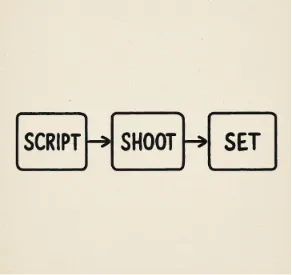
Streamlining film pre-production workflow means connecting those lists to your drawings and calendar. Follow The 3-Step Sync Workflow:
Script Breakdown: Auto-tagging your coffee cups and cast.
Storyboard Mapping: Linking your scene sketches to those tags.
Schedule Optimization: Arranging the smartest shooting order.
When optimizing, always apply the “Sun-First” rule: shoot exterior scenes first because you cannot control daylight, then move inside for your interior shots. Mastering this screenplay breakdown for efficient shooting days builds a timeline your crew will actually respect.
Launch Your Film: The 3-Step Strategy to Move from Idea to Organized Set
You no longer have to cross your fingers and hope your shoot comes together. By linking your creative vision directly to your daily logistics, you have unlocked a workflow once reserved for massive studios. This is the distinct advantage of Studiovity vs traditional film scheduling software. By switching to Studiovity, you gain access to an unparalleled Storyboard and Shooting Schedule Software designed for indie filmmakers.
Commit to a “pre-production first” mindset for your next project. Map out your next scene using an integrated storyboard and shooting schedule combo to watch your logistics automatically organize themselves. This approach builds the confidence needed to run a smooth, professional production.