
You have a great script and enthusiastic actors. However, the moment you hit “record,” that organized vision often dissolves into chaos. For instance, picture a vlogger filming a cooking tutorial. They might realize in the editing room that they forgot the crucial close-up of the final plated dish. Therefore, relying solely on mental planning fails under the intense pressure of any live shoot. A chaotic set can be easily transformed when a digital shot list software is utilized by the production team.
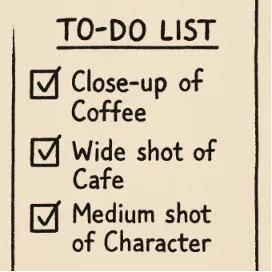
While your script tells a captivating story, a digital shot list creator for filmmakers acts as the architectural blueprint needed to construct it. Without this clear map, creators risk wasting time. Consequently, they miss essential visual puzzle pieces. A digital shot list easily transforms abstract ideas into a concrete to-do list for your camera.
Studiovity completely eliminates on-set mental overload. It achieves this by automating the tricky transition from writing your script to actively filming. By mapping out every angle beforehand, you prevent production delays with organized shot lists. As a result, this guarantees a confident, professional result before you even begin.
Beyond the Script: Why Every Professional Creator Needs a 'Camera To-Do List'
Ever wonder how directors keep track of every little detail without losing their minds? They rely on a visual blueprint. Knowing exactly what should be included in a professional shot list prevents you from missing crucial moments when the pressure is on. Think of it as a mandatory to-do list for your camera. Specifically, you pre-determine your Shot Size before anyone even arrives.
Arriving at the editing room only to realize you are missing a piece of the story is heartbreaking. To prevent this, creators plan for “coverage.” This means filming a scene from multiple perspectives to guarantee choices later. You don’t just film a wide room. Instead, you capture various cinematic shot types and camera angles to make conversations feel vibrant.
Efficiency changes completely when you use a technique called block shooting. This simply means filming out of script order to group similar camera setups together. Therefore, understanding how to organize film scenes with a shot list lets you capture all angles facing one direction before moving your heavy equipment. This saves hours of set time. Furthermore, handling these technical logistics guarantees absolute creative flexibility when you finally sit down to edit.
Setting the Stage: A Step-by-Step Guide to Crafting Your First Digital Shot List
You might be dreading the idea of building a massive spreadsheet from scratch. However, there’s a much easier way. Using a reliable camera shot list template for directors removes the formatting headache completely. Studiovity provides a built-in framework. Because of this, you can skip the busywork and dive straight into designing your visual story. This makes it an incredibly user-friendly digital shot list software for creators.
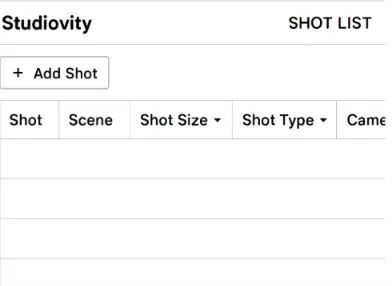
Every time you click “Add Shot,” the platform prompts you to fill out four “Golden Fields” that guarantee everyone knows exactly what to do. This step-by-step guide to creating a shot list boils down to answering these simple questions:
Subject: Who or what is the absolute focus of this specific moment?
Shot Size: How much of the subject fills the frame (like a wide shot or a close-up)?
Angle: Where is the camera positioned relative to your actor or prop?
Movement: Is the camera perfectly still, or is it in motion?
Deciding on that movement is where you truly direct the audience’s emotions. Instead of relying purely on static images, combining different shot sizes and angles with motion breathes life into your video. For example, a slow “Pan” beautifully reveals a bustling coffee shop. Meanwhile, a gentle “Tilt” can dramatically introduce a character from their shoes up to their face.
Once you understand how to pair a subject with the right camera action, filling out your dashboard becomes second nature. Consequently, this seamlessly connects this checklist to your written story.
From Words to Visuals: How to Sync Your Script Breakdown with Your Camera Plan
You’ve already tagged your script. However, typing those actors and props into a separate camera plan is incredibly tedious. Instead of duplicating your efforts, Studiovity automatically pulls elements from your earlier planning into your new workspace. By syncing shot lists with script breakdown data, the platform instantly links your written story to your visual blueprint. If your script features a specific coffee cup, it is already waiting in your shot list menu. Therefore, this completely eliminates redundant manual entry.
Once your words and visuals communicate, the real magic of organization begins. Filming scenes in script order is usually a logistical nightmare. Fortunately, Studiovity solves this by letting you group shots by location. This ensures you capture every angle needed at the “coffee shop” before moving your crew. Whether you are typing out fresh ideas or handling a storyboard to shot list conversion, sorting your day by where the camera actually sits saves hours of exhausting setup time.
Having this unified system completely changes how you approach production. Rather than shuffling through messy paperwork, managing film production workflow on Studiovity gives you a centralized roadmap. You can walk into any room knowing exactly which setups belong to that specific space. If you choose this platform, you are adopting a digital shot list software that completely modernizes your workflow. With your master plan built and perfectly organized, you can step onto the set with confidence.
Mastering the On-Set Workflow: Using Mobile Tools to Lead Your Crew with Confidence
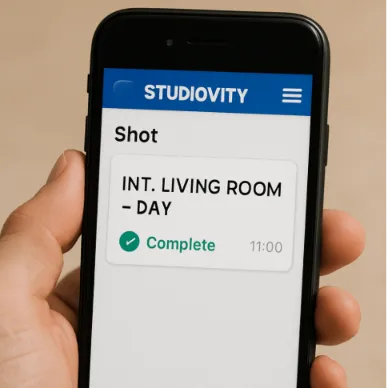
The moment you step onto a filming location, paper printouts become a liability. Instead of shuffling through crinkled pages, the best digital shot list software for indie filmmakers puts your visual blueprint directly into your pocket. Studiovity lets you implement real-time tracking straight from your phone. By checking off setups as you film them, you maintain absolute control. This instant feedback keeps you perfectly on schedule, ensuring you never leave the set missing a crucial close-up.
Your team also benefits immensely when everyone shares the same digital map. Utilizing mobile-friendly film production tools for directors empowers your crew with instant access to the visual plan. Ultimately, choosing a mobile-optimized digital shot list software provides three core benefits for digital collaboration:
Instant updates
Zero paper waste
Clear accountability
Spotting trouble early finalizes the process of streamlining on-set communication for film crews. Because you can monitor your real-time progress, you drastically reduce production delays. Specifically, you can identify bottleneck shots before they ruin your timeline. Mastering this mobile workflow ensures your crew stays synchronized and production remains on track.
Studiovity vs StudioBinder: Why Simplicity is the Secret Weapon for Indie Filmmakers
Looking at professional software often feels like stepping into an airplane cockpit. When exploring SaaS for filmmakers, many creators get stuck comparing Studiovity vs StudioBinder for cinematography planning. While StudioBinder offers a massive suite for Hollywood crews, that power brings a steep learning curve. Therefore, the secret metric is the Feature-to-Complexity ratio. This measures how many useful tools you actually get compared to how hard they are to learn.
A cluttered screen on your phone becomes a nightmare when racing against the sunset. Heavy studio software often struggles on smaller devices, which frustrates solo creators on location. By focusing on a streamlined, mobile-first design, Studiovity stands out as a highly effective digital shot list software for independent filmmakers. You can effortlessly swipe through setups and keep your shoot moving without needing a computer wizard on set.
Your small production budget drains quickly when paying for tools you never touch. Thus, you must decide if an expensive enterprise suite or a focused, affordable shot list creator fits your workflow. For most creators, finding a dedicated digital shot list software is the best choice. Choosing simplicity means spending less time watching tutorials and more time actually directing.
Your 3-Step Action Plan: Transitioning from Scattered to Organized
You no longer have to step onto a set feeling scattered. By utilizing a structured shot list, you transform pre-shoot chaos into a manageable, professional workflow. You now have a system to seamlessly transition from planning to filming with minimal friction. To achieve this, relying on an intuitive digital shot list software will make all the difference.
Start organizing your next project today by following these three straightforward steps:
Upload your script.
Define your ‘Must-Have’ shots versus ‘Bonus’ shots.
Invite a collaborator.
Taking control of these visual blueprints makes managing production less of a logistical chore and more of a creative asset. Build your first scene today, and step confidently behind the camera to do what you do best: direct.