
You’ve finished your script and are eager to hit record. But staring at a blank spreadsheet to coordinate five friends, three locations, and fading daylight quickly becomes a nightmare. Indeed, industry data reveals that manual planning traps creators in three hidden time-leaks: tracking shifting availabilities, managing location changes, and manually recalculating hours. Consequently, refusing to use a dedicated Shooting Schedule Software guarantees endless frustration before you even turn on a camera.
Therefore, why continue fighting a system that slows you down? The smart fix is moving to dynamic scheduling, which instantly adapts to production changes. Think of a “Digital Stripboard”—a visual timeline of your scenes—like rearranging magnets on a fridge. Instead of erasing and retyping an entire day when it suddenly rains, you simply drag and drop your scenes to fit the new reality.
Fortunately, creating faster shooting schedules does not require a prestigious film degree. This platform acts as your digital brain, effortlessly handling the heavy lifting of logistics. Furthermore, by utilizing this Shooting Schedule Software alongside proven time-saving techniques, you can snap your plan together like a Lego set.
Turning Words into a Plan: How Automatic Script Breakdowns Save Days of Work
You’ve finished writing, but staring at 30 pages of dialogue won’t tell you exactly what to pack in your camera van. Therefore, this is where a script breakdown comes in—think of it as a highly specific shopping list for each individual scene. Specifically, by automating script breakdown workflows, Studiovity’s intuitive Shooting Schedule Software reads your uploaded script and instantly starts finding the physical ingredients you need to make the shoot happen.
Instead of getting lost in messy spreadsheets, AI-assisted tagging does the heavy lifting to reduce breakdown time by 50%. Consequently, the software automatically creates a master inventory of your production needs by identifying the four essential items to tag in every scene:
Cast: Who needs to show up?
Props: What objects are they holding?
Locations: Where exactly are we filming?
Wardrobe: What specific clothes are they wearing?
Moreover, mastering the “Tag Once” rule means you never have to retype this metadata—the helpful background details stored behind each highlighted item—which eliminates repetitive data entry forever. As a result, figuring out how to reduce film scheduling time is much easier when your foundation is built this cleanly. Ultimately, all of this prepped information flows directly into a digital stripboard for assistant directors and solo creators alike.

The Digital Stripboard: Mastering the Art of Moving Scene Magnets for Efficiency
Now that you have your scene ingredients, it’s time to build a practical schedule using a stripboard. This digital timeline turns every scene into a colored strip you can drag and drop, exactly like rearranging magnets on a fridge. In fact, this modern Shooting Schedule Software provides the best alternatives to manual production boards by letting you instantly visualize your entire shoot at a glance without erasing a single whiteboard marker.
Undeniably, the fastest way to drain your energy is filming in exact script order. Instead, by organizing shooting days by location, you prevent the dreaded Company Move—industry talk for packing up all your gear and driving somewhere new midday. For example, dragging all your “coffee shop” strips into one cluster ensures you finish filming everything in that single spot before anyone has to find their car keys.
Furthermore, stacking these color-coded strips quickly reveals impossible schedules long before you step on set. To solve this, you insert Day-Breaks, which are simple dividers showing where one working day ends and another begins. Therefore, sliding these markers between scenes helps streamline pre-production timeline efficiency by explicitly warning you against cramming twelve hours of work into a single afternoon.
Of course, grouping scenes perfectly is a massive relief, but your timeline must also survive reality. Indeed, even the most efficient location plan shatters if your lead actor is busy that morning.

Managing the Who and Where: Syncing Cast Availability and Location Constraints Automatically
Clearly, nothing kills momentum on set faster than an actor missing their call time or a coffee shop kicking you out mid-scene. Instead of drowning in endless email threads to align everyone’s busy schedules, a collaborative Shooting Schedule Software like Studiovity centralizes this puzzle. By managing cast and crew availability directly in your timeline, you visually confirm exactly when your team can work.
Basically, think of the software as a smart assistant sitting on your shoulder, constantly double-checking your plan. If you accidentally schedule something impossible, real-time production coordination tools instantly trigger a red flag. Consequently, this automated conflict detection catches three common disasters before they happen:
Actor double-booking: Filming your lead on a Tuesday when they are only free Wednesday.
Location closing times: Shooting past 5 PM at a business that locks up at 4 PM.
Equipment overlaps: Assigning your only camera to two simultaneous scenes.
Thus, catching these errors early keeps your shoot moving and prevents the panic of last-minute adjustments. As a result, you get to focus entirely on directing instead of apologizing for scheduling blunders. While old-school Hollywood systems require special training to do this, finding the right tool shouldn’t be intimidating.
Studiovity vs. Movie Magic: Why Simplicity Wins for Independent Creators
For decades, the standard was bulky desktop programs built for massive studio productions. However, when looking at Studiovity vs Movie Magic Scheduling, the biggest difference is how fast you can start working. Undoubtedly, legacy software is notoriously complex, feeling more like operating an airplane dashboard than planning a creative project. Therefore, for independent creators, this steep learning curve and feature bloat simply cause frustrating user errors.
Fortunately, shifting to a modern tool changes everything. In addition, a clean, intuitive design means spending less time reading manuals and more time visualizing your shoot. Hence, embracing this cloud-based Shooting Schedule Software protects your production in three distinct ways:
Auto-saving: You never lose your hard work if a laptop suddenly crashes.
Team collaboration: Your crew can view schedule changes in real-time from anywhere.
Mobile syncing: Utilizing mobile-friendly film scheduling apps ensures your plan stays accessible in your pocket.
Ultimately, leaving old-school desktop systems behind provides professional-level control without the corporate headache. Once your intuitive schedule is securely built in the cloud, communicating that master plan to your team becomes entirely effortless.
One-Click Call Sheets: Keeping Your Crew Happy Without the 2 AM Email Stress
You’ve finalized the timeline, but now you have to herd cats. Traditionally, figuring out how to sync script changes with schedules meant spending hours typing a “call sheet”—the daily instruction manual telling everyone where to arrive. Consequently, for indie creators, this usually causes a stressful 2 AM email scramble.
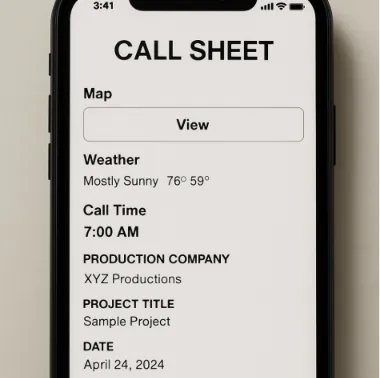
Thankfully, Studiovity eliminates that exhausting routine entirely. Acting as the premier Shooting Schedule Software for independent filmmakers, it lets you generate a professional PDF call sheet in under 60 seconds. Instead of wrestling with formatting, one click automatically pulls your locations and actor call times into a clean document.
Moreover, optimizing daily call sheet generation means beaming these instructions directly to your crew’s smartphones. Because the digital document includes integrated map links and live weather updates, you will instantly reduce those dreaded “Where do I park?” texts by 90%.
Best of all, digital distribution solves the nightmare of outdated plans. If a location suddenly falls through, cloud-based version control ensures every crew member instantly has the latest schedule in their pocket.
Your Fast-Track Production Plan: 3 Steps to Your First Professional Schedule
You no longer have to stare at a messy spreadsheet, hoping you didn’t double-book your lead actor. Indeed, by applying this Shooting Schedule Software alongside these time-saving techniques to organize your production like a digital Lego set with clear instructions, you now have the tools to save up to 10 hours of pre-production time on your next project. Thus, you are fully equipped to transition from an amateur with a spreadsheet to a pro with a clear, reliable plan.
To see immediate results, start building your schedule using this 3-step quickstart:
Import Script: Upload your draft and let the software automatically generate your scene foundations.
Tag Elements: Highlight your cast, locations, and props so you know exactly what is needed on set.
Arrange Stripboard: Drag and drop your scenes into a logical, conflict-free timeline.
In conclusion, dynamic scheduling eliminates the frantic guesswork of production logistics. Therefore, try this straightforward approach on your next video project and notice how much easier it is to navigate your day with significantly reduced stress. Ultimately, it is time to stop managing paperwork and finally start creating.