
Learning how to use AI for script breakdown is less about handing your screenplay to a machine and more about building a faster, cleaner bridge between the page and the shoot. AI can identify characters, props, locations, wardrobe, stunts, VFX, vehicles and animals in minutes, but it works best when it supports, not replaces, the judgment of producers, assistant directors, line producers and department heads. This guide walks through a practical, step-by-step workflow you can use on your next project.
What does AI add to script breakdown and pre-production planning?
AI adds structure, speed and consistency. Instead of starting from a blank spreadsheet and manually highlighting every prop, cast member, costume note or location cue, your team gets an organized first pass that people then review, refine and approve. In practical terms, AI can help you:
- Extract scene data such as scene numbers, locations, time of day, page count and characters.
- Tag production elements including props, wardrobe, set dressing, vehicles, weapons, animals, makeup, VFX, SFX and sound.
- Organize breakdown sheets so each department quickly sees what applies to them.
- Flag possible omissions that need a second look.
- Support scheduling by grouping scenes by location, cast, time of day or requirement.
- Improve collaboration by giving everyone a shared reference point earlier.
AI is not the final authority, though. A script may imply rain without saying “rain machine,” or suggest a crowd without naming every background performer. Use AI as a fast first reader and let experienced people interpret tone, logistics, budget and creative intent.
Where manual breakdowns lose the most time
Manual breakdowns rarely stall on one big bottleneck. Time leaks away in small, repeated tasks. Picture one short moment: a character enters with a bloodstained shirt, answers a ringing phone, looks out at a parked police car and hears fireworks in the distance. That single beat touches wardrobe continuity, props, vehicles, sound, background action, effects and locations. Multiply it across a feature or a series episode and the common slow points become obvious:
- Element identification: finding every prop, costume change, vehicle, weapon, screen insert or makeup detail.
- Scene-by-scene sorting: assigning each element to the right scene, location, time of day and category.
- Version comparison: rechecking everything when a new draft changes action, dialogue or locations.
- Department communication: turning script notes into usable lists for art, wardrobe, makeup, camera, sound and locations.
- Continuity tracking: keeping recurring items, injuries, weather and story timelines consistent.
AI shortens the first stage of all of these, so your team spends its energy on judgment: what is essential, what is risky and what can be simplified. The shift matters because it reduces blind spots at the stage when blind spots are cheapest to fix.
Start with creative understanding
Before you open any tool, understand the story, tone, scale and production style. A minimalist drama, a music video, a branded commercial and a sci-fi short use similar categories but have very different priorities. Read the script as a creative document first: notice repeated locations, weather or natural-light dependencies, quick wardrobe changes and props that carry narrative weight. These observations are what let you judge whether the AI output is complete.
If a script says “The street erupts into chaos,” AI may flag the location and background action. Your team still has to ask: extras? Picture vehicles? Stunts? Practical effects? Lock-ups and permits? Night lighting? Those answers shape the real plan.
Prepare your script for an accurate AI pass
The quality of the AI output depends on the quality of the script file. Before importing, check that:
- Scene headings are consistent, using standard INT./EXT., location and time-of-day formatting.
- Character names are clear and don’t vary unnecessarily.
- Action lines describe visible needs: anything seen, heard, worn, carried, driven or built.
- Revisions are controlled and everyone knows which draft is current.
- Page and scene numbers are stable before scheduling begins.
- Special elements such as stunts, VFX, animals, weapons, intimacy, minors and crowds are easy to spot.
Need a refresher on layout? Our guide on how to format a screenplay for script breakdown covers the formatting habits that make automated tagging far more reliable.
How to use AI for script breakdown, step by step
The short version: import a clean script, let AI identify scenes and elements, review every category yourself, add production-specific notes, share focused views with each department, and update the breakdown with every revision.
1. Import the latest script version
Start with the most current approved draft and label versions clearly so nobody breaks down an outdated script. If your script comes from a PDF or word processor, check that scene headings and page breaks survive the import. A few minutes of cleanup saves hours later.
2. Run the AI breakdown
Let the tool identify scenes and extract characters, props, set dressing, wardrobe, makeup, vehicles, animals, weapons, stunts, VFX, SFX, music and special equipment. Treat the result as a draft from a very efficient assistant that still needs supervision.
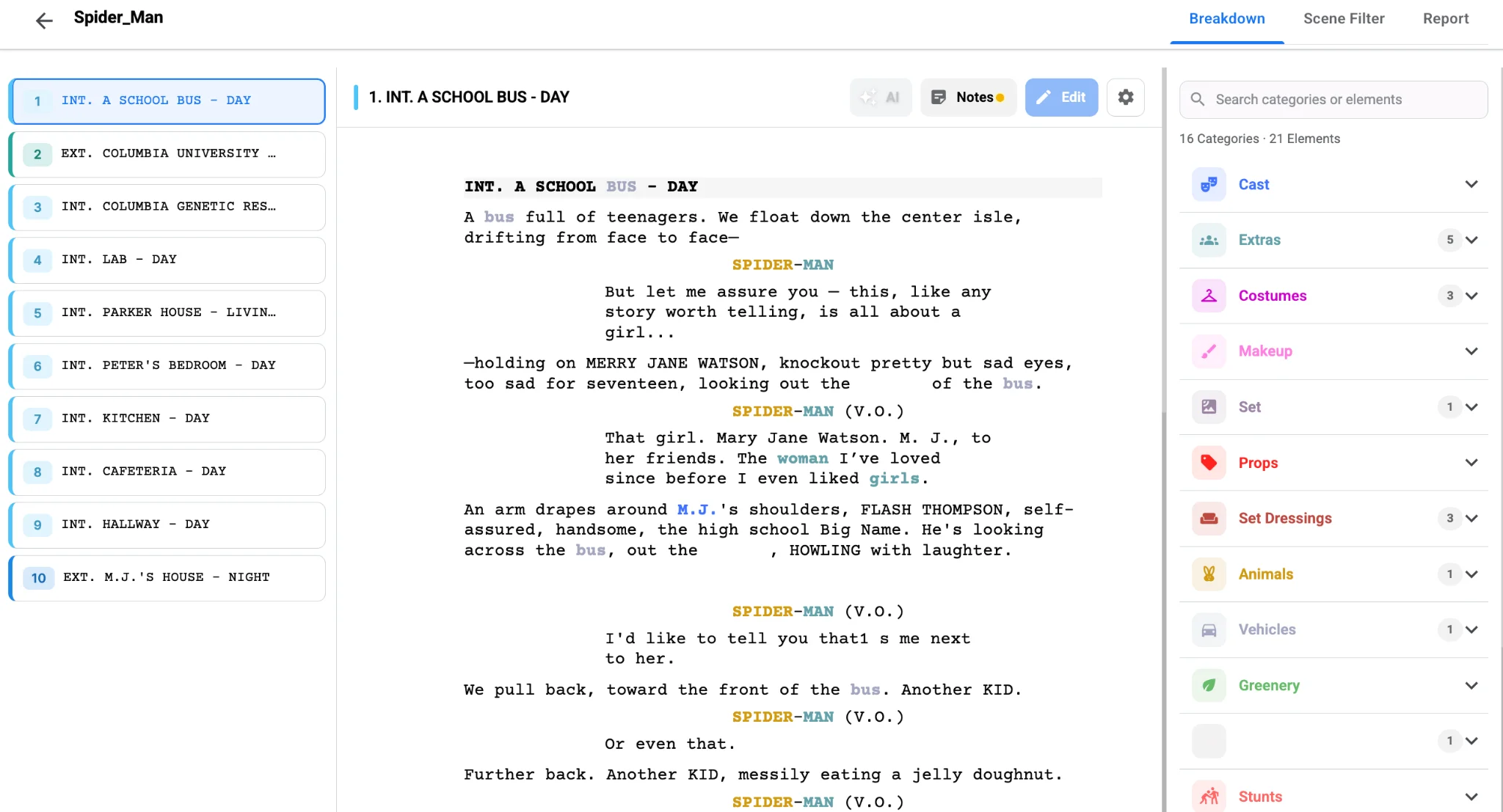
3. Review scene by scene
Compare the AI output against the script in order. Look for missing items, wrong tags, duplicates and categories that need more detail, especially in action scenes, flashbacks, dream sequences and montages. Ask one question for every scene: “If this item isn’t listed, could a department be surprised on the shoot day?” If yes, add it.
4. Add production-specific notes
AI knows what is in the script; your team knows how it will be shot. Note whether a location is built or found, whether a vehicle is picture or background, whether a prop needs duplicates, and whether a costume has continuity importance. Flag high-risk elements such as weapons, stunts, intimacy, minors, animals, pyrotechnics, drones and water work early.
5. Share department-specific views
Art needs props and set dressing, wardrobe needs character changes, locations need settings, access and time-of-day patterns, and production management needs the full picture. Use filters, reports or exports so each department gets a focused view.
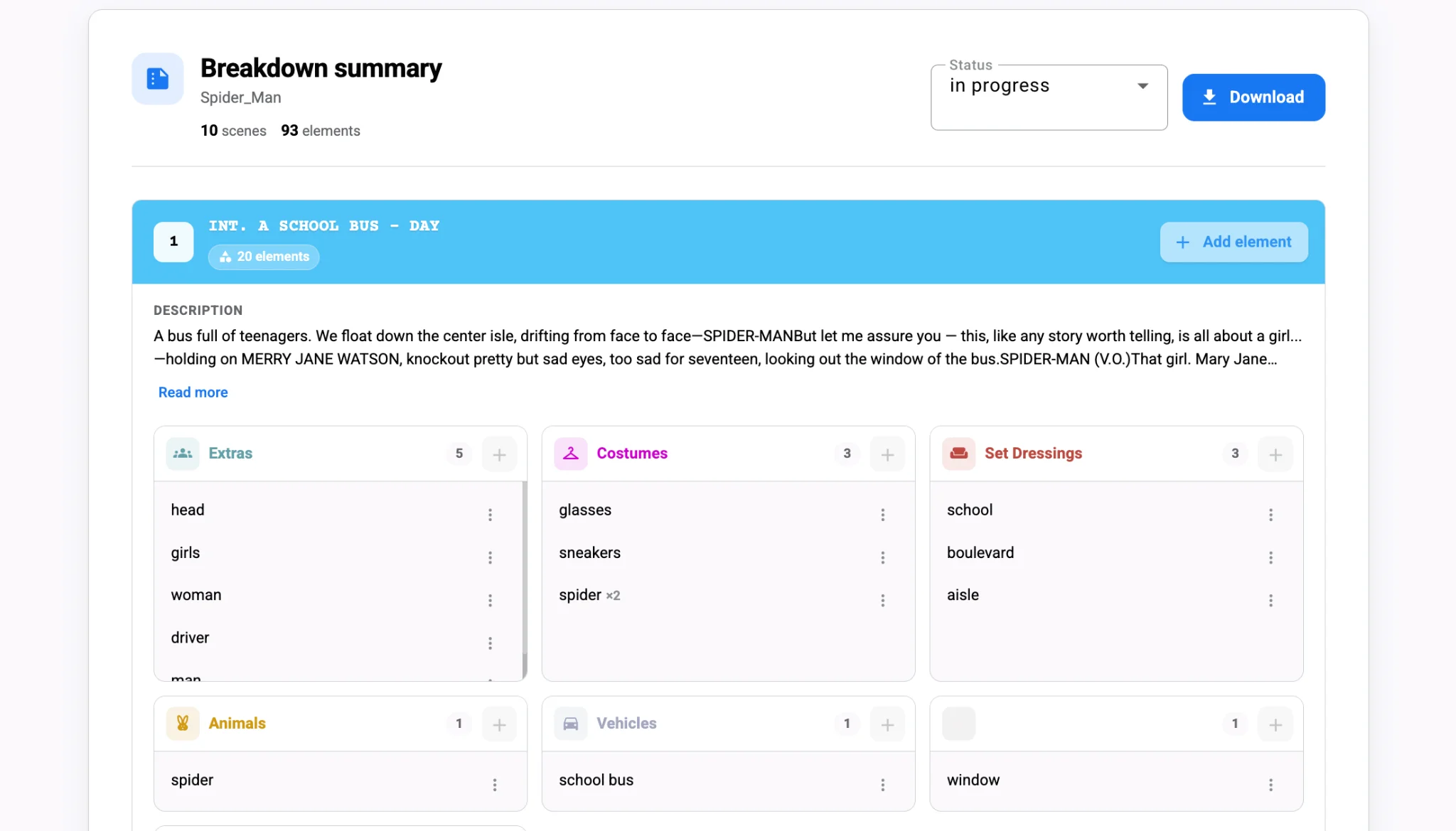
6. Update the breakdown with every revision
Scripts change, locations fall through and availability shifts. Re-run or update the breakdown quickly, compare drafts, identify affected scenes and tell departments what changed. Even if your tool doesn’t automate every comparison, document each change and its production impact.
Watch: what is a script breakdown?
Turn AI breakdown data into a stronger production plan
Once reviewed, the breakdown becomes a planning engine. Use it to answer:
- Which scenes share the same location?
- Which actors are needed on which days?
- Which scenes are night, exterior or weather-dependent?
- Which scenes need special gear, stunts, VFX or safety planning?
- Which expensive elements appear only briefly?
- Can scenes be grouped to reduce company moves?
- Which props, costumes or set pieces need continuity tracking?
AI can suggest groupings, but people decide whether they are practical once emotional continuity, actor availability, lighting and art resets are considered. The same goes for budget: one crowd scene, night exterior, rain effect or stunt can drive permits, crew, insurance and schedule. Spotting those pressure points early leaves room to adjust creatively.
How each department uses the same breakdown
| Department | What they look for | Why it matters |
|---|---|---|
| Production | Cast, locations, company moves, special requirements | Builds a realistic schedule |
| Art department | Props, set dressing, graphics, builds | Plans sourcing, fabrication and resets |
| Wardrobe | Character changes, period, clothing condition | Maintains continuity |
| Makeup and hair | Looks, injuries, aging, SFX makeup | Prepares tests, timing and continuity photos |
| Locations | INT/EXT, time of day, access, permits | Matches story to practical spaces |
| Camera and lighting | Night scenes, vehicles, VFX, rigs | Anticipates gear and crew |
| Safety and special teams | Stunts, weapons, animals, water, minors | Ensures responsible planning |
What humans should still check after the AI pass
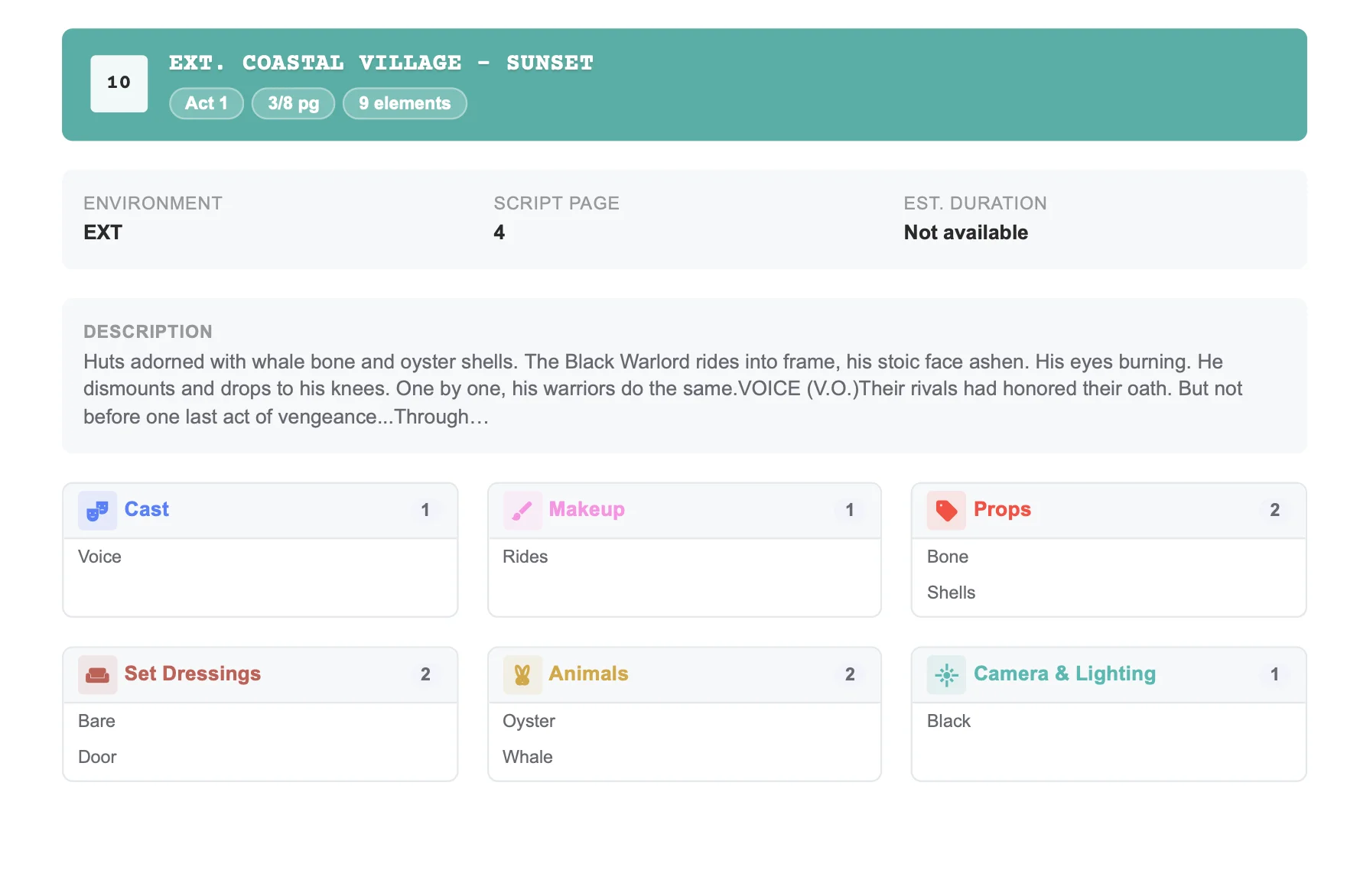
Review every creative, logistical, safety, legal and continuity detail. This isn’t a sign that AI failed; it’s part of a responsible workflow. Pay special attention to:
- Implied props and set dressing: a kitchen scene needs dishes, food and appliances even if the script doesn’t list them.
- Continuity across scenes: wardrobe damage, blood, wet hair, food levels and phone screens across non-sequential days.
- Background action: a “busy café” may mean extras, vehicles, signage, releases and crowd control.
- Safety-sensitive elements: stunts, weapons, animals, water, intimacy and minors need specialist planning.
- Characters mentioned but not on screen: dialogue references aren’t always cast requirements.
Common mistakes to avoid
- Skipping the manual review.
- Breaking down an outdated draft.
- Ignoring implied elements.
- Leaving department heads out of the review.
- Letting category labels get messy.
- Treating every tag as equally important.
- Not tracking revisions.
- Overloading the breakdown with detail nobody uses.
If a detail affects cost, schedule, safety, continuity or creative execution, track it. If it helps nobody make a decision, it probably doesn’t need the same level of attention.
A practical example
A character enters a motel room at night, drops a muddy backpack on the bed, notices a cracked mirror, washes blood from their hand and hears police sirens. AI will likely tag the character, motel room, backpack, bed, mirror, blood and sirens. Human review expands it: the backpack may need duplicates, the bedspread needs continuity protection, the mirror could be a safety concern, the blood needs makeup, cleanup time and continuity photos, and if police lights flash through the window, lighting and picture vehicles come into play. AI identifies the ingredients; your team designs the recipe.
Final takeaway
Use AI for a fast, organized first pass and human expertise to interpret, correct, prioritize and approve. Done together, your team spots complexity earlier, communicates more clearly and arrives on set with fewer surprises. Want a template-driven head start? Read mastering script breakdowns in 30 seconds, or try Studiovity’s AI-assisted breakdown tool free.