
Screenwriting software has become absolutely essential for writers in the film and television industry. By utilizing these platforms, the writing process is streamlined and scripts are automatically ensured to be formatted correctly and efficiently. Consequently, the Best Screenwriting Software in 2026 is being sought after by creators worldwide to elevate their daily workflows.
In 2026, the landscape of screenwriting tools is more diverse than ever before. Because of this evolution, writers have instant access to a massive range of both free and paid options.
Choosing the right software can significantly impact a writer’s productivity and creativity. However, with so many choices on the market, it can feel completely overwhelming to find the perfect fit.
Therefore, this guide will thoroughly explore the Best Screenwriting Software in 2026. We will compare features, benefits, and pricing models to help you make an informed decision.
Among the top contenders today is Studiovity AI. This is a brilliant tool that leverages artificial intelligence specifically to enhance the modern writing process.
Whether you are a seasoned professional or a brand-new beginner, finding the right software is crucial. Ultimately, it can help you organize your complex ideas and bring your stories to life.
So, let’s dive straight into the world of creative software. Let’s discover the tools that can elevate your scriptwriting mechanics this year.

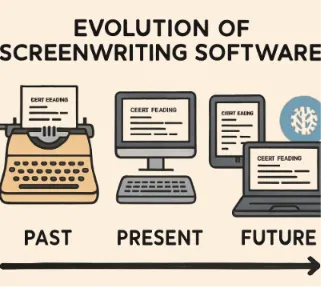
The Evolution of Screenwriting Software in 2026
Screenwriting software has come a long way since its early inception. In 2026, the industry sees continued, rapid innovation, with tools becoming more intuitive and feature-rich than ever.
Artificial intelligence now plays a significant role in production. It offers instant script suggestions and enhances creative brainstorming sessions. As a result, this technology empowers writers to push the boundaries of storytelling.
Meanwhile, cloud-based solutions completely dominate the market. They provide easy access and seamless collaboration, which allows writers to work anytime and anywhere. Consequently, this removes old geographical barriers entirely.
Furthermore, the modern emphasis on user-friendly interfaces makes it easier for writers of all skill levels to create scripts efficiently. In today’s top software, simplicity beautifully meets sophistication.
Indeed, emerging trends in the Best Screenwriting Software in 2026 include:
Cross-platform compatibility
Real-time collaboration features
AI-powered script analysis
Writers now fully expect advanced features that integrate smoothly into other creative workflows. Therefore, this rapid evolution directly reflects the industry’s demand for versatile, comprehensive options.
Why the Right Screenwriting Software Matters
Choosing the right platform is absolutely crucial for productivity and creativity. It directly affects how easily your ideas transform into a polished, production-ready script. A suitable tool streamlines the entire writing process, which enables you to focus more on storytelling rather than tedious formatting.
Because different software options offer varying features and efficiencies, prioritizing the right attributes ensures that your unique needs are met. Customization, ease of use, and integration with other creative tools are key.
When selecting your ideal platform, consider the following:
Usability and intuitive design
Collaboration capabilities
Cost-effectiveness and value
Each of these factors plays a pivotal role in enhancing how you craft your narratives. Thus, investing in the right tool directly aids in producing engaging, professional-quality scripts.
Free vs. Paid Screenwriting Software: What’s the Difference?
In 2026, writers can choose between free and paid options, with each type serving distinct creative needs. Free tools provide essential formatting features, making them highly accessible to new writers working on a tight budget.
Paid software, on the other hand, often includes advanced features. These tools cater specifically to professionals seeking comprehensive industry solutions. Enhanced formatting, robust collaboration tools, and in-depth analytics are common in premium options.
Obviously, upfront cost is a primary differentiator. Free tools sometimes come with strict limitations, such as mandatory watermarks or restricted export formats. Meanwhile, paid versions generally offer better technical support and regular updates.
Consider these factors in your decision-making:
Budget constraints
Feature requirements
- Long-term usability
Prospective users should weigh the following:
Free tools: Cost-effective, basic features
Paid options: Advanced features, strong support
Ultimately, the choice hinges on your specific needs and long-term goals. Evaluate whether advanced features truly justify the expense for your upcoming creative projects.

Key Features to Look for in Screenwriting Software
When selecting the Best Screenwriting Software in 2026, certain features stand out as absolutely crucial. First, these tools should completely simplify formatting, ensuring scripts meet strict industry standards with minimal effort.
User-friendly interfaces are vital for efficient daily navigation. Intuitive design allows you to focus purely on creativity rather than technical challenges. Therefore, look for software that offers seamless integration with popular collaborative platforms.
Consider these essential features:
Automatic formatting
Intuitive interface
Collaboration capabilities
Advanced tools often include robust analytics and feedback systems. These features help refine scripts and enhance storytelling. Additionally, cloud-based options provide valuable benefits, including instant access from any device.
Key advanced features include:
In-depth analytics
Real-time feedback
Cloud storage access
These capabilities significantly impact your overall productivity and script quality. As you explore your options, prioritize software that enhances your writing workflow without adding unnecessary complexity.

Top Paid Screenwriting Software in 2026
In 2026, the market for paid screenwriting software is brimming with advanced options. These tools are designed to streamline the scriptwriting process and support creativity. They offer features tailored to meet the needs of both novice and seasoned writers.
Paid options excel in providing robust functionalities like collaboration tools, analytics, and intricate formatting. The right software can enhance productivity and improve script quality. Investing in premium tools offers strategic advantages, ensuring your creative ideas seamlessly transition from concept to completed script. Let’s explore the top contenders transforming screenwriting in 2026.
1. Final Draft
Final Draft remains a massive powerhouse in the entertainment industry. Its comprehensive features set it apart, making it a staple for professionals. Automatic formatting ensures every script meets industry standards effortlessly.
Writers praise its intuitive interface, which allows for immersive focus during writing. Collaboration tools enable team projects, facilitating shared creative processes. Notable features of Final Draft include:
ScriptNotes: Add insightful notes to your script.
CollaboWriter: Collaborate in real-time with fellow writers.
Additionally, its smart type and PDF import/export functions streamline workflows. Whether you’re a beginner or a seasoned writer, Final Draft adapts to your needs. With regular updates, this software stays ahead of industry trends.

2. Studiovity AI
Studiovity AI completely revolutionizes the field by integrating artificial intelligence into screenwriting. This software anticipates writers’ needs by suggesting plot twists and character developments. It is an invaluable tool for brainstorming and refining ideas.
The software’s key features include:
AI-Powered Suggestions: Enhance creativity with intelligent prompts.
Scene Structuring: Automatically arrange scenes for optimal storytelling.
Studiovity AI stands out with its seamless integration with other creative platforms, allowing multimedia incorporation. This flexibility enhances narrative depth and engagement. For writers seeking innovation, Studiovity AI offers:
Multimedia Integration: Include images, videos, and more in scripts.
Real-Time Analytics: Gain insights into script pacing and flow.
Its cloud-based nature provides access anytime, anywhere, fostering collaboration. Users benefit from continuous updates and a supportive community. Embrace the future of screenwriting with Studiovity AI, where creativity meets technology.
3. StudioBinder
StudioBinder is renowned for its organizational prowess. This tool goes beyond scriptwriting, offering production management features that streamline the filmmaking process.
Writers can utilize its robust script breakdown capabilities. These allow for detailed analysis and efficient scene planning. Essential features of StudioBinder include:
Task Management: Assign tasks and track progress within your team.
Calendar View: Visualize deadlines and shooting schedules easily.
Additionally, StudioBinder supports seamless integration with other filmmaking software. This enhances collaboration between departments, making it ideal for complex projects. Its comprehensive approach ensures that every aspect of production is cohesive and organized.
4. Fade In
Fade In offers a perfect blend of professional-grade features at an accessible price point. Its standout features include extensive format support and a distraction-free interface.
This software provides powerful tools like revision management, which is crucial for multiple drafts. Fade In’s unique offerings include:
Universal Format Support: Import/export in all major file types.
Revisions Mode: Track changes across different script versions.
Fade In also prioritizes user experience with an intuitive design. It caters to both solo projects and collaborative efforts. With a one-time purchase cost, Fade In remains a cost-effective choice for serious writers.
5. Movie Magic Screenwriter
Movie Magic Screenwriter continues to be a favorite among professional screenwriters. Its reliability and industry-standard features make it indispensable for many writers.
This tool excels in formatting precision, offering robust template options. Noteworthy features include:
Industry-Standard Templates: Access templates for various media formats.
Powerful Outline View: Organize plot points with ease.
Movie Magic Screenwriter supports creative workflows with export options that include PDFs and Final Draft files. Its feature-rich environment makes complex scripts manageable, ensuring writers can focus on creativity.
Top Free Screenwriting Software in 2026
In 2026, free screenwriting software has advanced significantly, offering powerful tools without cost. These options appeal to budget-conscious writers who still demand robust functionality. Although free, they don’t sacrifice essential features necessary for productive writing.
These tools are ideal for newcomers to screenwriting or those exploring new ideas without financial commitment. They cover essentials like script formatting and collaborative features. As you dive into the best free offerings, consider the value they bring to your creative process and how they support your projects.
1. Trelby
Trelby remains a formidable free screenwriting software, known for its simplicity and efficiency. Its open-source nature allows users to customize their experiences freely. Despite its no-cost offering, Trelby delivers essential features like:
Cross-Platform Compatibility: Runs smoothly on Windows and Linux.
Customizable Interface: Tailor the environment to your needs.
The intuitive user interface helps new writers focus on story development. With a small installation footprint, Trelby runs efficiently even on older hardware. It’s perfect for writers looking for a basic yet reliable tool without the expense.
2. WriterDuet (Free Version)
WriterDuet’s free version is well-regarded for real-time collaboration, making it ideal for team projects. While the premium version offers more features, the free option doesn’t lag behind in basic functionality. Key offerings include:
Real-Time Collaboration: Work simultaneously with other writers.
Cloud Storage: Save your scripts directly to the cloud.
User-friendly and web-based, WriterDuet allows access from any device with an internet connection. Its modern interface ensures a seamless writing experience. Perfect for collaborations, this tool is a solid choice for creative teams on a budget.
3. Celtx (Free Plan)
Celtx’s free plan offers a solid foundation for beginner writers. While it provides advanced tools in its paid plans, the free version handles the fundamentals with ease. Essential features include:
Script Formatting: Automatic, industry-standard formatting.
Collaborative Tools: Share scripts with feedback functions.
Celtx thrives in educational environments, often used by schools and workshops to teach screenwriting. Its cloud-based approach ensures accessibility and simplifies file sharing. This makes Celtx an efficient choice for writers eager to start without upfront costs.
4. Highland (Free Version)
Highland’s free version is favored for its minimalist design, focusing writers’ attention on creativity. Though simpler in features, its innovative interface enhances the writing process. Notable elements include:
Mark-up Writing: Write with a syntax focus that Highland converts to screenplay format.
Drag-and-Drop: Easily rearrange script elements.
A Mac-exclusive tool, Highland is perfect for those immersed in the Apple ecosystem. It nurtures a distraction-free environment, fostering creativity without unnecessary bells and whistles. Ideal for writers seeking simplicity with functionality, Highland remains a favorite.

Studiovity AI: The Future of AI-Powered Screenwriting
In 2026, Studiovity AI emerges as a cutting-edge tool redefining the screenwriting landscape. Combining powerful AI capabilities with user-friendly design, it’s tailored for modern writers. Studiovity AI offers functionalities that enhance both the creative and logistical aspects of screenwriting.
A unique feature is its ability to provide intelligent script suggestions, offering dialogue enhancements and plot development ideas. These suggestions are informed by analyzing script patterns, ensuring relevance to your story.
AI-Powered Suggestions: Improve dialogue and plot with smart AI input.
Syntax Checking: Ensures scripts meet professional standards.
The tool also incorporates collaboration features that streamline the writing process for teams. Allowing real-time script editing and feedback, it simplifies coordination among writers. This feature is crucial for projects demanding seamless team cooperation.
Team Collaboration: Real-time script editing and feedback.
Version Control: Track and manage script changes with ease.
Studiovity AI’s adaptability makes it an ideal choice for screenwriters seeking innovation. It supports various genres and writing styles, making it versatile. With continuous updates, users benefit from the latest advancements in AI, enhancing script quality consistently.
Cross-Genre Support: Adaptable to different writing styles and genres.
Continuous Updates: Stay ahead with the latest AI enhancements.
This integration of AI technology not only boosts productivity but also nurtures creativity, offering writers a valuable partner in their screenwriting journey.

How to Choose the Best Screenwriting Software for Your Needs
Selecting the right screenwriting software is pivotal to your success. Start by understanding your personal writing goals and needs. It’s essential to align software features with these objectives.
Begin by evaluating the software’s interface. An intuitive, easy-to-navigate design can enhance your writing flow. Look for tools with interfaces that don’t hinder creativity.
Interface Considerations:
User-friendly design
Minimalistic layout
Budget plays a crucial role in the decision. Consider what you’re willing to spend on screenwriting software. Free versions often offer fundamental features, while paid tools provide more advanced options.
Budget Options:
Free tools for basic needs
Paid versions for comprehensive features
Lastly, research user reviews and industry feedback. Other writers’ experiences can provide insights into software reliability and performance. These insights can prevent unforeseen issues.
Screenwriting Software for Collaboration and Team Projects
Collaboration is key in film and TV writing. Choosing software that supports team projects is essential. Look for features that facilitate seamless sharing and communication.
Many tools now offer real-time collaboration options. This allows multiple users to edit and comment simultaneously, streamlining the creative process. It’s a huge advantage for distributed writing teams.
Essential Collaboration Features:
Real-time editing
Commenting and feedback tools
Version control
Additionally, consider integration capabilities with other project management tools. This enhances workflow by keeping the entire team on the same page and improves production efficiency. Collaborative tools can transform your team’s productivity.
Screenwriting Software for Beginners: Tips and Recommendations
Starting your screenwriting journey can be both exciting and daunting. Choosing beginner-friendly software can make the process smoother. Look for tools that are easy to navigate and offer intuitive interfaces.
User tutorials and guides are crucial for beginners. They help you become familiar with formatting and technical nuances without feeling overwhelmed. Don’t underestimate the value of a strong support community.
Beginner-Friendly Features:
Intuitive user interface
Comprehensive tutorials and support
Basic formatting tools
Moreover, trial versions offer a risk-free start. They help you test the waters before committing fully. Investing in the right software early on can greatly enhance your learning and creativity.
Advanced Features in Modern Screenwriting Tools
Modern screenwriting software boasts a wealth of advanced features. These can significantly boost your writing efficiency and creativity. Understanding these features is essential to fully leverage the technology.
Collaborative tools are increasingly vital. They allow real-time editing and feedback from team members, enhancing teamwork. Advanced formatting options also ensure your scripts meet industry standards effortlessly.
Key Advanced Features:
Real-time collaboration
AI-driven suggestions
Advanced formatting options
AI-driven suggestions are a game-changer. They can offer creative prompts, improving plot development and characterization. These tools transform the writing process into a more dynamic and interactive experience, essential for serious writers.

The Role of Screenwriting Software in the Creative Process
Screenwriting software is central to the modern creative process. It streamlines scriptwriting, enabling writers to focus on storytelling. By automating formatting and revisions, it frees up mental bandwidth for creativity.
The tools offer intuitive interfaces. This ease of use allows writers to experiment with new ideas without getting bogged down by technicalities. They foster an environment where creativity can flourish unencumbered.
Benefits in the Creative Process:
Simplifies script formatting
Enhances idea development
Facilitates creative experimentation
Integrated research tools further support creativity. Access to a vast library of resources can inspire new plotlines and character developments. Screenwriting software not only simplifies workflow but also enriches the creative journey.
Frequently Asked Questions About Screenwriting Software
Screenwriters often have questions when choosing screenwriting software. Clarifying these can help maximize the effectiveness of these tools. Understanding features and functionality is crucial.
Common Queries:
Is free software sufficient for professional work?
What distinguishes paid software from free options?
The answers depend on individual needs and project scopes. While free tools offer basic features, paid versions often include advanced functionalities like collaboration and cloud integration. Determining the right tool involves evaluating project requirements and personal preferences.
Considerations:
Do you need real-time collaboration?
Is mobile compatibility essential for your workflow?
By addressing these considerations, writers can choose a tool that aligns with their creative process and enhances productivity. Understanding these aspects ensures a well-informed decision, tailored to unique writing styles and project demands.
Conclusion: Finding Your Perfect Screenwriting Partner in 2026
Selecting the right screenwriting software can significantly impact your creative output. In 2026, options abound, each with unique features tailored to different needs. Evaluating your requirements and project goals is crucial to finding a suitable match.
Whether you need advanced AI features like those in Studiovity AI or prefer user-friendly tools for simple script formatting, there is a perfect match out there. Consider ease of use, cost, and feature set when making your decision. Each element plays a vital role in boosting productivity and creativity.
Keep in mind that the best tool is one that complements your workflow, allowing your stories to unfold seamlessly. As you explore the landscape of screenwriting tools, aim for a partner that empowers your writing journey.