
Creating a call sheet without Excel or spreadsheets means replacing manual rows, copied tabs, and fragile formatting with a purpose-built workflow for production communication. A professional digital process helps assistant directors, production managers, coordinators, and producers build a complete production call sheet, distribute it quickly, and keep everyone aligned when details change. This guide explains what to include, how to structure the information, and how call sheet software can make the process cleaner than a traditional spreadsheet-based call sheet template.
Related video: Streamline your production schedule with Studiovity’s call sheet feature
For film production teams, the goal is not simply to make a document that looks organized. The goal is to give every cast member, crew member, vendor, and department head the exact information they need to arrive prepared, work safely, and support the day’s schedule.
Why move your call sheets out of spreadsheets?
Moving your call sheets out of spreadsheets reduces formatting problems, version confusion, manual duplication, and distribution errors. A spreadsheet can work for a small project, but it often becomes inefficient once call times, locations, cast details, weather notes, parking instructions, and departmental notes begin changing close to shoot day. A dedicated digital workflow gives the production team a more reliable way to build, update, approve, and send the film call sheet.
Spreadsheets were built for data management, not production coordination. They require someone to manually protect cells, adjust column widths, merge fields, export PDFs, check page breaks, and ensure that no critical information has been hidden or overwritten. On a professional set, those small administrative risks can become meaningful because the call sheet is one of the most visible operational documents of the production.
A spreadsheet-based call sheet can also create version-control problems. One person may save a file locally, another may update a shared version, and a third may export a PDF before the final notes are added. If the wrong version is circulated, the result can be late arrivals, confusion at base camp, missed department notes, or unnecessary follow-up messages from crew who need clarification.
Modern call sheet software is designed to solve these issues by organizing the call sheet format around production needs rather than spreadsheet cells. Instead of building each day from scratch, the production office can reuse structured information such as crew contacts, cast details, location information, schedule items, and safety notes. The document remains consistent, while the details can be updated as the shoot evolves.
The role of the call sheet in a professional production
A call sheet is more than a schedule. It is the daily operating brief for a production. It tells people where to be, when to arrive, what scenes or setups are planned, who is working, what conditions to expect, and which instructions apply to the day.
In film, television, commercial, documentary, branded content, and digital production environments, the production call sheet supports coordination across many departments. Camera, lighting, grip, sound, art, wardrobe, hair and makeup, locations, transportation, catering, production, and assistant directing all depend on accurate information. Even a lean crew benefits from a formal call sheet because it reduces ambiguity and gives the day a shared reference point.
A strong call sheet also supports professionalism. It signals that the production team has considered logistics, safety, contact channels, and timing before crew arrive on set. When the document is clear, concise, and complete, it helps the day begin with fewer avoidable questions.
What a call sheet communicates
A professional film call sheet usually communicates several layers of information at once:
- The plan for the day: call time, shoot date, production title, day out of days reference if applicable, and overall schedule.
- Where people need to go: main location, base camp, parking, holding, nearest hospital when required, and location contact details.
- Who is expected: cast call times, crew call times, department contacts, extras or background information, and special instructions.
- What will be filmed: scenes, script pages, story day, set description, cast required, and estimated schedule blocks.
- What conditions matter: weather, sunrise and sunset, safety notes, meal expectations, company moves, stunts, animals, minors, special effects, or other production-specific considerations.
- How to communicate: key phone numbers, radio channels, emergency contacts, production office details, and approval contacts.
The value is not only in having this information available. The value is in presenting it in a consistent call sheet format so readers can find what they need quickly, especially early in the morning or during a fast-moving shoot day.
What should a digital call sheet include?
A digital call sheet should include the same essential operational information as a traditional call sheet: production details, shoot date, call times, locations, schedule, cast, crew, weather, safety notes, contacts, and department-specific instructions. The difference is that a digital system can organize these elements in reusable fields, reducing the need to rebuild the document manually each day. This makes the call sheet easier to update, review, and distribute without relying on spreadsheet formatting.
The exact contents will vary by project type, scale, and union or company requirements. A commercial shoot may need agency and client contacts. A narrative feature may need cast numbers, scene numbers, page counts, and transportation notes. A documentary crew may need flexible location information and access instructions. The best call sheet examples are not identical, but they all make the day’s plan easy to understand.
Core production details
Start with the information that identifies the project and the shoot day. This section typically sits at the top of the call sheet because it provides immediate context.
Include the production title, production company or responsible entity, shoot date, day number if relevant, general crew call, and document status if your workflow uses approvals. For multi-day shoots, it can also be useful to include the next shoot day or a brief note about upcoming work, as long as it does not distract from the current day’s instructions.
Keep this section clean. The top of the call sheet should not become crowded with every possible detail. Its purpose is to confirm that the reader is looking at the correct document for the correct day.
Location and reporting information
Location details must be practical and unambiguous. Include the primary shooting address, parking location, base camp address if separate, holding area, stage number, unit base, or any other reporting point. If the production is working across multiple locations, show where each group should report and whether a company move is expected.
A well-prepared production call sheet should also include access instructions. These may involve gate codes, loading zones, security check-in procedures, elevator notes, street restrictions, parking limits, or instructions for crew vehicles. If the location is difficult to find, a brief written note can prevent delays more effectively than a pin alone.
When using call sheet software, location records can often be saved and reused. That is especially helpful when returning to the same location over multiple shoot days. It also reduces the risk of retyping addresses or accidentally carrying over outdated instructions.
Call times by group
Every person should be able to identify their call time quickly. The general crew call is useful, but it is not enough for all productions. Cast, hair and makeup, wardrobe, transportation, catering, production assistants, pre-call departments, and specialty teams may need different arrival times.
A clear digital call sheet should separate call times by person, cast role, department, or group. Avoid burying exceptions in long notes. If one department has an earlier call, list it clearly. If an actor is being picked up before their on-set call, make the pickup time distinct from the makeup call and set call.
This is one of the areas where spreadsheets often become unwieldy. Multiple call-time columns can create confusion if headings are unclear or if rows wrap poorly when exported. Purpose-built systems generally allow more structured call-time fields, helping the production team present timing in a way that is easier to scan.
Daily schedule and scene work
The schedule section explains what the team intends to accomplish. For scripted projects, this often includes scene numbers, set names, brief descriptions, cast required, page count, day or night designation, and estimated timing. For commercials, it may include setup descriptions, product shots, talent requirements, agency review points, and company moves. For unscripted work, it may include interview blocks, verité coverage, travel windows, or access appointments.
The schedule should be detailed enough to guide departments, but not so overloaded that it becomes unreadable. A call sheet is not a full production bible. It is the practical plan for the day. If detailed shot lists, storyboards, or creative references are needed, the call sheet can point people to those materials rather than trying to contain everything.
Cast, crew, and contact information
The cast and crew sections should help people know who is working and how to reach essential contacts. Cast listings may include cast ID numbers, character names, actor names, status, pickup times, makeup calls, wardrobe calls, set calls, and wrap status where appropriate. Crew listings may be grouped by department with department heads clearly identified.
Be thoughtful about privacy. Not every distribution list needs every personal phone number or email address. Some productions circulate full contact information internally but send limited versions to outside stakeholders. A digital workflow can help manage different views or versions more carefully than a single spreadsheet file that is copied and forwarded broadly.
Weather, light, and environmental conditions
Weather matters to production planning, even on indoor shoots. It can affect parking, loading, travel time, wardrobe, generator placement, exterior sound, background holding, and safety. Include temperature expectations, precipitation risks, and sunrise or sunset information when relevant.
For exterior work, light windows and weather notes are especially important. If the schedule depends on dawn, dusk, harsh sun, or night work, departments need to plan accordingly. A concise note can help teams prepare equipment, staffing, and contingencies.
Safety and special instructions
Safety information deserves visibility. Include emergency contacts, nearest medical facility when appropriate, required personal protective equipment, hazard notes, stunt or effects notices, animal or vehicle activity, water work, heat or cold concerns, and any other condition that affects crew awareness.
Do not treat safety notes as a formality. They should be written in direct, practical language. If the day involves a sensitive location, restricted access, challenging terrain, or controlled activity, the call sheet should alert the team and tell them where to get further instruction.
A practical non-spreadsheet workflow
Creating a call sheet without spreadsheets is easiest when the production team separates the work into a repeatable process: gather verified information, enter it into a structured system, review it with key stakeholders, approve the final version, and distribute it with a clear record of who received it. This workflow keeps the focus on accuracy rather than formatting.
The following process can be adapted for productions of different sizes. A small branded content shoot may complete it quickly, while a larger narrative production may involve multiple department approvals. The principle is the same: build the call sheet from confirmed production data, not from a copied file that may contain outdated details.
Step 1: Choose a dedicated call sheet platform or structured document tool
Begin by selecting the system you will use to create and send the call sheet. Ideally, choose call sheet software designed for film production rather than a general office document. Purpose-built platforms often include production-specific fields for cast, crew, scenes, locations, contacts, schedule items, and distribution status.
If dedicated software is not available, a structured document tool can still be better than a spreadsheet, provided the layout is controlled and the information is entered consistently. The key is to avoid rows and columns becoming the foundation of the workflow. A call sheet should be treated as a production communication document, not as a table that happens to print as a PDF.
When assessing tools, consider whether they support reusable contact lists, templates, PDF exports, mobile viewing, approval workflows, and send tracking. The best option is the one your production team can use reliably under time pressure.
Step 2: Build or select a call sheet template
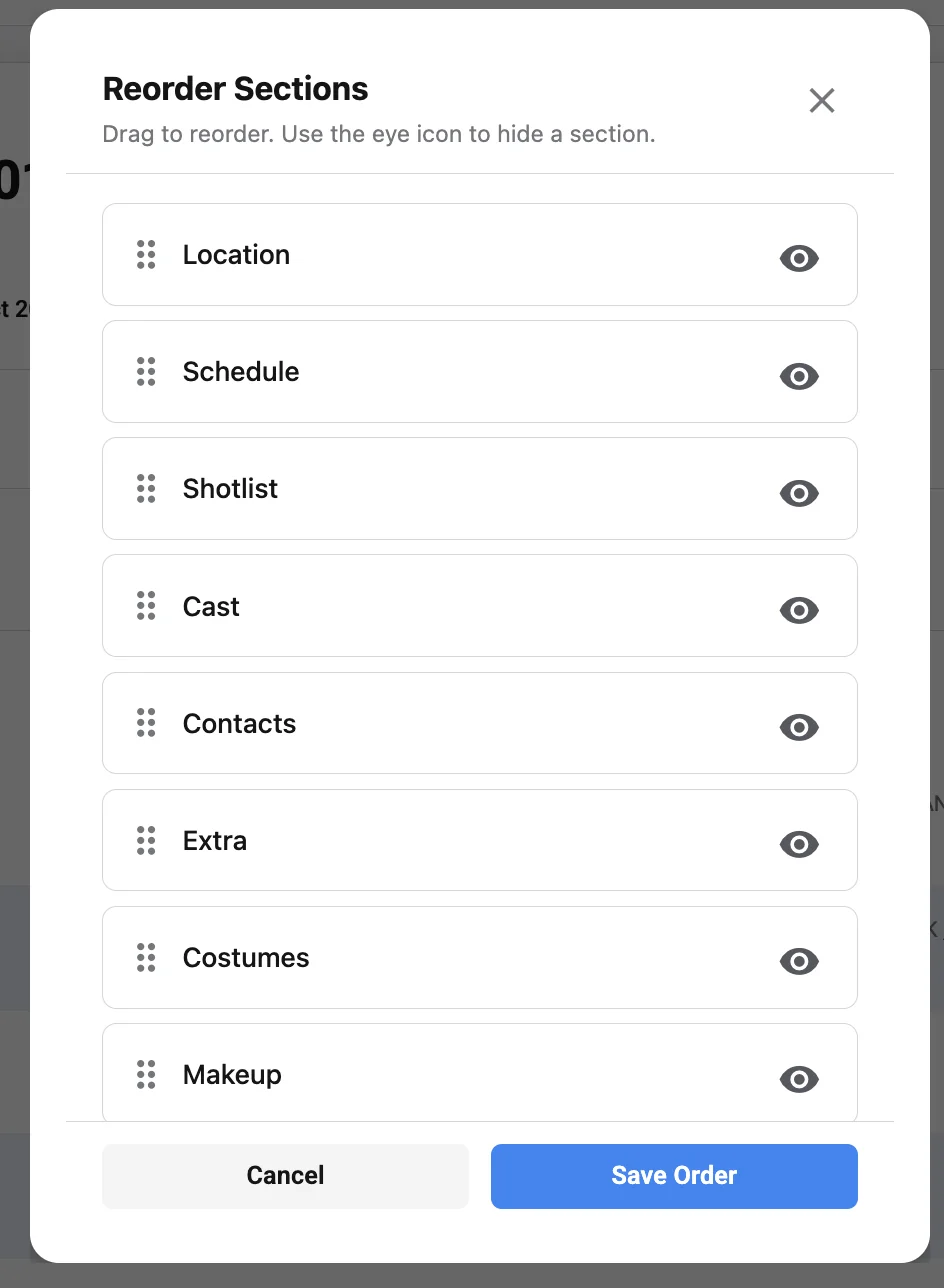
A call sheet template provides the structure for every shoot day. Instead of redesigning the document each time, create a standard layout with sections for production details, call times, locations, schedule, cast, crew, weather, safety, and notes.
The template should reflect how your team works. A short-form commercial production may need prominent client, agency, and product sections. A film call sheet for a narrative shoot may need more space for scenes, cast IDs, page counts, and department notes. A documentary call sheet may need interview subject details, release reminders, travel plans, and flexible schedule blocks.
A strong template is consistent but not rigid. It should allow unused sections to be hidden or simplified so the final document remains clean. A template that includes everything all the time can become as difficult to read as a spreadsheet with too many columns.
Step 3: Enter confirmed production information
Once the structure is ready, enter only confirmed information or clearly mark anything that remains tentative. Use verified details from the latest schedule, location notes, cast availability, transportation plan, department reports, and production management updates.
This is where a digital workflow can save significant effort. If crew members, cast members, and locations are saved as records, the production team can add them to the call sheet without retyping basic details. This reduces errors in names, phone numbers, addresses, and department labels.
Do not rely on yesterday’s call sheet as the only source. Copying a prior day’s document can be useful, but it also carries risk. Old parking notes, outdated scene lists, wrong weather information, or previous department instructions can remain in the document unnoticed. A structured system helps, but the production team still needs a deliberate verification step.
Step 4: Review the schedule with key departments
Before distribution, the assistant director, production manager, producer, or relevant department leads should review the call sheet for accuracy. The review should confirm that call times match the day’s plan, cast requirements are correct, locations are current, transportation details are included, and safety notes reflect the work being performed.
A review process does not need to be excessive, but it should be clear. If too many people edit the call sheet directly, conflicting updates can appear. If too few people review it, important operational details may be missed. Define who has authority to approve schedule, location, cast, transportation, and safety information.
Step 5: Generate the final version and distribute it
Once approved, generate the call sheet in a format that is easy to read on both mobile devices and printed pages. Many productions still circulate PDFs because they preserve layout and can be archived. Digital platforms may also allow recipients to view the call sheet through a secure link or production portal.
Distribution should be intentional. Send the call sheet to the correct cast, crew, vendors, stakeholders, and department contacts. If the tool supports delivery tracking, use it to confirm receipt. If not, establish a clear process for acknowledging critical call sheets, especially for people with early calls or complex reporting instructions.
Step 6: Manage revisions professionally
Changes happen. A location may shift, a call time may adjust, or weather may require an updated plan. When revisions are necessary, make the update clear. Label the revised version, communicate what changed, and avoid sending multiple vague messages that force recipients to compare documents manually.
A professional revision notice may state that a revised production call sheet has been issued and identify the affected sections, such as crew call, parking, cast pickup, or scene order. This helps recipients focus on the information that matters. It also reinforces confidence that the production office is managing changes carefully.
Non-spreadsheet call sheet creation checklist
A checklist is one of the simplest ways to maintain accuracy without returning to spreadsheets. Use it before every distribution, especially on productions where call sheets are created late in the day or revised under pressure.
- Confirm the shoot date and day number. Make sure the document corresponds to the correct production day and does not contain information from a previous call sheet.
- Verify the general crew call. Check it against the latest schedule and any department pre-calls.
- Review all cast call times. Confirm pickup, makeup, wardrobe, rehearsal, set call, and hold details as applicable.
- Check the primary location. Confirm address, parking, base camp, holding, entrance, security, and loading instructions.
- Confirm the shooting schedule. Ensure scenes, setups, interview blocks, or planned work reflect the latest approved plan.
- Review required cast and background. Confirm that only the correct performers are listed for the day.
- Update crew lists and department contacts. Add replacements, day players, additional hires, or vendor contacts.
- Add weather and light information. Include relevant sunrise, sunset, temperature, precipitation, or exterior conditions.
- Review safety notes. Confirm that hazards, emergency contacts, medical information, and special work are visible.
- Check transportation and parking notes. Make arrival logistics clear for crew vehicles, cast transport, equipment trucks, and vendors.
- Proofread department notes. Remove outdated instructions and clarify any language that could be misread.
- Export or publish the final version. Review the finished document as the recipient will see it, not only in the editor.
- Send to the correct distribution list. Confirm that cast, crew, clients, vendors, and stakeholders receive the appropriate version.
- Record revisions. If changes are made after distribution, label the revised version and explain what changed.
This checklist should become part of the production office routine. The purpose is not to slow the team down. It is to prevent avoidable mistakes that cost more time once the call sheet has already been sent.
Understanding call sheet format without spreadsheet columns
A professional call sheet format is based on hierarchy, clarity, and scanning behavior. The most urgent information should be easiest to find. Supporting details should be grouped logically. Notes should be specific enough to guide action without overwhelming the page.
When teams work in spreadsheets, they often think horizontally: more columns, more fields, more cells. A better call sheet format thinks vertically and operationally. It asks, “What will the reader look for first?†and “What information belongs together?†This approach produces a cleaner document, even when the production day is complex.
The top section sets orientation
The top section should quickly answer the basic questions: what production, what day, what date, and what general call. It may also include weather, sunrise, sunset, or primary location if those details are central to the day.
Avoid placing too much administrative information at the top. If the first screen or first printed page is crowded, crew may miss the most important details. Use the top section for orientation, then allow the rest of the document to provide depth.
The middle section carries the work plan
The middle of the call sheet usually holds the schedule, scene information, cast requirements, company moves, and department notes. This is where the day’s work becomes concrete. Readers should be able to understand the sequence of activity and how their department fits into it.
For scripted content, organize scene work in a consistent way. Scene number, description, set, cast, page count, and day or night designation should appear in the same order each day. For non-scripted content, keep interview blocks, travel windows, access times, and coverage priorities similarly consistent.
The lower section supports logistics and reference
The lower portion often includes crew lists, contact information, safety notes, nearest hospital information, walkie channels, vendor details, and additional instructions. This does not mean these details are less important. It means they function as reference information once the reader understands the day’s basic plan.
Digital viewing changes how people read call sheets. Many recipients will open the document on a phone. That makes section labeling, spacing, and prioritization essential. A layout that only works on a wide desktop screen may not serve the crew effectively.
Call sheet examples by production type
Useful call sheet examples vary because productions have different priorities. A single universal layout rarely serves every type of project equally well. The structure should support the way the production operates.
The following examples show how different production environments may emphasize different sections while keeping the same core function: giving the team a clear, accurate plan for the day.
Narrative film or television
A narrative film call sheet typically places strong emphasis on scenes, cast, page counts, locations, and department timing. It may include cast numbers, character names, actor names, pickup times, makeup and wardrobe calls, set calls, and scene-specific requirements.
For a scripted production, the assistant directing team often needs the call sheet to align closely with the shooting schedule. Scene numbers, set descriptions, story days, day or night designations, and cast requirements should be consistent with the latest approved schedule. If the production is using separate sides or script distribution, the call sheet can reference those materials without duplicating them in full.
Commercial or branded content
Commercial call sheets often need to balance production logistics with client and agency visibility. In addition to crew and talent information, they may include client contacts, agency contacts, product notes, approval windows, video village instructions, and brand-sensitive handling requirements.
Because commercial shoots may involve stakeholders who are not on set every day, clarity is especially important. The call sheet should help external stakeholders understand when they are needed, where to report, and whom to contact. It should remain professional and concise, avoiding unnecessary internal detail that may not be relevant to clients or agency representatives.
Documentary production
Documentary call sheets often require flexibility. The schedule may include interviews, b-roll opportunities, travel windows, access restrictions, subject availability, release reminders, or location sensitivities. The call sheet should provide structure while allowing the team to adapt to real-world conditions.
For documentary work, practical notes are especially valuable. Parking access, local contact names, subject arrival windows, sound concerns, backup locations, and release requirements may matter as much as the formal schedule. A non-spreadsheet workflow can help the production team update these details quickly as plans evolve.
Corporate and event video
Corporate and event productions often involve venue rules, speaker schedules, presentation timing, load-in instructions, security check-in, and client approval points. The call sheet may need to coordinate camera operators, audio technicians, lighting teams, producers, production assistants, and client representatives across a structured event timeline.
In this environment, the call sheet should make reporting instructions and venue logistics especially clear. Crew may need separate arrival times for load-in, rehearsal, live event coverage, and strike. A clean digital call sheet can keep these details organized without forcing the reader through a dense spreadsheet grid.
Choosing call sheet software for production teams
Call sheet software should make the production team faster, more accurate, and more consistent. It should not create a complicated administrative burden that only one person understands. The right tool supports the way professional productions actually prepare, approve, and distribute daily documents.
When evaluating software, focus on workflow rather than appearance alone. A polished PDF is useful, but the process behind it matters just as much. The system should help the team collect information, reuse reliable data, review changes, and send the final call sheet efficiently.
Features that matter most
The following features are particularly useful for production call sheet creation:
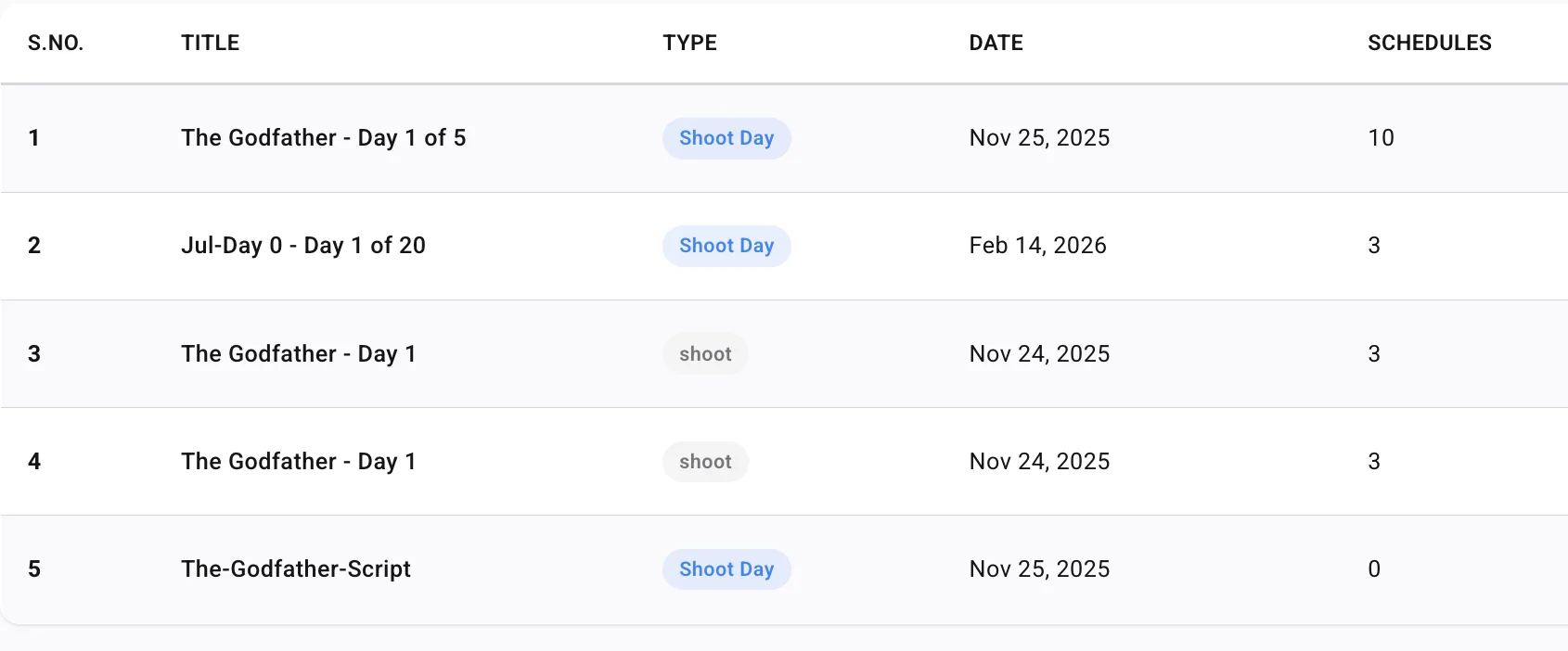
- Reusable contacts: Store cast, crew, vendors, department heads, and production contacts so they can be added without retyping.
- Location management: Save addresses, parking notes, base camp details, access instructions, and location contacts.
- Template control: Build a repeatable call sheet template that supports consistent formatting across all shoot days.
- Schedule integration or structured schedule fields: Enter scenes, setups, interview blocks, or work periods in a format that remains readable.
- Custom call times: Assign different call times for cast, departments, vendors, and specialty roles.
- PDF export and mobile viewing: Ensure the final document is accessible in the formats crew actually use.
- Approval workflow: Allow the right people to review and approve before distribution.
- Distribution tracking: Confirm who received or opened the call sheet when that feature is available.
- Revision management: Label updates clearly and reduce confusion when changes are issued.
- Privacy controls: Limit sensitive contact information when different recipient groups require different versions.
Not every production needs every feature. A small crew may prioritize speed and clean PDF output. A larger production may need contact management, approval controls, and revision tracking. The software should match the scale and risk profile of the project.
Questions to ask before selecting a tool
Before committing to a platform, production teams should ask practical questions:
- Can the team build a complete call sheet without extra layout work? If every document still requires manual formatting, the software may not solve the core problem.
- Can information be reused across shoot days? Reusable cast, crew, and location records reduce repetitive entry.
- Is the final call sheet easy to read on mobile devices? Many recipients will not open it on a desktop.
- Can revisions be handled clearly? The tool should support professional updates without creating confusion.
- Does the platform fit the production’s privacy needs? Contact information and sensitive notes should be managed carefully.
- Can more than one production team member use it confidently? A system that depends on one person can become a bottleneck.
- Does it support the project’s format? Narrative, commercial, documentary, and event productions may require different sections.
The best call sheet software is not necessarily the most complex. It is the system that helps the team produce an accurate call sheet under real production conditions.
How do you create a call sheet without Excel or spreadsheets?
To create a call sheet without Excel or spreadsheets, start with a dedicated call sheet template in a production-focused tool, add verified project information, organize call times and logistics by department or person, review the document with the appropriate decision-makers, and distribute the final version through a controlled channel. The process should prioritize accuracy, readability, and revision control rather than manual formatting. This is the practical answer to “How to Create a Call Sheet Without Using Excel or Spreadsheets†in a professional production environment.
Here is a complete workflow that can be followed for a typical shoot day.
1. Set up the production profile
Create the production record with the project title, production company or responsible team, key contacts, and standard document settings. Add recurring information that will appear across multiple call sheets, such as production office contacts, emergency procedures, default department headings, and standard safety language if approved for use.
This setup stage should be done before the production enters its daily call sheet cycle. The more reliable the underlying production profile is, the less repetitive work the coordinator or assistant director has to perform each day.
2. Add cast, crew, and vendors as structured records
Enter cast, crew, and vendor information into the system as individual records rather than free-text rows. Include names, roles, departments, phone numbers, email addresses, and any internal notes that are appropriate for production use.
Structured records make it easier to generate consistent call sheets and reduce typographical errors. They also help when crew members work only certain days or when cast members have different reporting instructions. Instead of copying names between spreadsheet tabs, the team can select the relevant people for each day.
3. Create the shoot day
Create a new call sheet for the specific shoot date. Add the general crew call, primary location, anticipated wrap or schedule notes if used, and the day’s overall production context. If the software allows duplicating a previous day, use that feature cautiously and review every copied field.
This is where discipline matters. A duplicated call sheet can save time, but only if the team removes information that no longer applies. Outdated notes are one of the most common risks in any template-based workflow.
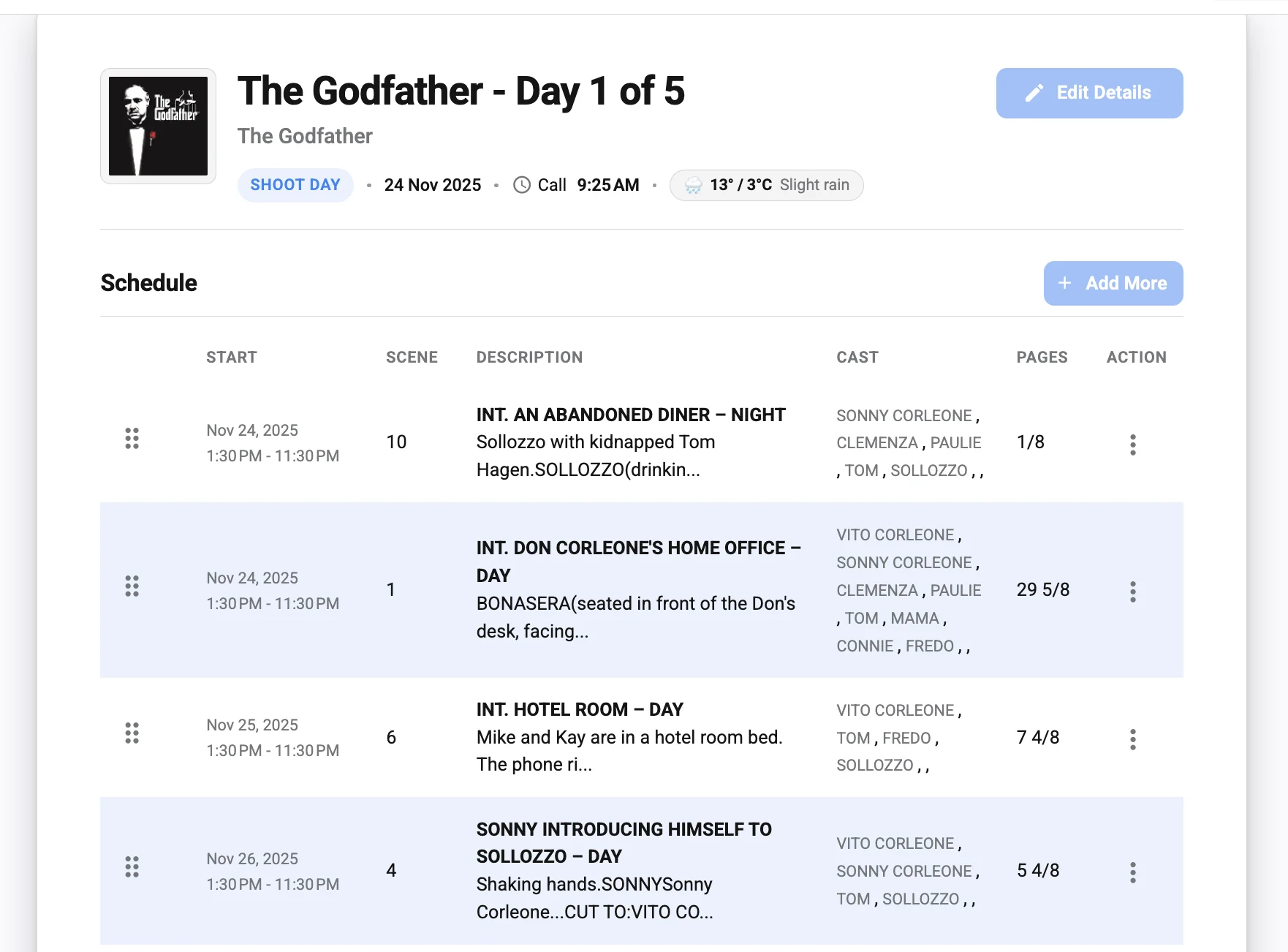
4. Build the schedule section
Add scenes, setups, interviews, travel blocks, meal periods, company moves, or other schedule items in the order they are expected to occur. Keep descriptions concise but useful. Departments should understand what work is planned and what resources may be needed.
For scripted productions, confirm that scene details match the latest schedule. For commercial or corporate productions, confirm that client-facing moments and approval points are reflected accurately. For documentary work, identify fixed appointments separately from flexible coverage blocks.
5. Assign call times
Enter call times for crew, departments, cast, background, vendors, and any special teams. Make sure pre-calls and staggered arrivals are visible. If transportation is involved, distinguish pickup times from on-set call times.
This is one of the strongest reasons to avoid spreadsheets. Call-time exceptions can become difficult to read in a grid. A production-focused system can present exceptions more clearly and reduce the chance that someone overlooks a special instruction.
6. Add locations and logistics
Insert the primary location, parking, base camp, holding, loading, and access information. If the day involves more than one location, show movement clearly. Avoid assuming that crew understand the geography, especially if the production is working in an unfamiliar area.
Add concise notes for security, check-in, elevators, street parking, permits, loading docks, quiet zones, or restricted areas. These details prevent delays and help the location team manage arrivals more efficiently.
7. Add safety, weather, and department notes
Include the day’s relevant safety information and environmental notes. If the production has formal safety procedures, follow the approved language and placement required by the production. Add department notes that are necessary for the day, but avoid turning the call sheet into a collection of unrelated reminders.
A useful department note is specific and actionable. For example, it might tell crew where to stage equipment, identify a wardrobe continuity concern, or explain that a location requires quiet during certain hours. Vague reminders are less helpful and can make the call sheet feel cluttered.
8. Review, approve, and distribute
Review the completed call sheet in the final viewing format. Check both desktop and mobile readability if possible. Confirm that page breaks, section order, and text wrapping do not obscure essential details.
Once approved, distribute the call sheet through the chosen platform, email, production portal, or secure link. Keep the distribution list current. If revisions are issued, label them clearly and communicate what changed.
Common mistakes when replacing spreadsheets
Moving away from spreadsheets improves the process only if the team also improves its habits. A new tool will not automatically fix unclear information, weak review procedures, or poor distribution discipline. Avoid the following mistakes when shifting to digital call sheets.
Recreating the spreadsheet inside another tool
Some teams adopt a new platform but continue thinking in spreadsheet rows. They create overly wide tables, add too many fields, and preserve the same cluttered structure. This misses the opportunity to improve readability.
Instead, design the call sheet around how people consume information. Group related details, use section headings, and prioritize the most important instructions. The document should feel like an operational brief, not a data export.
Keeping outdated template language
A call sheet template is useful only if it stays current. Old safety notes, previous location instructions, outdated department reminders, and irrelevant contact details can create confusion. Review template language regularly and remove anything that no longer serves the production.
This is especially important when a template is reused across different project types. A note that makes sense for a stage shoot may not apply to an exterior documentary day. A professional call sheet should be specific to the current production day.
Sending revisions without context
A revised call sheet should not leave recipients guessing. If the production sends a new version, identify the change. A simple revision note can prevent unnecessary calls and messages.
For example, if only parking has changed, say so. If cast call times have shifted, identify the affected cast or departments. Clear revision communication respects the crew’s time and reduces operational risk.
Overloading the call sheet with nonessential information
Because digital tools make it easy to add sections, teams may include too much. Excessive notes, long descriptions, and duplicated information can bury the details that matter most. The call sheet should remain focused on the day’s work and logistics.
If a document, map, storyboard, shot list, or policy needs to be shared, consider linking or distributing it separately. The call sheet can reference supporting materials without becoming a complete archive.
Best practices for professional call sheet communication
A call sheet is a communication tool, and its effectiveness depends on how thoughtfully it is written and distributed. The document should serve a diverse group of readers, from department heads reviewing operational details to day players looking for a single arrival instruction.
The following practices help maintain clarity and professionalism.
Use consistent names and labels
Use the same department names, role titles, location labels, and schedule terms throughout the production. If one document says “unit base,†another says “base camp,†and another says “crew parking,†readers may wonder whether those terms refer to different places. Consistency reduces friction.
The same applies to cast and character names. Establish a clear format and use it throughout the call sheet. If cast numbers are used, confirm they match the production’s internal documents.
Write notes that lead to action
A call sheet note should tell someone what to do, where to go, what to bring, whom to contact, or what to expect. Avoid vague language that sounds official but does not provide direction. If a note is not actionable, consider whether it belongs on the call sheet.
For example, “limited parking†is less useful than a specific instruction about where crew should park or whom to contact if the lot is full. Practical wording reduces follow-up questions.
Keep sensitive information controlled
Productions handle personal contact details, performer information, location access instructions, and sometimes confidential creative or commercial material. Treat the call sheet accordingly. Send only the necessary information to each recipient group when possible.
Digital systems may support separate versions or controlled distribution. If yours does not, establish internal procedures for what may be included and who receives it. Professionalism includes protecting information, not merely presenting it neatly.
Review the call sheet from the recipient’s perspective
Before sending, imagine opening the document as a crew member with limited time. Can you find your call time? Can you identify where to report? Are parking and access instructions clear? Are any changes from the previous day obvious?
This perspective often reveals problems that are easy to miss while editing. The production office may know what a shorthand note means, but the broader crew may not. Clarity should always take priority over internal convenience.
A simple call sheet structure to adapt
If you are moving away from spreadsheets and need a starting point, use a streamlined structure that can be adapted by production type. This is not a full call sheet template, but it shows the logical order a professional digital call sheet can follow.
- Header
- Production title
- Shoot date
- Shoot day or episode if applicable
- General crew call
- Version or revision status if used
- Key contacts
- Producer
- Production manager or coordinator
- First assistant director
- Location contact
- Emergency contact or designated safety contact
- Location information
- Shooting location
- Parking
- Base camp or holding
- Access instructions
- Nearest medical facility if required by the production
- Schedule
- Scenes, setups, interviews, or work blocks
- Estimated order
- Cast or participants required
- Company moves or travel windows
- Meal period notes if relevant
- Cast and talent
- Character or role
- Performer name
- Pickup, makeup, wardrobe, and set calls as applicable
- Special instructions
- Crew and departments
- Department groupings
- Department heads
- Crew call variations
- Vendor or specialty team information
- Weather, light, and safety
- Forecast summary
- Sunrise and sunset if relevant
- Hazard notes
- Required safety instructions
- Department notes
- Camera, grip and electric, sound, art, wardrobe, hair and makeup, locations, transportation, catering, production, and other notes as needed
- Distribution and revision notes
- Final approval status
- Revision summary
Attachments or supporting materials if applicable
This structure can be expanded or reduced depending on the production. The key is to keep sections predictable so crew do not have to relearn the document every day.
When a spreadsheet may still be useful behind the scenes
Avoiding spreadsheets for the final call sheet does not mean spreadsheets have no place in production management. Some teams may still use spreadsheets for budgeting, equipment inventories, contact exports, or internal tracking. The important distinction is that the call sheet itself should not depend on spreadsheet formatting or manual PDF assembly.
If a spreadsheet remains part of the broader production workflow, treat it as a data source, not the final communication document. Confirm information before it enters the call sheet. Do not assume that an internal tracker is always current, especially when cast, crew, locations, or schedules are changing rapidly.
This balanced approach allows production teams to keep useful internal tools while improving the professionalism of the document that reaches the crew. The call sheet should be the polished, verified operational brief, regardless of how the information was originally collected.
Key takeaways for production teams
Creating a call sheet without spreadsheets is not just a software change. It is a workflow improvement. The strongest results come from combining a clear call sheet template, reliable production data, structured review, and disciplined distribution.
Keep these principles in mind:
- A production call sheet should be easy to scan, accurate, and specific to the shoot day.
- Spreadsheets often create formatting, version-control, and readability issues as productions become more complex.
- A dedicated call sheet format helps organize call times, locations, cast, crew, schedule, weather, and safety notes more clearly.
- Call sheet software can reduce repetitive entry, support reusable records, and improve revision control.
- Strong call sheet examples vary by production type, but all prioritize practical communication.
- The final document should be reviewed from the recipient’s perspective before distribution.
- Revisions should be labeled clearly and accompanied by a concise explanation of what changed.
The best call sheet is the one that helps the day run more smoothly. It gives each person the right information at the right time, without requiring them to interpret a crowded grid or search through multiple versions.
Final thoughts
A professional film call sheet is one of the most important daily documents in production. It sets expectations, communicates logistics, supports safety, and gives the crew a shared plan. While spreadsheets may be familiar, they are rarely the most efficient way to create, review, revise, and distribute that plan.
By moving to a structured digital workflow, production teams can spend less time adjusting cells and more time verifying the information that matters. A strong call sheet template, supported by reliable call sheet software and a disciplined review process, helps every shoot day begin with clarity. For filmmakers and production teams seeking a more dependable process, learning how to create a call sheet without using Excel or spreadsheets is a practical step toward more professional production communication.