
A call sheet generator helps production teams create, update, and share accurate call sheets without rebuilding documents from scratch. For filmmakers, producers, directors, assistant directors, and coordinators, it turns a time-sensitive administrative task into a repeatable production workflow. This guide explains how to prepare your details, use a call sheet app or software tool effectively, and avoid the common mistakes that slow down shoot days.
Related video: Studiovity AI Mobile Callsheet
Why does a call sheet matter on every shoot?
A call sheet matters because it tells every cast member, crew member, and department where to be, when to arrive, what will be filmed, and who to contact if something changes. A strong production call sheet reduces confusion before call time, supports safer coordination on set, and gives the assistant director team a shared reference for the day’s plan.
Whether you are managing a short film, commercial, music video, branded content shoot, or feature scene, the call sheet is one of the most practical documents in the production package. It connects the schedule, locations, cast, crew, transport notes, weather considerations, and emergency contacts in one place. When that information is missing or inconsistent, the day can lose momentum before the camera even rolls.
A filming call sheet is especially important because film sets depend on timing. Makeup, wardrobe, lighting, camera, sound, art, talent, and production all move in relation to one another. The clearer the call sheet, the easier it is for every department to prepare without asking the same questions repeatedly.
The core information every production call sheet needs
Before you use any call sheet template or generator, gather the details that make the document useful. A generator can organize information quickly, but the quality of the final call sheet still depends on the accuracy of the inputs.
At minimum, prepare these essentials:
- Production title and shoot day: Include the project name, production day, shoot date, and any episode, scene, or unit details that apply.
- General call time: This is the main arrival time for the crew, though individual departments or cast members may have separate times.
- Location details: Add the full address, parking instructions, entrance notes, holding areas, and any access limitations.
- Key contacts: List the producer, director, assistant director, production coordinator, location contact, and emergency contact where appropriate.
- Schedule overview: Include scenes, setups, estimated sequence order, meal breaks, company moves, and wrap expectations when known.
- Cast and crew call times: Separate people by role or department so the document is easy to scan.
- Weather and daylight notes: Add forecast details, sunrise and sunset times, and any conditions that may affect wardrobe, lighting, travel, or safety.
- Special instructions: Include props, wardrobe, stunts, vehicles, animals, minors, location rules, safety notes, or department-specific reminders.
A movie call sheet for a larger production may also include hospital information, map links, transport schedules, radio channels, catering notes, scene pages, and advanced safety requirements. Smaller productions may not need every field, but they still benefit from a consistent structure.
How do you make a call sheet in minutes using a generator?
To make a call sheet quickly, start with verified production details, choose a digital call sheet template, enter your schedule, cast, crew, and location information, then review the final document before distributing it. The speed comes from using call sheet software to automate layout, reuse saved contacts, and update changes without redesigning the document each time.
Here is a practical workflow your team can follow.
1. Confirm the day’s schedule first
Do not begin with design. Begin with the shooting plan. The assistant director or production team should confirm which scenes or setups are planned, the expected order, company moves, and any timing constraints that affect the day.
If the schedule is still shifting, mark uncertain items internally before publishing. A call sheet should not become a guessing document. It should reflect the best confirmed plan available at the time it is sent.
2. Open your call sheet app or generator
Choose a call sheet app that lets you work from a saved project, import or reuse contacts, customize departments, and export or share the final sheet. The goal is not only to make one document faster; it is to make the next call sheet easier as well.
A digital generator is especially useful when the same cast and crew return across multiple shoot days. Instead of copying old files and manually editing each line, you can update the date, scenes, locations, and call times while keeping the production structure intact.
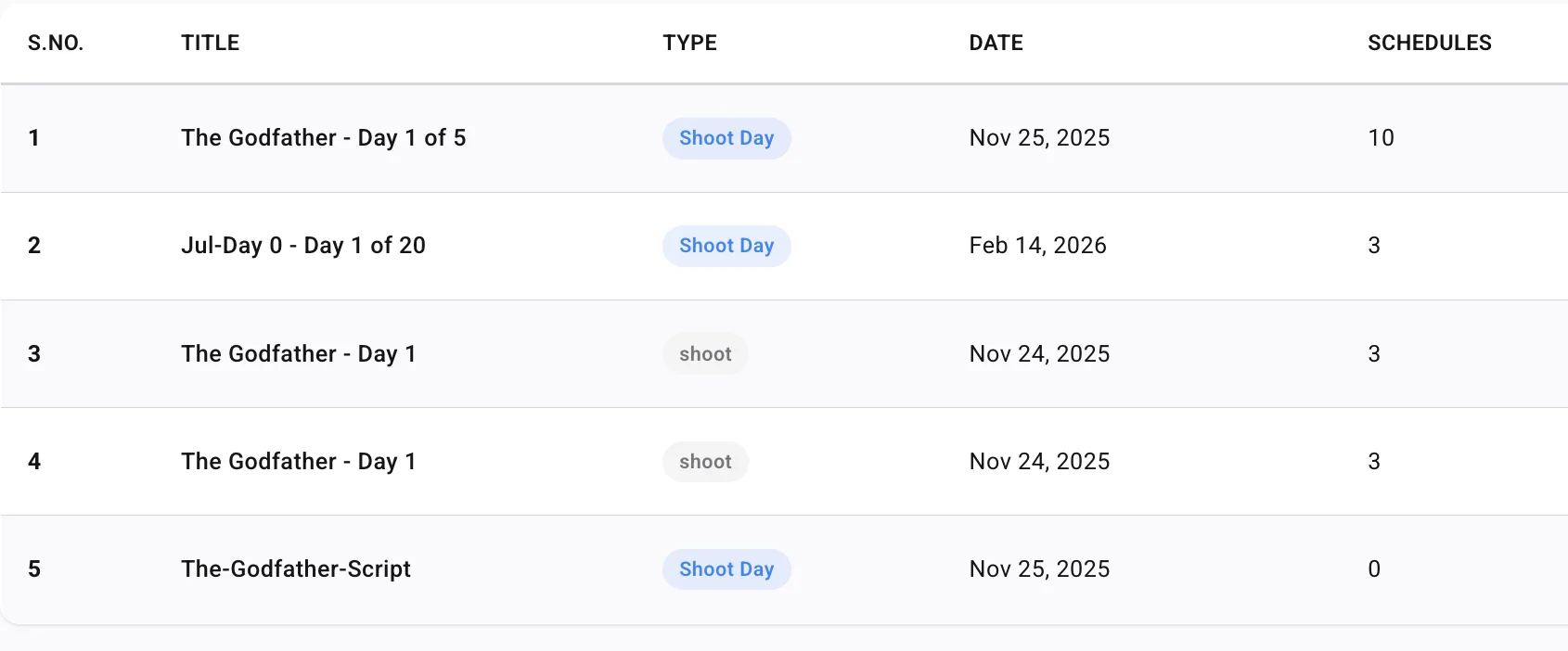
3. Add production and location details
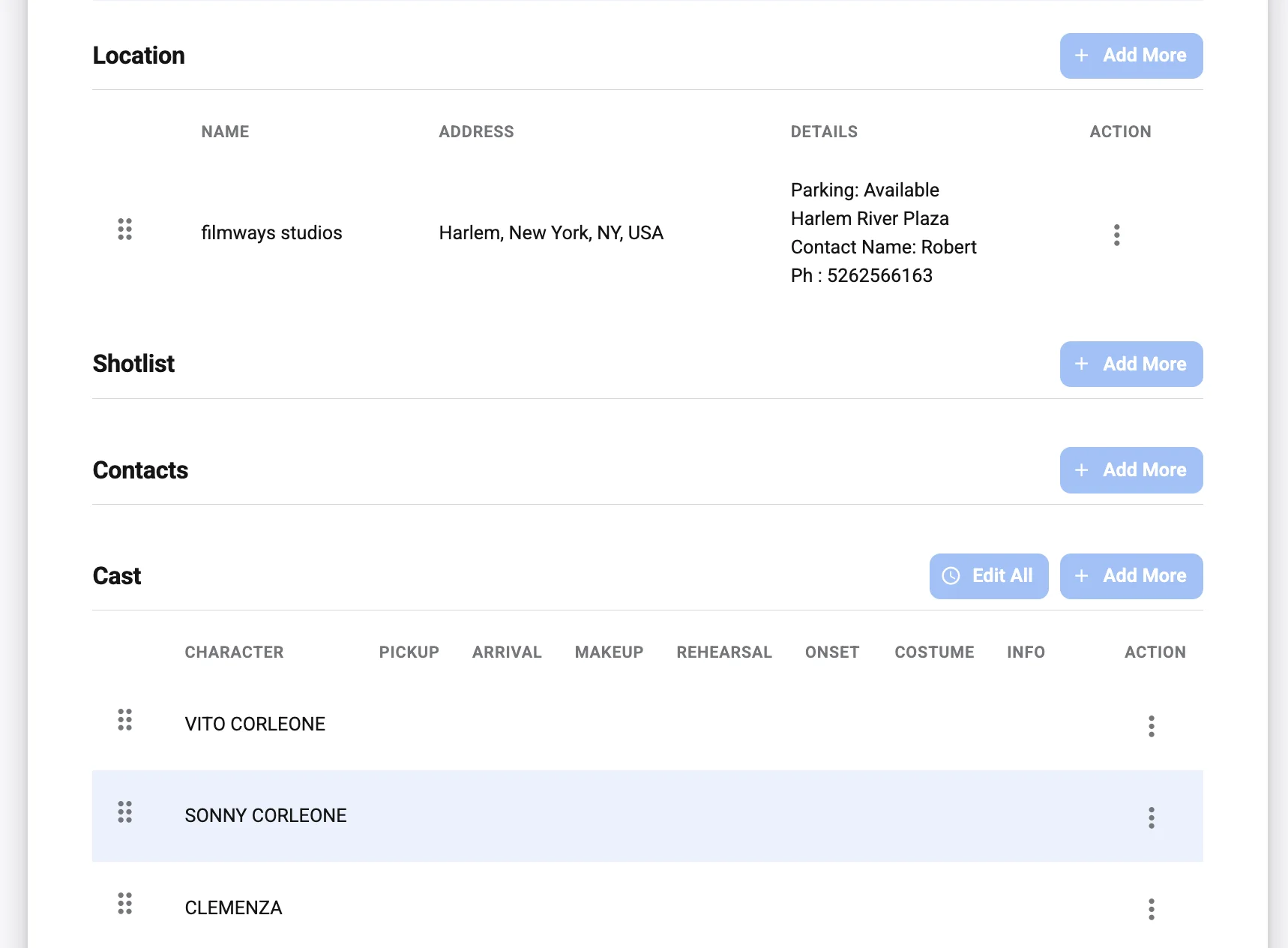
Enter the project name, shoot date, production day, and main location. Then add practical location notes that help people arrive without confusion. Parking, loading access, check-in instructions, security gates, elevators, unit base, and holding areas can all affect punctuality.
For multi-location days, make the company move clear. Include the destination, timing, transport notes, and whether departments should pre-rig, wrap, or travel separately. A beautiful call sheet is not useful if the location information is vague.
4. Enter cast, crew, and department call times
Organize people in a way that matches how your production communicates. Many teams group by department: production, direction, camera, grip, electric, sound, art, wardrobe, hair and makeup, locations, transport, post, and cast.
Individual call times should be specific where needed. For example, makeup may need to arrive before cast, lighting may be called before general crew, and background talent may have a separate holding time. A generator helps you keep these variations readable instead of burying them in a long paragraph.
5. Add scenes, notes, and safety information
Include the scene numbers or descriptions your team needs to understand the day. Avoid overloading the call sheet with unnecessary creative detail, but provide enough information for departments to prepare gear, props, wardrobe, set dressing, and continuity.
Safety notes should be visible and direct. If the day involves stunts, weapons, intimacy coordination, water, vehicles, animals, special effects, night work, extreme weather, or sensitive locations, the call sheet should point people to the relevant protocol and responsible contact.
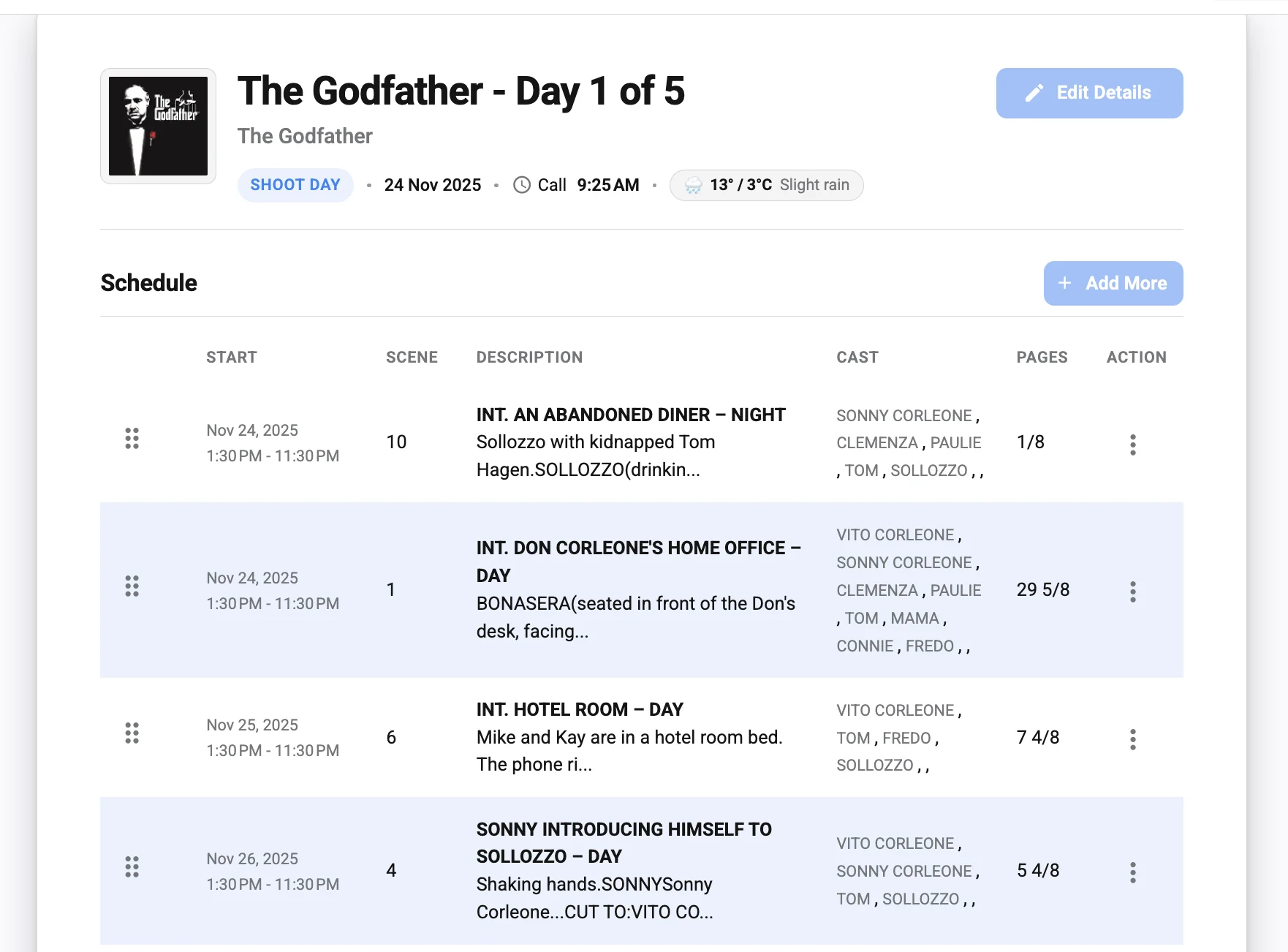
6. Review before sending
A fast call sheet still needs a human review. Check names, phone numbers, addresses, call times, scene order, and attachments. Look for contradictions, such as a cast member called after their first scene or a department note that conflicts with the schedule.
If possible, have the assistant director, producer, or production coordinator review the final version. One careful pass can prevent dozens of avoidable messages later.
Manual templates vs. call sheet software
A call sheet template is a helpful starting point, especially for new filmmakers or small teams. It gives you a familiar structure and reminds you which details to include. However, templates can become slow when schedules change, crew lists grow, or several departments need updated versions.
Call sheet software is designed to reduce that friction. Instead of manually adjusting tables, copying contact lists, and reformatting pages, your team can work inside a production-focused system. This is valuable for assistant directors and coordinators who create call sheets repeatedly and need accuracy under time pressure.
| Option | Best for | Practical limitation |
|---|---|---|
| Static call sheet template | Small shoots, one-off projects, simple crew lists | Manual edits can create version control problems |
| Spreadsheet-based call sheet | Teams comfortable with tables and shared files | Formatting and mobile readability may vary |
| Dedicated call sheet app | Recurring productions, changing schedules, larger teams | Requires the team to enter and maintain accurate data |
| Integrated call sheet software | Productions that want organized contacts, schedules, and distribution | Works best when the production team commits to a consistent workflow |
The right choice depends on your production size, pace, and complexity. For a one-day interview shoot, a clean template may be enough. For a narrative project with multiple cast members, company moves, and department-specific instructions, a generator can save time and reduce mistakes.
What should you check before sending a filming call sheet?
Before sending a filming call sheet, check that the document is accurate, readable, complete, and aligned with the latest approved schedule. The most important review points are call times, location details, contact numbers, scene information, safety notes, and distribution permissions.
Use this checklist before publishing:
- Date and day number: Confirm the shoot date, day out of days, and production day are correct.
- Call times: Check general crew call, pre-calls, cast calls, background calls, transport times, and department-specific arrivals.
- Location accuracy: Verify the address, parking, entrance, holding, unit base, and company move instructions.
- Scene list: Make sure scenes match the latest shooting schedule and are in a logical order.
- Cast requirements: Confirm which cast members are needed, when they report, and whether wardrobe or makeup notes are included.
- Crew list: Remove people who are not needed and add any day players, vendors, or special department contacts.
- Weather and daylight: Include relevant weather expectations and daylight notes when they affect the plan.
- Safety and emergency details: Ensure emergency contacts, nearest hospital information, or required safety notes are included according to your production’s process.
- Attachments and links: Test maps, parking passes, sides, schedules, or any supporting documents before sending.
- Version clarity: If you are sending a revision, make it obvious that it replaces the previous version.
This review should be part of the production rhythm, not an optional final glance. The more people depend on the document, the more important version control becomes.
Making your call sheet clear for every department
A production call sheet has to serve many readers at once. The director may scan scenes and cast. The cinematographer may look for location, daylight, and company move details. The production designer may focus on props and set dressing. Cast may care most about arrival time, makeup, wardrobe, and parking.
That means clarity matters more than decoration. Use clean section labels, consistent time formatting, and department groupings that match your set. Avoid long blocks of text when a bullet list or table would be easier to read on a phone.
A good call sheet also respects attention. Crew members often read it late at night, early in the morning, or while moving between tasks. If the most important information is buried, people may miss it. Put arrival times, location, key contacts, and safety information where they can be found quickly.
Common mistakes that slow down call sheet creation
Many call sheet problems come from rushing without a system. A generator helps, but your workflow still needs discipline. These are the mistakes production teams should avoid:
- Starting before the schedule is stable: If the scene order is still being debated, wait for approval or clearly manage the draft internally.
- Copying yesterday’s sheet without checking every field: Old dates, locations, call times, or weather notes can easily remain in the file.
- Using inconsistent names or departments: Keep names, titles, and department labels consistent so people can find information quickly.
- Leaving location notes too vague: “Park nearby” is not useful when crew are arriving with equipment, vehicles, or time-sensitive responsibilities.
- Sending too many versions: Revisions happen, but each update should be controlled, clearly labeled, and sent through the agreed channel.
- Forgetting mobile readability: Many people open call sheets on phones, so dense formatting can reduce usability.
- Treating safety notes as an afterthought: Any elevated-risk work should be clearly communicated and supported by the right production process.
The best way to prevent these issues is to create a repeatable call sheet workflow. Gather information in the same order, review it with the right people, and send it through a consistent distribution method.
Using Studiovity for digital call sheet creation
For teams looking at dedicated product options, Studiovity offers call sheet software that can support digital call sheet creation and production organization. It is relevant for filmmakers and production teams that want to move beyond static documents and manage call sheet details in a more structured way.
You can learn more about Studiovity’s call sheet software.
As with any production tool, the value depends on how your team uses it. A call sheet generator is most effective when the production office, assistant director team, and department leads keep information current and follow a shared approval process before sending.
A simple workflow for faster call sheets
If your team wants to create call sheets faster without sacrificing quality, build a workflow that repeats from one shoot day to the next. The goal is to remove unnecessary decisions, not to remove review.
A practical process looks like this:
- Collect updates: Confirm schedule, cast, crew, locations, transport, weather, and safety notes.
- Enter details into the generator: Use saved contacts and templates where possible.
- Review by department needs: Check whether camera, sound, art, wardrobe, makeup, locations, and production have the information they need.
- Approve internally: Have the assistant director, producer, or coordinator review the final version.
- Send through one official channel: Avoid splitting distribution across too many apps unless your production has a clear system.
- Track revisions: If information changes, label the update clearly and make sure the team knows which version is current.
This is the practical answer behind “How to Make a Call Sheet in Minutes Using a Call Sheet Generator”: prepare reliable information, use a reusable structure, and let the software handle the formatting and organization.
Final takeaway
A strong call sheet is more than a schedule; it is the operating guide for the shoot day. When it is clear, accurate, and easy to access, the entire production team can move with more confidence.
Using a call sheet app, a reliable call sheet template, or dedicated call sheet software can make the process faster, but the fundamentals remain the same. Confirm the plan, organize the details, review carefully, and distribute one clear production call sheet that everyone can trust.