
You’ve got your actors ready, your camera is charged, and everyone is staring at you asking, “What’s next?” In practice, this moment of on-set panic ruins momentum and wastes valuable time. Therefore, if a solution is needed, the Best Shot List Software for Filmmakers can be utilized by directors to avoid this chaos entirely. Imagine getting home from shooting a two-minute YouTube skit only to realize you forgot to film the crucial close-up of the punchline.
That frustration is preventable with a shot list, which acts as a simple to-do list for your camera bridging your script to the video. While handwritten notes work, upgrading to dedicated production software makes organizing drastically easier. Consequently, this modern shot list app handles the tedious planning so you finish your shoot on time.
What is a Shot List? The 'Grocery List' Your Camera Can't Live Without
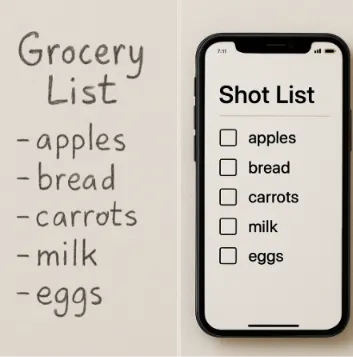
Think of your script as a recipe, making your shot list the essential grocery list. In short, a professional shot list is a precise to-do list for your camera. Instead of writing “buy eggs,” you decide on framing basics—choosing how close the audience stands to the action.
Clear planning helps your crew know exactly what to shoot next. For example, any good digital shot list creator for directors breaks scenes down into four vital ingredients:
Angle: Where the camera sits.
Framing (shot types): Wide establishing views or tight close-ups.
Movement: Does the camera pan or sit still?
Lens: Which glass captures the scene.
Gathering this variety, including extra background footage called B-roll, gives you proper coverage. Because of this, coverage ensures you film enough different angles so you never hit a frustrating dead end while editing.
The Digital Advantage: Why Spreadsheets and Clipboards Are Killing Your Productivity
We’ve all been there: you make a brilliant, last-minute change to your plan, but your cameraman arrives holding yesterday’s printed copy. Relying on paper or static Excel files creates a frustrating chaos of mismatched plans. When your small crew is looking at outdated documents, you inevitably lose valuable setup time trying to figure out what happens next.
Fortunately, modern cloud-based film production management tools fix this mess instantly. By hosting your plan online, you completely eliminate version control issues—the dreaded problem of guessing whose file is the most current. Furthermore, if you update a camera angle on your laptop, your crew sees it immediately on their phones. Thus, you are utilizing real-time production team collaboration tools that ensure nobody gets left behind.
Beyond ending the confusion on set, streamlining your film pre-production workflow means your hard work is automatically secured in the cloud. As a result, you never have to panic about losing a clipboard. Similarly, you won’t waste hours re-typing scenes from your script into a blank spreadsheet. This automatic, pocket-sized approach makes platforms like Studiovity the Best Shot List Software for Filmmakers and the ideal all-in-one assistant for independent creators.
Why Studiovity is the All-in-One Assistant for Independent Creators
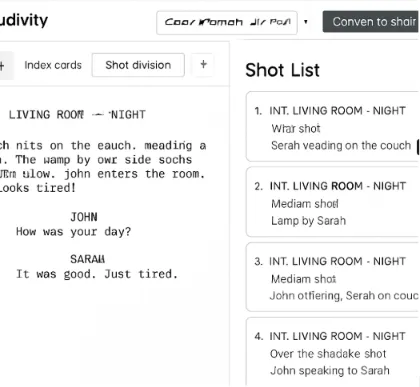
Turning your written script into a functional plan shouldn’t feel like punishing data entry. When comparing Studiovity vs StudioBinder for independent filmmakers, Studiovity stands out as the Best Shot List Software for Filmmakers because the biggest difference is accessible, time-saving automation. Instead of spending hours typing dialogue into a blank spreadsheet, Studiovity acts as your digital assistant, automatically reading your document and pulling out the necessary scenes for you.
This magic happens by integrating a script breakdown with shot lists. Specifically, a script breakdown identifies everything you need to successfully film a scene—like a specific prop, a location, or a main actor. Once the software knows what is happening in the scene, it helps you plan exactly how to point your camera without ever starting from scratch.
To keep your production day running smoothly and eliminate on-set panic, this platform gives you three powerful tools:
Script Breakdown: Instantly identify needed cast and props.
Automated Shot List: Generate a ready-to-use camera checklist.
Mobile Call Sheets: Send daily schedules straight to crew phones.
Visualizing your project is effortless when software handles the manual work, using automated camera shot categorization to instantly group your close-ups together. Ultimately, seeing your movie before you shoot it transforms amateur chaos into a calm, professional set.
5 Must-Have Features in a Modern Shot List Creator
Transitioning from a great idea to a successful shoot requires the right digital tools. When deciding what features to look for in shot list apps, you need more than a simple notepad. Indeed, you want a system that pairs text checklists with visual storyboards so you can actually see your movie’s flow before pressing record.
Because it offers these advanced tools, Studiovity is regularly chosen as the Best Shot List Software for Filmmakers. The best collaborative cinematography planning software simplifies your production day using these five essentials:
Drag-and-Drop Ordering: Instantly rearrange your schedule if an actor runs late.
Visual Storyboarding: Pair reference images with your text to clearly communicate your exact vision.
Lens/Equipment Logging: Track helpful data, or “metadata,” including cinematography technical specifications. This logs your focal length—choosing exactly how “zoomed in” your lens should be.
Mobile App Sync: Keep your entire crew updated instantly on their own phones.
Export to PDF: Generate professional daily schedules, called call sheets, to email your cast.
Handing your team a clean, digital or printed call sheet instantly builds trust and authority. Therefore, using the Best Shot List Software for Filmmakers ensures your crew stays aligned.
Step-by-Step: Building Your First Professional Shot List in Studiovity
Organizing film scenes is like writing a recipe. Instead of filming chronologically—which wastes hours moving equipment—you will shoot out of order, capturing everything in one location simultaneously. Therefore, you manage this workflow through “tagging,” marking which actors and gear belong to each setup using this 3-Step Quickstart:
Import/Write Script: Let Studiovity automatically break down your text.
Tag Shots: Label visual elements and locations.
Arrange and Share: Drag and drop setups by location, not timeline.
Once you sync shot lists with storyboards and schedules, you gain absolute confidence on set. For this reason, selecting the Best Shot List Software for Filmmakers is crucial. These mobile-friendly call sheet generators put the exact plan in everyone’s pocket.
Your Roadmap to a Stress-Free Production Day
The difference between a home movie and a professional production is preparation. Indeed, trading easily lost paper for a digital tool unlocks true creativity. When you aren’t worried about remembering the list, you can focus entirely on your actors’ performances. That peace of mind defines the core value of the Best Shot List Software for Filmmakers.
Create a free Studiovity account today and import one scene to test the workflow. In conclusion, letting a dedicated digital assistant handle the scheduling logistics saves hours of setup time, giving you the freedom to focus entirely on directing.